The Tool Desk
Outbyte PC Repair FREEClear out junk files and repair common Windows errorsFree Scan →Outbyte Driver Updater FREEFix the driver behind crashes, sound loss and screen glitchesFind Drivers →Amazon has not been shown to remove prices across its entire shopping app. The widely shared example appears to show a promotional homepage or deals feed where compact product cards displayed labels such as 54% off and Black Friday Deal without a dollar amount. The price was expected to appear after opening the product.
That is different from a product page that says See price in cart, and it is also different from a site-wide Amazon outage. Here is how to identify which situation you are seeing—and how to verify what you would actually pay before treating a percentage-off badge as a bargain.
What the viral Amazon screenshot actually showed
The image behind the complaint shows the Amazon Shopping app on a phone. It includes a Deals for you section, a See all deals link, product images, percentage-off badges, and promotional labels including Black Friday Deal. The cards show discounts such as 54% off, 25% off, 15% off, and 46% off, but no visible dollar prices.
The accompanying complaint was that shoppers had to tap each item to find out what the discount meant in dollars. You can view the original screenshot and the Bored Panda page that reproduced the complaint.
Quick wins for a faster PC:
Repair Windows errors before they cause bigger problemsFix Now →Scan for outdated or missing drivers - takes under a minuteDriver Scan →#1 Best Overall

- Fire HD 8 offers an 8" HD display for seamless streaming and gaming, coupled with a 5MP rear facing camera for photos—with a thin, light, durable design.
- Fast and responsive with long battery life - With up to 4 GB RAM (2X more than 2022 release), 64GB of storage, and up to 1 TB of expandable storage (sold separately). Hexa-core processor for fast, responsive performance. Up to 13 hours of reading, browsing the web, watching videos, gaming, and listening to music at home and on-the-go.
- Save time, get creative - Enjoy three smart tools to help you send polished emails, quickly summarize webpages, and create unique wallpapers.
- Stream or download your favorite shows, movies, and games (like Minecraft, Roblox, and more). Enjoy your favorite content from Facebook, Hulu, Instagram, TikTok, and more through Amazon’s Appstore (Google Play not supported. Subscription for some apps required).
- Stay connected with family and friends - ask Alexa to make video calls to friends and family or download apps like Zoom.
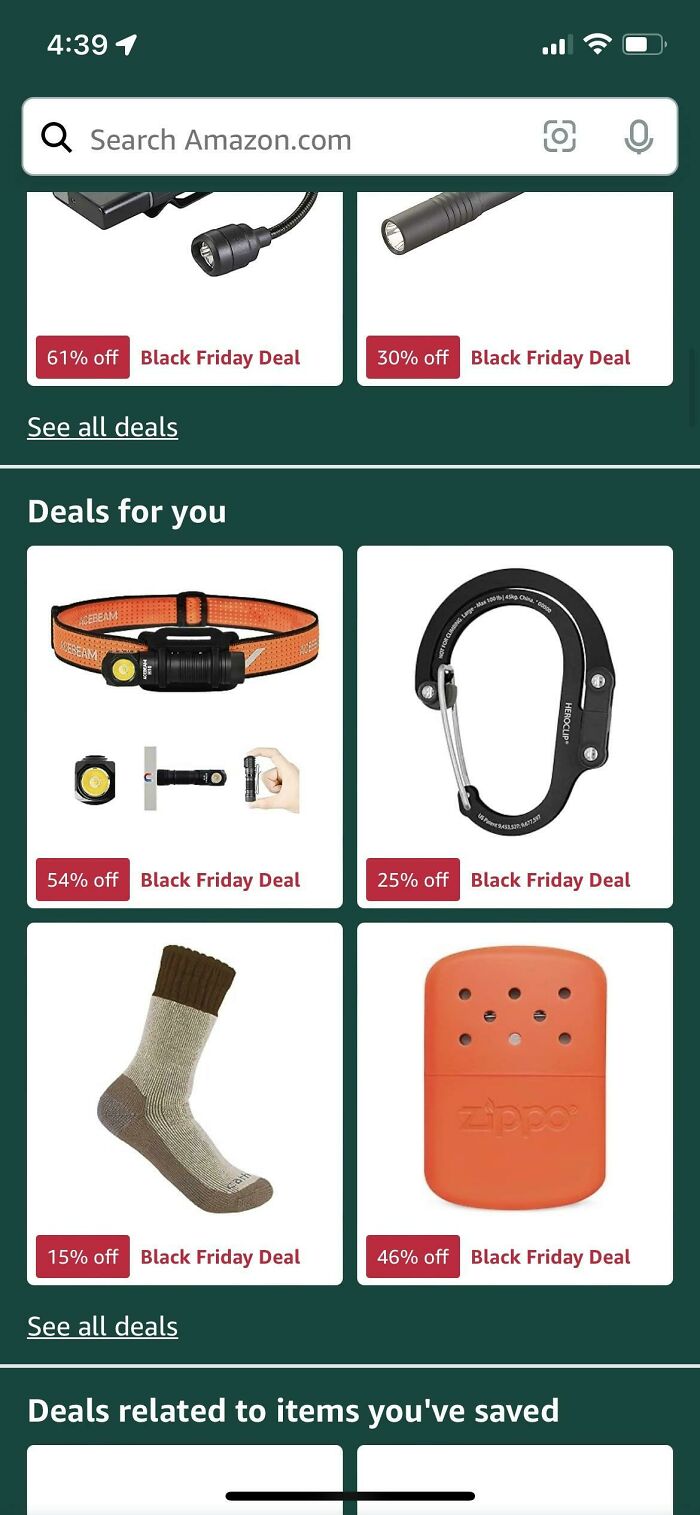
The important detail is the screen itself. A reply on the same page identified it as Amazon’s front page rather than ordinary search results. The original Reddit post linked from the discussion has since been deleted, so the screenshot does not establish the user’s app version, operating system, account, country, or whether the price appeared normally after tapping an item.
Did Amazon remove prices from the app?
There is no public evidence that Amazon permanently removed prices throughout its app. The screenshot is better understood as a homepage or deals-feed presentation, possibly shown to a subset of users, rather than an app-wide pricing policy.
Amazon described its redesigned Shopping app homepage in October 2024 as a personalized surface containing recommendations, seasonal finds, trending products, best sellers, and deals. Amazon also said it was testing homepage designs and features with millions of U.S. customers on iOS and Android. That means two customers may not always see identical promotional modules or layouts. See Amazon’s explanation of the Shopping app homepage redesign and testing.
That context supports three limits on what can be concluded from the image:
What’s actually slowing this PC down?
Pick the symptom - the matching free tool is one click away.
- It does not show that Amazon search results stopped displaying prices.
- It does not show that product-detail pages, carts, or order histories lost their prices.
- It does not prove that the percentage-only design was rolled out to every customer or made permanent.
Amazon has not publicly explained why dollar amounts were absent from the particular cards in the screenshot. The most accurate description is therefore: Amazon’s promotional homepage may show a discount percentage without showing the product price on the card.
Why would a deal card show a percentage but not a price?
Promotional design is the documented explanation
Amazon uses prominent deal badges and savings percentages in its promotional surfaces. Its advertising documentation says deal creatives may automatically display percentage savings and deal badges when an eligible deal is live. Amazon also promotes personalized deals and price drops through the Shopping app and Today’s Deals experience.
A compact card has limited space. In the screenshot, the product image and promotional labels take up much of the tile. The design may prioritize the discount badge and the invitation to open the item rather than showing both a reference price and a current price.
Amazon’s e-commerce advertising specifications support the use of deal badges and percentage savings, but they do not establish that Amazon intentionally omitted prices to make customers buy impulsively.
Free tools Windows power users keep installed
One-click scans. No signup required.
Rank #2

- Do what you love, uninterrupted — 25% faster performance than the previous generation and is ideal for seamless streaming, reading, and gaming.
- High-def entertainment — A 10.1" 1080p Full HD display brings brilliant color to all your shows and games. Binge watch longer with 13-hour battery, 3 or 4 GB RAM, 32 or 64 GB of storage, and up to 1 TB expandable storage with micro-SD card (sold separately).
- Thin, light, durable — Tap into entertainment from anywhere with a lightweight, durable design and strengthened glass made from aluminosilicate glass. As measured in a tumble test, Fire HD 10 is 2.7 times as durable as the Samsung Galaxy Tab A8 (2022).
- Stay up to speed — Use the 5 MP front-facing camera to Zoom with family and friends, or create content for social apps like Instagram and TikTok.
- Ready when inspiration strikes — With 4,096 levels of pressure sensitivity, the Made for Amazon Stylus Pen (sold separately) offers a natural writing experience that responds to your handwriting. Use it to write, sketch in apps like OneNote, and more.
Click-through optimization is only a possibility
One reasonable design hypothesis is that showing the deal percentage encourages shoppers to open the product page, where Amazon can present the full offer, variations, seller information, delivery promise, and related recommendations. Another possibility is simply that the homepage card has a restrictive layout.
Neither explanation has been confirmed by Amazon for this specific screen. It would be an overstatement to say that Amazon definitely hid prices to increase impulse purchases.
How to find the real price in the Amazon app
If you see a percentage-only card, do not calculate the price from the badge and immediately place an order. Use this sequence:
- Tap the product card. Open the product-detail page rather than relying on the homepage tile.
- Select the exact version you want. Choose the size, color, pack count, quantity, condition, format, or bundle. The card may represent the cheapest available variation rather than the one you need.
- Read the current offer price. Check the main offer area after the selected variation loads. Amazon’s Shopping app is designed to let customers view product details, reviews, and purchasing information before buying; see the Amazon Shopping app listing.
- Check the seller and fulfillment method. Note who is listed under Sold by and who is listed under Ships from. A different seller or offer can have a different price, condition, warranty, or delivery date.
- Look for coupons and conditions. A clipped coupon, Prime membership, minimum quantity, subscription, or other eligibility requirement may be necessary to receive the advertised price.
- Open the cart before buying. Confirm that the item price, discount, shipping charge, and delivery option are what you expect. You can inspect the cart without completing the purchase.
Do not assume that the percentage on the homepage applies to every variation. A deal card may promote the lowest-priced size or color, while your selected version costs more.
What does “See price in cart” mean?
If the product page itself does not show a price and instead says See price in cart or Add to cart to see product details, you are looking at a different Amazon mechanism from the percentage-only homepage card.
Amazon seller-support material explains that an offer price may be concealed until the product is added to the cart, including when the price is below a manufacturer’s suggested retail price. The customer can add the item, view the price, and remove it without completing the purchase. See Amazon’s seller-support discussion of price-reveal listings.
This type of presentation is commonly associated with minimum advertised price, or MAP, arrangements. A manufacturer may restrict the price a retailer publicly advertises while allowing the retailer to sell for less. Hiding the amount until the shopper reaches the cart can be used to display a lower offer without advertising it openly.
MAP is a likely explanation for some listings that explicitly say See price in cart, but it is not a proven explanation for every missing-price incident. Seller discussions also describe MAP-related pricing in Amazon’s seller forums.
Windows Errors? Fix Them Before They Spread
Repair common Windows errors and clear accumulated junk for a smoother, more stable PC - no reinstall needed.Free scan · no reinstallCrashes, No Sound, or Screen Glitches?
Random freezes, missing sound and display glitches usually trace back to one bad driver. Find and replace yours safely.Free scan · under a minuteRank #3

- Like-New Amazon Fire HD 8 tablet is refurbished, tested, and certified to look and work like new and comes with the same limited warranty as a new device. Like-New Amazon devices may be packaged in generic Amazon-branded boxes.
- Fire HD 8 offers an 8" HD display for seamless streaming and gaming, coupled with a 5MP rear facing camera for photos—with a thin, light, durable design.
- Responsive with all day battery life - Includes 3GB RAM (50% more than 2022 release), 32GB of storage, and up to 1 TB of expandable storage (sold separately). Up to 13 hours of reading, browsing the web, watching videos, gaming, and listening to music at home and on-the-go.
- Save time, get creative - Enjoy three smart tools to help you send polished emails, quickly summarize webpages, and create unique wallpapers.
- Stream or download your favorite shows, movies, and games (like Minecraft, Roblox, and more). Enjoy your favorite content from Facebook, Hulu, Instagram, TikTok, and more through Amazon’s Appstore (Google Play not supported. Subscription for some apps required).
How to reveal a cart-only price
- Tap Add to cart or the price-reveal control.
- Open the cart.
- Read the item price and any shipping or discount line.
- Check whether the price changed after choosing a variation or seller.
- Remove the item if you do not want it.
Adding an item to the cart is not the same as purchasing it. Still, check the cart carefully if you have more than one offer or variation selected.
What if every Amazon listing is missing its price?
If prices are absent from nearly every product, the issue is less likely to be the promotional homepage design shown in the older screenshot. Look for signs of a broader app, account, network, or Amazon service problem:
- Search results show incomplete cards or unusual messages on almost every item.
- Product pages fail to load reviews, images, delivery dates, or offer information.
- Items cannot be added to the cart.
- Checkout fails or repeatedly returns an error.
- The app logs you out, or account and order-history pages do not load.
- The same problem occurs in the Amazon website and the mobile app.
- Other shoppers are reporting the same symptoms.
Amazon experienced a separate, broad outage on March 5, 2026. Reports included missing prices, broken product pages, login problems, order-history issues, mobile-app failures, and unsuccessful checkouts. Downdetector reports peaked at approximately 22,000 U.S. reports, and Amazon later attributed the incident to a software-code deployment before saying its website and app were operating normally again. Coverage from Ars Technica and Investing.com documents that event.
That outage was a technical failure, not evidence that Amazon intentionally adopted the older percentage-only deals layout. It is useful as a diagnostic comparison: a missing price combined with broken checkout and missing account information points to an outage much more strongly than a missing price on a single promotional tile.
Basic troubleshooting
- Open the same item in a web browser. If the price appears on the website but not in the app, the problem may be app-specific or related to an interface rollout.
- Open a direct product page. This helps distinguish a deals-feed display from a listing or service problem.
- Confirm your delivery address. Availability, delivery promises, local grocery offers, and some fees can depend on the selected destination.
- Force-close and reopen the app. If the display is stale, a fresh session may reload the offer information.
- Update the app. App labels and homepage modules can change between releases.
- Check reputable outage reports. If many users report missing prices and broken checkout, waiting for Amazon to restore service is safer than repeatedly submitting an order.
- Do not place duplicate orders during a service incident. If an order appears to fail, check the order history and payment activity before trying again.
Why the displayed percentage may not be the savings you expect
A badge such as 50% off tells you that Amazon is presenting a comparison. It does not, by itself, tell you the final amount, the comparison price, or whether the item is cheaper than it was recently.
The comparison may involve a:
- Manufacturer’s suggested retail price.
- List Price.
- Typical Price.
- Prior Amazon price.
- Seller-provided reference price.
- Promotional price that requires a coupon or membership.
For example, if a product is compared with a $100 reference price, a 54%-off badge would suggest $46 before taxes, shipping, coupons, or other conditions. But the badge does not tell you that the reference price is $100, that the $46 price applies to your chosen variation, or that $46 is the final checkout total. That is why the dollar price must be checked on the product page and in the cart.
Amazon announced updated requirements for validating List Prices effective April 23, 2026. Amazon said a validated List Price must be supported by a recent price at another retailer or by Amazon Featured Offer purchase history. Those requirements may improve the basis for some reference-price claims, but they do not mean that every historical percentage badge was necessarily a good deal, nor do they eliminate the need to compare prices.
Amazon’s explanation of List Price and Typical Price appears in its seller guidance on reference-price validation.
Rank #4

- Our fastest Kindle Paperwhite ever – The next-generation 7“ Paperwhite display has a higher contrast ratio and 25% faster page turns.
- Ready for travel – The ultra-thin design has a larger glare-free screen so pages stay sharp no matter where you are.
- Escape into your books – Your Kindle doesn’t have social media, notifications, or other distracting apps.
- Battery life for your longest novel – A single charge via USB-C lasts up to 12 weeks.
- Read in any light – Adjust the display from white to amber to read in bright sunlight or in the dark.
How to check whether an Amazon deal is genuine
Use the percentage as a prompt to investigate, not as the conclusion.
- Write down the current price. Record the amount for the exact size, color, pack, condition, and seller you want.
- Check the reference price. Identify whether the comparison is called List Price, Typical Price, or something else.
- Check the coupon. Determine whether the displayed saving requires clipping a coupon, using a promotion code, buying multiple units, or meeting another condition.
- Compare the total cost elsewhere. Include shipping, delivery, taxes, handling charges, membership requirements, and the cost of any required quantity.
- Review price history. Amazon says its shopping assistant can show price-history information, with the expanded feature offering up to one year of history in the United States, United Kingdom, and India. The tool’s name, icon, and availability can vary by country, account, product, and app rollout. Amazon also announced that Rufus was renamed Alexa for Shopping on May 13, 2026. See Amazon’s guide to checking Amazon price history and its information about Alexa for Shopping.
- Recheck the cart. The cart is where coupons, shipping, seller changes, and other conditions can affect the amount you would actually pay.
The FTC recommends comparing the complete cost of an online purchase, including shipping, handling, delivery, taxes, and other fees. It also says that discount claims must not be misleading and that a general claim such as 50% off, without a particular product price, does not itself disclose the product’s total price. Those are general consumer-protection principles, not a determination that the particular Amazon screenshot violated the law. See the FTC’s guidance on pricing and discount disclosures and online-shopping costs.
Independent reader supportYour contribution helps us test, update, and keep practical guides available for everyone.Other reasons the amount may change after you open the item
Different product variations
A homepage card may advertise one size, color, pack count, bundle, or format. Selecting another option can change the price. This is especially common with clothing, electronics storage capacities, household multipacks, and beauty products.
Multiple sellers and offers
One product page can contain offers from several sellers. Amazon may feature one competitive offer while making other offers available for comparison. Amazon’s seller explanation of the Featured Offer describes how the selected offer can depend on factors such as price, delivery, and seller performance.
Before buying, verify Sold by, Ships from, condition, delivery date, return terms, and whether the offer is Prime-eligible. A product title alone is not enough to identify the offer you are purchasing.
Coupons, Prime requirements, and subscriptions
A deal may be visible to all shoppers but provide its best price only after a coupon is clipped, a Prime account is used, a minimum quantity is purchased, or Subscribe & Save is selected. Compare the ordinary one-time price with the promotional price and make sure you are not enrolling in a recurring order unintentionally.
Location and delivery address
For ordinary shipped products, changing the address may affect availability, delivery timing, or shipping cost. For Amazon Fresh, Whole Foods, same-day delivery, and other local services, the selected store or destination can be especially important. If a grocery or local-delivery price is missing, confirm that a valid delivery address and service area are selected before assuming the item has no price.
This should not be confused with a claim that Amazon necessarily gives each customer a different individualized price. Offer selection, inventory, seller, destination, and eligibility conditions can change what is displayed without proving personalized price discrimination.
Best Value
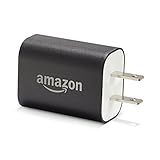
- Official Amazon 9W, 1.8A power adapter compatible with most devices with a micro-USB port, although charging times may vary (requires micro-USB cable, not included with charger)
- Charges your Kindle, Kindle Fire tablets, Fire tablets, Fire phone and Fire Keyboard in less than 5 hours
- Designed for use with the micro-USB cable included with Amazon devices and replacements sold in the Kindle Store
- Official Amazon 9W, 1.8A adapter charges Kindle Fire HD 8.9" in under 5 hours, Kindle Fire HD 7" in under 4 hours, and Kindle Fire in under 3 hours
- Official Amazon 9W power adapter for Echo Dot (1st and 2nd Generation). Cable not included.
A quick way to diagnose what you are seeing
| What appears on screen | Most likely meaning | Best next step |
|---|---|---|
| A percentage badge on a homepage tile | A promotional discovery card that may omit the dollar amount | Open the item and check the product page |
| See all deals with no prices on the cards | A deals-feed layout or homepage experiment | Open an individual deal or search for the product separately |
| See price in cart | An offer-specific price-reveal display, sometimes associated with MAP arrangements | Add it to the cart, inspect the amount, and remove it if necessary |
| See options on many unrelated listings | Offer-selection trouble, incomplete product data, or a technical failure | Test the website and a direct product page |
| Nearly everything says unavailable | A destination, inventory, account, or service problem | Confirm the address and try again later |
| Prices, reviews, delivery dates, and checkout all fail | A broader Amazon incident is more likely | Check service reports and avoid duplicate orders |
| The price changes after choosing a color or size | The card represented a different variation | Compare the exact selected configuration |
| The price changes in the cart | A coupon, seller, shipping, quantity, membership, or offer condition changed | Compare the item price with the final checkout total |
The practical answer for shoppers
The old screenshot does not prove that Amazon’s app quit showing prices. It shows that at least one promotional homepage presentation placed more emphasis on percentage savings and deal labels than on the dollar amount.
That can be inconvenient, but the financial risk is manageable if you treat the card as an advertisement rather than a complete price quote. Open the product, select the exact version, inspect the seller and conditions, check the cart, and compare the total with competing retailers or available price history.
If the price is missing only from a compact deals card, it is probably a presentation issue. If the product page says See price in cart, use the cart to reveal the offer. If prices disappear across the app and website along with checkout and account functions, treat it as a technical problem rather than a normal Amazon pricing design.
Frequently Asked Questions
Did Amazon remove prices from its entire app?
No public evidence in the available reporting establishes a permanent, app-wide price-removal policy. The widely shared image shows a promotional homepage or deals feed, not every Amazon page. Search results and product pages can have different layouts and behavior.
Recommended Free Tools
How do I see the price when Amazon shows only a percentage off?
Tap the deal card, select the exact variation, check the seller and fulfillment method, review coupons and eligibility requirements, and confirm the item price in the cart. Do not assume the percentage badge applies to every size, color, bundle, or seller.
Why does Amazon say “See price in cart”?
Amazon sometimes reveals an offer price only after the item is added to the cart. Seller-support material associates some of these listings with manufacturer pricing arrangements, including minimum advertised price policies. Add the item, inspect the cart, and remove it if you do not want to buy it.
Does a 54% off badge prove that an Amazon product is a good deal?
No. The percentage may be based on a List Price, Typical Price, manufacturer reference price, prior selling price, or another comparison. Check the exact dollar price, total checkout cost, coupon requirements, competing retailers, and price history before buying.
What should I do if prices are missing from nearly every Amazon product?
Open Amazon in a browser, test a direct product page, confirm your delivery address, restart or update the app, and check reputable outage reports. If reviews, delivery dates, login, account history, and checkout are also failing, a technical incident is more likely than a normal deals-feed design.
Do these 3 things before closing this tab:
1Scan for outdated or missing drivers - takes under a minute2Clear out junk files and repair common Windows errors3Fix the driver behind crashes, sound loss and screen glitchesThe Bottom Line
Bottom line: Amazon did not necessarily stop showing prices. The viral example appears to be a promotional homepage layout that showed percentage-off badges without dollar amounts. Open each item, verify the exact offer and final cart total, and treat the advertised percentage as a claim to check—not proof of savings.
Quick Recap
Product prices and availability are accurate as of the date/time indicated and are subject to change. Any price and availability information displayed on Amazon at the time of purchase will apply.




