What’s actually slowing this PC down?
Pick the symptom - the matching free tool is one click away.
The safest response to an unexpected Apple Pay-related request is simple: do not share a password, verification code, device passcode, or recovery information; do not send money while someone is pressuring you; and contact the supposed bank, company, friend, or family member through contact details you find independently.
Apple Pay’s security can protect your card number during a legitimate checkout, but it cannot determine whether the person asking you to pay is honest. Many “Apple Pay scams” are actually social-engineering scams involving Apple Cash, fake support calls, phishing links, compromised accounts, or fraudulent sellers.
As an Amazon Associate I earn from qualifying purchases.
Apple Pay and Apple Cash are not the same thing
Apple Pay is Apple’s wallet for using eligible credit, debit, prepaid, and transit cards in stores, apps, and on websites. When you pay with a card through Apple Pay, the merchant generally receives a device-specific Device Account Number rather than your original card number, along with a transaction-specific dynamic security code.
Apple Cash is a person-to-person payment feature. In the United States, eligible users can use it to send money to other people. An Apple Cash payment is a private transfer—not the same protection as paying through a marketplace checkout—and an accepted payment may be difficult or impossible to recover.
#1 Best Overall

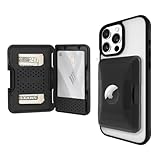
- 5 Card Storage: minimalist MagSafe wallet with expanded storage for up to 5 cards or 4 cards and 3 banknotes to suit any occasion. Product dimensions: 3.74 x 2.57 x 0.44 inches. What's in the box: 1*Magnetic Wallet, 2*Metal Sticker, 1*Instruction Manual
- Strong Magnetic Lock: Engineered with 20 powerful N52 magnets delivering 3,200 g of holding force with a magnetic case, our MagSafe wallet has 4x the magnetic strength of the official MagSafe wallet. Stay confident knowing your wallet stays securely in place—no slips, no drops
- Effortless Card Access: A specially designed 20 mm slot at the bottom lets you quickly slide cards in and out—no fumbling, no hassle
- Enhance Security: Our upgraded Magnetic wallet features built-in RFID-blocking technology, creating a secure shield around your cards to block unauthorized scans. Keep your credit cards, IDs, and personal data safe from digital theft—wherever you go
- Compatibility: for iPhone 18 Pro Max/18 Pro/17e/17 Pro Max/17 Pro/17/Air, 16 Pro Max/16 Pro/16 Plus/16, 15 Pro Max/15 Pro/15 Plus/15, 14 Pro Max/14 Pro/14 Plus/14, 13 Pro Max/13 Pro/13, 12 Pro Max/12 Pro/12, and MagSafe-compatible phone cases; also for non-MagSafe phones and phone cases using the included magnetic rings, such as Samsung Galaxy S26 Plus/S26 Ultra/S25 Plus/S25 Ultra/S24 Plus/S24 Ultra/S23 Plus/S23 Ultra and Google Pixel 7-11 Series; But Not for iPhone 13/12 mini, Samsung S26/S25/S24/S23
In practical terms: Apple Pay can protect your card number at checkout, but it cannot tell whether the person asking you to send money, click a link, or reveal a code is legitimate.
The five Apple-related scam situations to recognize
1. A fake Apple or bank security alert
You may receive a text, email, pop-up, calendar invitation, or phone call claiming that your Apple Account, bank account, or card has been compromised. The message may mention an unauthorized Apple Pay charge and tell you to “verify” the account immediately.
The scammer may ask for your Apple Account password, a two-factor authentication code, device passcode, recovery key, card details, or remote access to your phone. Caller ID can appear convincing because telephone numbers can be spoofed.
Recommended Free Tools
What to do: end the conversation and do not use the link, phone number, or email address in the message. Open the official Apple or bank app yourself, visit a website you already know is genuine, or call the number printed on your card.
2. A fake Apple representative, government agency, or technical-support worker
A caller may claim to be from Apple, the police, a tax agency, a utility company, or another official organization. They may say that you must send Apple Cash to “protect” your money, pay a fine, keep your account open, or help investigate fraud.
That is a major warning sign. Apple says it will not ask for your Apple Account password, verification code, device passcode, recovery key, account-security details, or payment through Apple Cash. Businesses and government agencies do not use Apple Cash as a normal method for demanding payment from a stranger.
Do not install screen-sharing or remote-access software at the caller’s direction, and do not follow technical commands merely because someone says they are support staff. A legitimate organization can be contacted independently after you hang up.
Rank #2

- Secure Your Information: Simply insert the RFID blocking card into your wallet to protect against digital pickpocketing. Block unauthorized scanning of your contactless cards, including credit/debit cards, passports, driver's licenses - to safeguard your identity and financial security
- Effective Protection: Our RFID blocking card utilizes advanced electromagnetic shielding technology, which features an embedded antenna mesh and chip that instantly detects and scrambles scanning attempts, providing consistent and reliable protection for the entire wallet
- Ultra Slim & Easy to Use: Credit-card-sized and just 0.03 inches (0.76 mm) thick, it slips easily into your wallet, purse or card holder adding no bulk. No charging or batteries needed. It will not demagnetize other cards, nor interfere with your phone signals
- A Thoughtful Gift: Give the practical gift of security. Effortlessly protecting your loved ones from digital theft – offering instant peace of mind, which is a truly meaningful way to show your care
- Test the Card: Test our RFID blocking card at self-checkout: Layer your contactless card with our RFID card on the reader - payment fails instantly, error message pops up
3. A seller who moves you outside a marketplace
A seller on social media, a classifieds site, or an online marketplace may offer an attractive price and then insist that you pay with Apple Cash directly. They may claim that direct payment avoids fees, reserves the item, or is required because the marketplace checkout is “broken.”
Paying outside the marketplace removes safeguards that might otherwise help document the purchase or handle a dispute. Paying before an item arrives creates additional risk. Apple warns that recovery may not be possible in these circumstances.
Safer approach: keep communication and payment inside the marketplace when possible. If a seller insists on Apple Cash, especially before shipping, treat that as a reason to walk away—not as a reason to send a small deposit.
4. A fake friend or family emergency
A message from a familiar name or social-media account says someone has lost a phone, been arrested, had an accident, or needs immediate help. The sender asks for Apple Cash and says not to call because the situation is urgent or embarrassing.
Do these 3 things before closing this tab:
1Clear out junk files and repair common Windows errors2Fix the driver behind crashes, sound loss and screen glitches3Repair Windows errors before they cause bigger problemsThe account may have been compromised, or the scammer may simply be impersonating the person. A real-looking conversation is not independent verification.
Call the person using a phone number already stored in your contacts, or contact another family member through a separate channel. Do not use the number or link supplied in the unexpected payment request.
5. The bad check or money-transfer exchange
Someone offers to send you a check and asks you to send Apple Cash in return—for example, to cover a fee, refund an excess payment, or pass money to another person. The check can appear in your account before it is fully cleared and later bounce, while the Apple Cash transfer may already be gone.
Rank #3

- Bulit-in Case for Airtag: Put your airtag into the built-in case designed solely for airtag, then you will get a slim and nice-looking airtag holder case (Not including AirTag)
- Built to Last: This classic & retro wallet is made from high-quality leather which's been distressed to give it the patina of a wallet you've had for years
- Slim Design: Sizing 3.3" x 4.1" x 0.12", this minimalist card case wallet can easily fit into your front pocket or jeans pocket
- Large Capacity: This slim wallet can hold as many as one id card, 5 credit cards and 6-10 bills
- Perfect Gift Idea: Packed in a nice gift box, this hawanik thin wallet is a perfect gift idea for your beloved ones for birthday, anniversary, father’s day, new year’s day, christmas and other important occasions
Never send Apple Cash to convert a check into cash, move money for someone else, or “return” an overpayment to a stranger. A person who wants to pay you can use a normal, verifiable transaction method without asking you to send money first.
Free tools Windows power users keep installed
One-click scans. No signup required.
Red flags that should stop the payment
- The request is unexpected and demands immediate action.
- You are threatened with arrest, account closure, lost access, or financial loss if you do not pay.
- The person tells you to keep the request secret or not contact the organization directly.
- You are asked for an Apple Account password, one-time code, device passcode, recovery key, or remote access.
- A stranger wants Apple Cash for an item you have not received.
- A seller wants to move payment away from the marketplace.
- You are asked to pay a prize fee, government charge, technical-support bill, or “fraud protection” deposit with Apple Cash.
- Someone offers a check and asks you to send money back.
- The name looks familiar, but the request comes from a new number, account, or unusual conversation.
A safer way to handle an unexpected request
- Pause. Do not let urgency make the decision for you. Put down the phone, close the chat, or stop replying.
- Do not disclose secrets. Apple, your bank, and legitimate support staff should not need your password, verification code, device passcode, or recovery material through an unsolicited contact.
- Verify independently. Use the official app, the number printed on your card, a previously saved contact, or a website you type yourself. Do not use a callback number, QR code, link, or email address supplied by the suspicious message.
- Check the recipient carefully. Before confirming an Apple Cash payment, review the recipient’s name, phone number or email address, and the amount. Do not assume a familiar display name proves identity.
- Heed warnings in the payment flow. Apple Cash may display warnings for some potentially risky payments. Treat a warning as a reason to stop and verify, not as an obstacle to dismiss quickly.
- Use a separate channel for personal emergencies. Call the person on a known number or verify the situation with someone else who knows them.
- Keep purchases in the marketplace. Do not let a seller’s deadline or discount push you into an irreversible payment method.
Protect your Apple Account and phone
Enable two-factor authentication
Two-factor authentication adds another sign-in requirement to your Apple Account. It does not make a fraudulent Apple Cash transfer impossible, but it can reduce the chance that a stolen password alone is enough to access the account.
On current Apple devices, review this under Settings > [your name] > Sign-In & Security. Check that two-factor authentication is enabled and review the devices associated with the account. Remove devices you do not recognize and change the Apple Account password if you suspect that someone has obtained it.
Keep your device passcode private
Your iPhone passcode is highly sensitive. Do not type it while someone is watching, tell it to an unsolicited support contact, or reuse it as a password elsewhere. A scammer who obtains both your phone and passcode may have more options than someone who merely has your Apple Account password.
Consider Stolen Device Protection before a loss
On a supported iPhone, Settings > Face ID & Passcode > Stolen Device Protection lets you enable an additional layer for certain sensitive actions when the phone is away from familiar locations. It can require biometric authentication and impose security delays for selected account and device changes.
Do not misunderstand this feature: it is not a guarantee that a thief cannot make Apple Pay purchases. Apple notes that passcode authentication can still be used for Apple Pay purchases. Stolen Device Protection is an additional safeguard, not a substitute for a private passcode and quick action after a phone is lost.
Optional: a physical security key for higher phishing risk
Independent reader supportYour contribution helps us test, update, and keep practical guides available for everyone.What to do if you already sent money or shared information
If an Apple Cash payment is still pending
- Open the Wallet app.
- Tap your Apple Cash card.
- Find and open the transaction.
- If it is marked Pending and the recipient has not accepted it, look for the option to Cancel Payment.
Cancellation is limited. An accepted Apple Cash payment is not routinely presented as cancellable, so act immediately rather than waiting to see what happens.
If you believe the payment was a scam or need help with an Apple Cash transaction, contact an Apple Cash Specialist at Green Dot Bank promptly through the official Apple support route. Do not rely on a phone number supplied by the person who contacted you.
If you see an unauthorized card or payment-app transaction
Contact the relevant card issuer, bank, or payment service as soon as possible. Explain that the transaction was unauthorized and ask what dispute, reversal, or account-protection options are available. Review recent statements and transactions for additional activity.
The Federal Trade Commission recommends asking both the payment company and the bank or card issuer about reversing unauthorized transactions where applicable. There is no guarantee that a scam payment will be recovered, and the rules can differ depending on the payment method and circumstances.
If you shared a password, code, or used a phishing site
- Change your Apple Account password immediately from a trusted device.
- Confirm that two-factor authentication is enabled.
- Review the devices and sign-in activity associated with your Apple Account.
- Remove anything you do not recognize and follow Apple’s account-recovery steps if you are locked out.
- Change any other password that was reused with the exposed password.
- Contact your bank or card issuer if payment details were also disclosed.
Never share a new verification code with someone who says they need it to secure your account. The code is meant to prove that you are signing in.
Quick wins for a faster PC:
Clear out junk files and repair common Windows errorsFree Scan →Fix the driver behind crashes, sound loss and screen glitchesFind Drivers →Repair Windows errors before they cause bigger problemsFix Now →If your iPhone is lost or stolen
- Use Find My to mark the device as lost as soon as possible.
- Follow Apple’s lost-device instructions and contact your wireless carrier if appropriate.
- Contact card issuers if you need cards suspended from Apple Pay.
- Change important passwords if you believe the device passcode may be known.
Lost Mode can suspend Apple Pay cards on the missing device. Do this quickly, but do not assume that enabling Stolen Device Protection or Lost Mode eliminates every possible risk.
Save evidence and report the scam
Before deleting anything, preserve the practical details: screenshots, the sender’s address or number, the recipient, the amount, the transaction status, dates, times, links, and any payment instructions. This information can help your bank, Apple Cash support, marketplace, or law enforcement understand what happened.
Best Value

- MagSafe Compatibility: Designed for compatibility with iPhone 12, 13, 14, 15 ,16 and 17 series (including iPhone 12/13 mini), this MagSafe card holder uses MagSafe technology for seamless attachment and removal. For optimal magnetic attachment, affix the card holder directly to your phone or to a magnetic-compatible case
- RFID Protection: Cardholders are RFID protected, helping to protect your card and personal information from unauthorized scanning or theft. (Note that RFID can only work when the card's chip is covered by leather)
- Large Capacity: This MagSafe card holder can hold up to 6 cards, providing convenient storage space for your daily needs of credit cards, ID cards, or other essential cards. When you're ready to pay, the thumb slot gives you quick and easy access to the card you need
- Slim and Portable: This MagSafe card holder measures approximately 3.7*2.5 inches, and its slim profile allows it to easily fit into a pocket, bag, or pouch without adding bulk or weight. Its portability ensures you can easily take it with you anywhere
- High Quality & Durable: This stand is made from high-quality materials and is designed to withstand daily wear and tear. Its durability ensures long-term use, giving you a reliable accessory for the long term. The flip function prevents cards from falling out and private information from being directly exposed
Apple directs users to report suspicious Apple-lookalike email and SMS messages to [email protected]. Suspicious FaceTime material can be reported to [email protected]. U.S. consumers can report scams and scam calls at ReportFraud.ftc.gov.
Reporting does not guarantee a refund, but prompt notification can help protect your account and may give the payment provider information needed to investigate.
The Tool Desk
Outbyte Driver Updater FREEScan for outdated or missing drivers - takes under a minuteDriver Scan →Outbyte PC Repair FREERepair Windows errors before they cause bigger problemsFix Now →Frequently Asked Questions
Can Apple Pay be hacked by a scammer at a payment terminal?
Apple Pay’s documented design uses a device-specific Device Account Number and a transaction-specific dynamic security code rather than sending your original card number to the merchant. The more common risk in these situations is social engineering: a scammer persuades you to send money, reveal a code, disclose credentials, or install remote-access software.
Can I cancel an Apple Cash payment?
Only in a limited situation. If the payment is still marked Pending and the recipient has not accepted it, open Wallet, tap Apple Cash, open the transaction, and look for Cancel Payment. An accepted payment may not be cancellable, so contact an Apple Cash Specialist at Green Dot Bank immediately if you believe it was a scam.
Will Apple ever ask for my verification code or Apple Cash?
Apple says it will not ask for your Apple Account password, verification code, device passcode, recovery key, account-security details, or payment through Apple Cash. If an unsolicited contact claims to be Apple and requests any of these, end the contact and reach Apple independently.
Does Stolen Device Protection stop someone from using Apple Pay?
It adds biometric requirements and security delays for selected sensitive actions away from familiar locations, but it is not a guarantee against all Apple Pay spending. Apple notes that passcode authentication can still be used for Apple Pay purchases. Keep your passcode private and use Find My and Lost Mode quickly if the phone disappears.
Outdated Drivers Are Slowing You Down
One free scan finds every outdated or missing driver and matches the right update for your exact hardware.Free scan · exact hardware matchPC Slower Than It Used to Be?
A free scan shows the junk files, broken settings and background clutter dragging Windows down - then fixes them in one click.Free scan · Windows 10 & 11The Bottom Line
Remember the three rules: never share Apple Account codes or passwords, never send money because a stranger is creating urgency, and independently verify every unexpected request. Apple Pay can reduce card-number exposure at legitimate checkout; it cannot protect you from authorizing a payment to a scammer.
Quick Recap
Product prices and availability are accurate as of the date/time indicated and are subject to change. Any price and availability information displayed on Amazon at the time of purchase will apply.




