Lucid does not publish a fixed customer-pay price for replacing a high-voltage battery pack in the official North American warranty and service materials reviewed. The cost depends on the vehicle and the repair Lucid determines is needed, so owners should get a diagnosis and a written, vehicle-specific estimate rather than rely on an unsourced dollar figure.
What Lucid’s warranty covers
Lucid’s North American New Vehicle Limited Warranty version 2025.11.2 covers the high-voltage battery for 8 years or 100,000 miles, whichever comes first, with a minimum 70% capacity-retention condition. Those are warranty terms, not a published replacement price or a prediction of how long a battery will last. Lucid’s warranty also notes that terms vary by vehicle and market; check the document that applies to your model year and purchase or lease.
For an eligible claim, Lucid may repair, replace, or adjust the battery. The warranty allows Lucid to use a new, reconditioned, or remanufactured part at its discretion, so coverage does not mean the owner is guaranteed a new, complete pack for every battery concern. The warranty describes these repair options.
Does a low range estimate mean the battery needs replacing?
No. The warranty says displayed range is an estimate affected by driving conditions and habits, among other factors. Lucid’s trained and authorized representatives determine battery capacity, and the warranty gives them discretion over the measurement method. A change in displayed range alone does not establish that the battery is below the warranty threshold or eligible for replacement.
Quick wins for a faster PC:
Clear out junk files and repair common Windows errorsFree Scan →Fix the driver behind crashes, sound loss and screen glitchesFind Drivers →Repair Windows errors before they cause bigger problemsFix Now →#1 Best Overall

- Replacement batteries for a Lucid Air with a low or dead key fob battery.
- Includes two (2) CR2032 3V car key batteries.
How to get a reliable replacement estimate
- Check the applicable warranty. Find the warranty document for your vehicle’s model year, purchase or lease timing, and region. Lucid lists separate warranty documents on its warranty page.
- Arrange a diagnosis. Schedule service through the Lucid app or contact a service center using Lucid’s service page. Ask whether the concern may qualify for warranty coverage before approving customer-pay work.
- Request a written, itemized estimate. Ask the service advisor to identify the recommended repair and separate diagnostic charges, parts, labor, taxes, and any applicable coverage or goodwill adjustment. If replacement is proposed, ask whether the quote is for a complete pack or another repair, and whether the part is new, reconditioned, or remanufactured.
- Review what the quote covers. Confirm the vehicle model year and battery configuration, what is included in the total, and any warranty on the repair. A quote for a repair is not directly comparable to a quote for a complete pack.
High-voltage pack versus 12-volt battery
This answer concerns the high-voltage traction battery that powers the vehicle. A Lucid also has a 12-volt accessory battery, which is a separate component with a different replacement and pricing question. Make clear which battery you mean when contacting service.
Quick Recap
Best Value

- This Richmat HJH13D remote is Non-universal bed remote. It is only compatible with Milemont and Lucid Adjustable Bed, NOT compatible with the other brand of adjustable beds, such us BeautyRest and Classic Brands Adjustable Bed
- There are several versions of this remote model HJH13D, different versions have different functions and buttons, please check your remote button, if the buttons are different from ours, it CANNOT replace your remote
- The remote will not come paired, we have listed 4 pairing methods in the picture, please follow one of these instructions or use your bed's current pairing instructions. If any questions on your remote please contact us anytime
- This remote does NOT have a massage function, so if your adjustable bed has a massage function, please do NOT buy this remote control, it will NOT fit
- The remote used 2 AAA batteries, which need to be purchased separately. Please check the battery before operation
Rank #4
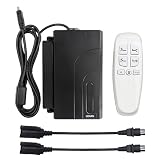
- The Adjustable Bed HJH13D Remote, HJC18 Control Box and Conversion Cable Replacement made by Richmat
- This Richmat Replacement is NOT universally compatible, is only for Lucid L300 Adjustable Bed, is not compatible with Milemont and other Brand of Adjustable Beds
- The Remote and Control Box together is that you can avoid the Control Box and Remote produced at different times not working properly due to chip incompatibility
- The Connector of the Control Box is 4 pins, if the Connector of the Motor is 8 pins, you can use a Conversion Cable
- The Remote used 2 AAA batteries, which need to be purchased separately
Rank #3
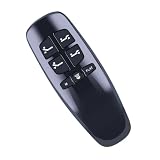
- Compatible Models:This remote is only compatible with HJH13D, for L300, for Milemont Adjustable Bed, for CastleBeds (Not BT Version)
- 【Note】Please verify that the buttons on your old remote control match the diagram exactly before purchasing. If they do not match completely or if your remote has Bluetooth functionality, it may not work properly
- How To Pair: 1.Make sure the batteries work fine. Replace them when needed. 2.Plug the power cord to the power source. Ensure there is power to the source/outlet. 3.Press and hold [Head Up] and [Foot Up] simultaneously, then press and hold the button blue button on the control box cable for about 3 seconds
- Durable & Comfortable:Featuring high-quality ABS material and a newly upgraded smart chip, it delivers instant button response with precise control up to 8 meters/26 feet. Soft silicone buttons protect fingertips, while the ergonomic curved design ensures comfortable, fatigue-free use during extended daily operation
- Package included & After-Sales Service:1 * Remote Control ( 2pcs AAA Battery & Instruction Not Included.) If you have any questions, please contact us through AMZ tools and we will help you within 12 hours
Rank #2

- Compatible Models: This remote control is only compatible with Lucid l600 adjustable beds and cannot replace other brands of adjustable beds
- Replacement Part Number: Replace RF.27.19.33(This product does not come with batteries, you need to bring 2 AAA batteries)
- Easy Pairing: Step 1: Place two AAA batteries in the remote. Step 2: On the control box (under the base), press the PAIR button twice. The LED light on the control box turns blue. Step 3: On the remote, press and hold the PAIR button. The light on the remote flashes and the pairing process begins. If pairing is successful, the LED light on the control box turns green. If pairing fails, the LED light on the control box turns off
- Excellent Quality: Our remote control is made of high-quality ABS plastic, which is wear-resistant, sturdy and resistant to falling, and has a long service life
- Adjustment Function: This remote control can control various functions such as bed angle adjustment
Product prices and availability are accurate as of the date/time indicated and are subject to change. Any price and availability information displayed on Amazon at the time of purchase will apply.
Independent reader supportYour contribution helps us test, update, and keep practical guides available for everyone.



