Current status: New claims in the $95 million Apple Siri privacy settlement are closed. The original deadline was July 2, 2025. If you filed a valid claim but never received, lost, or failed to cash your payment, the official settlement website currently says you can request a payment reissue by September 3, 2026. Reissued payments are estimated to be sent around September 17, 2026.
The settlement covered eligible individuals in the United States and its territories who owned or purchased certain Siri-enabled Apple devices and experienced an unintended Siri activation during a conversation they intended to keep private between September 17, 2014, and December 31, 2024.
As an Amazon Associate I earn from qualifying purchases.
The short answer
The Apple Siri settlement is real. It is the court-authorized Lopez Voice Assistant Settlement, arising from Lopez et al. v. Apple Inc., Case No. 4:19-cv-04577-JSW, in the U.S. District Court for the Northern District of California.
However, the settlement is no longer accepting ordinary claims. If you never filed by July 2, 2025, there is no current late-claim process for receiving a payment. If you did file and your payment was lost, returned, sent to an old address, expired, or never successfully cashed, use the official payment-reissue process instead of submitting another claim.
#1 Best Overall

- Efficient Charging: Our Apple Watch wireless charger ensures your watch powers up quickly, whether you have a Series 2 or the latest Apple Watch Ultra. Designed for efficient charging, it helps you save time and stay ready to go with a fully charged device
- Seamless Magnetic Alignment for Easy Use: Enjoy the simplicity of magnetic charging. The built-in magnet ensures effortless alignment every time you place your watch on the dock. This intuitive design makes it easy to start charging, whether you're at home or traveling. (Tip: For the best charging experience, remove the watch case and use a 5V/1A adapter or Watch Charging Adapter.)
- Compact and Travel-Friendly Design: This sleek, portable charging stand is designed for easy storage and portability. Its lightweight and compact build make it the perfect travel companion. Keep your Apple Watch powered up wherever you go — no more worrying about running out of battery while traveling or on the move.
- Advanced Safety Features for Peace of Mind: Safety is a priority. Our charging dock is equipped with overheating protection, ensuring your Watch stays safe from overcharging or excessive heat. Charge with confidence knowing your device and charger are protected from damage.
- Compatible with All Apple Watch Models: Whether you own an Apple Watch Series 2 or the latest Ultra, our wireless charger is designed to be fully compatible with all models. Enjoy a reliable and efficient charging experience, no matter which Apple Watch you own. This charger is your perfect solution for all Apple Watch versions.
The settlement advertised a payment of up to $20 per qualifying device, for no more than five devices. That meant a theoretical maximum of $100, not a guaranteed payment. Based on recipient reports and coverage of the January 2026 distribution, the practical payment was approximately $8.02 per approved device, or about $40.10 for five devices. The settlement terms describe the payment as a pro-rata share of the net fund, so individual amounts could depend on the number of devices validated and the final fund calculation.
What the Siri lawsuit alleged
The lawsuit alleged that Siri-enabled devices sometimes activated without the user intentionally saying the wake phrase or pressing the relevant button. Plaintiffs alleged that Apple obtained recordings of private conversations captured after those unintended activations and, in some cases, shared information with third parties or contractors.
Do these 3 things before closing this tab:
1Clear out junk files and repair common Windows errors2Fix the driver behind crashes, sound loss and screen glitches3Repair Windows errors before they cause bigger problemsThe allegations followed reporting about Apple’s former Siri quality-review or “grading” program. In August 2019, Apple said it had suspended human grading of Siri requests while it reviewed its practices and privacy protections.
Those points need to be kept separate:
- A lawsuit allegation is a claim made by plaintiffs, not automatically an established fact.
- Reporting about a review program does not prove that every Siri user’s conversations were recorded or heard by a person.
- A settlement resolves disputed claims without necessarily deciding who was legally right.
- A settlement is not a judicial finding that Apple intentionally eavesdropped on every user or unlawfully recorded every private conversation.
Apple denied the allegations and did not admit wrongdoing by settling the case.
Who was eligible under the original settlement?
The settlement class generally covered an individual who met all of the following conditions:
- They were a current or former owner or purchaser of a qualifying Siri Device.
- They lived in the United States or one of its territories.
- Siri was enabled on the device.
- They experienced at least one Siri activation they did not intend.
- At least one unintended activation occurred while they were having a conversation they intended to keep confidential or private.
- The event occurred between September 17, 2014, and December 31, 2024.
The settlement materials also described the class in terms of confidential or private communications allegedly obtained by Apple or shared with third parties. The original claim form required the claimant to make the relevant attestations under penalty of perjury, but it did not require the claimant to identify a particular recording, provide a precise incident date, or prove a specific dollar loss. Claims could still be reviewed, validated, or audited.
The Tool Desk
Outbyte PC Repair FREERepair Windows errors before they cause bigger problemsFix Now →Outbyte Driver Updater FREEScan for outdated or missing drivers - takes under a minuteDriver Scan →Devices included in the settlement definition
The settlement’s defined list of “Siri Devices” included:
Rank #2

- 3 in 1 Wireless Charger Station: This 3-in-1 wireless charger is designed to work seamlessly with a variety of devices, including iPhone 16 15 14 13 12 11 8 Pro Max Mini Plus X XR XS Max SE Plus Series, Apple Watch Series 10 9 8 7 6 5 4 3 2 SE and Ultra, AirPods 2 3 4 Pro 2 (Note: for Airpods 2 3 4, needs work with a MagSafe charging case). A perfect Christmas present for couple (to husband or wife), son, daughter, or any loved ones.
- Fast Charging Power: Ensure your devices are efficiently charged with up to 7.5W for phones, 3W for earbuds, and 2.5W for watches. The charger is versatile, making it ideal for company work desk, window sills, living room or bedside, providing quick and reliable power delivery.
- Portable and Foldable Design: Featuring a foldable, lightweight design, this charging station is ideal for home, office, travel or trip. Manufacturer designed it to fit easily into bags, it makes a thoughtful present for loved ones who need reliable charging on the go. It's convenient for working remotely or on traveling.
- Safe Charging Base: Built with multiple safety features, including overcurrent, overvoltage, and overheating protection. This charger has worked reliably for customer. The LED indicators offer clear charging status, making it a reliable accessory for any desk or nightstand.
- Customer Friendly Features: It is equipped with a non-slip surface and case-friendly compatibility, which supports cases with a thickness of ≤ 0.16 inches (4mm). Please avoid cases with metal rings, pockets, or magnets. It helps to keep devices organized and charged while enhancing any room or office with its sleek appearance.
- iPhone
- iPad
- Apple Watch
- MacBook
- iMac
- HomePod
- iPod touch
- Apple TV
AirPods were not listed in the settlement’s defined device list. Do not assume that every Apple product qualified merely because it could interact with Siri.
Facts that were not enough by themselves
These facts alone did not establish eligibility:
- Owning an iPhone or another Apple product.
- Having Siri enabled.
- Intentionally saying “Hey Siri” or otherwise activating Siri.
- Receiving an email, postcard, or other settlement notice.
- Seeing advertising after discussing a product.
- Living outside the United States and its territories.
- Missing the July 2, 2025 claim deadline.
Common edge cases
- Former owners: You did not have to still own the device. The class included current and former owners or purchasers.
- Used devices: A used-device owner could potentially qualify if the other requirements were met. The claimant still had to make the required attestations.
- No receipt or serial number: The original claim process allowed claimants without notice codes to provide other requested contact and device information. A receipt could be supplied where available, but the form also contemplated model and serial-number information.
- No email or postcard: Notice was not a prerequisite during the original claims period. Someone who believed they qualified could file without receiving a notice. That does not reopen the deadline now.
- A child’s device: The claim form allowed an authorized individual to submit a claim for a minor class member.
- Several people used one device: The settlement capped claims at five devices per individual and payments were subject to validation. It should not be assumed that every household member could claim the same device independently.
The original claim form contains the detailed eligibility attestations and device definition.
Can you still file a new Siri settlement claim?
No. The online claim deadline was July 2, 2025, at 11:59 p.m. Pacific Time. Mailed forms had to be postmarked by July 2, 2025. The original claims window has closed, and the official settlement materials do not provide an ordinary exception for people who simply missed the deadline.
Recommended Free Tools
| Your situation | What to do now |
|---|---|
| You never filed a claim | There is no current ordinary route to submit a late initial claim. |
| You filed but never received the payment | Use the official payment-reissue or claim-status process by September 3, 2026. |
| Your check was lost, returned, or sent to an old address | Request a reissue and provide updated payment or address information through the official process. |
| Your check expired or you failed to cash it | Do not try to cash an expired check; request a reissue instead. |
| You received less than you expected | Check the approved device count and payment status. The amount was based on validated devices, not necessarily every device entered on the form. |
Do not pay a private company or law firm that promises to reopen the claims period. A reissue request is not a new initial claim.
How to request a payment reissue
This process is for people who already submitted a claim. According to the official settlement homepage, the current reissue deadline is September 3, 2026.
- Navigate directly to the official website: Type lopezvoiceassistantsettlement.com into your browser rather than relying on a link in an unexpected email or text message.
- Open the claim-status or payment-reissue page: The listed page is lopezvoiceassistantsettlement.com/my-claim.
- Locate your original claim information: Gather your Claimant Identification Code, Confirmation Code, claim confirmation email, payment notice, or other correspondence if you still have it.
- Submit the reissue request by September 3, 2026: Follow the current instructions for a replacement payment or updated payment information.
- Contact the administrator if the portal does not work: The settlement administrator’s listed telephone number is 1-888-981-4106.
- Save proof of the request: Keep the confirmation page, confirmation email, screenshots, and any information showing when you submitted the request.
The website estimates that final reissued payments will be sent on or around September 17, 2026. That is an estimate, not a guaranteed delivery date.
If the portal says the deadline has expired
There is an apparent inconsistency in the settlement website. The current homepage says payment reissue requests remain available through September 3, 2026, while an indexed version of the /my-claim page has displayed a message saying the portal deadline expired.
If those messages conflict when you visit:
- Confirm that you are using the exact official domain.
- Save a screenshot of the message and note the date and time.
- Try the claim-status page again from the official homepage.
- Call 1-888-981-4106 promptly and explain that the homepage and portal show different status messages.
Do not submit a second original claim in an attempt to fix the problem. The original filing period is closed.
Rank #3
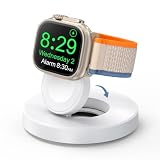
- One-Step Charging Stand: Simply place your Apple Watch upright on the dock to start charging, no installation required, very easy to use.And it will cut off automatically when your watch is fully charged. (Note: The power adapter is not included, you may need a USB A port adapter)
- Charging with Nightstand Modes: The watch charging stand supports Apple Watch in nightstand mode, bedside time-telling piece, also could be an alarm clock. (Tips: before using the nightstand mode function, please turn on the nightstand mode in your watch settings in advance)
- Compatible with All Apple Watch Models: Specially designed for your Apple Watch, ZAPOGO watch charging dock is compatible for Apple Watch Series 12/11/10/9/8/7/SE/6/5/4/3/2 (includes 38mm 40mm 41mm 42mm 44mm 45mm version), Apple Watch Sport, Apple Watch Nike Plus, Apple Watch Hermes, and Apple Watch Edition. (Note: Not support series 1)
- Portable Wireless Charging Stand: The charging station built-in a magnetic charger for your smartwatch. Strong magnetic keeps your watch firmly on the charging stand. Lightweight and compact design perfect for your home, kitchen and bedroom, office, business trips, holidays, travels. Convenient and elegant
- Advanced Safety Features for Peace of Mind: Safety is a priority. Our apple watch charger is equipped with overheating protection, ensuring your Watch stays safe from overcharging or excessive heat. Charge with confidence knowing your device and charger are protected from damage.
How much was the Apple Siri payout?
What the settlement terms promised
The gross settlement fund was $95 million. The settlement provided for payments of up to $20 per qualifying Siri Device, with a maximum of five devices per claimant.
| Item | Amount or limit |
|---|---|
| Gross settlement fund | $95 million |
| Maximum per qualifying device | Up to $20 |
| Maximum devices per claimant | Five |
| Theoretical maximum per claimant | $100 |
| Guaranteed payout | None; payments were pro rata |
The net fund was reduced by administration and notice expenses, taxes, court-approved attorneys’ fees and expenses, and service awards. The available amount was then distributed according to the settlement’s formula and the number of valid claims and approved devices.
What claimants reportedly received
Initial payments began on or around January 23, 2026. Recipient reports and coverage of the distribution indicated a practical amount of approximately $8.02 per approved device. The following is an approximation, not a universal official payment schedule:
Windows Errors? Fix Them Before They Spread
Repair common Windows errors and clear accumulated junk for a smoother, more stable PC - no reinstall needed.Free scan · no reinstallCrashes, No Sound, or Screen Glitches?
Random freezes, missing sound and display glitches usually trace back to one bad driver. Find and replace yours safely.Free scan · under a minute| Approved devices | Approximate reported payment |
|---|---|
| 1 | About $8.02 |
| 2 | About $16.04 |
| 3 | About $24.06 |
| 4 | About $32.08 |
| 5 | About $40.10 |
The approximately $8.02 figure was reported by recipients and technology coverage, including 9to5Mac’s distribution report. The settlement website’s terms describe a pro-rata amount rather than promising every claimant a fixed $8.02 rate.
One reason the payout was below the $20 cap is the volume of submissions. In a court-filed declaration, Angeion reported receiving 2,487,788 claim-form submissions as of August 20, 2025. That number represents submissions, not necessarily valid or approved claims.
How payments were sent and how to verify one
Payments could be sent by ACH, physical check, or digital check, depending on the payment method selected by the claimant. Reports identified payment descriptions such as:
- Lopez Voice Assistant
- Lopez Voice Asst—Payouts
These labels were reported in connection with legitimate distributions, but a label alone should not be treated as proof that an unexpected message or deposit is genuine. If you see an unfamiliar deposit, verify it through the official settlement website or by calling the administrator at the published number.
If you received a paper check
Settlement checks generally had a limited acceptance period, reportedly about 120 days in many cases, but the expiration date could vary by issuance date. Use the expiration date printed on your particular check. If it has expired, was lost, or was returned, request a reissue rather than attempting to deposit it.
Rank #4

- 【Easy to Place and Charge】!!Apple Watch Charger is not included.!! Lamicall Watch Stand suit for Apple Watch Magnetic Fast Charger always holds your watch securely in place. The hole of the stand compatible with iwatch is perfect for you to embed your watch charger. And you can take it off anytime. The charging cable can be organized in order if you use the charging stand, so that you can run away from messy desktop.
- 【Non-Shaking & Non-Slippery】- The bottom of the stand compatible with Apple Watch have whole piece of high quality silicone to prevent shake and slip. The rubber cushion can protect your watch and the polished metal will not scratch it. Lamicall stand suit for iwatch is made by superior quality Aluminum alloy, and 4mm thickness makes this stand 3 times more sturdy than normal.
- 【Wide Compatibility】Apple Watch Series Ultra 4 Ultra 3 Ultra 2 Ultra, Series 12 11 10 9 8 7 6 5 4 3 2 1, SE SE2 SE3(38mm / 40mm / 41mm / 42mm / 44mm / 45mm /46mm / 49mm) BASIC /SPORT /EDITION. ❗❗Note : Apple Watch Charger Cable Do Not Included. Hope you can Understand.
- 【Exquisite & Elegant Design】- Standard 45 degree angle design for easy viewing and using.Thick aluminum body, delicate polish, sleek looking, it's a great watch charging stand for desk, table, nightstand. Even if it is not used as a charging stand, it is also a very beautiful and useful stand holder suit for Apple watch.
- 【Support Nightstand Mode】 Setting Nightstand Mode, the Apple Watch screen will display the date, time. When the alarm is set, that time is also displayed on the watch face. Put it on your desk or next to your bed and it quickly transforms into a beautiful upholstery.
Fraud and phishing precautions
- Do not pay a fee to receive a settlement payment or to request a reissue.
- Do not give an unsolicited caller your Apple password, Social Security number, or unrelated bank credentials.
- Do not assume that an email’s logo, sender name, or embedded link makes it legitimate.
- Type the official website address into your browser and start there.
- Use the administrator’s published phone number, 1-888-981-4106, to verify a payment issue.
- Do not call the federal court clerk for payment-processing help. The settlement notice directs payment questions to the administrator.
The original claim form listed [email protected] as an administrator email address, but readers should verify current contact details on the official settlement website before relying on an old notice.
Independent reader supportYour contribution helps us test, update, and keep practical guides available for everyone.What participating in the settlement meant legally
Receiving money was not the only consequence of remaining in the class. A person who stayed in the settlement class and did not opt out gave up the right to bring or continue covered claims against Apple relating to the matters released by the settlement.
In plain English:
- Filing a claim: You could receive a settlement payment if your claim was approved, but you remained bound by the settlement release.
- Opting out: You would not receive a settlement payment, but opting out was the route intended to preserve a potential individual claim covered by the settlement.
- Doing nothing: You would not receive a payment, and if you were included in the class, you could still be bound by the settlement release.
The opt-out and objection deadlines were also July 2, 2025. Court-filed materials show that the case generated objections and thousands of exclusion requests submitted through third-party law firms, with the court considering issues concerning their validity and solicitation. Those proceedings do not create an ordinary new-claim or late-opt-out route for consumers today.
Quick wins for a faster PC:
Scan for outdated or missing drivers - takes under a minuteDriver Scan →Repair Windows errors before they cause bigger problemsFix Now →Settlement timeline
| Event | Date or status |
|---|---|
| Lawsuit filed | 2019 |
| Second amended complaint | March 17, 2021 |
| Proposed $95 million settlement filed | December 31, 2024 |
| Preliminary approval | February 10, 2025 |
| Original claim, opt-out, and objection deadline | July 2, 2025 |
| Court-filed submission count | 2,487,788 submissions reported as of August 20, 2025 |
| Final approval | Reported October 14, 2025 |
| Appeal | Filed in November 2025 and later voluntarily dismissed |
| Initial payment distribution | Began on or around January 23, 2026 |
| Payment-reissue request deadline | September 3, 2026 |
| Estimated final reissue date | Around September 17, 2026 |
Some older settlement notices and pages still contain August 2025 final-approval hearing language, including inconsistent references to August 1 and August 22. Those are historical notices, not upcoming events.
Do not confuse this case with the separate 2026 Siri matter
The settlement discussed here concerns alleged unintended Siri activations and the capture or sharing of private conversations. A separate 2026 Apple-related matter concerns allegedly delayed, unavailable, or upgraded Apple Intelligence and Siri features.
Do not use the other matter’s claim form, device list, eligibility rules, settlement amount, or deadline when checking this settlement. For this case, the relevant official website is lopezvoiceassistantsettlement.com.
For future Siri privacy questions
The settlement does not determine what Siri is doing on your device today, and requesting a reissue does not change your device settings. Apple’s current support materials explain the available controls, including Improve Siri & Dictation and the iPhone instructions for turning Siri on or off and changing how it is activated.
Free tools Windows power users keep installed
One-click scans. No signup required.
Frequently Asked Questions
Is the Apple Siri settlement payout real?
Yes. The $95 million Lopez Voice Assistant Settlement is a real court-authorized settlement. Apple denied wrongdoing and did not admit liability by settling. The official verification website is lopezvoiceassistantsettlement.com.
Best Value

- Our 3-Year Promise to You:🛡️ 3-Year Coverage – Full protection against manufacturing defects.💰 Free Replacement – We send you a new one, completely free.📦 No Return Needed – Keep the old one. No wasting time at post offices.
- 【Customizable Blue Night Light & On/Off Control】 Unlike ordinary chargers, our wireless charging station features a soothing blue ambient light built into the base. It creates a cool, modern aura on your desk or nightstand without being intrusive. You are in full control—simply tap the sensor to turn the night light ON/OFF or adjust brightness. Use it as a gentle guide to find your phone at night or turn it off completely for total darkness. It's the perfect bedside charger for sleep lovers and tech enthusiasts.
- 【15W Fast Charging & Advanced Safety】 Experience high-speed wireless charging (up to 15W for iPhone). Our advanced smart chip provides temperature control, over-current protection, and short-circuit prevention. The blue indicator light confirms your phone is perfectly aligned and charging at peak speed. It charges your phone from 0% to 100% efficiently without overheating your device.
- 【3-in-1 Fast Charging Station】 Replace multiple cables with just one dock. This magnetic charging stand powers up your iPhone, Apple Watch, and AirPods simultaneously. It eliminates desktop clutter and organizes your space. Whether you need a charging station for multiple devices for home or office, this dock delivers seamless power to your entire Apple family.
- 【Powerful Magnetic Snap & Viewing Angles】 Equipped with upgraded N52 strong magnets, this MagSafe charger snaps perfectly to your iPhone (Requires magnetic case/iPhone 12+). The sturdy vertical stand supports both Portrait and Landscape modes, allowing you to use StandBy Mode as a alarm clock, calendar, or watch videos hands-free while charging. Never worry about misalignment or slow charging again
Can I file a new Siri settlement claim in 2026?
No. The original online and mail claim deadline was July 2, 2025. The current process is for existing claimants seeking a payment reissue, not for people who never filed.
What if I never received an email or postcard?
Not receiving a notice did not automatically disqualify someone during the original claims period. However, the deadline has now passed, so the absence of a notice does not create a late-claim exception.
How much did five-device claimants receive?
The settlement cap was $20 per device, or $100 for five devices, but that was not guaranteed. Recipient reports and distribution coverage indicated approximately $8.02 per approved device, commonly about $40.10 for five devices.
What’s actually slowing this PC down?
Pick the symptom - the matching free tool is one click away.
Were AirPods eligible devices?
AirPods were not included in the settlement’s defined list of Siri Devices. The listed devices included iPhone, iPad, Apple Watch, MacBook, iMac, HomePod, iPod touch, and Apple TV.
What if I no longer own the Apple device?
Former owners or purchasers could potentially qualify if they met the other settlement requirements. Current ownership was not required.
Why was my payment lower than $20 per device?
The $20 amount was a maximum, not a guaranteed rate. Payments came from the net settlement fund on a pro-rata basis after deductions and depended on the number of devices the administrator approved.
What does “Lopez Voice Assistant” mean on a bank statement?
That was one of the payment descriptions reported for the settlement distribution. If you are unsure whether a deposit is genuine, verify it through the official settlement website or by calling 1-888-981-4106. Do not rely only on an email or bank label.
What should I do if my settlement check expired or was sent to an old address?
Use the official payment-reissue process by September 3, 2026. Check expiration dates varied by instrument, so do not assume every check had the same deadline and do not attempt to cash an expired check.
Did Apple admit that Siri recorded everyone?
No. The lawsuit alleged unintended activations and the capture or sharing of private communications. Apple denied wrongdoing. The settlement resolved disputed claims and was not a finding that Apple recorded or had people hear every Siri user’s conversations.
Does requesting a payment reissue create a new claim?
No. A reissue request is intended for someone who already filed an original claim and did not successfully receive or cash the payment. It is not a way to submit a late initial claim.
The Bottom Line
Bottom line: You cannot file a new claim in the Apple Siri privacy settlement. The July 2, 2025 deadline has passed. If you already filed and your payment failed, use the official reissue process by September 3, 2026, or call the administrator at 1-888-981-4106. The advertised maximum was $20 per device, but the reported practical distribution was about $8.02 per approved device—not the $100 maximum many headlines suggested.
The Tool Desk
Outbyte PC Repair FREERepair Windows errors before they cause bigger problemsFix Now →Outbyte Driver Updater FREEScan for outdated or missing drivers - takes under a minuteDriver Scan →Quick Recap
Product prices and availability are accurate as of the date/time indicated and are subject to change. Any price and availability information displayed on Amazon at the time of purchase will apply.




