The Tool Desk
Outbyte PC Repair FREERepair Windows errors before they cause bigger problemsFix Now →Outbyte Driver Updater FREEFix the driver behind crashes, sound loss and screen glitchesFind Drivers →Square is the strongest general-purpose starting point; Loyverse suits small counters that want a free core system; Toast is built around restaurant workflows; Helcim is worth comparing for its payment model; and PayPal POS fits occasional sellers or businesses already using PayPal. These are picks for different needs, not a universal ranking. “Free” usually means no recurring subscription for the stated software tier—not free payment processing, hardware, or every feature. This guide reflects vendor terms checked on September 27, 2026, and a shortlist drawn from a 2025 roundup.
How to compare free POS systems
Start with the full cost of operating your checkout, not just the monthly software price. A $0 subscription can still come with payment-processing charges, hardware purchases, paid add-ons, or implementation costs. Before choosing, check:
As an Amazon Associate I earn from qualifying purchases.
- Subscription: Is the software tier actually $0, and is that price per location?
- Payments: What are the applicable rates for in-person, online, and keyed transactions? Is using the provider’s own processing service required?
- Included features: Are sales history, employee controls, and inventory tools included, or do they require an upgrade?
- Equipment and setup: Can you use a phone or tablet you already own? Are compatible card readers, printers, installation, or approved hardware extra?
- Growth costs: What will change if you add staff, locations, advanced reporting, or online sales?
The product descriptions below do not establish comparable payment rates or total costs for every business. Check the provider’s current terms for your location, payment mix, and setup before deciding.
Best free POS systems by business need
Square: best starting point for many small businesses
Square combines POS and payment tools from one provider, making it a practical first option for sellers who want a broad small-business setup. Square’s U.S. pricing page lists its Free tier at $0 per month per location. That is a software subscription price; processing fees and optional hardware or add-ons may still cost extra. The exact processing rates are not established here, so confirm them on Square’s current U.S. pricing page before estimating your costs.
#1 Best Overall

- A complete countertop point of sale — Combine dual responsive touchscreens, built-in POS software, and durable hardware for a fast, reliable checkout experience.
- Serve customers faster — Run smoothly through busy shifts, complex menus, and big orders with high-speed processing, memory, and responsive touchscreen displays.
- Accept every way they pay — Take all major cards at one simple rate, with no hidden fees or long-term contracts. Receive funds as soon as the next business day.
- Handle real-world demands — Resist everyday spills, dust, and wear with a durable, IP54-rated design.
- Stay reliable through every rush — Maintain strong connectivity and consistent performance through your busiest hours.
Square said in an article dated December 19, 2025, that more than four million merchants use its free POS software. That is Square’s own published figure, not an independently verified adoption count.
Loyverse: best for a small counter that can use existing devices
Loyverse’s Free plan can be started without entering payment details, according to Loyverse. Its free core may suit food retailers, cafes, and smaller counters that want to begin with a phone or tablet rather than make a larger software commitment. The trade-off is that sales history beyond 31 days, employee management, and advanced inventory are optional paid add-ons. Check device and payment compatibility, as well as current add-on prices, against your needs.
Rank #2

- Windows 11 PROFESSIONAL POS TERMINAL - Equipped with Intel Core i5 High-Performance CPU, 4 GB Memory, and 128 GB Hard Disk. It also offers versatile connectivity options, including two serial ports, four USB ports, an HDMI output, an audio input, a DC 12V power input, and an Ethernet port.
- SLEEK & COMPACT DESIGN - Volcora POS Terminal is designed to take up as little space as possible so you can focus on better utilization of the counter space. Our sleek yet heavy-duty metal base ensures the terminal is well-stabled while taking orders with style. Suitable for any business such as retail stores, quick service restaurants, dine-in restaurants, cafes, bars, and more.
- DUAL WIDE TOUCHSCREEN - Terminal comes with one 15.6" capacitive LCD touchscreen and one 11.6” capacitive LCD touchscreen for customer display, combined with 1366x768 high-resolution, makes it easy to read and touch with minimal effort. Our POS Terminals can also withstand over 15000 hours of screen time with little to no quality sacrifice.
- IN THE BOX - Volcora 15.6" & 11.6” Dual-TouchScreen Windows 11 Professional POS Terminal, Power Adapter, Registration Card, and User Manual.
- LIFETIME WARRANTY & SUPPORT - Simply unbox, and set up your POS terminal like a Windows tablet with ease. We do understand that additional support might be needed for non-tech-savvy users and our US Based Customer Service team is committed to help. Plus, all Volcora products come with a limited lifetime warranty so you can purchase with peace of mind.
Toast: best to evaluate for restaurant workflows
Toast is the restaurant-focused option in this shortlist. The key question is not just whether a software tier is advertised as free, but what the full restaurant setup requires. Toast’s page, last updated August 20, 2026, says upfront hardware and implementation costs vary and its services require approved Toast hardware. Get the costs and terms for your specific setup before treating Toast as a low-cost choice.
Helcim: best for comparing payment economics
The 2025 NerdWallet roundup describes Helcim’s POS as free and presents its payment model as a reason to compare it. That does not establish that Helcim will be the cheapest processor for your business: eligibility, payment terms, and costs depend on the arrangement and your transactions. Review current terms directly and compare them with your expected mix of in-person, online, and keyed payments.
Rank #3

- Windows 11 PROFESSIONAL POS TERMINAL - Equipped with Intel Core i5 High-Performance CPU, 4 GB Memory, and 128 GB Hard Disk. It also offers versatile connectivity options, including two serial ports, four USB ports, an HDMI output, an audio input, a DC 12V power input, and an Ethernet port.
- SLEEK & COMPACT DESIGN - Volcora POS Terminal is designed to take up as little space as possible so you can focus on better utilization of the counter space. Our sleek yet heavy-duty metal base ensures the terminal is well-stabled while taking orders with style. Suitable for any business such as retail stores, quick service restaurants, dine-in restaurants, cafes, bars, and more.
- WIDE TOUCHSCREEN - The 15.6" capacitive LCD touchscreen, combined with a 1366x768 high-resolution display, makes it easy to read and touch with minimal effort. Our POS Terminals can also withstand over 15000 hours of screen time with little to no quality sacrifice.
- IN THE BOX - Volcora 15.6" Single Screen Windows 11 Professional POS Terminal, Power Adapter, Registration Card, and User Manual.
- LIFETIME WARRANTY & SUPPORT - Simply unbox, and set up your POS terminal like a Windows tablet with ease. We do understand that additional support might be needed for non-tech-savvy users and our US Based Customer Service team is committed to help. Plus, all Volcora products come with a limited lifetime warranty so you can purchase with peace of mind.
PayPal POS: best for occasional sellers already using PayPal
PayPal POS may be convenient if you already run your business through PayPal or only need to take payments occasionally. A free app is not the same as free card acceptance. Check transaction charges and whether the available reader and checkout features meet your needs before relying on it for regular sales.
What the shortlist leaves out
This is a practical shortlist, not a claim that these are the only five free options or objectively the five best for every business. NerdWallet’s October 2025 roundup also includes SpotOn’s Quick Start plan and an eHopper free option. Either could be a better fit for someone specifically comparing restaurant systems or cash-discount programs; confirm the current terms and eligibility before choosing.
Rank #4

- ☄[Professional POS Point of Sale]:20.4-inch dual touch screen (main and secondary screens are the same size) The main display supports multi-angle adjustment, innovative linear heat dissipation structure, continuous without heating, multi-point capacitive touch, let you experience excellent color display.
- ☄[Multi-function interface]:The cash register is equipped with: 1 network port, 1 COM port, 1 audio port and 6 USB ports, which can easily connect to printers, barcode scanners and other devices.
- ☄[High-performance i5 processor]:The second-generation Intel i5 dual-core processor, with a 1366×768 high-definition capacitive touch screen, is responsive and runs smoothly, greatly improving cash register efficiency.
- ☄[High-performance configuration]:Our POS terminal is equipped with a quad-core processor, 8GB DDR3 memory, 128GB SSD solid-state drive and Windows LTSC to ensure the stable of various professional software and meet high-intensity work needs.
- ☄[Multi-scenario application]:Our small commercial cash register touch screen can be easily applied to convenience stores, shopping malls, supermarkets, clothing and shoe stores, restaurants, cafes and other scenes. Make your work easier.
Shopify is another common comparison, but its current U.S. pricing page does not describe a standalone free POS plan. Shopify says basic in-person POS features are included with paid Shopify plans. On the page checked September 27, 2026, Basic was listed at $39 per month, with POS Pro available for an additional $89 per month per location. Shopify describes the total POS cost as a combination of the plan, transaction fees, and POS Pro locations. Those are current U.S. terms, not prices that should be assumed to have applied throughout 2025.
What’s actually slowing this PC down?
Pick the symptom - the matching free tool is one click away.
Do you need to buy POS hardware?
Not necessarily. A small seller may be able to start with an existing phone or tablet, depending on the system and payment method. A physical checkout may call for extra equipment, but buy only what your workflow requires.
Best Value
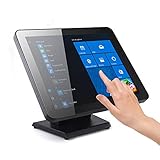
- ✔【 Seamless flat touch screen design】- Unlike home-use monitors designed for occasional personal use, the seamless construction enhances resilience against water and dust ingress, ensuring durability and reliability in various environments. By eliminating crevices or edges where water or dust could accumulate or penetrate, this seamless flat capacitive touch screen remains functional even in challenging conditions.
- ✔【No Need To Install Driver 】- This Plug & Play Capacitive Touch screen monitor is designed to effortlessly support multi-touch functionality when connected to Windows 8/10/11 systems. For Windows 7/XP/2000, it operates flawlessly with single-touch capability. Moreover, it is compatible and integrates seamlessly with a range of operating systems including Windows 7/10/XP
- ✔【 10-point multi-touch capacitive touch screen 】- Recognize and respond up to ten simultaneous touch points with precision and accuracy. Allows for seamless multi-user interaction and supports a wide range of gestures, including pinch-to-zoom, swipe, and rotate, providing users with a highly intuitive and engaging experience. Whether used in interactive kiosks, educational settings, or collaborative workspaces, the 10-point multi-touch capability enhances productivity, creativity, and versatility by enabling seamless collaboration, efficient multitasking, and immersive interactive experiences.
- ✔【 Solid Metal Stand 】- Comes with a heavy duty metal stand designed for POS industry offers exceptional stability, preventing tipping or wobbling in busy environments. Its sturdy construction securely holds the monitor in place, reducing the chance of damage and maintaining uninterrupted operation. This stability boosts user confidence and safety during touch screen interaction, ensuring a smooth and dependable user experience.
- ✔【 Enhanced Brightness and Viewing Angles】- This 17” Commercial-grade touchscreen monitor offers higher brightness and wider viewing angles, making them suitable for well-lit commercial spaces such as retail stores, restaurants, or public areas.
- Thermal receipt printer: Useful if you need printed receipts; check compatibility with the POS and device.
- Barcode scanner: Helpful for scanning inventory, but not essential for every counter.
- Cash drawer: Relevant if you accept cash and need a secure till.
These are optional accessories, not universal requirements. Toast’s approved-hardware requirement is a separate consideration for businesses evaluating its services.
Quick Recap
How to choose without underestimating the cost
- Write down your checkout needs. Note whether you sell in person, online, or both; how many staff and locations need access; and whether you need detailed inventory or sales history.
- Shortlist by workflow. Start with Square for broad small-business use, Loyverse for a small counter, Toast for restaurant workflows, Helcim for a payment-model comparison, or PayPal POS if you already use PayPal.
- Get the current payment terms. Compare the rates and conditions that apply to your actual payment types and expected sales. Do not assume a provider’s processing arrangement is optional.
- Add likely extras. Include any paid features, required or desired hardware, and setup costs. For a physical counter, verify accessory compatibility before buying.
- Recheck the price at your intended scale. Confirm what changes when you add a location, employee, longer sales history, or advanced inventory. A free starting tier may not remain the best-value tier as your needs grow.
Product prices and availability are accurate as of the date/time indicated and are subject to change. Any price and availability information displayed on Amazon at the time of purchase will apply.




