Recommended Free Tools
Google Wallet launched in Pakistan on March 11, 2025, so its launch is no longer pending. Eligible users can add supported cards for contactless payments and use Google Pay at participating online and in-app checkouts. What works depends on the card, phone and merchant.
Google Wallet launched in Pakistan on March 11, 2025
Google’s release notes announced that Google Wallet launched in Pakistan and Jordan on March 11, 2025. The note was published on April 15, 2025, and said users could add supported cards and passes and pay using the Google Pay checkout button. Google Wallet release notes
As an Amazon Associate I earn from qualifying purchases.
The names refer to related parts of the payment experience, not identical features. Google Wallet is the app for storing payment cards and digital passes. Google Pay is also the name used for a payment option at participating online and in-app checkouts. Google lists Pakistan among countries where Google Pay is available for those checkouts, but that does not mean every merchant offers it. Google Pay availability for online and in-app payments
Which cards can be added to Google Wallet?
Google’s Pakistan-specific support page lists the following participating issuers and card types. Individual cards may still be restricted by the issuer, so an issuer’s presence on the list does not guarantee every card it issues will work. Google Wallet supported payment methods in Pakistan
#1 Best Overall
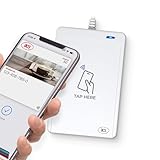
- BROAD NFC & SMART CARD COMPATIBILITY: Supports ISO 14443 Type A & B, ISO 15693, ISO 18092 NFC, MIFARE, FeliCa, DESFire, Ultralight, Plus, and other popular contactless card technologies.
- HIGH-SPEED, SECURE COMMUNICATION: Contactless read/write speeds up to 848 kbps with secure element–based key management, mutual authentication, key diversification, and extended APDU support up to 64 KB.
- MULTIPLE OPERATING MODES: Supports Smart Card Reader/Writer mode, Card Emulation mode, and Keyboard Emulation mode for flexible deployment across access control, ticketing, loyalty, and identity applications.
- USB Type-A: USB 2.0 Full Speed CCID interface with PC/SC and CT-API support. Compatible with Windows, macOS, Linux, and Android. Features user-controllable bi-color LED and buzzer.
- APPLE VAS & GOOGLE SMART TAP CERTIFIED: Fully certified for Apple Value Added Services (VAS) protocols including ECP 1.0 and Apple ECP 2.0 Access Control, as well as Google Smart Tap, enabling seamless interaction with Apple Wallet and Google Wallet passes.
| Issuer | Card types listed by Google |
|---|---|
| Allied Bank Limited | Visa debit |
| Askari Bank | Visa debit |
| Bank Alfalah | Visa and Mastercard credit and debit |
| Easypaisa Digital Bank | Visa debit |
| Faysal Bank Limited | Mastercard credit and debit |
| Habib Bank Limited | Visa and Mastercard credit and debit |
| Habib Metropolitan Bank Limited | Visa debit |
| JazzCash | Mastercard debit |
| JS Bank (Zindigi) | Visa debit |
| Meezan Bank Limited | Visa and Mastercard debit |
| The Bank of Punjab | Mastercard credit |
| United Bank Limited | Visa debit; Mastercard prepaid and debit |
Google’s support list is the more useful reference for current eligibility than a launch announcement: card participation can change, and the issuer may impose restrictions on particular cards. Check the page and confirm with your bank or card issuer if setup fails.
What you need for contactless payments in stores
Adding a card to Wallet does not by itself guarantee that you can tap to pay everywhere. For contactless payments, Google requires an NFC-enabled Android phone, a card that is eligible for Wallet, and a merchant that accepts contactless payments. NFC means Near Field Communication, the short-range wireless technology used when you tap your phone at a payment terminal. Google Wallet requirements and supported methods
Rank #2

- ACTIVATION REQUIRED - SCAN THE QR CODE IN THE BOX: This reader only accepts payments after it is activated on a Nayax account. Scan the QR code on the yellow card inside the box and submit your email and device serial number. We register the reader with Nayax for you.
- HOW LONG ACTIVATION TAKES: Already a Nayax customer? We transfer the reader to your existing account. New to Nayax? You will receive a Nayax application (business details and bank account for weekly payouts). Nayax bank approval takes about 7 business days. The reader stays inactive until then - this is normal, not a defect.
- NAYAX SERVICE FEES: Nayax bills its monthly service and card-processing fees directly to you after activation. These fees are not included in this purchase.
- MDB VERSION - CHECK YOUR MACHINE: Includes an MDB cable for machines with an MDB port, such as most modern vending, snack and drink machines and many claw, arcade and laundry machines. For coin-pulse machines without an MDB port, choose the Pulse version.
- FEATURES: Accepts EMV chip, contactless/NFC and magstripe cards plus Apple Pay, Google Pay and Samsung Pay. Built-in 4G LTE (no Wi-Fi needed), 2.4 inch color touchscreen, real-time sales and telemetry in the Nayax app, loyalty and discount tools.
- Check the exact card: Confirm both the issuer and card type on Google’s Pakistan support page. If the bank is listed but your specific card will not set up, ask the issuer using the phone number printed on the card.
- Check the phone: Make sure the Android device has NFC. If you are considering a new phone only for tap-to-pay, verify NFC support for that exact model before buying.
- Check the payment point: The store must accept contactless payments. Wallet availability does not establish that all merchants or terminals accept it.
Google identifies separate country or region requirements for payments on smartwatches, so do not assume that a phone-compatible card will also work on a watch in Pakistan.
Crashes, No Sound, or Screen Glitches?
Random freezes, missing sound and display glitches usually trace back to one bad driver. Find and replace yours safely.Free scan · under a minutePC Slower Than It Used to Be?
A free scan shows the junk files, broken settings and background clutter dragging Windows down - then fixes them in one click.Free scan · Windows 10 & 11Google Pay online and in apps is a separate route
Google lists Pakistan as a location where Google Pay can be used at participating online and in-app checkouts. Look for the Google Pay option at checkout; its availability depends on the merchant. That country listing is not evidence that a card can be used for in-store contactless payments, which have the separate phone, card and merchant requirements above. Google Pay online and in-app availability
Rank #3

- Includes Elavon encryption
- Chip Card / EMV / NFC Compatible
- 2.4’’ Color LCD with backlight
- 192 MB of Memory (128 MB RAM / 64 MB DDR RAM)
- Includes terminal and power supply
What Visa’s launch announcement tells you
Visa’s announcement on March 13, 2025 described an early stage of the rollout: it said Visa cardholders at HBL, Bank Alfalah, UBL and Meezan could add eligible cards that day, and named several other issuers as coming soon. That was a dated launch snapshot, not a current full list; use Google’s Pakistan support page for the issuer and card types it currently lists. Visa’s March 13, 2025 announcement
Visa also reported that digital transactions accounted for 84 per cent of total retail payments processed by banks and electronic money institutions in Pakistan in 2024. That figure is Visa’s measure of that defined payment segment, not a claim about 84 per cent of all consumer spending. The announcement reflects the payment environment at launch; it does not establish current acceptance at individual merchants.
Quick Recap
Best Value

- acr122u nfc reader writer
- 13.56 Mhh support mifare 1k, ntag213, ultralight /ultralightc, Mifare plus, Mifare desfire
- provide SDK and free nfc tool software
- 5 pcs ntag213 nfc tag samples and 2 pcs UID MF1 card
- IEC14443A and ISO18092 protocol compliance
Rank #4

- Accept all major credit and debit cards and pay one low rate
- No hidden fees and no long-term contracts
- Mobile card reader that accepts payments anywhere & anytime
- Use the free SumUp App on your smartphone or tablet to start accepting transactions
- Simply pay 2.6% +10 per in-person transaction
What to do if your card will not set up
- Open Google’s Pakistan payment-method support page and match your issuer, network and card type.
- If the issuer and card type appear but setup is declined, contact the issuer using the number on your card. Google notes that banks can restrict individual cards.
- If your goal is in-store tapping, verify that your Android phone has NFC and that the merchant accepts contactless payments.
- If your goal is an online or in-app purchase, check whether that merchant offers Google Pay at checkout; an in-store card setup issue and online merchant availability are separate questions.
Product prices and availability are accurate as of the date/time indicated and are subject to change. Any price and availability information displayed on Amazon at the time of purchase will apply.
Do these 3 things before closing this tab:
1Scan for outdated or missing drivers - takes under a minute2Clear out junk files and repair common Windows errors3Fix the driver behind crashes, sound loss and screen glitches



