Outdated Drivers Are Slowing You Down
One free scan finds every outdated or missing driver and matches the right update for your exact hardware.Free scan · exact hardware matchWindows Errors? Fix Them Before They Spread
Repair common Windows errors and clear accumulated junk for a smoother, more stable PC - no reinstall needed.Free scan · no reinstallIf you notice the charge before paying, stop and ask the attendant to remove or void the item. If you have already paid, keep your receipt and payment record, ask the store to correct the transaction, and contact your card issuer promptly if the store does not resolve it. The right dispute process depends on your location and whether you paid by credit or debit card.
If you have not paid yet
- Pause the transaction. Call the self-checkout attendant and point to the item on the screen or receipt preview. Ask them to remove or void that line.
- Check the total before paying. Make sure the displayed amount no longer includes the item. If staff cannot correct it at the kiosk, ask them to help complete the transaction another way.
There is no single self-checkout procedure that every retailer is required to use. Ask staff to correct the specific line rather than assuming the machine will automatically reverse it.
As an Amazon Associate I earn from qualifying purchases.
If you have already paid
Save the transaction details
Keep the itemized receipt and the payment record, such as the card transaction in your banking app or statement. Note the store location, date and approximate time, and the item description or code shown on the receipt. If useful, photograph the shelf label or product barcode that helps explain the mistake. Keep copies of messages and write down when you spoke with staff and their name, if available. The FTC advises consumers to retain receipts and transaction documents when seeking to resolve a problem (FTC guidance on billing problems).
Ask the store to correct the charge
Contact the customer service desk or store manager. Identify the exact receipt line, say that you did not buy the item, and state the amount charged. Ask the retailer to refund that amount through the original payment method where available, and request a corrected receipt or written confirmation. Retailers set their own in-store correction process; keep a record of the conversation. The FTC notes that many businesses will work with customers to resolve a problem, but that is not a guarantee of a particular outcome (FTC guidance on solving problems with a business).
#1 Best Overall

- Super Mini Pocket 1D Scanner: Completely mini pocket size and ultralight at 35 g(1.2 oz), making the Eyoyo barcode scanner a better choice for portable use, especially for bookstores, online stores, retail shops, warehouses, and similar places
- 3-in-1 Connection Ways: Easily switch between 2.4G wireless, Bluetooth, and USB wired modes to suit your needs; Eyoyo Bluetooth barcode scanner offers a transmission range of up to 30 m(98 ft) in 2.4G mode and up to 50 m(164 ft) in Bluetooth mode without barriers
- Advanced 1D Scanning Technology: The Eyoyo 1D scanner effortlessly captures almost all common 1D barcodes, including UPC/EAN, Code 39, Interleaved 2 of 5, Code 93, Code 128, Codabar, Industrial 25, Matrix 25, and more; With superior decoding capability, it also can scan damaged, distorted, colorful, and reflective barcodes
- Please Note: This scanner only supports printed 1D barcodes and does not support scanning any 1D codes or 2D QR codes from phone or computer screens or printed 2D QR codes; it is not compatible with square pos or square register systems
- High Compatibility: The Eyoyo Bluetooth scanner seamlessly connects with laptops, PCs, POS systems, smartphones, tablets, iPhones, iPads, and other devices; It is compatible with common computer operating systems such as Windows XP/7/8/10/11, Mac OS, Linux
If the store does not fix it
- Make a written request. Send a concise message to the manager or the retailer’s corporate customer-service team. Include the transaction date, store location, specific item and amount, your earlier contact dates, and a copy of the receipt. Keep a copy of what you send. The FTC’s sample card-dispute letter illustrates how to describe an overcharge or an item you did not buy and why copies of supporting documents matter.
- Contact your card issuer promptly. Ask how to dispute the remaining charge and what evidence or form it requires. Do not wait through a lengthy store process before checking the issuer’s deadline.
- Consider a public consumer office for a persistent problem. For a recurring scanner issue or unresolved complaint, look up the relevant state or local consumer protection office or weights-and-measures authority. USAGov provides a directory of state consumer protection offices. The appropriate agency and remedy depend on where the transaction occurred and what went wrong.
Credit card and debit card disputes are different
For a covered credit-card billing error, the FTC says you generally must send a written dispute within 60 days after the first statement showing the error is sent. Check the issuer’s instructions and submit the dispute in the required way; the deadline is not a reason to delay while waiting for the retailer. See the FTC’s explanation of credit cards and disputing charges.
Debit-card protections and procedures differ from credit-card billing-error rules. Contact your bank or debit-card issuer as soon as you spot the charge and follow its instructions. In either case, retain the receipt, payment record, and your communications with the store.
Rank #2

- 【IP66 Waterproof Dustproof Mini Pocket 2D Scanner】Just bring this scanner with you. Anytime you want to collect data, just connect it with your device via Bluetooth or use the storage mode. 【Package Includes】Barcode Scanner x1, USB Cable x1, Dongle x1, User Manual x1.
- 【Waterproof Dustproof Silicone Port Plug】Newly designed waterproof and dustproof silicone port plug on marketplace, it enables better performance of the scanner in every working conditions. The silicone button on the scanner body enables every soft and smooth scanning experience.
- 【3-in-1 Connection Ways】This scanner works with Bluetooth, 2.4GHz wireless and USB 2.0 wired mode. The transmission distance can be 656ft in barrier free environment and 98 ft in an environment with obstacles using a 2.4G USB dongle. In addition, it is also compatible with various operating systems, such as windows 11/10/8/7/xp, Mac OS, iOS, android, linux.(Note: Not Compatible with Square)
- 【Vibration Alert】: When you need a quiet working environment, just turn the volume off and the vibration function will let you know if a barcode is detected.
- 【1D 2D QR Scanner】:Supports Both Digital and Printed 1D 2D QR Bar Code Symbologies: 1D Decode Capability: Codabar, Code 11, Code93, MSI, Code 128, UCC/EAN-128, Code 39, EAN-8, EAN-13, UPC-A, ISBN, Industrial 25, Interleaved 25, Standard 25, 2/5 Matrix 2D Decode Capability: QR, PDF417, Data Matrix, Aztec code, Maxi Code.
Do not assume a scanner-law bonus applies
Scanner-price laws are location-specific and do not necessarily cover a charge for an item that was never purchased. For example, Michigan’s scanner law addresses certain cases where a completed transaction charges more than the displayed price. Michigan’s Attorney General says a qualifying customer must have a receipt and notify the seller within 30 days; the state describes a refund of the price difference and a possible payment of ten times that difference, with a $1 minimum and $5 maximum. That Michigan process is not a nationwide entitlement, and it may not apply when an unwanted item was charged at its correctly displayed price. Check the rules for the place where you shopped; the Michigan Attorney General’s scanner-law guidance explains that state’s requirements.
Quick Recap
Best Value
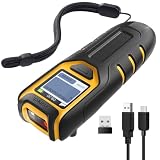
- Equipped with Display, Compact and Portable: The Inateck BCST-47 barcode scanner wireless features a 1.4 inch display that provides realtime scan feedback. The compact and lightweight design of our barcode scanners makes them ideal for warehouses and retail stores, helping to reduce fatigue and enhance portability
- 2600mAh High Capacity Battery: The Inateck wireless portable barcode scanner features a 2600mAh high capacity battery that supports up to one week of continuous use with low charging frequency. Its battery capacity is twice that of most portable scanners, offering greater convenience and peace of mind during use
- Durable and Easy to Use: The Inateck 2D barcode scanner comes with an APP and SDK, enabling quick setup through the APP and supporting customization. The handle features an antislip design, making it durable and easy to operate. Ideal for inventory management and warehouse operations, it helps improve efficiency in stocktaking and inbound/outbound processes
- Wide Compatibility with Three Connection Modes: Inateck barcode scanner supports Bluetooth, 2.4G, and wired connections, compatible with Windows, macOS, Linux, Android, and iOS systems to meet diverse needs. Ideal for individual entrepreneurs, home library management, and a variety of other use cases
- Exceptional Scanning Capability: The 2D barcode scanner supports reading almost all common 1D and 2D barcodes, as well as QR codes, both on paper and screens. Supported barcode types include: Code 128, EAN-13, EAN-8, UPC-A, UPC-E, Code 39, Code 93, Codabar, Interleaved 2 of 5, Standard 2 of 5, Industrial 2 of 5, Matrix 2 of 5, IATA 2 of 5, MSI, Code 11, ISBN, ISSN, GS1 128, GS1 DataBar, GS1 DataBar Expanded, GS1 DataBar Limited, QR Code, PDF-417, Aztec Code, Maxi Code, Data Matrix, Han Xin Code
Rank #4

- Mini 2D Barcode Scanner: Ultra Mini Size: 3.5*1.18*0.78 inch, Ultra Lightweight: 1.5 oz. Portable and pocket size makes the wireless barcode scanner perfect for on-the-go and long-term scanning. Suitable for inventory, warehouse, supermarket, library, bookstores, library, sales stores and more
- 3 Wireless Connection Ways & High Compatibility: You can switch 2.4Ghz Wireless, Bluetooth Wireless, and USB Wired connections according to your needs, which is more convenient. Eyoyo wireless barcode reader delivers up to 80-100m/260-330ft transmission distance barrier-free under the wireless mode. Easily connected with your laptop, PC, POS, mobile phone, tablet, phone
- Advanced 2D Scan Technology: The image 2D Barcode Scanner is equipped with an advanced CMOS sensor, and higher decoding accuracy, which can easily capture 1D/2D (QR/ PDF417/ MicroPDF417/ DataMatrix/ Aztec/ Maxicode, etc) barcodes from paper and electronic screen, effectively compensate for the problem that 1D laser scanner can not identify 2D and screen code. Also with super decoding ability supports scanning damaged, distorted, colorful, reflective, reverse barcode, etc special barcodes
- Long-Lasting Rechargeable Battery & Energy Saving Design: Our upgraded wireless Bluetooth barcode scanner is equipped with a rechargeable battery, it can work continuously for 8 hours, a 180-day super long standby time. To save power, the scanner will automatically shut down after 5 minutes of no operation by default, users can set or cancel the shutdown time
- Two modes of data transfer: Instant transfer mode/storage mode. in offline storage mode. The barcode scanner can automatically store the barcode data in the device. Upload data to your device in bulk when required. The barcode data can be stored up to 150.000 barcodes
Rank #3

- Convenient Clip-on & Pocket Design: At the office or on the go: The Eyoyo mini portable barcode scanner with a clip so you can use it anywhere. Pocket size design allows you to easily put it in your pocket. If you don’t have a pocket or the pocket is full of things, it doesn’t matter, This Eyoyo scanner is equipped with a clip on the back, you can clip it to any place that can be clipped, such as shirts, jeans, or your belt
- 2000mAh Huge Battery with Battery Indicators: Eyoyo is the one to design huge battery capacity with battery indicator level on the portable mini barcode scanner.Built-in 2000 mAh rechargeable battery, which can scan continuously for 20 hours after being fully charged. if you only scan 5000 barcodes per day, it can be used for 20 days. Used Smart LED Indicators tracking remaining power left (25%-50%-75%-100%). Input and output status, you need not guessing whether need to charge it or not
- Bluetooth & 2.4G Wireless & Wired Connection: This Eyoyo Bluetooth barcode scanner features 3-in-1 connection with Bluetooth, 2.4G wireless and USB wired. Its breakthrough design allows for easy transition between corded and cordless operation. Easily adapts to different needs and supports connection with your laptop, PC, MAC, iPhone, Android, and tablet
- Superior 1D & 2D Scanning Performance: This qr bar code scanner gun wireless adopts advanced 2D CMOS image technology, it scans virtually all 1D and 2D barcodes even poor quality, damaged, or low contrast codes. Capable of reading bar codes off smartphone screens: mobile coupons, digital wallets, and digital loyalty cards.Scanning ISBN/UPC/EAN, UPC/EAN With Supplementals, Code39, Interleaved 2 of 5, Code93, Code 128, Codabar, QR, Data Matrix, PDF417, etc barcode with ease
- Custom Configuration: The Eyoyo wireless scanner with a separate 𝗽𝗵𝘆𝘀𝗶𝗰𝗮𝗹 𝘀𝘄𝗶𝘁𝗰𝗵 𝗯𝘂𝘁𝘁𝗼𝗻, which reduces the loss of power. It supports 𝗶𝗻𝘀𝘁𝗮𝗻𝘁 𝘂𝗽𝗹𝗼𝗮𝗱 & 𝘀𝘁𝗼𝗿𝗮𝗴𝗲 mode, turning on/off the sound&vibration, adding custom prefix/suffix digits, hiding characters, adding keyboard keys (TAB, CR&LF, etc.), Support Key trigger, Auto-sensing, Continous scanning mode
Product prices and availability are accurate as of the date/time indicated and are subject to change. Any price and availability information displayed on Amazon at the time of purchase will apply.




