TradingView is the stronger choice if your priority is a dedicated charting and analysis workspace with tiered tools and broad market coverage. Webull is the stronger choice if you want a brokerage account that already includes charting, screening, and paper trading. The two overlap, and Webull documents a connection that lets you place orders from TradingView charts through a Webull account, so the question is less “which one” than “which job comes first.” The answer also depends on where you live, which markets you trade, and what you will actually pay once fees and data subscriptions are added up.
What each product is built to do
TradingView is a charting and market-analysis platform. Its core product is the chart workspace, with indicators, drawing tools, alerts, scripts, and a broker-connected trading panel layered on top. It is not a brokerage in its own right. You trade through a broker that TradingView connects to, and whether that connection is available depends on your location and account.
Webull is a brokerage. Its charting tools, screeners, research pages, and paper trading sit inside the same app and account you use to buy and sell. If you already want a brokerage account, Webull gives you the charts without a second product to manage. If you only want the charts, you are paying for a brokerage relationship you may not need.
Charting depth and plan limits
Both platforms present their feature counts as marketing figures. Treat the numbers below as vendor statements, not independent measurements, and compare the features you would actually use.
#1 Best Overall

- DO MORE ON ONE SCREEN: See every detail on the wider display featuring a 21:9 aspect ratio; Ultra WQHD provides the simplest way to maximize screen real estate and experience truly seamless multitasking on just one screen.Brightness (Typical) : 300 cd/㎡. Static Contrast Ratio 3000:1.
- ENJOY A BILLION COLORS W/ INCREDIBLE DEPTH: With HDR10 that displays over 1 billion colors compared to 16.7 million for typical SDR technology, dark colors are darker and the brightest are even brighter; Content is experienced as the creator intended
- CARE FOR YOUR EYES DAY and NIGHT: An ambient light sensor on the monitor detects lighting in your workstation and automatically adjusts brightness; Eye Saver Mode minimizes excessive blue light, and Flicker Free relieves eye strain
- SEE CONTENT SMOOTHER, EVEN GAMING: A faster than average refresh rate updates the image on screen more often every second; 100Hz refresh rate reduces lag and motion blur when playing games, watching videos, or working on design projects
- STAY IN SYNC WITH THE ACTION: AMD Radeon FreeSync keeps the refresh rate of your monitor and graphics card in sync to reduce image tearing for a superfluid entertainment experience; Watch movies and play games without interruptions
- Webull (charting page, 2026): more than 56 technical indicators and more than 63 technical signals, split into technical-analysis patterns, technical indicators, and candlestick patterns. Webull also advertises custom intervals and comparisons on its charts.
- TradingView (as described on Webull’s TradingView integration page, 2026): 15+ chart types, 110+ smart trading tools, 400+ technical indicators, 13 alert conditions, and 100+ financial ratios.
- TradingView (pricing page, 2026): an instrument count of 3,539,722, which TradingView presents as instruments available through hundreds of data feeds. Real-time access and actual coverage depend on the market and on the subscription you hold.
The more important difference is that TradingView’s paid tiers gate the things serious chart users tend to hit first: how many charts you can open at once, how many indicators you can run on a chart, how much historical data you get, and how many alerts you can set. Its plan comparison also lists features such as custom chart types and replay on certain plans. Before you commit, check those limits against your own habits, such as how many watchlists you keep or how far back you need data. Webull’s charting is included with the brokerage account rather than sold as a separate tier, so its limits show up as product behavior rather than as a plan line item.
Connecting the two platforms
Webull’s integration page describes using TradingView as the chart and order interface for a Webull account. The documented steps are:
- Open TradingView and go to the broker menu, either from your broker profile or from the trading panel attached to a chart.
- Select Webull from the list of brokers.
- Sign in with your Webull credentials and authorize the connection.
- Once connected, place orders from the TradingView chart using the connected Webull account.
Two cautions apply. First, the connection covers the account and products Webull supports for your location and account type, so do not assume every instrument you can see on a TradingView chart can be traded through it. Second, an order placed from a chart is still a live order. Execution price, speed, liquidity, market conditions, and system performance can all affect the fill, and Webull’s own pricing page warns about this.
Rank #2

- Improved ComfortView Plus: Reduces harmful blue light emissions to ≤35%, for all-day comfort without sacrificing color accuracy.
- Refresh rate: A smooth, tear-free experience with AMD FreeSync Premium (refresh rate up to 120Hz) and an ultra-low 0.03ms response time create a captivating experience for work and play.
- Vivid colors: Enjoy vibrant, true-to-life colors with 99% sRGB and 95% DCI-P3 coverage. The VA panel with 3000:1 contrast ratio and HDR readiness delivers stunning depth, detail and realism.
- Re-engineered sound quality: Enjoy more detailed sound with spacious audio featuring greater output power, deeper frequency response and more decibel range than the previous generation.
- Easy connectivity: Keep your desk organized and clutter-free with a single USB-C cable (up to 65W power delivery).
What you will actually pay
Webull
Webull’s pricing page describes $0 commissions on eligible U.S.-listed stocks, ETFs, and options in qualifying accounts. The same page notes that certain order fees may apply, along with possible regulatory and exchange charges. “Zero commission” is therefore a commission figure, not a total trading cost. Read the fee schedule for the specific products and order types you plan to use.
TradingView
TradingView’s cost is the subscription tier you choose, plus any market-data subscriptions for exchanges that charge for real-time quotes. TradingView’s pricing page localizes prices to the visitor’s region and can show taxes separately. Because of that, this article does not state a universal dollar price for any tier. Open the pricing page on the TradingView site and select your country to see the figures that apply to you.
Combined use
If you pay for a TradingView plan and trade through Webull, you pay both the subscription and the brokerage fees. Add those together before comparing against a single all-in brokerage that includes charts.
Rank #3
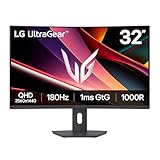
- Fast Response. Full Screen Immersion. - This UltraGear delivers fast, immersive gameplay on a 32" QHD curved display, with 180Hz refresh rate, and 1ms response. AMD FreeSync ensures smooth, tear-free action, while HDR10 and up to 99% sRGB coverage bring vivid color.
- 32" QHD Curved Display (1000R) - Dive into every detail with a 32" QHD (2560x1440) curved display. The 1000R curvature pulls you into the action, expanding your field of view for deeper immersion and giving you more screen space to game, multitask, or stream with ease.
- HDR10 & up to 99% sRGB Color - Experience vibrant, bold visuals with HDR10 support and up to 99% sRGB color gamut coverage. Whether you're gaming, streaming, or creating, colors stay rich and impactful—revealing more detail in every scene for a more dynamic and visually stunning experience.
- Experience Smooth Motion with 180Hz - With a fast 180Hz refresh rate, you’ll experience smoother frame transitions. Whether you're working or gaming, enjoy more fluid visuals with less screen stutter and motion blur.
- 1ms Response (GtG) for Crisp Gameplay - 1ms Response Time (GtG) keeps fast-paced gameplay sharp by minimizing blur and ghosting. Whether you're tracking enemies or racing to the finish, every frame stays crisp—giving you the edge when it matters most.
Paper trading
Both platforms offer simulated trading, but the scope differs. TradingView’s paper-trading feature is described in its support documentation as available globally and covering a broad set of asset classes. Webull’s charting page describes paper trading for U.S. stocks and options. Use either one to learn the order screens and to test a process, but remember that simulated fills do not reflect real slippage, rejected orders, or the behavior of thinly traded instruments. Label your results as simulated when you compare them with live performance.
Market access and geography
This is where many readers outside the United States need to slow down. Webull’s pages that I reviewed describe its U.S. brokerage offer, and they do not provide a complete country-by-country list of supported accounts or products. TradingView’s market coverage is broad, but the instruments you can see on a chart are not the same as the instruments you can trade or stream in real time. Confirm three things for your own country before choosing: whether you can open the brokerage account, whether the products you want are offered, and whether the data you need is included in your subscription.
Do these 3 things before closing this tab:
1Repair Windows errors before they cause bigger problems2Scan for outdated or missing drivers - takes under a minute3Clear out junk files and repair common Windows errorsHow the two compare
| Decision axis | TradingView | Webull |
|---|---|---|
| Primary role | Charting, analysis, alerts, and a broker-connected trading panel. Not a brokerage. | Brokerage with integrated charts, screeners, research, and paper trading. |
| Charting limits | Set by subscription tier (chart count, indicators, historical data, alerts), per TradingView’s pricing page. | Included with the brokerage account; vendor figures are more than 56 indicators and more than 63 signals, per Webull’s charting page. |
| Trade execution | Available through supported broker connections. Webull is one documented option. | Orders placed in the Webull account, or from TradingView charts once connected. |
| Cost structure | Subscription tier plus any market-data fees; prices vary by region. Check the pricing page for your country. | $0 commission on eligible U.S.-listed stocks, ETFs, and options in qualifying accounts, plus certain order fees and regulatory or exchange charges. |
| Paper trading | Described as globally available across a broad set of asset classes. | Described for U.S. stocks and options. |
| Geographic scope | Market and data availability depend on the feed and subscription. Country-level coverage not stated in a single list. | U.S. brokerage terms reviewed; full country-by-country eligibility not stated. |
Other Webull trading details to check
If you choose Webull for its brokerage, two details on its U.S. stock-trading page matter for how you plan trades. Extended-hours trading is offered in a pre-market session from 4:00 a.m. to 9:30 a.m. ET and an after-hours session from 4:00 p.m. to 8:00 p.m. ET. Fractional-share purchases of stocks and ETFs have a $5 minimum, according to the same page. Both are Webull statements and may change.
Rank #4

- 【Curved Ultrawide Monitor 49" & VA】 Premium VA Panel delivers double FHD 1080p resolution up to 144hz( DP1.4) monitor for content creation and gaming, 32:9 aspect ratio bring more wider visual than ordinary 16:9 monitor, capture game details more clearly for quick response. Tilt / Swivel / Height Adjustable meet different viewing visions
- 【USB Type C, DP and HDMI Ports】49C1G widescreen curved monitor delivers powerful USB C power delivery connectivity and have richful interfaces: 1 x DP 1.4, 1 x USB C 65W, 1 x HDMI 2.1, 2 x USB A, 1 x USB-B, 1 x RJ45, 1 x 3.5MM Audio Jack, you can directly connect your USB C devices such as Laptop, Mac, Phones, Tablets, Gaming Console( like Switch, PS5/4/3, XBOX Series etc) . It's much more convenient
- 【Adaptive-Sync & HDR 400 Technology】 INNOCN 49C1G ultrawide computer gaming monitor adopt high dynamic range (HDR) technology with professional color gamut (99% sRGB) delivers high contrast 3000:1 and color performance that meets the Display HDR 400 and Adaptive-Sync, bring smooth images and video viewing experience
- 【Enhanced Comfort & Double Your Experience】: 1800R curvature results in less eye fatigue; The curved screen allows content to be viewed at a glance while proven to limit eye strain compared to flat monitors. Dual FHD ensures enhanced depth in every detail, delivering incredibly realistic images; INNOCN 49C1G 32:9 super ultra wide display maximizes your screen real estate for seamless multitasking on just one computer screen
- 【Boost Productivity with Ultrawide Display】 Equipped PIP / PBP split screen technology which allowing you to configure your monitor to show content from two separate input sources. Play, watch, stream or work from multiple input sources at the same time, on one screen. You will not go wrong with any details, produce more fun and innovative things with INNOCN monitor. Just turn on and play
Which one fits your situation
- Choose TradingView when chart configuration, multi-market analysis, alerts, or scripts are your priority, and you are willing to pay a subscription for the tier that includes the limits you need. Confirm that the feature and the market data are included at your tier before you rely on them.
- Choose Webull when you want one account for charts, screening, practice, and trading, and Webull supports your location and the instruments you trade. Compare its fees on the products you use most, not just the commission headline.
- Use both when you want TradingView’s chart workspace and are able to route supported live orders through a connected Webull account. Check that your account and product qualify before you set this up.
Neither platform is the best choice for everyone. A U.S. options trader who wants built-in charts and paper trading may find Webull enough on its own. A technical analyst who watches many markets and needs deep chart configuration may find TradingView worth the subscription, with Webull as an optional execution route.
Vendor pages for both products are the primary sources for plan limits and fees. Check them before you sign up:
- Webull, TradingView integration page: https://www.webull.com/partners/tradingview
- Webull, charting page: https://www.webull.com/feature/charting
- Webull, pricing page: https://www.webull.com/pricing
- Webull, U.S. stock trading page: https://www.webull.com/stock-trading/
- TradingView, subscriptions pricing page: https://www.tradingview.com/pricing/
- TradingView, paper trading support article: https://www.tradingview.com/support/solutions/43000516466-paper-trading-main-functionality/
Vendor statements were reviewed as of October 2026. Plan terms, market-data access, and brokerage fees change, so confirm current figures on the pages above before you decide. This is a comparison of platforms, not investment advice.
Quick Recap
Product prices and availability are accurate as of the date/time indicated and are subject to change. Any price and availability information displayed on Amazon at the time of purchase will apply.




