What’s actually slowing this PC down?
Pick the symptom - the matching free tool is one click away.
Microsoft Build 2025 was less a consumer Windows launch than a blueprint for an agent ecosystem. Held in Seattle from May 19 to May 22, 2025, the conference focused on software that can use tools, access business data, coordinate with other agents and complete work on a person’s or organization’s behalf.
The most important announcements covered GitHub Copilot’s asynchronous coding agent, Azure AI Foundry’s enterprise agent platform, Windows AI Foundry for local and hybrid AI, support for open protocols such as MCP and A2A, and new Microsoft 365 controls for customizing and governing agents.
As an Amazon Associate I earn from qualifying purchases.
The short version
- GitHub Copilot: Developers could delegate repository-level tasks to an asynchronous coding agent that produced changes in a draft pull request.
- Azure AI Foundry: Microsoft positioned Foundry Agent Service as a managed platform for building, connecting, monitoring and governing enterprise agents.
- Windows: Windows AI Foundry brought together local model selection, optimization and deployment across CPUs, GPUs and NPUs.
- Protocols: Microsoft backed Anthropic’s Model Context Protocol (MCP) and Google’s Agent2Agent (A2A) protocol.
- Microsoft 365: Copilot Studio and Microsoft 365 Copilot gained multi-agent workflows, enterprise customization and agent identity features.
Microsoft described this as the beginning of the “age of AI agents” and an “open agentic web.” Those are Microsoft’s strategic descriptions, not proof that the wider web has already become autonomous or interoperable.
Microsoft’s real Build 2025 strategy
The announcements fit together as a stack:
- Choose a model.
- Connect it to tools, applications and company data.
- Build an agent or workflow.
- Coordinate multiple agents when necessary.
- Give agents identities and permissions.
- Monitor their actions, quality, cost and safety.
- Deploy them in the cloud, on Windows hardware or across both.
That explains why Build 2025 featured coding agents, enterprise connectors, local AI runtimes, protocol support, observability and security in the same event. Microsoft was not announcing one replacement for a chatbot. It was assembling infrastructure for agents that can plan, call tools, delegate tasks and act within defined boundaries.
#1 Best Overall

- Compatibility: Fits one laptop or notebook up to 17” and supports weight up to 22lbs. Mount plates detachable and height adjustable. Dual mounting options for laptop or a monitor with mounting holes 75x75mm and 100x100mm
- Multiple Options: Featuring dual mounting options, this laptop mount includes a C-clamp compatible with desks 0.4"-4" thick and a Grommet mount suitable for desks 0.4"-2.2" thick, ensuring easy installation on different surfaces
- Multiple Adjustment: With high-grade arms that extend, retract, and allow for a 16" height adjustment, plus +/-15 tilt, +/-90 swivel, and 360-degree rotation, this Laptop Desk Mount enables you to customize your viewing experience seamlessly
- Innovative Cooling Design: Venting holes on laptop tray absorb cooling air from laptop fan. Tray measure 14 x 11 inch (L x W), with a 0.6” protruding bottom lip
- Ergonomic Workspace Solution: Elevate your laptop to the optimal viewing height with the Laptop Mount, reducing neck and eye strain while maximizing desk space for a tidy and organized workspace setup. Enjoy peace of mind with reliable customer support for any product inquiries
The word agent covered several different products. A coding agent modifies a repository. A Copilot Studio agent automates a business process. An Azure agent may coordinate several specialized services. A Windows application may expose one safe action to an AI system. These should not be treated as equally autonomous.
Microsoft’s Build announcement provides the company’s overview of this strategy.
GitHub Copilot moved from suggestions to delegated work
The headline GitHub announcement was an asynchronous Copilot coding agent. Instead of remaining in an editor waiting for the next prompt, a developer could assign a repository task and allow the agent to inspect code, make changes and open a draft pull request.
Outdated Drivers Are Slowing You Down
One free scan finds every outdated or missing driver and matches the right update for your exact hardware.Free scan · exact hardware matchPC Slower Than It Used to Be?
A free scan shows the junk files, broken settings and background clutter dragging Windows down - then fixes them in one click.Free scan · Windows 10 & 11Potential tasks included refactoring code, improving test coverage and addressing defects. The important change was the unit of work: Copilot was being positioned to attempt a repository-level task rather than merely suggest the next line or answer a coding question.
The practical workflow still required human control:
- Assign a clearly defined issue or task.
- Let the agent inspect and modify the repository.
- Review the generated diff and its rationale.
- Run tests, security scans and other CI checks.
- Approve, revise or reject the pull request.
This was not an unrestricted autonomous software engineer. Branch protection, repository permissions, code ownership rules and review requirements remained important. Enterprise administrators also had to enable the capability for eligible users. Build-era coverage associated the feature with Copilot Enterprise and Copilot Pro+ users, but plan names, eligibility and pricing can change.
CRN also reported that GitHub planned premium-request charges beginning June 4, 2025, with usage depending on the selected model and Copilot plan. That is a launch-era pricing signal, not confirmation of pricing or quotas in 2026. Check the current GitHub Copilot page before budgeting.
GitHub Models and open-source development
GitHub Models added prompt management, lightweight evaluations and enterprise controls. The strategic importance was broader than model experimentation: GitHub was becoming a place to select models, compare results, delegate coding tasks, review agent-generated changes and manage development policies.
Microsoft also said AI-powered Copilot extension capabilities would be incorporated into the open-source repository behind Visual Studio Code. This connected agent-assisted development more closely to the cross-platform, open-source tools many developers already use.
GitHub Models, agent mode inside an IDE and the asynchronous GitHub Copilot coding agent are related, but they are not the same product.
Rank #2

- Versatile 2-in-1 Laptop & Monitor Mount - Stable aluminum laptop arm mount is compatible with Laptop, Monitor, Macbook and Chromebook. With the tray, the laptop stand can hold notebooks up to 17". Simply remove the tray to accommodate monitors ranging from 13-32" with VESA pattern 75x75mm and 100x100mm, holds up to 4.4-19.8lbs. 𝐏𝐥𝐞𝐚𝐬𝐞 𝐧𝐨𝐭𝐢𝐜𝐞 𝐭𝐡𝐚𝐭 𝐢𝐭 𝐢𝐬 𝐧𝐨𝐭 𝐜𝐨𝐦𝐩𝐚𝐭𝐢𝐛𝐥𝐞 𝐰𝐢𝐭𝐡 𝟏𝟎𝟎𝟎𝐑/𝟏𝟓𝟎𝟎𝐑/𝟏𝟖𝟎𝟎𝐑 𝐜𝐮𝐫𝐯𝐞𝐝 𝐬𝐜𝐫𝐞𝐞𝐧𝐬
- Full-Motion Adjustment For Comfortable View -The laptop arm mount offers -45° to +90° tilt, 180°swivel, 360° rotation. Raise your monitor up to 16.9” to support a healthy sitting posture. Whether you’re working from home, gaming through the night, or switching between video calls and documents, getting the screens to your natural line of sight helps relieve neck, shoulder and back strain so you can stay focused longer with less fatigue. 𝐍𝐨𝐭𝐞: 𝟑𝟔𝟎° 𝐫𝐨𝐭𝐚𝐭𝐢𝐨𝐧 𝐢𝐬 𝐫𝐞𝐜𝐨𝐦𝐦𝐞𝐧𝐝𝐞𝐝 𝐨𝐧𝐥𝐲 𝐟𝐨𝐫 𝐦𝐨𝐧𝐢𝐭𝐨𝐫 𝐢𝐧𝐬𝐭𝐚𝐥𝐥𝐚𝐭𝐢𝐨𝐧. When you're using the laptop tray, please do not to rotate the tray to a vertical position to ensure safety
- Space Saving & Keep Your Desk Organized - Elevate your laptop or monitor with this laptop desk mount to free up valuable space and creates a clean work environment. Easily switch between laptop and monitor modes to enhance your multitasking abilities and boosting your productivity while preserving desk space. Built-in cable management guides wires along the arms, keeping cords out of sight and out of the way. Enjoying your working, gaming or viewing hours in a tidy and modern workstation
- Heat Dissipation & Secure - The ventilated tray maximizes airflow and keeping your device cool and running efficiently. The tray includes 4 anti-slip pads and Velcro straps your laptop in place, preventing slips or falls during work or gaming. Ideal for home office professionals, office workers, programmer,designer, gaming enthusiasts and students
- Quick & Easy Setup - Assembly is straightforward with the provided tools and visual user manual. Depending on your desk situation, you can choose clamp or grommet mounting (suitable for desks from 0.39" to 2.76" thick). The hole diameter for grommet base should be 0.39" to 2.36". Do not hesitate to relate with us for any pre-purchase or installation questions
Azure AI Foundry became Microsoft’s enterprise agent control plane
Microsoft announced the general availability of Azure AI Foundry Agent Service for developers building and deploying enterprise agents. The service was designed for managed deployment, enterprise integrations and systems that may coordinate multiple specialized agents.
Key elements included:
- Developer tooling drawing together Microsoft’s Semantic Kernel and AutoGen direction.
- Support for MCP and A2A.
- Templates, actions and connectors to business systems.
- Enterprise data connections, including SharePoint and Microsoft Fabric; CRN reported more than 1,400 enterprise data sources.
- Model choice across a changing catalog; Microsoft described more than 1,900 models at the event.
- Monitoring for quality, cost, performance and safety.
Foundry was aimed at the operational problems that appear after a prototype works: connecting tools safely, controlling permissions, tracing failures, measuring cost, evaluating responses and deploying consistently.
General availability for the service did not make enterprise autonomy automatic. Teams still had to design data access, tool behavior, escalation paths, error handling, prompt-injection defenses and evaluation sets.
Why observability mattered
Azure AI Foundry Observability was one of the more consequential announcements because agent failures are difficult to diagnose from the final answer alone. Tracing can help teams determine:
- Which tools an agent called.
- Which data sources it accessed.
- How many model calls, retries or delegated tasks occurred.
- Why latency or cost increased.
- Where an agent looped or failed.
- Whether the problem came from the model, retrieval, permissions or tool execution.
Observability shows what happened; it does not prove that an agent’s decision was correct or safe.
Windows became a local and hybrid AI development platform
Windows AI Foundry was presented as the evolution of Windows Copilot Runtime. It covered model selection, optimization, fine-tuning and deployment across client hardware and the cloud.
Its components included Windows ML, local model support, Foundry Local, model catalogs such as Ollama and NVIDIA NIMs, Windows inbox AI APIs and deployment across hardware from AMD, Intel, NVIDIA and Qualcomm. Windows ML was intended to support inference across CPUs, GPUs and NPUs.
The goal was to make Windows more than a client operating system that consumes cloud AI. Developers could build applications that use local or hybrid inference for:
- Lower latency.
- Offline or intermittent-connectivity scenarios.
- Data locality and privacy-sensitive processing.
- Potentially lower cloud inference costs.
- Device NPU acceleration.
- Hardware-specific optimization.
However, local AI capability depended on the target device, supported model, runtime, drivers and available CPU, GPU or NPU. A Windows 11 PC was not automatically capable of running every feature discussed at Build. Some capabilities were specifically associated with Copilot+ PC hardware.
Do these 3 things before closing this tab:
1Fix the driver behind crashes, sound loss and screen glitches2Clear out junk files and repair common Windows errors3Scan for outdated or missing drivers - takes under a minutePhi Silica and LoRA fine-tuning
Microsoft announced a public preview of LoRA fine-tuning for Phi Silica, its small on-device model. LoRA, or Low-Rank Adaptation, allows developers to adapt a model using a comparatively small set of additional parameters rather than retraining the entire model from scratch.
Rank #3

- Versatile 2-in-1 Design: This ergonomic laptop mount is designed to support both notebooks and monitors. With the tray, the laptop stand can hold notebooks up to 17”. Simply remove the tray to accommodate monitors ranging from 13-34” (VESA 75x75mm, 100x100mm) with a weight capacity of 4.85-19.8 lbs. The C-clamp fits desks from 0.39” to 2.56” thick, and the grommet mount works with desks up to 2.95”, offering a variety of installation options.
- Full Range of Motion: Effortlessly adjust your laptop or monitor to the perfect angle and height. Tilt it ±45°, swivel ±90°, or rotate it 360°—whatever suits you best. The laptop arm extends up to 18.1” and can reach a maximum height of 17.5”, keeping your screen at eye level and reducing strain for long working hours.
- Quick & Hassle-Free Setup: Set up your workstation in minutes. The VESA mounting plate and laptop arm come pre-assembled, allowing you to easily attach the laptop arm mount to your desk with minimal effort. The C-clamp securely holds it in place, providing a stable, reliable setup without the need for additional tools.
- Keep Your Notebook Cool and Secure: The 11.8” x 10.4” ventilated tray is designed to keep your notebook cool during extended use with airflow-enhancing ventilation holes. The tray also includes 6 anti-slip pads and a widened bottom guard to hold your laptop securely in place, while Velcro straps ensure the laptop and tray stay firmly together, preventing unwanted movement.
- Maximize on Desk Space: Elevate your laptop or monitor with this laptop desk mount to free up space and create a more organized workspace. Easily switch between laptop and monitor modes to enhance your multitasking abilities, boosting your productivity without sacrificing valuable desk space.
According to CRN, the initial preview applied to Qualcomm Snapdragon X Series NPUs, with Intel and AMD Copilot+ PC support expected later. That distinction matters: an announced capability, a preview and broad production availability are different things.
Windows MCP support and App Actions
Microsoft announced native Windows support for MCP, initially as a private developer preview planned for the following months. It also announced App Actions, which would let developers expose defined application capabilities for discovery and agent interaction.
In principle, an application could expose actions such as finding a document, resizing an image, creating a calendar item, summarizing selected content or starting a workflow. The app would need to expose those actions deliberately; Windows MCP support did not give an agent unrestricted control over every installed program.
CRN reported that Windows MCP servers would require safeguards such as package identity, code signing and interface security testing to reduce risks including tool poisoning.
MCP and A2A: the plumbing for connected agents
Microsoft announced broad first-party support for Anthropic’s Model Context Protocol across GitHub, Copilot Studio, Dynamics 365, Azure AI Foundry, Semantic Kernel and Windows 11. Microsoft and GitHub also joined the MCP Steering Committee.
Microsoft separately supported Google’s Agent2Agent protocol.
| Protocol | Primary purpose | Simple explanation |
|---|---|---|
| MCP | Tool and data connectivity | Helps an agent or model connect to external tools, data and services. |
| A2A | Agent-to-agent communication | Helps agents built with different systems exchange messages, capabilities and delegated work. |
Protocols are plumbing, not a guarantee of safe interoperability. Implementations still need compatible schemas, authentication, authorization, version handling, accurate tool descriptions and security review. An agent that can technically call a tool may still be prohibited from using it for a particular user or operation.
Free tools Windows power users keep installed
One-click scans. No signup required.
Microsoft also discussed MCP authorization work and an MCP server registry concept. Adoption, implementation quality and governance will determine whether those efforts produce a genuinely connected agent ecosystem.
Microsoft 365 Copilot gained enterprise customization
Copilot Tuning
Microsoft announced Microsoft 365 Copilot Tuning, allowing customers to use organizational data, workflows and processes to create more specialized models and agents. Microsoft said these agents would operate within the Microsoft 365 service boundary and follow permissions for the underlying data.
This should not be described as simply “training a private ChatGPT.” Enterprise customization can involve model adaptation, retrieval, workflows and permissions, and those approaches have different costs and behavior. Organizations must evaluate:
Rank #4

- ERGONOMIC MONITOR ARM - If you've been working at the computer for long time, your eyes, shoulder and neck will more or less get painful. This monitor arm with laptop tray help relieve these fatigue by allowing you to position your monitor screen at the optimal viewing height, angle, position, and distance.
- MULTIFUNCTIONAL DESK STAND - With the detachable laptop tray, this desk monitor arm can be used for a notebook, venting holes and bottom edge lip prevent overheating and falling. Without the notebook tray, you can use it as a desk monitor mount. With cable and slot management, no worry about desk messing up.
- UNIVERSAL MONITOR STAND - This universal laptop and monitor stand fits for most 13 to 27 inch flat and curved monitors with VESA of 75x75mm or 100x100mm. Laptop tray with size of 400 x 300mm, fits for notebook up to 15.6 inch. Arm of this monitor bracket supports a maximum weight of 10kg.
- ADJUSTABLE DESK MOUNT - The monitor desk stand arm is fully and independently adjustable. Joints on arm can be swiveled 180°. Monitor can be rotated 360°, and tilted ±90°. Height adjustment of 400mm provides you more choices to get a comfortable position.
- 2 MOUNTING OPTIONS - This monitor arm with notebook tray comes with C-clamp and grommet base, you can choose the mounting method for your desk. Option A: C-clamp (for desk thickness 10-80mm). Option B: grommet base (for desk thickness 10-80mm, hole diameter 10-78mm). Includes all necessary accessories and a manual. The installation can be completed in 10 minutes.
- Which data is eligible.
- Whether permissions are accurate and current.
- How the resulting agent will be evaluated.
- Who owns and maintains it.
- Whether it encodes outdated or contradictory processes.
CRN reported an early-adopter program for organizations with at least 5,000 Copilot licenses beginning in June 2025. That was a Build-era rollout detail, not a current eligibility rule.
Recommended Free Tools
Multi-agent orchestration in Copilot Studio
Copilot Studio gained public-preview multi-agent orchestration. Agents could exchange data, collaborate and divide work according to their areas of expertise.
An illustrative workflow might use:
- An intake agent to classify a request.
- A research agent to gather information.
- A policy agent to check compliance.
- A drafting agent to prepare a response.
- A human approver before any consequential action.
This architecture can make complex work easier to organize, but it also adds model calls, latency, failure points and permission boundaries. More agents are not automatically better than one well-designed agent.
Microsoft 365 Agents SDK and agent identity
Microsoft announced a generally available Microsoft 365 Agents SDK for testing and debugging agents across Copilot, Teams, the web and Agent Playground. Useful testing should cover tool-call accuracy, permission boundaries, hallucinated actions, prompt injection, failure recovery, escalation, cost and latency.
Microsoft Entra Agent ID was announced in preview. Agents created in Copilot Studio or Azure AI Foundry could receive unique identities in an Entra directory, helping administrators discover, manage and govern them.
The Tool Desk
Outbyte PC Repair FREEClear out junk files and repair common Windows errorsFree Scan →Outbyte Driver Updater FREEScan for outdated or missing drivers - takes under a minuteDriver Scan →Identity answers “which agent is acting?” It does not answer “what may that agent do?” Organizations still need to control data access, tool invocation, transaction approval, credential lifetime, ownership and retirement.
What was actually available at Build 2025?
| Announcement | Build-era status | Important limitation |
|---|---|---|
| GitHub Copilot coding agent | Preview or limited availability | Plan eligibility, repository permissions, premium requests and human review applied. |
| GitHub Models updates | Preview capabilities announced | Models, quotas and pricing could change. |
| Azure AI Foundry Agent Service | General availability announced | Production architecture and governance remained the customer’s responsibility. |
| Azure AI Foundry Observability | New monitoring capabilities announced | Tracing does not guarantee correctness. |
| Windows AI Foundry | Developers could get started | APIs, models and hardware support differed. |
| Windows MCP support | Private developer preview planned | Not a universal Windows 11 consumer feature at announcement. |
| App Actions | Developer capability announced | Apps had to expose supported actions. |
| Phi Silica LoRA fine-tuning | Public preview | Initial hardware support was limited. |
| Entra Agent ID | Preview | Identity did not replace authorization or policy. |
| Copilot Tuning | Early-adopter rollout announced | Licensing and eligibility were material. |
| Copilot Studio multi-agent orchestration | Public preview | Tenant and regional availability could differ. |
| MCP and A2A support | Broad support announced | Protocol support did not guarantee interoperability. |
| NLWeb | Open project introduced | Adoption, security and implementation quality remained uncertain. |
Because this article looks back at a 2025 event, launch-era status should not be confused with availability on September 11, 2026. Current prices, plan names, quotas, supported models and regional availability require checking the relevant vendor pages.
Independent reader supportYour contribution helps us test, update, and keep practical guides available for everyone.NLWeb and the proposed agentic web
Microsoft introduced NLWeb, an open project for adding natural-language interfaces to websites. Each NLWeb instance could function as an MCP server, allowing users or agents to query a site conversationally.
Early participants reported by CRN included Chicago Public Media, Eventbrite, Snowflake, Tripadvisor and Shopify. The idea was significant, but participation did not prove that the broader web had become agentic. Structured data quality, authentication, security, business incentives and compatible implementations would determine whether NLWeb gained broad adoption.
Quick wins for a faster PC:
Fix the driver behind crashes, sound loss and screen glitchesFind Drivers →Clear out junk files and repair common Windows errorsFree Scan →Scan for outdated or missing drivers - takes under a minuteDriver Scan →What the announcements mean for different readers
Software developers
GitHub Copilot’s coding agent was the most immediately relevant announcement if work is already organized around GitHub issues, pull requests, CI and branch protection. The benefit is asynchronous delegation; the cost is reviewing generated changes and tracking premium-request or model usage.
Best Value
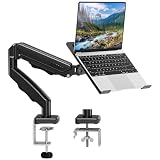
- Universal laptop Mount Desk: Hold one up to 14"-17" laptop. Each arm can hold 4.4-19.8lbs /2-9kg laptop or monitor with 75mm x75mm or 100mm x 100mm VESA mounting holes.
- Full Motion Adjustable Laptop Stand: This monitor desk mount with arms offer a wider range of movement. Single Monitor Desk Mount arms can extend up to 21.5" long, and rise up to 16.9" in height. Easy to find the right viewing angle and position. Supports screen rotates 360° for landscape or portrait orientation, swivels 360° to share your display, and tilts up 90°/down 45° for better viewing.
- Protect Your laptop Monitor Stand: Multiple slots on the tray are designed for heat dissipation. The stopper is positioned in the middle of the bottom to defend your notebook from sliding and falling. In addition, there is a strip and non-slip pads to secure your laptop tightly.Compatible with MacBook Air and MacBook Pro over 14inch.
- Professional Space Saver: Keeps your workspace professional and organized with the cables and wires tucked neatly in the arms. Height adjustable, full motion design lets you work in a more comfortable ergonomic position. You can work comfortably at your desk for long hours without stiff necks or back pain now.
- Two Installation Options: We provide both C-clamp and grommet kits. The C-clamp and grommet base allow for 0.39 to 2.76 inches thick. The dimensions of the hole range from 0.39 inches to 2.36 inches. The clamp laptop stand simplifies assembly. There is no need to worry about assembly, installation can be completed in 10 minutes.
Windows app developers
Windows AI Foundry was more important than any consumer-facing AI label. It offered a path to local and hybrid inference, but developers needed to target actual hardware and supported runtimes rather than assume every Windows PC was equivalent.
Azure teams
Azure AI Foundry was the stronger fit for enterprise data connectors, multi-agent systems, centralized monitoring and cloud deployment. It was most compelling for organizations already using Azure, Entra, Fabric, SharePoint or related Microsoft services.
Microsoft 365 administrators
Copilot Tuning, Copilot Studio orchestration and Entra Agent ID expanded the administrative surface. The immediate priority was not simply enabling more agents, but establishing ownership, permissions, data hygiene, approval gates and retirement procedures.
Do these 3 things before closing this tab:
1Fix the driver behind crashes, sound loss and screen glitches2Repair Windows errors before they cause bigger problems3Scan for outdated or missing drivers - takes under a minuteSecurity and compliance teams
Agent identity, observability, authorization and tool provenance were central rather than optional. Sensitive operations should use least privilege, explicit approvals, audit trails and human escalation.
Individual Windows users
Build 2025 was not primarily a major consumer Windows feature launch. Many announcements targeted developers, IT teams and enterprise buyers. Consumer benefits depended on the PC’s hardware, Windows version, available applications and later product rollouts.
The risks Microsoft’s agent strategy had to solve
- Wrong actions: Require approval for financial, legal, HR, security or irreversible operations.
- Prompt injection: Treat retrieved documents, websites and external content as untrusted input.
- Tool poisoning: Validate package identity, signatures, provenance and declared behavior.
- Agent sprawl: Assign every production agent an owner, identity, lifecycle status and permission set.
- Hidden costs: Track model calls, retries, premium requests, multi-agent fan-out and long-running tasks.
- Hardware mismatch: Check the target device’s NPU, model, runtime, drivers and memory.
- Stale enterprise knowledge: Govern the source data and regularly retest business processes.
- Protocol incompatibility: Expect custom authentication, schemas and error handling even when both systems support MCP or A2A.
- Unreviewed code: Keep tests, code review, branch protections and security scanning around coding agents.
The commercial reality
Build 2025’s announcements pointed toward several Microsoft purchasing decisions, but launch announcements should not be treated as current pricing.
- GitHub Copilot is aimed at AI-assisted and delegated coding inside GitHub workflows.
- Azure AI Foundry targets enterprise AI development, deployment, evaluation and monitoring.
- Copilot Studio targets low-code business agents and workflows.
- Microsoft 365 Copilot targets productivity and organizational data scenarios.
- Copilot+ PCs may matter when local models and NPU acceleration are genuine requirements.
- Microsoft Entra and Microsoft Purview are relevant when agents access sensitive business data.
Buyers should verify current licensing, capacity, model rates, connector charges, hardware requirements and regional availability directly with Microsoft or GitHub. A small team seeking a simple chatbot may not need the full enterprise stack, while a regulated organization may find identity, auditing and governance more important than model variety.
Recommended Free Tools
Other Windows and developer announcements
Windows-related announcements also included a Virtualization-Based Security Enclave SDK, post-quantum cryptography capabilities, the open-sourcing of Windows Subsystem for Linux, updates to Windows Terminal, WinGet and PowerToys, and Microsoft Store changes such as free developer registration, a Win32 Web Installer, analytics reports and an App Campaign program.
These were useful platform updates, but the central Build story remained the combination of local AI, agent connectivity and enterprise governance.
Bottom line
Microsoft Build 2025 was an infrastructure conference for the agent era Microsoft wanted to create. Its biggest news was not one spectacular consumer application. It was the attempt to connect the entire lifecycle: GitHub for delegated code work, Azure AI Foundry for enterprise deployment, Windows AI Foundry for local execution, MCP and A2A for connectivity, and Entra, observability and Copilot tooling for control.
The opportunity was substantial: software that can perform larger units of work across repositories, applications and business systems. The constraint was equally important: agents still needed permissions, testing, cost controls, human review, reliable data and security engineering. The success of Microsoft’s strategy would depend less on how many agents it announced than on whether developers and enterprises could make them dependable, affordable and governable.
Quick Recap
Product prices and availability are accurate as of the date/time indicated and are subject to change. Any price and availability information displayed on Amazon at the time of purchase will apply.




