What’s actually slowing this PC down?
Pick the symptom - the matching free tool is one click away.
You can move money between Zelle and Cash App, but the official workflows described by the services do not provide a direct Zelle-to-Cash App transfer or let you link the two accounts to each other. Use an eligible bank account as the bridge: receive Zelle money at the bank before adding it to Cash App, or withdraw Cash App money to the bank before sending it with Zelle. Availability depends on your bank and the features shown in Cash App.
How to transfer money from Zelle to Cash App
The money must reach your eligible bank account through Zelle before you can use Cash App’s available funding options. Zelle says payments to enrolled recipients are typically available within minutes, though timing can vary.
- Receive the Zelle payment at your bank. The sender must use your enrolled U.S. mobile number or email address, and your financial institution must participate in Zelle. Both parties need eligible U.S. checking or savings accounts. See Zelle’s payment timing information and eligibility and enrollment guidance.
- Open Cash App and check its funding options. If adding money from a linked account is available for your account, choose the bank account or eligible debit card shown in the app. Cash App’s terms describe adding money from a linked U.S. bank account or debit card; not every account or funding option is guaranteed to be available.
- Review the details before confirming. Check the amount, source account and any prompts in the app before submitting.
How to transfer money from Cash App to Zelle
Withdraw the Cash App balance to your linked bank account first. After the funds are available there, send a separate Zelle payment from your bank’s app or online banking.
Quick Recap
Best Value
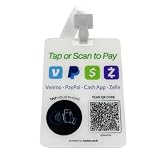
- Instant Hands-Free Scan to Pay: Streamline customer checkouts right from your chest. Buyers can instantly scan qr code vectors or tap the embedded chip. It functions as a portable venmo sign qr code, cash app qr code sign, paypal link, and zelle qr code sign to deliver a zero-friction, contactless payment experience
- Cloud-Managed Custom QR Hub: Route clients to a personalized digital portal rather than one single link. This flexible custom qr code sign allows you to update your profile, logo, and active social media sign destinations in the cloud anytime. You will never need to re-order a new physical qr code holder or buy fresh venmo sticker sets
- Zero App Downloads & No Subscription Fees: A reliable scan to pay sign that works directly through any native smartphone web browser. Your clients simply use their built-in camera to scan me qr code sign codes—no hidden monthly fees, no app downloads required, and absolute financial freedom for your brand
- Wearable Freedom for Pop-Up Events: Ditch restrictive counter spaces. This innovative acrylic qr code sign is precision-engineered as a lightweight, pre-drilled wearable card. Complete with a premium neck strap, it seamlessly integrates into your pop up event supplies for small business, flea markets, roaming vending, and busy convention booths
- High-Gloss Protective Acrylic Business Sign: Replace flimsy paper setups with a rugged custom acrylic sign built for active daily hustle. Designed to look polished under any lighting, it operates as an eye-catching instagram counter display when laid flat, or a durable custom table sign when your shift is over
Rank #4

- Multi functional signage: The Pahdecor Multi QR Code Business Social Media Sign is a versatile and multifunctional sign that serves several purposes in one compact package. It includes various QR codes that allow customers to interact with the business in different ways.
- Easy to use: The sign is designed to be user-friendly and easy to use. Customers can simply scan the QR codes using their smartphones to access the desired information or complete a transaction quickly and conveniently.
- Scan to pay: The sign features a QR code that enables customers to make payments using their preferred payment method, such as PayPal or other digital wallets. This allows for seamless and secure transactions without the need for cash or cards.
- Social media integration: The sign also includes QR codes that link to the business's social media pages, allowing customers to follow or connect with the business on various social media platforms. This can help businesses to build their online presence and engage with their customers.
- Small business friendly: The Pahdecor Multi QR Code Business Social Media Sign is a great tool for small businesses looking to streamline their operations and enhance their customer experience. It is a cost-effective and practical solution that can help businesses stay competitive in an increasingly digital world.
Rank #3

- ALL-IN-ONE DESIGN: Single high-visibility QR code accepts Venmo, Cash App, PayPal, and Zelle on a branded customer page
- PREMIUM CONSTRUCTION: Made from 3/8-inch thick high-impact plastic with precision-embossed text and logos, measuring 7.5" × 4" × 4"
- SMART FEATURES: Built-in business card dispenser, Venmo Code Assist for first-time payers, a secure dashboard for scan and payment tracking
- QUICK SETUP: One-minute activation process - simply scan QR code, add payment methods, business information, and customize settings
- CUSTOMIZED & HANDCRAFTED: Personalize your sign with your business name on top and custom text on the bottom — each piece is handcrafted for a professional, branded look
Rank #2

- All-in-One NFC & QR Code Multi-Payment Stand: Enable your customers to pay instantly with a simple tap or QR scan. This versatile stand supports Venmo, PayPal, Cash, Zelle, Cash App, and more, providing a professional contactless payment solution for counters, cafés, restaurants, retail stores, and pop-up shops
- No App or Fees – Easy Contactless Payments: Customers can complete payments directly via NFC or QR code without downloading apps, creating accounts, or paying subscription fees. This Scan to Pay sign ensures fast, seamless, and secure transactions, enhancing convenience and customer satisfaction
- No App or Fees – Easy Contactless Payments: Customers can complete payments directly via NFC or QR code without downloading apps, creating accounts, or paying subscription fees. This Scan to Pay sign ensures fast, seamless, and secure transactions, enhancing convenience and customer satisfaction
- Acrylic Desktop Stand: Crafted from high-quality acrylic, this NFC QR code payment stand is compact, self-standing, and perfect for counters, desks, or reception areas. Its sturdy tabletop design ensures visibility and professional presentation while customers tap or scan to pay effortlessly
- Acrylic Desktop Stand: Crafted from high-quality acrylic, this NFC QR code payment stand is compact, self-standing, and perfect for counters, desks, or reception areas. Its sturdy tabletop design ensures visibility and professional presentation while customers tap or scan to pay effortlessly
#1 Best Overall

- ONE TAP, MULTIPLE WAYS TO GET PAID – Give customers one simple place to access your payment options. Add Cash App, Venmo, PayPal, Zelle, card checkout links, ACH, wire transfer, Bitcoin, cryptocurrencies and custom payment methods.
- NFC TAP + QR CODE – Customers can tap the sticker with a compatible NFC smartphone or scan the QR code to open your KeeperTag Pay page. No KeeperTag app is required for the person paying.
- UPDATE ANYTIME — NO NEW STICKER NEEDED – Change usernames, payment links, banking instructions or crypto wallet addresses from your KeeperTag account while keeping the same physical NFC & QR sticker.
- BUILT FOR SMALL BUSINESS & EVERYDAY PAYMENTS – Ideal for counters, salons, food trucks, pop-up shops, markets, service professionals, creators, drivers, events, tips and other places where customers need an easy way to access payment information.
- NO BATTERY & EASY TO ACTIVATE – Passive NFC technology requires no charging or batteries. Activate your KeeperTag, add your preferred payment methods and place the 4 x 4 inch sticker where customers can easily tap or scan. KeeperTag provides payment links and information; payments are completed through the selected third-party service.
- Transfer your Cash App balance to your linked bank. Select the bank transfer option in Cash App and review the choices and fee displayed for your account. Cash App says standard transfers typically take up to three business days. Eligible instant transfers are typically completed within minutes and carry a fee shown in the app. These are service estimates, not guarantees; consult Cash App’s current terms and the in-app disclosure.
- Wait until the money is available in your bank account. A Cash App withdrawal and a Zelle payment are separate transactions; a withdrawal marked as sent does not necessarily mean the funds are ready to send onward.
- Send with Zelle through your bank. Use your financial institution’s app or online banking, enter the recipient’s enrolled U.S. mobile number or email, and verify the recipient before sending. Zelle recommends using the service with people you know and trust and does not offer purchase protection, so it is not a protected checkout method for buying from strangers. See Zelle’s scam and purchase-protection guidance.
How the two transfer directions compare
| Direction | Where the money starts | Bank step | Typical timing stated by the services | Potential instant-transfer fee |
|---|---|---|---|---|
| Zelle to Cash App | Your Zelle payment is received at your bank first. | Receive at an eligible bank, then use an available Cash App add-money option. | Zelle says payments to enrolled recipients are typically available within minutes; Cash App add-money timing is not stated here. | No instant withdrawal applies to this direction; check any current Cash App prompts for the funding option offered to you. |
| Cash App to Zelle | Your Cash App balance. | Withdraw to your bank, then send a separate Zelle payment through the bank. | Cash App says standard transfers typically take up to three business days; eligible instant transfers are typically completed within minutes. | Cash App says an eligible instant transfer carries a fee displayed in the app. |
Eligibility and safety checks
- Confirm that your bank participates. Zelle is accessed through participating banks’ or credit unions’ apps or online banking. Both sender and recipient need eligible U.S. checking or savings accounts; check with your institution if you are unsure.
- Use the right Zelle enrollment route. The standalone Zelle app stopped supporting sending and receiving money on April 1, 2025. Former standalone-app users need to enroll through a participating bank or credit union to continue using Zelle. See Zelle’s information about the app’s closure.
- Never send Zelle money to an untrusted seller. Zelle payments do not include purchase protection, and a payment sent to the wrong recipient can be difficult to recover. Verify the recipient and use another payment method for purchases from strangers.
- Check Cash App’s current options and disclosures. Bank-linking eligibility, transfer timing and fees can depend on the account and may change. Follow the choices and fee information shown in your app rather than relying on a fixed screen sequence or assuming every bank account works.
- Keep credentials private. Do not share your bank or Cash App login details, and do not send a test payment to an unknown person.
Product prices and availability are accurate as of the date/time indicated and are subject to change. Any price and availability information displayed on Amazon at the time of purchase will apply.




