To reply to a Google review, verify your Business Profile, open Read reviews, select Reply beside the review, write your response, and submit it. If approved, the reply appears publicly under your business’s name and the reviewer is notified—so write for that customer and for anyone else who may read it.
How to reply to a Google review
Google’s review-management instructions, checked October 8, 2026, require a verified Business Profile before a business can reply. The labels below reflect Google’s documented workflow; the interface may vary by device or account.
- Sign in to the Google account that manages the verified Business Profile.
- Open the profile and choose Read reviews.
- Find the review and choose Reply beside it.
- Write a response, then submit it.
Google reviews replies for policy compliance. An approved reply appears publicly as the business, and the reviewer is notified. If a reply is not approved, Google may ask you to edit it. A reviewer can still change their review after seeing your response. See Google’s review-management workflow.
What makes a useful reply?
Google recommends replies that are professional, polite, clear, helpful, brief, and conversational. Its advice is to “Be a friend, not a salesperson.” Include relevant information rather than repeating the same generic thanks, and avoid offers or promotions. Personalize the response when doing so adds something useful. These are writing principles, not a required script. Read Google’s reply-writing guidance.
Windows Errors? Fix Them Before They Spread
Repair common Windows errors and clear accumulated junk for a smoother, more stable PC - no reinstall needed.Free scan · no reinstallOutdated Drivers Are Slowing You Down
One free scan finds every outdated or missing driver and matches the right update for your exact hardware.Free scan · exact hardware match#1 Best Overall
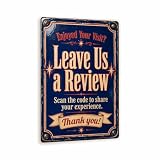
- CLEAR MESSAGE: Reads "Leave Us a Review". Scan the code to share your experience. A professional promo & customer engagement sign for counters, windows, entrances and tip jars.
- VINTAGE ENAMEL STYLE: Vintage cobalt-blue porcelain-enamel with bold cream lettering, a red keyline border and a worn-metal patina, designed to look polished and on-brand — not a plain printed placard.
- DURABLE ALUMINUM: UV-printed on rust-proof 1/8" aluminum composite (ACM). Won't fade, chip, warp or rust — rated for indoor and outdoor use in any weather.
- READY TO HANG: 8"x 12" with smooth rounded corners and pre-drilled 3/16" mounting holes. Hang in minutes with screws, nails or zip ties (not included).
- PERFECT FOR SHOPS, CAFES & RESTAURANTS: A clean, durable upgrade from paper signs. Designed and made in the USA by MRC Wood Products.
How to answer positive reviews
Thank the reviewer, mention one specific detail they shared, and close naturally. Keep the response proportionate: a short or star-only review may need only a brief thank-you. There is no need to post an identical public message on every review; respond when you have something relevant to say.
For example: “Thanks for taking the time to share this, [Name]. We’re glad [specific detail] worked well for you, and we hope to see you again.” Replace the bracketed text with accurate details, or leave out a name if you are unsure how the reviewer wants to be addressed.
Rank #2

- 🌟 GET MORE GOOGLE REVIEWS WITH A SIMPLE TAP OR SCAN: Turn happy customers into reviewers while they’re still at the counter. This Google review tap card stand helps customers open your review page instantly using NFC tap or the built-in QR code, making review collection effortless for restaurants, salons, retail stores, and front-desk businesses. Pay once, no monthly fees ever.
- 📊 PROFESSIONAL DISPLAY + LIVE STATISTICS DASHBOARD: This eye-catching stand looks better than a loose paper QR printout and is built to last on high-traffic counters. Track live statistics of visits and reviews through your TapFive dashboard so you know your investment is working. Also works as a QR code stand or Google review sign for counters, front desks, and checkout. Free replacement if anything goes wrong.
- ⚡ LIGHTNING-FAST NFC TAP + QR CODE — ALL PHONES, NO APP: Customers can tap with any NFC-compatible iPhone or Android, or scan the QR code sign if they prefer. No customer app download required. Our lightning-fast NFC technology works in seconds for fast in-person Google review collection. Also works as a Google review card, plate, or sticker alternative.
- ⏱️ EASY 30-SECOND SETUP — UPDATE YOUR LINK ANYTIME: Connect your Google Business review link through the free TapFive platform in about 30 seconds. Change your link anytime — new location, new Google profile, no new hardware needed. Manage multiple QR code stands from one dashboard. One-time purchase, not a subscription.
- 🏢 BUILT FOR CHECKOUT COUNTERS, RECEPTION DESKS & FRONT DESKS: Designed for the places where happy customer moments happen — checkout counters, reception areas, service desks, hostess stands, and retail registers. Ideal for restaurants, salons, med spas, dental offices, auto shops, and any local business that depends on online reviews. A review boost card your customers can’t miss.
How to answer negative reviews
Before replying, check the facts with the staff or records relevant to the complaint. A public response should acknowledge the customer’s concern without exposing personal information, arguing, or claiming certainty you do not have. Google advises businesses to be honest about mistakes and limitations, apologize when appropriate, protect privacy, and avoid personal attacks.
- Acknowledge the issue. Refer to the problem the reviewer described without disputing their experience.
- Show empathy. Apologize when the business made a mistake or when an apology is appropriate; do not use an apology to imply facts you have not verified.
- State only what you know. Explain a relevant next step or limitation plainly. Do not promise a fix or outcome that has not been confirmed.
- Move detailed follow-up to a private channel. Invite the reviewer to contact the business using an approved contact method if resolving the issue requires personal information or a longer conversation.
Example: “Thank you for letting us know, [Name]. I’m sorry [specific issue] was frustrating. We’d like to understand what happened and see how we can help; please contact us at [business-approved private contact method].” Keep the public reply general; do not post customer details or speculate about who the reviewer is.
Quick wins for a faster PC:
Repair Windows errors before they cause bigger problemsFix Now →Fix the driver behind crashes, sound loss and screen glitchesFind Drivers →Clear out junk files and repair common Windows errorsFree Scan →Rank #3

- ✅ Boost Your Business with 5🌟 Reviews ; Effortlessly increase reviews! The review us on digital business card tap allows customers to leave feedback instantly with a simple NFC tap or QR code scan. Perfect for small businesses, restaurants, and offices.
- 🌟 Smart, Reusable, and Reliable : Powered by Revlixi Technology, this reusable Google Review Card Stand includes free unlimited taps and scans—no subscriptions, ever! Enjoy lifetime access and never worry about running out of functionality.
- 📈 Enhance Your Online Business : Drive more customers to your business with a tool designed to improve SEO and credibility. Use the NFC business card and QR code stand functionality to make leaving reviews seamless and fast.
- 🎯 Easy Setup in 1 Minutes : No tech skills needed! Simply connect the Google Review Tap Card to your review page using our clear instructions. Ideal for businesses looking to simplify and scale their customer engagement.
- 💼 Versatile Design for All Businesses : Made of durable acrylic with a sleek black finish, this google for business stand review tool is an elegant addition to any store, counter, or reception area. Compatible with all phones—no apps required.
When to report a review instead of replying
Report a review when you have reason to believe it violates Google’s content policies. A low rating, a disagreement about what happened, or an unflattering opinion is not by itself a policy violation or a reason to seek removal. Google says only reviews that violate its policies are eligible for removal and cautions businesses not to report reviews simply because they dislike or dispute them.
To start, use the reporting option from Read reviews or Google’s Reviews Management Tool. Reporting is not a substitute for a reply to criticism that does not violate policy.
Rank #4

- Durable plastic construction for long-term use
- Designer style for a clean, modern appearance
- Strong two-sided adhesive foam tape included for easy mounting
- No tools or drilling required
- Ideal for doors, walls, counters, and other flat surfaces
Keep review requests separate from replies
A review link or QR code is a way to ask customers for genuine feedback, not a tool for writing replies. Google permits businesses to share these request methods, but prohibits offering free or discounted goods or services in exchange for posting, changing, or removing a review. See Google’s review-request guidance.
What replies can—and cannot—do for local visibility
Google says replying shows that a business values customer feedback. Its local-ranking guidance does not establish that a particular reply, wording, or response rate guarantees a ranking lift, higher rating, or increase in conversions. Treat a reply first as customer communication, not as a promised search-ranking tactic.
Free tools Windows power users keep installed
One-click scans. No signup required.
Best Value

- ProsperQR’s user-friendly software makes getting reviews a breeze. Setup takes less than 60 seconds.
- Featuring both NFC & QR code, you can change your review page destination at anytime to fit your business needs.
- Great for all businesses, including: auto dealerships, nail salons, law firms, dental and medical practices, gyms, pet grooming and boarding, med spas, restaurants and cafes, and retail stores.
- Our specialist team is available around the clock to support ProsperQR customers. We typically respond in under a day.
- Your Google Review Stand purchase is yours to keep. There are no subscriptions and no monthly fees.
Do you need review-management software?
For the basic task of replying, Google’s built-in workflow is sufficient. Businesses handling many reviews or locations may consider optional workflow software, but the sources cited here do not establish which provider is best. Before choosing one, check whether it connects to the profiles and locations you need, whether replies are drafted for approval or published automatically, how it handles privacy and account access, and its current pricing and cancellation terms. Vendor descriptions of their own features are not independent evaluations.
Quick Recap
Product prices and availability are accurate as of the date/time indicated and are subject to change. Any price and availability information displayed on Amazon at the time of purchase will apply.




