Yes, you can dropship on Shopify—but Shopify is the storefront, not the supplier. Your customer buys from your store, a supplier picks and ships the order, and you remain responsible for pricing, delivery promises, refunds, product safety, taxes, and customer service.
The five steps below take you from product selection to a tested launch. They can organize the setup process, but they cannot guarantee demand or profit. The difficult work is validating the supplier, calculating real margins, attracting customers, and handling problems after the sale.
As an Amazon Associate I earn from qualifying purchases.
How Shopify dropshipping works
The transaction usually follows this sequence:
- You list a supplier’s product in your Shopify store.
- A customer purchases it at your retail price.
- The order is sent or synchronized to the supplier.
- You pay the supplier’s product and fulfillment cost.
- The supplier picks, packs, and ships the product.
- You remain the customer’s point of contact.
Shopify provides the storefront, checkout, order management, hosting, and an app ecosystem. It does not automatically manufacture, warehouse, inspect, or return your products. See Shopify’s dropshipping documentation for the platform’s explanation of the model.
Free tools Windows power users keep installed
One-click scans. No signup required.
Dropshipping means reselling products supplied by another business. Print on demand is similar, except the supplier prints or manufactures an item after it is ordered. Wholesale fulfillment usually involves buying or negotiating inventory in advance, while private label adds your branding and often requires more supply-chain and compliance work.
#1 Best Overall

- Large Touch Screen Display: Features a 17 inch touch screen display monitor for easy navigation and operation
- Complete POS System: Includes PC controller and POS software built in for seamless point of sale management
- Secure Cash Storage: Comes with a cash drawer for safe and organized cash handling during transactions
- Customer Receipt Printer: Equipped with a receipt printer to provide customers with printed transaction receipts
- Kitchen Order Printer: Includes a dedicated kitchen order printer for efficient order management and food preparation (long cord included)
Is Shopify dropshipping worth it?
It can be useful for testing demand without buying large quantities of inventory upfront. But “no inventory” does not mean “no cost” or “passive income.” You may still pay for Shopify, a domain, supplier products and shipping, payment processing, apps, advertising, samples, refunds, replacements, taxes, customs, and chargebacks.
Profitability depends on product differentiation, supplier reliability, delivery speed, contribution margin, return rates, customer-acquisition cost, and your ability to create a better buying experience than stores selling the same item. Generic products with long delivery times and weak support are especially vulnerable to price competition and refunds.
Step 1: Choose a product and validate the supplier
Screen the product first
Favor products that:
- Solve a clear problem or serve a defined interest.
- Can be demonstrated or explained quickly.
- Leave room for product cost, shipping, payment fees, refunds, and marketing.
- Are compact, durable, and inexpensive to ship.
- Have bundle, accessory, or repeat-purchase potential.
- Can be improved through better content, packaging, education, or service.
Be cautious with children’s products, cosmetics, supplements, food, medical products, electronics, batteries, chargers, fragile goods, oversized items, and products requiring installation. Avoid copyrighted characters, logos, and patented designs unless you have the necessary rights.
Product safety is still your responsibility even when another company ships the order. Shopify says merchants must check applicable certifications, warnings, instructions, markings, and licensing requirements in each target market. Read Shopify’s legal requirements for dropshipping before listing regulated products.
Evaluate the supplier
Before committing, document:
- Warehouse and shipping origin.
- Processing time before dispatch.
- Typical delivery time to your target customer.
- Tracking coverage and carrier handoffs.
- Inventory synchronization.
- Product quality and variant accuracy.
- Packaging, invoices, and supplier branding.
- Return address and return procedure.
- Refund rules for lost, damaged, or incorrect orders.
- Response times and escalation procedures.
- Compliance documents, where relevant.
- Whether multiple products in one order ship separately.
Order a sample before advertising. Ship it to the market you plan to serve and inspect the actual item, packaging, instructions, tracking, delivery time, and support response. Shopify specifically recommends ordering from the supplier to assess processing and delivery performance.
A supplier’s marketplace rating is not enough. The exact product, variant, shipping route, and customer-service process must work for your store.
Choose a supplier model
| Model | Advantages | Trade-offs |
|---|---|---|
| AliExpress-oriented app | Large catalog and low upfront commitment | Variable quality, delivery times, and supplier consistency |
| US or EU supplier network | Potentially faster regional shipping | Higher product costs and possible app fees |
| Print on demand | Customizable products without holding inventory | Higher unit costs and design-dependent demand |
| Direct supplier | Potentially better pricing or customization | More negotiation and operational work |
| Local wholesaler or retailer | Faster regional fulfillment | Less automation and fewer products |
Step 2: Open and configure your Shopify store
Shopify’s US pricing page currently shows a three-day free trial and a promotion advertising $1 per month for the first three months. The promotion is not the normal price and may depend on eligibility. Prices and features vary by country and can change.
Quick wins for a faster PC:
Repair Windows errors before they cause bigger problemsFix Now →Fix the driver behind crashes, sound loss and screen glitchesFind Drivers →Clear out junk files and repair common Windows errorsFree Scan →As displayed in the US on August 18, 2026, standard pricing was:
| Plan | Monthly billing | Yearly billing | Typical use |
|---|---|---|---|
| Basic | $39/month | $29/month | Most solo beginners |
| Grow | $105/month | $79/month | Growing stores or small teams |
| Advanced | $399/month | $299/month | Larger or more complex operations |
| Plus | From $2,300/month | Not a normal entry plan | Large businesses |
Basic is generally the sensible starting point for a solo store, but confirm payment availability, staff requirements, and country-specific pricing. Shopify may charge third-party transaction fees when you use an outside payment provider instead of Shopify Payments, and Shopify Payments is not available everywhere. Check the current Shopify pricing page before subscribing.
Rank #2

- Large Touch Screen Display: Features a 19 inch XL touch wide screen display monitor for easy navigation and operation
- Complete POS System: Includes POS controller and POS software built in for seamless point of sale management
- Secure Cash Storage: Comes with a cash drawer for safe and organized cash handling during transactions
- Customer Receipt Printer: Equipped with a receipt printer to provide customers with printed transaction records
- Kitchen Order Printer: Includes a dedicated kitchen order printer for efficient order management and food preparation (25ft cord included)
Shopify includes hosting, a free myshopify.com address, and TLS/SSL for added domains with the subscription. A custom domain can make the store easier to remember, but it does not validate your product or create demand.
Initial setup sequence
- Start the trial and choose a store name.
- Select a theme; the default theme is sufficient for initial testing.
- Add accurate business contact details.
- Connect a custom domain if appropriate.
- Set the store currency, target market, and customer-facing language.
- Configure available payment methods.
- Set shipping zones and delivery information.
- Add your refund, shipping, privacy, and terms pages.
- Keep the store unpublished until checkout and fulfillment have been tested.
Admin labels and menu locations can change, so use the current Shopify interface rather than relying on old screenshots or tutorials.
The Tool Desk
Outbyte Driver Updater FREEScan for outdated or missing drivers - takes under a minuteDriver Scan →Outbyte PC Repair FREERepair Windows errors before they cause bigger problemsFix Now →Step 3: Connect the supplier and build a real catalog
In Shopify admin, open Apps or the Shopify App Store, find the supplier or fulfillment app, review its permissions and pricing, then install and authorize it. Configure the shipping origin, pricing rules, inventory synchronization, and order-fulfillment settings.
Import only products you can support. Shopify supports fulfillment apps and third-party fulfillment services, but synchronization capabilities vary. Some apps can update inventory, prices, order status, and tracking; none removes the need for supplier due diligence. See Shopify’s fulfillment guidance.
For example, the Shopify App Store listing observed during research showed DSers with a free Basic tier, an Advanced plan displayed at $19.90 per month or $190.80 per year, and a Pro plan displayed at $49.90 per month, with possible usage-related charges. DSers is oriented toward AliExpress, 1688, Alibaba, and related workflows. App prices and features are time-sensitive.
Other app categories include regional supplier networks and print-on-demand providers. Choose based on delivery geography, product quality, automation, costs, and support—not simply because an app has a free installation option. Free installation does not make products, shipping, advertising, refunds, or customer service free.
Recommended Free Tools
Edit every imported listing
Do not publish supplier listings unchanged. Replace or verify:
- Product titles and descriptions.
- Images, watermarks, and supplier branding.
- Dimensions, materials, specifications, and variant names.
- Delivery estimates and stock status.
- Unsupported health, performance, sustainability, or scarcity claims.
- Unnatural translations and copied promotional language.
- Prices and “sale” comparisons.
Use your own positioning, demonstrations, comparison information, FAQs, and care instructions. A focused catalog with accurate information is usually more credible than a large catalog copied from a supplier.
Step 4: Set prices, shipping, payments, and policies
Price from landed cost
Use contribution margin rather than markup alone:
Retail price
− product cost
− supplier shipping
− payment processing
− Shopify or third-party transaction fee
− app cost allocated per order
− expected refund or return cost
− advertising cost per order
= contribution margin
Illustration:
Selling price:        $39.99
Product cost:        −$12.00
Supplier shipping:    −$5.00
Payment fee:          −$1.46
Advertising cost:    −$10.00
Refund reserve:       −$2.00
Estimated margin:      $9.53
This is only an example, not a benchmark. A product with a 60% markup can still lose money after acquisition costs, refunds, chargebacks, and support time. Set a maximum customer-acquisition cost before advertising and recalculate it when delivery or return performance changes.
Rank #3

- COMPLETE RETAIL POINT OF SALE SYSTEM - The perfect turnkey solution for all of your POS Systems business needs. Perfect for retail stores: liquor, grocery, tobacco, clothing, convenience, garden and more!
- PREMIUM HARDWARE SET - Bundle includes: 15" Touchscreen PC with Windows 10 Pro, Thermal Receipt Printer (USB), Barcode Laser Scanner (USB), 16" Cash Drawer, Mini Keyboard (USB), and Integrated Two Line Display (USB).
- FREE TRAINING & REMOTE SETUP - Includes 60 days of FREE Standard Care Support for setup/training, hardware (1-year warranty) and software. Seamlessly track, report and analyze inventory, sales, returns, employees, and more.
- CASH REGISTER EXPRESS (CRE) - Trusted by over 70,000 merchants worldwide for 20+ years, CRE provides fast checkup and lookup items in seconds. CRE software integrates with QuickBooks Desktop for your small business needs.
- 100% CUSTOMER SATISFACTION GUARANTEED - We are the leading provider of retail point of sale systems and POS software because of our commitment to you. Contact our support directly for any of your needs or to learn about our extra turnkey services.
Make shipping promises you can keep
State the processing time, estimated delivery window, shipping origin where relevant, shipping price or free-shipping threshold, possibility of split shipments, and any customs or import charges. Explain what happens when an order is delayed, lost, or damaged.
What’s actually slowing this PC down?
Pick the symptom - the matching free tool is one click away.
Do not claim “guaranteed delivery,” “ships from the USA,” or “arrives in three to five days” unless your tested fulfillment process genuinely supports those statements. Shopify says processing and shipping information must be publicly accessible and additional fees must be disclosed before purchase where applicable. Customers should be notified about delays or material changes.
If you sell internationally, duties and tax treatment depend on the destination, product classification, origin, and shipping terms. Shopify’s current documentation says that, as of August 29, 2025, US de minimis treatment does not apply to shipments to the United States and duties and import taxes apply regardless of shipment value. This is a volatile, US-specific statement; recheck Shopify’s current duties guidance and official government guidance before selling cross-border.
Configure payments
Activate payment methods available to your business, verify bank and business information, review payout timing and possible reserves, configure fraud-prevention settings, and test both successful and failed checkout flows. Do not assume Shopify Payments or a particular payment method is available in every country.
Publish accurate policies
Before accepting orders, provide:
- Refund and return policy.
- Shipping and processing policy.
- Privacy policy.
- Terms of service.
- Contact information.
- Product safety disclosures where relevant.
Shopify says a current, publicly accessible refund policy should identify the return timeframe, return destination, responsibility for return costs, refund timing, and contact method. Your supplier’s policy may not match your promise to customers, so confirm the supplier’s actual return address, time limit, restocking terms, and refund process first. Shopify’s templates are not a substitute for jurisdiction-specific legal advice.
Do these 3 things before closing this tab:
1Fix the driver behind crashes, sound loss and screen glitches2Repair Windows errors before they cause bigger problems3Scan for outdated or missing drivers - takes under a minuteStep 5: Test, launch, and operate the store
Run a complete test order
Before sending traffic, browse on mobile and check:
- Every product variant and inventory status.
- Shipping rates and delivery estimates.
- Tax display and discount codes.
- Payment success and failure flows.
- Order confirmation and shipping emails.
- Footer links to every policy.
- Contact forms and customer-support addresses.
- Checkout from your target market.
Then verify the fulfillment chain:
- The order appears correctly in Shopify.
- The supplier receives the correct product, variant, and address.
- The supplier charges the expected amount.
- The fulfillment status updates.
- Tracking reaches Shopify.
- The customer receives accurate notifications.
- You can issue, record, and explain a refund.
Some apps automatically send orders to suppliers; others require approval or manual action. Understand the exact workflow before launch.
Launch narrowly
Start with one target market, a small catalog, and a traffic source you can measure. Do not spend heavily before your sample order, checkout, tracking, and support process work. Improve your product page with demonstrations, clear delivery information, comparison content, FAQs, and honest policies.
Monitor:
- Conversion rate.
- Contribution margin per order.
- Customer-acquisition cost.
- Actual processing and delivery time.
- Refund and chargeback rate.
- Supplier defect rate.
- Tracking success rate.
- Customer-service response time.
If a product sells but margins are weak, do not assume more orders will solve the problem. Reprice, improve conversion, reduce acquisition cost, change suppliers, bundle products, or stop selling it.
Rank #4
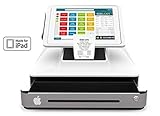
- Monthly subscription required for software $64 retail or quick server restuarant or salon, includes: software, support via phone & text & email, and online reports
- Amazon Fire NOT INCLUDED. Download Datio Point of Sale software from Amazon Fire App Store to try for free before buying
- Datio Credit Card Payments by Worldpay, or use your processor and terminal or use for cash only. Station only works with Datio POS Software
- Free Credit Card Payment EMV device with Worldpay processing approval
- Perfect for retail, salon, quick serve restaurant (order at the counter) type businesses
Common ways new Shopify dropshippers lose money
They publish before ordering a sample
The product may differ from the listing, arrive damaged, or take much longer than advertised. Pause advertising, contact affected customers proactively, correct the listing, and replace the supplier if necessary.
They price from the item cost alone
Shipping, payment fees, advertising, refunds, and support can consume the apparent markup. Use contribution margin for every product and channel.
They ignore split shipments
One order may arrive in several packages with separate tracking numbers. Explain this possibility and use single-supplier bundles where practical. Shopify notes that matching product selection to supplier capabilities can simplify fulfillment.
They assume the supplier handles refunds
Your customer bought from your store. If the supplier’s return process is slow or incompatible with your policy, you still have to communicate and resolve the issue.
They sell regulated products casually
Missing certifications, warnings, labels, or instructions can create safety and liability problems. Remove products unless you can verify compliance in every target market.
They expand internationally too early
Start with one market while you verify taxes, duties, delivery, returns, and customer expectations. If you expand, collect the right product classification and origin information and decide whether duties are paid at checkout or on delivery.
When to move beyond dropshipping
Dropshipping can be a testing model rather than a permanent fulfillment model. Consider buying inventory, using a third-party logistics provider, holding best sellers locally, negotiating private-label production, or developing a direct supplier relationship when demand is consistent and the economics justify more control.
Those changes may improve delivery speed, packaging, quality control, and margins, but they add inventory risk, cash requirements, forecasting, and operational complexity. Move when the evidence supports it—not simply because another app promises automation.
Crashes, No Sound, or Screen Glitches?
Random freezes, missing sound and display glitches usually trace back to one bad driver. Find and replace yours safely.Free scan · under a minutePC Slower Than It Used to Be?
A free scan shows the junk files, broken settings and background clutter dragging Windows down - then fixes them in one click.Free scan · Windows 10 & 11Quick Recap
Product prices and availability are accurate as of the date/time indicated and are subject to change. Any price and availability information displayed on Amazon at the time of purchase will apply.




