Outdated Drivers Are Slowing You Down
One free scan finds every outdated or missing driver and matches the right update for your exact hardware.Free scan · exact hardware matchPC Slower Than It Used to Be?
A free scan shows the junk files, broken settings and background clutter dragging Windows down - then fixes them in one click.Free scan · Windows 10 & 11Exness and XM are both online brokers built mainly for leveraged forex and CFD trading, but they suit different priorities. Exness generally offers more account and execution choices, stronger proprietary trading tools, and—where available—very high leverage. XM is often simpler to understand, with a low entry deposit, MT4/MT5 access, and straightforward account options.
The better broker depends on your country, the legal entity accepting your account, the instruments you plan to trade, and whether you care more about low advertised spreads, commission structure, platform choice, or payment convenience. Neither broker is a universal best choice, and neither gives you long-term ownership of the underlying shares when you trade stock CFDs.
Exness vs. XM at a glance
| Feature | Exness | XM |
|---|---|---|
| Main focus | Forex and CFDs, including metals, energies, indices, stocks, and cryptocurrencies | Forex and CFDs, including indices, commodities, metals, shares, and cryptocurrencies where available |
| Platforms | MT4, MT5, Exness Terminal, and Exness Trade | MT4 and MT5, with availability of other tools depending on region |
| Typical entry account | Standard accounts; minimum deposit depends on country and payment method | Micro, Standard, or Ultra Low accounts depending on the entity and region |
| Professional-style pricing | Pro, Zero, and Raw Spread accounts in eligible regions | Ultra Low and Zero accounts in eligible regions |
| Leverage | Varies by entity, instrument, and account; very high leverage may be available in some jurisdictions | Varies by entity and instrument; lower limits may apply under stricter regulators |
| U.S. availability | Not generally available to U.S. residents | Not generally available to U.S. residents |
| Best known for | Flexible account structures, high leverage, and proprietary platforms | Simple account access, low starting deposit, and conventional MT4/MT5 trading |
These are brand-level comparisons, not guarantees. The account, leverage, instruments, fees, and protections shown during registration are the terms that matter.
Regulation and client protection
Both brokers operate through multiple legal entities. That matters because the brand name alone does not tell you which regulator supervises your account.
Do these 3 things before closing this tab:
1Fix the driver behind crashes, sound loss and screen glitches2Clear out junk files and repair common Windows errors3Scan for outdated or missing drivers - takes under a minute#1 Best Overall

- POWER YOUR STUDY, FUEL YOUR PLAY – Discover smarter learning with the Lenovo Idea Tab. Stay campus-ready with all-day battery life, AI-powered apps to enhance your work, and sharp graphics for tv marathons with friends.
- SMOOTH, POWERFUL, IMMERSIVE – The MediaTek Dimensity 6300 processor is more powerful than ever, with the AI-enhanced multitasking you need to stay ahead.
- CIRCLE IT, SEARCH IT – Use your Lenovo Tab Pen or fingertip to circle items for instant search results or to translate other languages without switching apps. Circle to Search with Google ensures answers are only a circle away.
- SHARP VIEW, CLEAR SOUND – Experience sharp visuals and immersive sound for study sessions and streaming breaks. With 72% NTSC and quad Dolby Atmos-tuned speakers you can enjoy your study breaks with vivid videos and crystal-clear sound.
- LEVEL UP YOUR STUDY – Write, organize, sketch, and calculate with four learning apps built to match your flow. Lenovo AI Note, Squid, Nebo, and MyScript Calculator help you stay clear, focused, and ready for every study session.
XM is associated with Trading Point entities in different jurisdictions, while Exness also uses separate entities for different regions. A client accepted by an offshore entity may not receive the same leverage limits, compensation arrangements, negative-balance protections, or dispute process available under a UK, European, Australian, or other tightly regulated entity.
Before depositing, open the broker’s legal documents or account-opening disclosures and check:
- The exact company name accepting your account.
- The regulator and licence number.
- Whether negative-balance protection applies.
- Whether client money is held separately from company funds.
- Whether an investor-compensation scheme applies to your account.
- Which restrictions apply to leverage, bonuses, instruments, and withdrawals.
Do not treat a long list of licences as proof that every customer receives the strongest protection. The relevant licence is the one attached to your own account.
Markets and products
Exness and XM are primarily derivatives brokers. You normally speculate on price movements rather than purchase the underlying currency, company share, or index.
| Market | Exness | XM |
|---|---|---|
| Forex | Yes | Yes |
| Metals | Yes | Yes |
| Energy and commodities | Yes, subject to region | Yes, subject to region |
| Stock indices | Yes | Yes |
| Individual stock CFDs | Available in supported regions | Available in supported regions |
| Cryptocurrency CFDs | Available in supported regions | Available in supported regions |
Exness tends to appeal to traders who want a broad selection of forex pairs and the option to use proprietary web and mobile software alongside MetaTrader. XM is a more conventional choice for traders who want to stay within MT4 or MT5 and trade standard forex and CFD markets.
Instrument lists can differ by entity. A product visible on a global website may be unavailable in your country or on the account type offered to you.
Platforms: Exness has more choice, XM keeps it familiar
Exness
Exness supports MetaTrader 4 and MetaTrader 5, as well as its browser-based Exness Terminal and Exness Trade mobile app. MT4 and MT5 support automated strategies, custom indicators, and the large MetaTrader ecosystem.
Exness Terminal is useful if you do not want to install desktop software. It provides browser charting and order management, although advanced MetaTrader users may still prefer the desktop versions. The Exness Trade app is designed for account management, charting, and mobile trading; check whether your account is MT4- or MT5-compatible before assuming one app handles both.
The Tool Desk
Outbyte PC Repair FREERepair Windows errors before they cause bigger problemsFix Now →Outbyte Driver Updater FREEScan for outdated or missing drivers - takes under a minuteDriver Scan →XM
XM’s core platform offering is MT4 and MT5 on desktop, web, and mobile formats. This is a strength for traders who already use MetaTrader templates, Expert Advisors, or third-party indicators.
Rank #2

- 【Android 16 Tablet with Gemini AI 3.5】The 11 inch TABWEE T90 brings a cleaner, smarter tablet experience for work, study and home use. Android 16 adds a simpler lock screen, customizable Quick Settings, improved video calls with background blur and portrait light, easier cloud photo selection and enhanced Linux terminal support. With Gemini AI 3.5, you can search, translate, summarize notes, organize ideas and plan tasks more efficiently—ideal for online classes, reading, video calls and light office work
- 【11 Inch FHD IPS Display for Streaming, Reading and Learning】Enjoy a bigger and clearer viewing experience on the 11 inch FHD display with 1920 x 1200 resolution and an 84.9% screen-to-body ratio. The fully laminated TDDI screen delivers more natural colors, smoother touch response, and a more immersive feel when watching movies, reading documents, viewing recipes, or studying online. With Widevine L1 support, dual smart speakers, and 380-nit brightness, this Android tablet is ideal for Netflix-style streaming, YouTube, music, eBooks, online lessons, and comfortable indoor entertainment
- 【24GB RAM + 128GB ROM, More Space for Daily Needs】Android 16 tablet comes with up to 24GB RAM, including 8GB built-in RAM and 16GB virtual memory expansion, helping daily apps run smoothly for browsing, video watching, note-taking, email, and study apps. The 128GB ROM provides plenty of room for photos, documents, music, videos, learning materials, and work files. Need more storage? The TF card slot supports up to 2TB expansion, so you can keep more movies, books, files, and family memories without constantly deleting content. Memory expansion path: Settings > System > Memory Expansion
- 【T615 Octa-Core + 8000mAh Battery for Long Days】Powered by the Unisoc T615 octa-core processor, T90 delivers reliable everyday speed for streaming, video calls, online lessons, reading, emails and document editing. The 8000mAh battery supports up to 11H video playback, 8H daily entertainment or 40H music, while smart power management helps reduce background drain, making it ready for flights, commutes, study sessions and busy workdays
- 【13MP Camera with Google Lens】The 13MP rear camera works with Google Lens to make daily tasks easier. Scan documents, translate text, identify objects, search products, capture handwritten notes, or save useful information in seconds. The 5MP front camera is suitable for video calls and clear face-to-face communication. With dual-band 5G WiFi, Bluetooth 5.0, and support for GPS, GLONASS, Galileo, and Beidou, this Android tablet offers fast downloads, stable wireless connections, easy accessory pairing, and reliable location support for travel, maps, and mobile use
The trade-off is that XM generally feels less differentiated at the platform level. If you want an integrated proprietary terminal rather than MetaTrader, Exness is usually the more compelling comparison.
Account types and minimum deposits
Exness commonly separates its accounts into Standard and professional-style options. Standard accounts are intended for ordinary retail trading, while Pro, Zero, and Raw Spread accounts target traders comparing tighter spreads with commissions.
Exness’s minimum deposit is not one universal number. It can depend on the country, account type, and payment method. A low minimum shown on a marketing page may not be the amount displayed in your Personal Area.
XM commonly offers account families such as Micro, Standard, Ultra Low, and Zero, although names and availability can vary by jurisdiction. A Micro account can be useful for testing position sizing because trade values are smaller, but it does not remove the risk created by leverage.
XM has often promoted a low starting deposit, commonly around a few dollars, but payment-method minimums and regional restrictions can change. Treat the deposit amount shown in the live registration flow as authoritative.
| Priority | More suitable option | Reason |
|---|---|---|
| Small initial test deposit | Often XM | XM commonly advertises a low entry threshold, though the payment method may set a different minimum. |
| Several spread/commission choices | Exness | Its Standard, Pro, Zero, and Raw Spread structures give more ways to match execution preferences. |
| Micro-sized trade testing | XM, where the Micro account is offered | Micro account sizing can make early position testing more granular. |
Spreads, commissions, and overnight costs
There is no meaningful answer to “Which has lower fees?” without naming the instrument, account, trade size, and trading session.
Exness Standard and Pro accounts generally build the broker’s compensation into the spread, while Raw Spread and Zero accounts can combine very narrow spreads with a commission. A zero-spread account does not mean zero-cost trading: commission, swap, slippage, and other charges may still apply.
Recommended Free Tools
XM’s Ultra Low-style accounts generally advertise reduced spreads without the same commission structure as a Zero account. XM Zero accounts typically use a commission alongside lower spreads. The exact commission depends on the instrument and entity.
For either broker, compare the complete round-trip cost:
Rank #3

- 【Android 16.0 Tablet】 CUPEISI tablet adopts the 2026 latest version of android 16.0 system and has passed Google GMS certification, The android 16 tablets offer personalized security systems, lightning fast application launches, super smooth gaming, and stunning netflix multimedia experiences.
- 【20GB RAM+128GB ROM+2TB Expandable】 Our CP31M android tablet PC built-in a powerful storage combination of 20GB RAM (4GB + 16GB achieved through expansion technology) and 128GB ROM, comes with new generation ultra-high performance and low power consumption 2.0GHz Octa-core CPU, achieve faster and more stable running and storage speeds. In addition, it can be expanded up to 2TB with a microSD card (card not included) for even more storage.
- 【Portable 2 in 1 Tablet with Keyboard】 This 10.1 inch android 16 tablet equipped with a bluetooth keyboard, wireless mouse, and stylus as well as a foldable protective case, allowing you to seamlessly transform your 10'' tablet into a laptop-style device. This versatility makes it the ideal device for those who need to be productive on the go, whether it be for work, study, or play.
- 【10.1 inch Touchscreen & HD Camera】 The android 16.0 tablet has a 10.1 in IPS display, 1280*800 resolution, a tablet with sensitive screen sensing, equipped with 8MP+2MP HD cameras, narrow edge screen design. The high-definition screen brings you more detailed natural colors and advanced visual effects. The "reading mode" can reduce harmful light to the eyes so you get to enjoy a comfortable night reading.
- 【2.4G/5G Wi-Fi 6.0+6000mAH Battery】 10 inch wifi tablet support 5Ghz Wi-Fi 6 or 2.4Ghz, it has a more stable wireless signal, achieves faster transmission speed, and makes wireless devices more power-saving. In addition, it is equipped with a 6000mah battery, a single charge can last up to 6-8 hours, perfect for long-distance commuting and travel, reading, watching movies, dramas, listening to music and so on.
Estimated trading cost = spread cost + opening commission + closing commission + financing or swapFor example, a 0.2-pip spread with a commission can be more expensive than a 0.8-pip spread with no commission—or cheaper—depending on the commission and position size.
Overnight financing is another common source of confusion. “Swap-free” or “Islamic” status does not automatically mean a position can be held indefinitely at no cost. Some instruments or accounts may have administration charges after a grace period. Read the current fee schedule for the exact account before holding leveraged positions overnight.
Leverage and risk
Exness is usually the stronger choice for traders specifically looking for very high leverage, because some Exness entities advertise leverage far above the limits imposed by stricter regulators. Availability can depend on account equity, instrument, trading conditions, and jurisdiction. Maximum leverage may also be reduced around major economic announcements or when margin requirements rise.
XM also offers high leverage in some regions, but the maximum is commonly more constrained. Clients under stricter regulatory regimes may receive substantially lower limits.
High leverage is not a discount. It reduces the cash required to open a position while making a small adverse price movement more damaging to your account. A trader risking 2% of an account should calculate the stop-loss distance and position size first, then select leverage—not use the maximum leverage as a target.
Deposits and withdrawals
Both brokers support several payment methods, but the available cards, bank methods, e-wallets, processing times, and minimums depend on your country.
Common operational problems include:
- Depositing from a payment account that is not in your own name.
- Trying to withdraw to a different person’s card or e-wallet.
- Using a payment method that is temporarily unavailable.
- Failing to complete identity or address verification before requesting a withdrawal.
- Assuming an “instant” broker-side approval means instant bank settlement.
With either broker, use a payment method in your own name and save deposit receipts. Before making a large deposit, test the withdrawal process with a small amount and confirm the available withdrawal rules in the client portal.
Independent reader supportYour contribution helps us test, update, and keep practical guides available for everyone.Demo accounts
Both Exness and XM provide demo trading, generally through MT4 or MT5. A demo account is useful for checking spreads, platform order types, Expert Advisors, and the broker’s execution environment.
It is not a perfect simulation of live trading. Demo fills may differ from live fills, liquidity conditions are not identical, and virtual funds remove the emotional pressure of a real loss. Test the exact account type you expect to use, and check whether the demo expires after a period of inactivity.
Rank #4
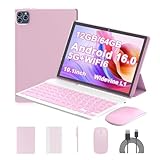
- 【Android 16.0 Tablet】ICONLINK tablet adopts the 2025 latest version of android 16.0 system and has passed Google GMS certification, The android 16 tablets offer personalized security systems, lightning fast application launches, super smooth gaming, and stunning netflix multimedia experiences.
- 【12GB RAM+64GB ROM+1TB Expandable】 Our ZB32A android 16 tablet PC built-in a powerful storage combination of 12GB RAM (3GB + 9GB )achieved through expansion technology ) and 64GB ROM, comes with new generation ultra-high performance and low power consumption 2.0GHz Processor, achieve faster and more stable running and storage speeds. In addition, it can be expanded up to 1TB with a microSD card (card not included) for even more storage.
- 【Portable 2 in 1 Tablet with Keyboard】 This 10.1 inch android tablet equipped with a bluetooth keyboard, wireless mouse, and stylus as well as a foldable protective case, allowing you to seamlessly transform your 10'' tablet into a laptop-style device. This versatility makes it the ideal device for those who need to be productive on the go, whether it be for work, study, or play.
- 【10.1 inch Touchscreen & HD Camera】 The android 16.0 tablet has a 10.1 in IPS display, 1280x800 resolution, a tablet with sensitive screen sensing, equipped with 8MP+2MP dual cameras, narrow edge screen design. The high-definition screen brings you more detailed natural colors and advanced visual effects. The "reading mode" can reduce harmful light to the eyes so you get to enjoy a comfortable night reading.
- 【2.4G/5G Wi-Fi 6.0+6000mAH Battery】 10 inch Wifi tablet support 5Ghz Wi-Fi 6 or 2.4Ghz, it has a more stable wireless signal, achieves faster transmission speed, and makes wireless devices more power-saving. In addition, it is equipped with a 6000mah battery, a single charge can last up to 10 hours, perfect for long-distance commuting and travel, reading, watching movies, dramas, listening to music and so on.
Which broker is better for you?
Choose Exness if:
- You want MT4 and MT5 plus a proprietary web or mobile trading experience.
- You want more account structures, including raw-spread and commission-based options.
- You trade frequently enough for execution cost and account design to matter.
- You specifically need the high leverage available from an eligible Exness entity.
- Your preferred instruments and payment methods are available in your country.
Choose XM if:
- You want a familiar MT4 or MT5 setup with fewer platform decisions.
- You are starting with a small deposit and the XM account offered in your region meets that need.
- You want to compare Micro, Standard, Ultra Low, or Zero-style accounts.
- You prefer to evaluate a broker using conventional forex and CFD products rather than proprietary tools.
Neither is the right choice if:
- You want to buy and hold real shares or ETFs rather than trade CFDs.
- You are a U.S. resident seeking a U.S.-regulated retail forex broker.
- You are selecting solely on the headline maximum leverage.
- You have not confirmed the legal entity, withdrawal policy, and all-in cost for your country.
FAQ
Is Exness better than XM for beginners?
XM may be easier for a beginner who wants a straightforward MT4 or MT5 account and a small starting deposit. Exness may be better for a beginner who values its proprietary web and mobile tools, but its larger selection of account types can require more comparison. Neither makes leveraged CFD trading low-risk.
What’s actually slowing this PC down?
Pick the symptom - the matching free tool is one click away.
Which broker has lower spreads, Exness or XM?
Neither is always cheaper. Compare the same instrument, account type, trading session, commission, and overnight financing. A narrow spread can be offset by commission or other charges.
Does Exness offer MT4?
Yes. Exness supports MT4 and MT5, alongside its own web and mobile trading tools. Availability and account compatibility should be checked in the client area.
Does XM offer MT5?
Yes. XM generally offers both MT4 and MT5, although the instruments and account types available can vary by country and legal entity.
Can U.S. residents use Exness or XM?
Neither should be assumed to accept U.S. residents. Exness generally states that it does not serve U.S. residents, and XM’s eligibility also depends on its current terms and entity restrictions. U.S. residents should use a broker authorized for their jurisdiction.
Free tools Windows power users keep installed
One-click scans. No signup required.
Are Exness and XM safe?
Safety depends on the legal entity holding your account, its regulator, client-money rules, negative-balance protection, and your own operational precautions. Verify those details before depositing rather than relying only on the global brand name.
Do Exness and XM offer real stock ownership?
Their stock products are generally stock CFDs, which provide exposure to price movements but not ownership, voting rights, or the same investor protections as buying shares through a share-dealing broker.
The Bottom Line
Exness is the better fit for traders who want flexible account pricing, MT4/MT5 plus proprietary platforms, and potentially very high leverage. XM is the better fit for traders who want a simpler MetaTrader-focused setup, a low entry deposit, and familiar Micro, Standard, Ultra Low, or Zero-style choices.
Make the final decision using the exact offer shown after entering your country: legal entity, regulator, account type, spread and commission schedule, leverage, instruments, payment methods, and withdrawal terms. Those details matter more than either broker’s headline advertising.
Quick Recap
Product prices and availability are accurate as of the date/time indicated and are subject to change. Any price and availability information displayed on Amazon at the time of purchase will apply.




