If you can’t log in to online banking, start from your bank’s official website or app, check for a service alert, and use the bank’s own recovery process rather than continuing to guess. If you suspect someone else has accessed your account—or you cannot use the registered phone or device needed for verification—contact the bank through a verified channel.
First, make sure you are using the real bank login
Type the bank’s known web address yourself or open its official installed app. Avoid links in unexpected texts or emails, and do not rely on an old bookmark if the bank advises using its current login page. Check the bank’s official service-status page or notices for outages and maintenance; access problems can be temporary, and availability depends on the institution.
Do not enter your password or a one-time code on a page reached through an unsolicited message. If a page or message seems suspicious, close it and contact the bank using a number on your card or statement, or independently open the official app or site.
Check your login details before trying again
Banks use different names for login details, including username, customer number, personal ID, security number, passcode and password. Read the bank’s prompt carefully and make sure you are using the identifier associated with the correct account. Check for typing errors and any input settings that may affect what you enter.
#1 Best Overall

- POWERFUL SECURITY KEY: The Security Key C NFC is the essential physical passkey for protecting your digital life from phishing attacks. It ensures only you can access your accounts.
- WORKS WITH 1000+ ACCOUNTS: Compatible with Google, Microsoft, and Apple. A single Security Key C NFC secures 100 of your favorite accounts, including email, password managers, and more.
- FAST & CONVENIENT LOGIN: Plug in your Security Key C NFC via USB-C and tap it, or tap it against your phone (NFC) to authenticate. No batteries, no internet connection, and no extra fees required.
- TRUSTED PASSKEY TECHNOLOGY: Uses the latest passkey standards (FIDO2/WebAuthn & FIDO U2F) but does not support One-Time Passwords. For complex needs, check out the YubiKey 5 Series.
- BUILT TO LAST: Made from tough, waterproof, and crush-resistant materials. Manufactured in Sweden and programmed in the USA with the highest security standards.
If you have forgotten a detail, select the matching forgotten-username, password or security-detail option on the official login page or in the app. Follow that bank’s identity checks. The process may require a one-time code sent to a phone number or other channel already registered with the bank. For example, Tesco Bank and Santander UK describe different recovery steps; neither bank’s process should be assumed to apply elsewhere.
If you may be locked out, stop guessing
Repeated incorrect attempts can trigger a security lock. The Federal Reserve’s 2021 interagency guidance describes financial-institution controls that may lock access after a defined number of incorrect attempts and require strong authentication for resets. It does not set one universal attempt limit for all banks.
Rank #2

- Compatible work with RC522 and PN532. Works with KABA,SAFLOK,MIWA, ONITY , Securelox LOCKS. NOT work with HID, SALTO, ASSA, ABLOY Locks. ( Please make sure this keyfob is compatible with your system before purchasing.)
- RFID key fobs are pre-programmed with a unique ID , 4byte UID. ( UID is fixed and not changeable. The ID number is not engraved on the tag casing!!! )
- ISO 14443A, 13.56MHZ, 1KB memory. NOT compatible with AMIIBO and 125KHz Readers !!! If you want to add the key tags to your lock system, please ensure that your system is the same frequency.
- Key tag is made of ABS, waterproof and environmental material. Each package includes 50 PCS. Factory default key : FF FF FF FF FF FF.
- If you have any questions about our RFID key fob, please contact us and we will try our best to make things right. MINDRFID belongs to Chengdu Mind Golden Card System Co., Ltd.
Tesco Bank, for example, says it locks a security number, password or both after three unsuccessful attempts. That is Tesco Bank’s stated policy, not a general banking rule. If you see a lockout message, use your bank’s official reset or unlock option; if it does not work, contact the bank through a verified channel rather than continuing to try passwords.
If the bank does not recognize your device
A bank may ask for extra verification when it cannot recognize your browser or device. A browser change or update, private browsing, cleared cookies, or privacy software that blocks cookies can remove or prevent a recognition token. Tesco Bank says its recognition token is stored in the browser; other banks may handle device recognition differently.
Quick wins for a faster PC:
Fix the driver behind crashes, sound loss and screen glitchesFind Drivers →Repair Windows errors before they cause bigger problemsFix Now →Rank #3

- HARDWARE 2FA AND MFA: FIDO Alliance Certified FIDO2 v2.1 with CTAP2 plus legacy U2F and CTAP1 for strong two-factor login and passwordless sign-in on services that support security keys
- BUILDING ACCESS ON ONE CARD: MIFARE DESFire EV2 4K applet with AES encryption adds office door and physical access control alongside digital authentication
- CERTIFIED SECURE ELEMENT: An NXP Common Criteria EAL6+ certified secure controller and Java Card platform protects your keys on a tamper-resistant chip
- DUAL INTERFACE SMART CARD: Contactless NFC ISO 14443 plus ISO 7816 contact reader support in an ISO 7810 ID-1 format that is passive and needs no battery
- SWISS ENGINEERED DESIGN: Built by Cryptnox as a single card for authentication and access control and backed by a 2 year warranty
Complete the verification challenge shown by the official bank site or app. Do not turn off account security controls to bypass it. If you cannot receive the verification code, use the bank’s official recovery or support route to update or confirm your registered contact details.
If the website is failing to load or behaving unexpectedly
When your credentials seem correct but the website errors, freezes or fails to load, try these low-risk checks:
Rank #4

- FIDO2 CERTIFIED: FIDO Alliance Certified FIDO2 v2.1 and CTAP Level 1 for 2FA and MFA on Google Microsoft Apple GitHub login.gov AGOV SwissID and any WebAuthn service
- PASSKEY READY: Works as a hardware passkey for passwordless sign-in where the service enables it and as a U2F and WebAuthn security key everywhere else
- CERTIFIED SECURITY: NXP JCOP 4.5 secure element rated Common Criteria EAL6+ (augmented)
- TAP OR INSERT: Dual NFC ISO 14443 and contact ISO 7816 interface in an ID-1 format smart card that is passive and battery-free
- BUILT TO LAST: Passive smart card made in Switzerland designed by Swiss company Cryptnox and backed by a 2 year manufacturer warranty
- Check that your internet connection is working, then reload the official login page.
- Use a browser and device software version supported by the bank, and install available updates.
- Check the bank’s help instructions for required cookies and JavaScript; allow them for the bank site if needed.
- Close and reopen the browser. If the bank’s guidance supports it, try another supported browser.
- Clear the browser cache if the problem persists. Be aware that clearing cookies may also make the bank ask you to verify the device again.
- If the bank’s instructions point to an extension or add-on, investigate that specific issue. Avoid broadly disabling security software or browser protections.
- For persistent connection problems, restart the device or router and check the bank’s service notices again.
NatWest and other banks provide troubleshooting for particular browser and connection problems. Follow the instructions for your own institution, since supported browsers and settings vary.
Independent reader supportYour contribution helps us test, update, and keep practical guides available for everyone.If the mobile banking app will not let you in
First check your connection and the bank’s service-status information. Confirm that you are using the bank’s official app and follow its own forgotten-passcode or login recovery steps. If you recently changed your online banking credentials, the app may need the updated details or may require re-registration. Reinstall it only if the bank recommends that step; otherwise, use its support instructions or contact the bank.
Recommended Free Tools
Best Value
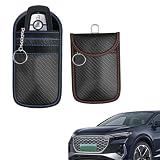
- [Double-Layer Signal Blocking Protection]: RFID Signal Blocking Pouch crafted with premium carbon fiber textured material and two layers of shielding materials – this Faraday bag blocks wireless signals, keeping your car keys safe from hacking, signal theft, and keyless entry attacks. Double protection for total peace of mind.
- [Universal Compatibility for Most Keys]: Cell Phone Signal Blocker Case fits most car keys, smart keys, and access cards – making it a versatile accessory for anyone looking to protect personal belongings and prevent unauthorized access. Works with a wide range of modern vehicle key fobs.
- [Compact & Convenient to Carry]: Lightweight and sleek – these protectors are easy to carry in your pocket or bag, providing security and convenience with a modern look. The slim design fits easily without adding bulk to your everyday carry.
- [2-Pack Value]: Includes 2 small-size key holders – fits multiple car keys or spares. Choose the size that fits your needs. Keep one in your pocket and one in your bag for complete protection wherever you go.
- [Easy-to-Use RFID Blocking Solution]:These protectors block all wireless signals – preventing hackers from accessing your vehicle with an easy-to-use, hassle-free solution. Simply place your key inside and close the pouch. As a top pick for Faraday car key pouch, RFID signal blocking fob protector and anti-theft key case.
Choose self-service recovery or verified bank support
| Situation | Best next step |
|---|---|
| You forgot a login detail, can use your registered verification channel, and the official recovery flow works. | Use the bank’s self-service recovery process and complete its identity checks. |
| You are locked out, cannot access the registered phone or device, or the recovery flow fails. | Contact the bank using a verified phone number or the official app or website. |
| The problem appears to be a website, app, connection or service issue rather than a forgotten credential. | Check service notices and follow the bank’s relevant technical support steps. |
| You see activity you do not recognize or think your credentials may be compromised. | Contact the bank promptly through a verified channel and follow its instructions to secure access. |
Exact recovery steps, lockout rules, contact options and browser support depend on the bank and country. The examples here include banks in the U.K., U.S. and India; use your own institution’s official instructions.
If you suspect fraud, treat it as a security issue
Call the number on your bank card or statement, or open the official app or website independently. Tell the bank you cannot access the account and explain what raised your concern. Follow its directions to secure access and review account activity. Do not disclose a password or one-time code to an unsolicited caller, and do not follow an unexpected message’s link to “unlock” your account.
Quick Recap
Product prices and availability are accurate as of the date/time indicated and are subject to change. Any price and availability information displayed on Amazon at the time of purchase will apply.




