Recommended Free Tools
The best project management software depends less on the longest feature list than on the cost of keeping your team organized. A solo freelancer may need tasks, deadlines, and client sharing. A growing business may need workload planning, reporting, dependencies, and permission controls.
This 2026 shortlist covers ten established options, including general-purpose work-management platforms and two more specialized Mac project-planning tools. Because pricing, plan limits, and desktop support change frequently, check the vendor’s current pricing page before committing. A free plan or trial is useful, but the real cost is often determined by the number of users, required integrations, storage limits, and reporting features.



Best project management software compared
| Software | Best for | What to evaluate before paying |
|---|---|---|
| monday.com | Visual workflows and growing teams | Whether your preferred views, automations, and dashboards are included in your plan |
| ClickUp | All-in-one task and project management | Storage, automation, AI, and reporting limits |
| Notion | Flexible documents, wikis, and lightweight projects | Whether you need more structured scheduling or advanced project controls |
| Wrike | Agency and enterprise workflows | Per-user pricing and the cost of advanced reporting and approvals |
| Asana | Clear team task management | Which timeline, automation, and reporting tools require a paid plan |
| Trello | Simple Kanban boards | Whether Power-Ups, permissions, and views create additional cost or complexity |
| Basecamp | Client projects and straightforward collaboration | Whether its opinionated workflow suits your team better than a customizable tool |
| OmniPlan | Detailed scheduling on Apple devices | Current system requirements, licensing, and whether your Mac supports the latest release |
| Merlin Project | Apple-native planning with Gantt and Kanban views | Current licensing and the features available during and after the trial |
| Smartsheet | Spreadsheet-style work management | Per-user costs, automation, dashboards, and reporting add-ons |
1. monday.com: best for visual workflows
monday.com is a strong option for teams that want projects to look and feel like configurable tables. Work can be organized into boards, groups, columns, statuses, owners, and dates. That makes it useful for marketing calendars, sales operations, product launches, and recurring business processes.
Its appeal is flexibility: a team can begin with a simple board and later add different views, automations, dashboards, and integrations. The financial caution is that flexibility can become plan sprawl. Before choosing it, list the specific features you need—such as timeline views, automations, guest access, or portfolio reporting—and verify which subscription level includes them.
The Tool Desk
Outbyte Driver Updater FREEScan for outdated or missing drivers - takes under a minuteDriver Scan →Outbyte PC Repair FREERepair Windows errors before they cause bigger problemsFix Now →#1 Best Overall
2. ClickUp: best all-in-one option
ClickUp combines tasks, documents, goals, dashboards, and several project views in one platform. It suits teams that want to replace a collection of task, note, and planning tools with a single workspace.
ClickUp provides a dedicated Mac download from its official download page: choose Mac under the desktop downloads section. The download is hosted at desktop.clickup.com. ClickUp also lists Brain MAX Desktop separately, so do not confuse that product with the standard ClickUp desktop application.
ClickUp can be powerful, but its large number of settings may create a training cost. A sensible rollout is to start with one task hierarchy, one status workflow, and only the reports the team will actually review. Add automations after the basic process works.
3. Notion: best for documents and lightweight projects
Notion works particularly well when project information lives alongside meeting notes, procedures, briefs, research, and an internal knowledge base. Databases can be configured with task owners, dates, statuses, tags, boards, calendars, and other views.
Free tools Windows power users keep installed
One-click scans. No signup required.
To install the Mac app, visit notion.com/desktop, select Download for macOS, open the downloaded file, install it, and sign in. Notion’s help center says the Mac app opens at login by default. To disable that behavior, right-click the Notion icon in the Dock, choose Options, and remove the check beside Open at Login.
Useful current settings are under Settings → Preferences. There you can manage Open Search when creating a new tab, Use Command Search, Show Notion in Menu Bar, and the Command Search keyboard shortcut. Notion updates automatically; to check manually, choose Notion in the macOS menu bar and then Check for Updates.
Notion is less suitable when you need rigorous resource planning, complex dependencies, or formal project controls. It also does not currently offer a Linux desktop app, according to Notion’s help center.
4. Wrike: best for agencies and complex workflows
Wrike is aimed at teams managing multiple clients, departments, approvals, and parallel projects. Its value is strongest when work needs structured intake, review stages, dependencies, and reporting rather than a basic checklist.
Quick wins for a faster PC:
Clear out junk files and repair common Windows errorsFree Scan →Fix the driver behind crashes, sound loss and screen glitchesFind Drivers →Repair Windows errors before they cause bigger problemsFix Now →Agencies should calculate the cost using active users, occasional collaborators, client access, and administrator accounts. Also check whether proofing, advanced analytics, request forms, and portfolio features are included in the plan you are considering. A platform designed for complex work may be wasteful for a small team that only needs assignments and deadlines.
5. Asana: best for clear team task management
Asana is a balanced choice for teams that want assignments, due dates, projects, dependencies, timelines, and repeatable workflows without building a system from scratch. It is often easier to introduce than a highly configurable platform because its core concepts are straightforward.
It works well for content production, product launches, operations, and cross-functional work. Before subscribing, confirm whether the features your team considers essential—such as timeline planning, rules, forms, workload management, or reporting—are available on the selected plan. A free tier can be enough for basic personal or small-team task tracking, but it may not cover more formal planning.
6. Trello: best for simple Kanban boards
Trello is a practical choice when a project can be represented as cards moving through columns such as To do, In progress, and Done. It is easy to understand and quick to deploy for editorial calendars, hiring pipelines, personal projects, and small business workflows.
The risk is outgrowing the board model. Larger teams may need dependencies, workload balancing, detailed permissions, or portfolio reporting that are not central to Trello’s basic experience. Review the cost and limits of Power-Ups and additional views before treating Trello as a long-term system for a complex organization.
7. Basecamp: best for straightforward client collaboration
Basecamp keeps projects centered on a relatively simple set of communication and coordination tools. It can work well for client services, consulting, creative work, and small teams that want fewer configuration decisions.
Its simpler approach can be an advantage: fewer custom fields and elaborate workflows may mean less administration. It can also be a limitation for teams that require detailed resource scheduling, advanced dependencies, or highly customized dashboards. Compare the total account cost with per-user alternatives, especially if your project includes many clients or occasional collaborators.
8. OmniPlan: best for detailed scheduling on Apple devices
OmniPlan is designed for formal project scheduling rather than general-purpose team chat or document management. Its current feature set includes multiple baselines, Monte Carlo simulation, scheduling-violation detection, critical-path highlighting, resource scheduling, and earned-value-analysis formulas.
The official Omni Group page currently lists macOS 12 as the Mac requirement and lists version 4.10.3 for Mac, iPad, iPhone, and Apple Vision Pro. If your Mac does not meet the current requirement, Omni points users to its downloads archive for older releases.
OmniPlan makes more sense when schedule accuracy has financial consequences—for example, when missed dependencies, resource conflicts, or deadline changes can affect a contract. It is likely excessive for a basic personal to-do list. Verify current licensing directly; do not rely on old references to Standard, Pro, or subscription prices.
Rank #4
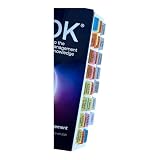
- Laminated Durable Tabs: The tabs are laminated with 3 mil film for durability and stiffness and made specifically for The PMBOK guide eighth edition (Book not Included)
- Color-coded tabs: Highlight the most important sections for PMBOK 8th Ed. The colors match the section for easy reference
- Find Sections Easily and Efficiently: Our color-coded tabs have large font and are printed on both sides so you can easily navigate the guide
- Includes Alignment Card: Our tabs are easy to install in alignment using our tabs alignment system. Each tab includes the location and page number for efficient installation
- Blank Tabs Included: Additionally we include blank tabs so you can highlight anything specific to your needs
9. Merlin Project: best Apple-native planning alternative
Merlin Project is marketed for Mac, iPad, and iPhone and is described by its developer as offline-capable. Its current feature navigation includes Gantt Chart, Kanban Boards, Mind Maps, Workload, and Export & Integration.
Its Gantt workflow supports linked tasks, milestones, slack-time display, progress entry, and critical-path recalculation. Its Kanban workflow uses To Do, Doing, and Done; moving cards can recalculate dates, critical path, and progress in the Gantt view.
The workload view can assign people, materials, companies, and equipment to tasks while identifying capacity issues and double-booking. Export options include PDF reports, images, XML, and CSV for Microsoft Project or MindManager. The official site currently advertises a Free 30 Day Trial.
Merlin is worth testing if you want detailed planning without moving away from Apple hardware. Confirm current pricing and licensing before purchase rather than relying on older claims about subscription-only plans or a separate Express price.
Independent reader supportYour contribution helps us test, update, and keep practical guides available for everyone.10. Smartsheet: best for spreadsheet-style management
Smartsheet is built around a grid that will feel familiar to spreadsheet users, while adding project views, automation, forms, dashboards, and reporting. It can be a good bridge for finance, operations, and administrative teams that already manage work in spreadsheets but need ownership, approvals, and visibility.
The main cost question is not simply the number of people who view a sheet. Check how the vendor defines licensed users, collaborators, guests, automation runs, storage, dashboards, and reporting access. A spreadsheet-like interface does not automatically make the system inexpensive; advanced controls can be the features that determine the final bill.
How to choose without overspending
- Define the work first. Write down whether you need simple tasks, Kanban, Gantt scheduling, resource capacity, client collaboration, or document management.
- Count paid seats accurately. Separate full editors, occasional contributors, external clients, and read-only users.
- Price the features, not the logo. Check the plan required for automations, dashboards, dependencies, time tracking, custom permissions, and exports.
- Test a real project. Import one active project and measure how long it takes to build, update, report, and correct.
- Check exit costs. Confirm whether data can be exported in usable formats such as CSV, PDF, XML, or standard project files.
- Set a review date. Recheck user seats and unused features every quarter. Project software often becomes more expensive through dormant accounts and unnecessary upgrades.
Which project management software is best for you?
- Choose monday.com if you want visual, customizable workflows.
- Choose ClickUp if you want tasks, documents, goals, and dashboards in one workspace.
- Choose Notion if project work is closely tied to notes, documents, and a knowledge base.
- Choose Wrike if your agency or enterprise needs approvals, intake, and complex reporting.
- Choose Asana if you want a polished, structured task-management system.
- Choose Trello if a simple Kanban board covers most of the work.
- Choose Basecamp if communication and client coordination matter more than detailed scheduling.
- Choose OmniPlan if you need advanced scheduling and resource analysis on Apple devices.
- Choose Merlin Project if you want Gantt, Kanban, workload, and offline-capable Apple software.
- Choose Smartsheet if your team thinks in spreadsheets but needs stronger project controls.
FAQ
What is the best project management software for a small business?
Asana, Trello, Notion, Basecamp, and monday.com are sensible starting points, depending on how much structure you need. Trello and Notion can work for simpler projects, while Asana or monday.com provide more formal task and workflow controls. Compare the cost of the users and features you will actually use.
What is the best project management software for Mac?
OmniPlan and Merlin Project are the most specialized choices in this list for Apple users who need detailed project planning. ClickUp and Notion also provide dedicated Mac applications. Check the current macOS requirements and download the software from the vendor’s official site.
Is free project management software enough?
Free software is often sufficient for personal projects, small teams, and basic task lists. It may become inadequate when you need automations, advanced views, reporting, permissions, resource planning, or more storage. Test your actual workflow before assuming a free plan will remain suitable.
How should I compare project management software prices?
Calculate the full annual cost for your actual number of editors and collaborators, then add any required upgrades, integrations, storage, reporting, or automation allowances. Also consider migration and training time. The cheapest monthly price is not always the lowest total cost.
PC Slower Than It Used to Be?
A free scan shows the junk files, broken settings and background clutter dragging Windows down - then fixes them in one click.Free scan · Windows 10 & 11Outdated Drivers Are Slowing You Down
One free scan finds every outdated or missing driver and matches the right update for your exact hardware.Free scan · exact hardware matchThe Bottom Line
For most teams, Asana, monday.com, ClickUp, or Trello offer a practical starting point. Notion is better when documentation is central, while Wrike and Smartsheet suit more structured organizations. Mac users who need serious scheduling should compare OmniPlan and Merlin Project. Before paying, test one real project and calculate the annual cost using actual seats and required features—not the headline plan price.
Quick Recap
Product prices and availability are accurate as of the date/time indicated and are subject to change. Any price and availability information displayed on Amazon at the time of purchase will apply.




