Free tools Windows power users keep installed
One-click scans. No signup required.
PayPal Pay Monthly is an interest-bearing installment loan for eligible U.S. purchases—not an automatically interest-free payment split. PayPal generally lists purchases from $49 to $10,000 and repayment terms from 3 to 24 months, but your availability, approval, APR, and schedule depend on the offer shown at checkout and the loan agreement you receive.
What is Pay Monthly?
Pay Monthly is a loan issued by WebBank and offered through PayPal at participating online merchants. It lets an approved customer repay an eligible purchase over a longer period, with principal and interest due under a fixed schedule. Each purchase requires a new application; approval for one transaction does not guarantee approval for another. PayPal’s U.S. help page describes the general purchase range as $49 to $10,000 and terms from 3 to 24 months. Selected merchants may offer larger amounts or longer terms to highly qualified customers.
PayPal’s product page lists plans of 3, 6, 12, or 24 months and says no down payment is due at checkout. The plan options available to you may differ. Check the offer and disclosure for your transaction rather than assuming a particular term or payment amount.
What does Pay Monthly cost?
PayPal states a fixed APR range of 9.99%–35.99%, based on creditworthiness. A promotional APR, potentially lower than the standard offer, may be available from time to time to eligible customers under separate terms. Neither a particular APR nor a promotion is guaranteed. Your WebBank Truth in Lending Disclosure Statement and Pay Monthly Loan Agreement show the APR, estimated payment schedule, and other terms for an approved loan. Review those documents and the total amount repayable before accepting.
Do these 3 things before closing this tab:
1Repair Windows errors before they cause bigger problems2Fix the driver behind crashes, sound loss and screen glitches3Clear out junk files and repair common Windows errors#1 Best Overall
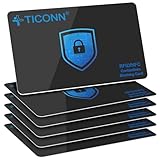
- RFID Protection: An electromagnetically opaque layer helps block unauthorized scans, protecting credit card, debit card, and passport information from nearby readers; This RFID blocking card helps prevent digital skimming by shielding your wallet from electronic theft
- Threats Stay Outside: Digital pickpockets use hidden readers to skim contactless cards in crowds, transit and checkout lines; This credit card protector works as an RFID blocker the moment it's placed in your purse or wallet, stopping electronic theft before it occurs
- Invisible Yet Active: Ultra-thin and sized to fit any wallet slot, this rfid blocking card adds no bulk; Invisible protection helps shield your debit cards and IDs from electronic skimming without changing the way you carry your wallet
- One Card Protects All: Forget slipping every card into a separate RFID sleeve, just one RFID blocking card protects every contactless card, passport, and license all at once; Carry it in a purse, travel pouch or cardholder and stay shielded at airports, transit hubs and during daily commutes
- Drop and Defend: Keep the RFID blocking card in your wallet or travel bag, or save it as a backup; Simply insert it alongside your credit and debit cards for immediate protection against identity theft — no charging, no setup
How is Pay Monthly different from Pay in 4?
These are separate PayPal payment options with different purchase ranges, repayment periods, and interest treatment. PayPal describes Pay in 4 as four interest-free installments for qualifying purchases of $10 to $2,000; Pay Monthly is a longer-term loan that generally charges interest for qualifying purchases of $49 to $10,000. An eligible promotional offer can change Pay Monthly’s APR, so compare the actual checkout disclosures rather than relying on the product name.
| Feature | Pay in 4 | Pay Monthly |
|---|---|---|
| General qualifying purchase range | $10–$2,000, according to PayPal | $49–$10,000, according to PayPal |
| Repayment | Four installments | Generally 3–24 months; available plans vary |
| Interest | Described by PayPal as interest-free | Fixed APR of 9.99%–35.99% based on creditworthiness; eligible promotions may differ |
| Application and approval | Subject to eligibility and approval | New application for each purchase; approval and terms are not assured |
PayPal Credit is another distinct option: it is a reusable credit line, not the Pay Monthly installment loan. Compare the terms actually offered for the purchase you intend to make. PayPal’s U.S. Pay Later merchant FAQ describes Pay in 4 and Pay Monthly in the context of merchant checkout offers.
Rank #2

- Cards are shipped active and ready for use.
- This card is non-reloadable. No cash or ATM access. Funds do not expire. If available funds remain on your card after the valid thru date has passed, please call customer service for a replacement card. A one-time purchase fee applies at the time of checkout. No fees after purchase.
- Double check if the URL/website is genuine before entering card details online. Do not provide any gift card details (example: claim code) to someone you do not know or trust. There are a variety of scams in which fraudsters try to trick others into paying with gift cards.
- If you believe that your Card has been lost or stolen, notify Mastercard immediately by calling 1-833-791-7288. You will be asked to provide the Gift Card number and other identifying information.
- Use your Mastercard Gift Card in the U.S. everywhere Mastercard debit cards are accepted, including online. Your Amazon.com Balance cannot be used to purchase Mastercard gift cards.
Who can use Pay Monthly?
Pay Monthly may appear at online checkout when PayPal is accepted, but it is not available for every customer, state, merchant, or purchase. PayPal says some merchants and goods are excluded, and subscriptions or recurring payments may not qualify. Its U.S. product page lists Alaska, Connecticut, Hawaii, and Washington as unavailable. Restrictions and eligibility can change, so check the current product page and the offer at checkout. Seeing PayPal at checkout does not mean Pay Monthly will be offered or approved.
How do I apply for Pay Monthly?
- Choose PayPal at checkout. If Pay Monthly is available for the merchant, item, and your account, select it from the payment options.
- Provide or confirm application information. PayPal says applicants may need a U.S. residential address, phone details, date of birth, SSN or ITIN, and annual income after taxes.
- Review the decision and terms. PayPal may consider the application details, credit score, PayPal transaction history, and how long you have had a PayPal account. Criteria can change, and approval is not assured.
- Read the loan documents before accepting. If approved, review the WebBank Truth in Lending Disclosure Statement and Pay Monthly Loan Agreement for the APR, payment schedule, and other terms.
PayPal’s Pay Monthly application help page explains the information it may request and factors it may consider.
Rank #3

- Mastercard Virtual eGift Cards are designed for online use only. Gift Cards are subject to Terms and Condition: a.co/9V5i70m
- When you access your Mastercard Virtual eGift Card for the first time, you’ll need to register your name, address, phone number, and email address via activationspot.com. These details should also be used as your billing address for online purchases, as many merchants require address verification for purchase authorization.
- This Mastercard Virtual eGift Card is non-reloadable. No cash or ATM access. - Mastercard Virtual eGift Cards are emailed active.
- Funds do not expire but your Mastercard Virtual eGift Card has a ‘valid thru’ date (9 years from date of purchase). If funds remain after this date has passed, please call Mastercard customer service for a replacement card. A one-time purchase fee applies at the time of checkout.
- This item is not eligible for refund, resale, or return. Available for sale within the United States only. Not available to residents of Puerto Rico, Hawaii, New Mexico, South Dakota, West Virginia and the US Virgin Islands.
When are payments due, and how do you repay?
The first payment is due one month after the merchant processes the order. Payments include principal and interest and follow the fixed schedule in the loan agreement. You can make manual payments or use autopay with a confirmed bank account or debit card; PayPal does not accept credit cards for repayment. PayPal says due dates cannot be changed.
If an order ships in multiple parts, the balance and interest accrual may update as items are processed or shipped. A later shipment can lead to an updated schedule or payment amount. PayPal cautions against using Pay Monthly for backordered items, so check how a split shipment could affect the plan before applying.
Rank #4

- RFID-Blocking Wallet: This sleek aluminum credit card holder, with ABS plastic components, offers RFID blocking to help protect your data. Its durable construction and compact design make it ideal for everyday use
- Small, Slim, Compact Wallet: Measuring 4.2 x 2.83 x 0.7 inches and weighing just 0.17 lb, this lightweight wallet, with its smooth, rounded corners, easily fits into front pockets or purses. Ideal for everyday use, quick trips, shopping, and travel
- Card Organizer: With 7 accordion-style slots, this wallet can hold up to 10 standard credit cards or over 20 business cards
- Artistic Designs: Available in a variety of designs, from classic artworks to contemporary patterns, allowing you to choose a style that reflects your personality
- Thoughtful Gift Idea: Makes a thoughtful gift for any occasion, combining functionality and style
Does applying for Pay Monthly impact my credit score?
PayPal says applying does not affect your credit score. That is different from taking out a loan: if you are approved and use Pay Monthly, PayPal may report the loan amount and payment history to credit reporting agencies, which may affect your score. PayPal provides further details in its application help information.
Quick Recap
Best Value

- Visa Virtual eGift Cards are designed for online use only. Gift Cards are subject to Terms and Conditions: a.co/5bw3qXJ
- When you access your Visa Virtual eGift Card for the first time, you’ll need to register your name, address, phone number, and email address via activationspot.com. These details should also be used as your billing address for online purchases, as many merchants require address verification for purchase authorization.
- This Visa Virtual eGift Card is non-reloadable. No cash or ATM access. Visa Virtual eGift Cards are emailed active.
- Funds do not expire but your Visa Virtual eGift Card has a ‘valid thru’ date (9 years from date of purchase). If funds remain after this date has passed, please call the Toll Free number found on your Visa Virtual eGift Card for a replacement card. A one-time purchase fee applies at the time of checkout.
- This item is not eligible for refund, resale, or return. Available for sale within the United States only. Not available to residents of Puerto Rico, Hawaii, New Mexico, South Dakota, West Virginia and the US Virgin Islands.
What to check before accepting an offer
- The APR and whether it is promotional, plus any conditions attached to that promotion.
- The number and amount of payments, first due date, and total amount repayable.
- Whether the purchase and merchant qualify, and whether shipment timing could change the balance or schedule.
- How repayment and possible credit reporting fit your budget and plans.
Product prices and availability are accurate as of the date/time indicated and are subject to change. Any price and availability information displayed on Amazon at the time of purchase will apply.
Recommended Free Tools




