Some Verizon customers say automated support has made it harder to resolve problems, with repeated questions, circular transfers and delays reaching a person. The evidence supports a real pattern of frustration, but it does not show that every customer encounters AI or that Verizon’s entire service operation is worse because of it. The practical test is whether an interaction solves the problem accurately, preserves context and offers a timely human handoff when automation fails.
What changed in Verizon support?
Verizon has expanded AI across customer-experience and support workflows. On June 24, 2025, the company announced AI-powered initiatives intended to make support simpler, faster and more consistent. That does not mean every customer now speaks to an AI system: an interaction may involve a customer-facing chatbot, automated routing, software assisting a human agent, or a combination of these. Verizon’s announcement describes the rollout; its Virtual Agent materials describe self-service and virtual-agent uses, while a Verizon solution brief covers AI tools for digital customer experience and agents.
These distinctions matter. A bot may collect information and route a customer without being able to change an account. An agent-assist tool may transcribe a call or search a knowledge base while the representative remains human. Public speculation about voice processing is not proof that a caller is speaking to an AI. Verizon’s generative-AI customer-service description presents AI as a way to support both automated and human interactions.
What are customers reporting?
Public complaints describe several recurring failure modes: a system misunderstands a billing, account or technical issue; asks for information already supplied; sends the customer between channels; or fails to deliver a clear transfer to a person. Some accounts also describe losing the conversation history during handoff, ending an interaction without resolution, or receiving sales offers during a support request. These reports identify plausible problems, not their frequency across Verizon’s customer base.
Do these 3 things before closing this tab:
1Scan for outdated or missing drivers - takes under a minute2Clear out junk files and repair common Windows errors3Fix the driver behind crashes, sound loss and screen glitches#1 Best Overall
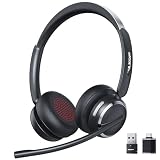
- Noise-Free,Instant Privacy: With an AI noise-cancelling mic, this wireless headset with mic for work reduces up to 97% of ambient noise, delivering clear, natural voice in busy offices, call centers or home workspaces. Whether handling customer calls or coordinating tasks in noisy environments, the wireless headset keeps conversations focused and professional. When the unexpected arise, one-tap mute gives you instant privacy control, silencing the mic to avoid awkward or accidental noise
- Bluetooth 6.0 & Pure Sound: Combined Bluetooth 6.0 with precision-tuned 40mm driver, the bluetooth headset with microphone delivers clear voice and rich, accurate sound and provides faster connections, lower latency, and extended wireless range up to 49ft. From online meetings to training sessions and media playback, the bluetooth headset reduce lag, stabilize connections, and eliminate audio distortion—stay natural and timing stays perfectly aligned, even in dynamic work environments
- Universal Compatibility, Three Ways to Connect: Beyond Bluetooth and USB-A, the added USB-C adapter expands compatibility across PC, MacBook, tablet, and smartphone—future-proofing your setup. Move seamlessly between desks, meeting rooms, and devices while staying connected on Teams, Zoom, Skype, Webex, and Google Meet. From wireless freedom to plug-and-play stability, the wireless headphones with mic adapt to your workflow, letting you switch scenarios without losing connection or control
- 65 Hours of Power & Fast Charging: With up to 65 hours on a single charge, the wireless headset with mic is built for extended meetings, training sessions, and extended office shifts.No more daily charging, mid-call shutdowns, or desk-side power hunting—just reliable performance through back-to-back calls, and multi-day workloads, keeping you focused and uninterrupted. A quick 5-minute charge provides up to 2 hours of use, keeping you ready when meetings run long or schedules get unpredictable
- Comfortable Fit, Effortless Control: From extended training session to full work shifts, the wireless headset with mic for work delivers pressure-free comfort with a ergonomic fit. The work headset with mic combines breathable ear pads, lightweight, and an adjustable headband to minimize fatigue during long meetings or customer service shifts. Easy-access control and the MFB button make answering calls, adjusting volume, or managing audio quick and intuitive—no learning curve, no fatigue
A documented customer account
In a post on Verizon Community, one customer described being moved among website chat, phone automation, text and iMessage, repeating information before reaching a person. It is an individual account, not representative survey evidence. Still, it illustrates why a technically available support channel can feel inaccessible when context does not carry over or a transfer does not resolve the issue.
Why the problem matters more for some requests
Automation is a more reasonable first stop for routine questions than for an account takeover concern, disputed charge, suspended service, device-financing problem or failed promotion credit. In those cases, the system may not have authority to make the needed change, and delay can have a direct financial or practical cost. A bot can provide correct general information yet still fail the customer if it cannot complete the account-specific action.
What employees reportedly say—and what remains unverified
Android Headlines reported on September 15, 2025 that customers and employees criticized Verizon’s Gemini-powered chatbot. The article included an employee-reported comparison in which tasks said to take about five minutes before the AI changes could take around 30 minutes afterward. That is an allegation relayed by secondary reporting, not a verified workforce-wide measurement: the report does not establish a named employee, methodology, internal metrics or an independent audit. Gemini’s role and the reported effects should therefore be attributed to that coverage, not treated as independently confirmed findings.
Rank #2

- Smart Digital Display: Easy-to-read digital display shows the remaining power of the charging case for the refill in time.
- High Capacity and Long-Lasting: Equipped with the 500mAh charging case to juice up the bluetooth headset for almost 72 hours of music/talking time. The single headset offer 18-23 hours of talking time.
- Design Ideas Of Mute: Add the individual mute button on the bluetooth earpiece to meet your demand for muting more simply on the cell phone call. (ONLY ALLOW TO MUTE DURING CALL ON PHONE)
- Ear Painless: Maximizing compactness of wireless headset based on ergonomics. Small and light even unobtrusive but still stable, and provide a more comfortable wearing experience.
- Ultra-Powerful Bluetooth Tech: Wireless earpiece features the updated 5.3 Bluetooth technology to quickly and stably connect devices in the 10m range.
The mechanism is credible even without assuming the allegation applies everywhere. AI can reduce workload when it completes routine requests. If it misclassifies a complex case, fails to pass useful context or leaves a customer angry before transfer, it can add work for both the customer and the human agent. A low rate of transfers to people would not, by itself, show success; customers may have resolved their issues, or they may have given up.
Recommended Free Tools
Verizon’s own findings show why human access matters
Verizon’s 2025 customer-experience research, published August 13, 2025, presents a more nuanced picture than either “automation always helps” or “all AI support fails.” In the company’s survey, satisfaction was 88% for mostly or fully human interactions and 60% for AI-driven interactions. Forty-seven percent of surveyed consumers identified being unable to speak or text with a live sales or customer-service agent as their main frustration with automated interactions. These are findings from Verizon’s survey, not a measurement of satisfaction with Verizon’s own chatbot specifically. See the news release and 2025 CX Annual Insights.
The same Verizon report says 54% of surveyed consumers reported declining trust in companies’ use of personal data; 30% said personalization worsened their experience, compared with 26% who said it improved it. Verizon’s stated position is that AI should work with human support to improve speed, relevance and consistency, rather than simply remove the human role. Its 2025 CX report PDF discusses the human handoff and the need to measure whether AI improves the customer journey.
Rank #3

- MOST COMMON RETURN REASON – Not a Bluetooth headset. This headset uses DECT technology for superior range and clear, reliable audio on desk phones and computers—it's not compatible with cell phones or other Bluetooth devices.
- OFFICE PHONE AND COMPUTER HEADSET – The LH570 offers Dual-Connectivity between desk phone and computer. Easily switch between the two with the press of a button.
- COMPATIBLE WITH OFFICE PHONES & MICROSOFT TEAMS - Sound great on all leading VoIP and desk phones: RingCentral, Polycom, Yealink, Cisco, Avaya, Mitel, and more. Works with Microsoft Teams, Zoom, and other online meeting software.
- UP TO 350-FOOT RANGE – Because it is NOT a Bluetooth headset, DECT UltraRange Mobility gives you 10 times the range of a basic Bluetooth headset. You can go anywhere in your house or office and stay connected without losing call quality.
- FREE 5-YEAR WARRANTY AND UNLIMITED SUPPORT – Warranty guaranteed by Leitner Headsets. For pre-sales support, click "Sold by Leitner Headsets" under "Add to Cart" to contact our US-based headset experts.
The real test is resolution, not how fluent the bot sounds
Whether AI is the sole cause of a bad interaction is difficult to determine from a complaint alone. A problem may also reflect complicated billing or plan rules, disconnected support systems, weak transfer procedures, incomplete knowledge, staffing decisions or company policy. AI can magnify those weaknesses by adding another step between a customer and someone able to act.
Support quality should be judged by whether the issue is accurately resolved without needless repetition or another contact—not by chatbot containment or shorter queues alone. Useful measures would include repeat-contact rates after an AI interaction, successful-resolution rates, time to human escalation, whether conversation history reaches the agent, and satisfaction for AI-only versus human-assisted cases. Verizon’s published materials cited here do not establish a company-wide increase in handling time, complaints, churn or support costs caused by AI.
How to reach Verizon and make a difficult issue easier to escalate
Verizon’s Contact Us page lists 800-922-0204 for mobile, 5G Home Internet and LTE Home Internet account, billing and technical support, and 800-837-4966 for Fios account, billing and technical support. Verizon advertises online chat as available 24/7 and provides a chat-with-an-agent option through its support flow. Routes and interface details can vary by product and issue, so use the official Support page for current options rather than relying on a remembered menu sequence.
Rank #4

- Open Ear Comfort & Situational Awareness: Designed with an open ear air conduction design, these wireless bluetooth headphones provide all-day comfort without pressure inside the ears. Stay aware of surrounding sounds while working, driving, walking, or exercising. Ideal open ear headphones for office work, commuting, workouts, and daily use.
- Clear Calls with Microphone: Featuring an advanced microphone system for clear voice pickup during calls, meetings, online classes, and remote work. These bluetooth headphones with mic help deliver reliable communication for office professionals, drivers, students, and multitaskers.
- Dual Device Connection for Work & Daily Use: Connect two devices simultaneously and switch easily between phone calls, meetings, music, or video playback. This wireless headset with mic for work improves convenience and productivity whether you're using a laptop, smartphone, or tablet.
- Premium Audio & Easy Mute Function: Upgraded 16mm drivers deliver balanced sound with clear vocals and rich audio for calls, music, podcasts, and videos. Convenient one-touch mute control allows quick microphone management during meetings, calls, online learning, or remote work.
- Bluetooth 5.4 & Long Battery Life: Equipped with Bluetooth 5.4 for fast pairing and stable wireless connectivity up to 49ft. Enjoy up to 10 hours of talk time and playback on a single charge. Lightweight and flexible design makes this wireless headset comfortable for extended wear at work, driving, travel, or workouts.
- Lead with the outcome you need. Say, for example, “I need a billing correction,” “I need service restored,” or “I need a person to help with account access.”
- Give identifying details relevant to the problem. Include the bill date, disputed amount, affected line, order number or exact error message instead of a general description such as “my account is wrong.”
- Request a live representative plainly. If automation continues to loop, try a short request such as “live agent,” “representative” or “escalation.” No particular phrase or keypad sequence is established as a reliable bypass.
- Keep a record. Save transcripts and screenshots, and note dates, call times, case numbers and representative names or IDs. Ask for an interaction or case number so you can refer to the same issue in another channel.
- Move channels if one is not working. You can try phone support after chat, or an in-store specialist where appropriate. Use the notes from the earlier attempt to avoid starting from scratch.
- Put financial or service disputes in writing where possible. A written record is more useful than relying on an unrecorded verbal promise. Start support through Verizon’s official website, app or published contact details rather than responding to an unsolicited request for account credentials.
When automation is useful—and when to ask for a person
Reasonable self-service tasks
Verizon’s Virtual Agent materials describe self-service for repeatable requests. Checking outage status, basic plan information, order status, payment or balance details, login guidance and straightforward device troubleshooting are the kinds of tasks automation may handle efficiently. Whether it works in a particular case depends on the account, issue and support channel.
Requests that merit human involvement
Ask for a representative when the issue involves disputed charges, payment arrangements, suspected account takeover, cancellation or number porting, suspended service, missing promotional credits, device financing, accessibility needs, or troubleshooting you have already attempted. The same applies when connectivity is work-critical or the account-specific action cannot be completed through self-service.
Independent reader supportYour contribution helps us test, update, and keep practical guides available for everyone.Should you switch carriers over support?
Switching may make sense if repeated, documented failures remain unresolved and access to a human is more important to you than the costs and disruption of staying. It is not a guarantee of better support: other carriers also use automation, and the evidence here does not establish that a competitor provides superior human service. Check coverage at the places you use your phone, compare the support routes available for the exact plan, and calculate device payoff amounts, lost promotional credits, porting requirements, taxes and fees before moving.
What’s actually slowing this PC down?
Pick the symptom - the matching free tool is one click away.
Best Value

- Advanced Noise Cancelling Bluetooth Headset; bluetooth earpiece, equipped with dual microphones and upgraded noise cancelling chip, intelligently recognizes environmental noise and instantly turns noise into silence. Whether it's the roar of the subway, sound of the wind, or the sound of keyboard typing, it can be accurately eliminated. Choosing COMEXION bluetooth headset ensures that your calls no longer miss important information
- Upgraded Chips and Compatibility, G10 bluetooth headset for computer is equipped with the latest bluetooth 5.3, it can maintain stable communication while providing clear dialogue. G10 bluetooth headphones have strong anti-interference and one-to-one compatibility, which can stably connect in situations with many devices. It’s a perfect wireless Headset with mic for work, phone, laptop, office worker, trucker
- Portable Charging Case and Multiple Charging Methodsand, wireless headset with 500mAh charging case, Supports long-term office work and is not limited to desktop charging, it can also be charged when placed in a briefcase, allowing you to charge as you go and start each conversation with 100% battery. At the same time, a space for storing dongles has been designed inside the charging case, so you no longer have to worry about losing small item
- USB Dongle and Practical COMEXION wireless headset with mic is equipped with a one-to-one dongle, and your connection will continue to be stable with your device. In addition, if one device is already connected, you can long press the mute button for 5s to enter pairing mode. At this time, the headset can successfully connect to the second device, making it convenient for it to switch between multiple devices. One-Click the mute button to open the mute function on cell phones
- A Whole Day of Comfort, Due to the difference in ear size, we have designed earplugs of different sizes (at the bottom of the box compartment), and bluetooth headset with microphone can be switched between left and right ear wearing, so that you can find the angle that suits you best. Let you wear it comfortably all day long
Lower-commitment alternatives to investigate
If you want to test a different network without committing to a postpaid plan, AT&T Prepaid is one option to compare. AT&T’s Prepaid support page lists text support by sending “prepaid” to 75421 and phone support at 611 or 800-901-9878 during its stated hours. Its wireless plans page says prepaid plans start at $30 per month; terms and current offers should be checked directly. Prepaid can differ in device financing, roaming, data priority, promotions and support arrangements, so lower commitment does not promise a better support experience.
For a major-carrier postpaid comparison, AT&T’s wireless support page advertises chat with a representative and phone support for billing and account matters. Its plans page has displayed offers including $55 per line per month for two lines on AT&T 55+ and $40 per line per month for four lines on its 4GB plan, subject to eligible AutoPay and paperless-billing conditions, eligibility, taxes, fees and restrictions. These are not like-for-like comparisons with Verizon unlimited service; confirm current prices and qualification rules before using them to decide.
Staying on Verizon while escalating may be preferable if the issue is fixable and you have device financing or promotional credits to protect. Verizon Prepaid is another within-network option for some customers, but changing plan type does not establish that the underlying support experience will change; consult Verizon’s Prepaid FAQs for its terms and support routes.
Quick Recap
Product prices and availability are accurate as of the date/time indicated and are subject to change. Any price and availability information displayed on Amazon at the time of purchase will apply.




