If a Verifone Ruby2 register is unresponsive or showing an error, first note what is on screen and whether sales, prepay transactions, pumps, or other registers are affected. If a restart is appropriate, clear pending transactions and use the power brick’s AC input—not the round connector at the register. Verifone’s hardware guide gives a specific reboot sequence; it does not provide a universal public error-code guide, so faults that persist or affect payment and forecourt operations should go to your site’s Verifone support contact or authorized service contractor.
Start with the symptom, not a guessed fix
Ruby2 is Verifone’s all-touch point-of-sale system for petroleum and convenience retail. It is not one of Verifone’s unrelated countertop or mobile payment terminals, so do not apply instructions for another terminal family. Verifone’s support and resources portal lists Ruby2 under Petroleum & C-Store customer documentation.

Before changing anything, make a short record for the person who supports your store:
- The exact screen message or visible status. If practical, take a photo rather than paraphrasing an error.
- What the register was doing when the symptom appeared, such as starting up or processing a sale.
- Whether the problem affects one Ruby2, multiple registers, pumps, or the wider forecourt.
- Whether transactions may still be pending, including prepay transactions.
This is useful information for escalation, not an official Ruby2 diagnostic procedure. The public Verifone materials cited here do not establish a universal error-code map or a list of failure categories that can be reliably diagnosed by cashiers.
PC Slower Than It Used to Be?
A free scan shows the junk files, broken settings and background clutter dragging Windows down - then fixes them in one click.Free scan · Windows 10 & 11Crashes, No Sound, or Screen Glitches?
Random freezes, missing sound and display glitches usually trace back to one bad driver. Find and replace yours safely.Free scan · under a minute#1 Best Overall

- PAYMENT TERMINAL: The Verifone P400 is a compact, customer-facing payment terminal engineered for efficient checkout experiences. Powered by a 600 MHz Arm Cortex-A9 processor and Linux-based V/OS, it combines reliable performance, intuitive operation, and durable construction for modern retail and service environments.
- MULTIPLE PAYMENT OPTIONS: Accept a wide range of payment methods with support for triple-track magnetic stripe cards, EMV chip cards, and NFC/contactless transactions. Compatible with major contactless payment schemes and ISO standards, the P400 delivers flexible payment acceptance for diverse customer preferences.
- VIVID TOUCHSCREEN DISPLAY: Equipped with a 3.5-inch HVGA color capacitive touchscreen featuring Corning Gorilla Glass technology, the P400 offers a responsive and user-friendly interface. The bright display enhances customer interaction, making payment verification, PIN entry, and transaction processing quick and convenient.
- SECURE TRANSACTIONS: Designed with PCI PTS 5.x approval and EMVCo-certified technologies, the Verifone P400 helps safeguard sensitive payment information. Advanced security architecture, secure card authentication, and support for encrypted payment processing provide enhanced protection during every transaction.
- VERSATILE CONNECTIVITY: Integrate seamlessly with existing POS infrastructures using Ethernet, USB, and RS232 connectivity options. The P400 also supports optional Wi-Fi or Bluetooth configurations, enabling flexible deployment across retail counters, hospitality environments, and service-based businesses while maintaining dependable performance.
What to do before restarting a Ruby2
Do not begin a power cycle while a sale or other transaction may still be in progress. Verifone Training Services’ Ruby2 Hardware Guide, revision 1.5 (2018), instructs operators to confirm there are no prepay transactions set and to let pending transactions clear before removing power. If you cannot establish that transactions are clear, or are unsure how to check safely at your site, contact your supervisor or approved support channel first.
The guide says Ruby2 is meant to remain powered on after installation. Treat a reboot as a specific recovery step, not a routine response to every symptom, and do not repeatedly cycle power when the cause is unknown.
Rank #2
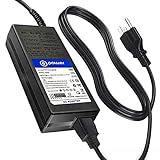
- T-Power Brand-new Input Voltage Range: AC 100V - 240V ( 24V DC - 5 Amp ) 3-pin Connector C143DIN-L
- ⚠️ ( Please Note ! that the " Verifone Touch Screen POS Console " available in a number of different New and Old Models , Please Make sure Your Model or PN : Match this Listing , Thank you
- ✅ Compatible with : VeriFone GC99D130024 CPS124130-3A-R for Ruby Ci Ruby2 Commander PN DOC169-001-01-A M169-300-01-NAA Topaz XL II 2 Touch Screen Console P050-02-310 310R 410 110 Verifone Ruby2 Ruby 2 II RubyII Touch Screen POS Console w/ ASM & Help Desk for Commander Model FSP120-AAAN2 FSP120AAAN2 P/N PWR050-001-01-B PWR050-001-B PWR050-001-01-8 PWR050-001-8 PWR050-001-01B PWR050-001B
- Verifone Ruby2 Ruby 2 II Touch Screen POS Console ASM & Help Desk for Commander FSP120-AAAN2 PWR050-001-01-B PWR050-001-B GC99D130024 P/N: CPS124130-3A-R For Verifone Ruby Ci Ruby2 Commander PN DOC169-001-01-A 169-300-01-A M169-300-01-NAA RubyCi Ruby 2 Touch Screen POS Console / Verifone Topaz XL II 2 Touch Screen Console 310 P050-02-310 310R P050-02-310R P050-02-410 Ruby P050-02-110 version 110 Touchscreen POS Terminal
- Verifone Ruby Ci RubyCi Ruby 2 Commander Ci PN DOC169-001-01-A 169-300-01-A M169-300-01-NAA Ruby2 Touch Screen POS Console w/ ASM & Help Desk for Commander; Verifone Topaz XL II 2 Touch Screen Console 310 P050-02-310 310R P050-02-310R P050-02-410 Ruby P050-02-110 version 110 Touchscreen POS Terminal VeriFone Model GC99D130024 GC990130024 P/N: CPS124130-3A-R CPS124130-3AR CPS1241303A-R CPS1241303AR CP5124130-3A-R Power Supply
How to safely reboot a Verifone Ruby2
- Confirm transactions are clear. Make sure there are no prepay transactions set and allow pending transactions to finish.
- Find the power brick. Remove the AC input cable from the power brick to remove power.
- Do not unplug the round connector at the POS. The hardware guide warns that using the round DC connector at the back of the Ruby2 for power cycling causes unnecessary wear on that connector.
- Wait for shutdown to finish. Wait until all Ruby2 lights go off, then pause for 30 seconds.
- Reconnect AC at the brick. Reconnect the AC input cable to the power brick.
- Let the full startup finish. The guide describes the Ruby2 splash screen followed by sales initialization. Wait until the cashier login is available before treating the register as ready.
These are the guide’s hardware reboot instructions, not a cure for every fault or a substitute for site-specific support. If the register does not complete startup, the same fault returns, or transactions could be unresolved, stop repeating the reboot and escalate.
Where to find Ruby2 instructions and support
Verifone’s support portal lists customer documentation for Petroleum & C-Store, including Ruby2, and provides a locator for Verifone Authorized Service Contractors (VASCs). Verifone describes VASCs as providing installation, maintenance, and on-site support. Use your store’s established Verifone support relationship or the authorized contractor serving your site when the problem needs configuration access, diagnostics, component work, or transaction reconciliation.
Rank #3
The Ruby2 Quick Reference Guide, marked updated January 24, 2024, covers common sales functions. It is useful for ordinary register operation, but it is not presented as a comprehensive service manual. Do not use undocumented diagnostic-switch procedures, bypass service controls, or share service credentials as a cashier-level troubleshooting shortcut.
When to call a service contractor
Contact your approved Verifone support channel or VASC rather than trying additional resets when:
Rank #4

- NO ENCRYPTION FOR DEBIT. NEED PIN PAD TO ATTACH WITH THE DEVICE TO WORK FOR DEBI
- Verifone VX520 terminal with EMV reader, contactless reader, and dual com modem.
- PCI COMPLIANT
- The Ruby2 will not finish its normal startup or cashier login does not become available.
- The fault recurs after the prescribed reboot.
- A sale, prepay, or payment may be unresolved and needs reconciliation.
- Payment processing, pumps, or more than one register is affected.
- The next step would require configuration access, opening or replacing hardware, or service procedures outside the public operator guides.
Provide the symptom record and describe which operations are affected. A site’s Ruby2 hardware and software revision, payment processor, and system integration can change which diagnosis or service action is appropriate.
Independent reader supportYour contribution helps us test, update, and keep practical guides available for everyone.Does a recurring problem mean it is time to upgrade?
Not by itself. Verifone presents Commander Site Controller and Commander C18 as an upgrade path from Ruby2, with migration planning, commissioning, staff training, and Verifone support as part of the process. Those are vendor-provided upgrade details, not evidence that a particular Ruby2 fault requires replacement. If problems recur or you are assessing continued support for legacy equipment, ask Verifone or your VASC to review your store’s configuration, support status, and requirements before deciding whether to maintain the current system or plan a migration. See Verifone’s Commander upgrade information.
Quick Recap
Best Value

- VeriFone Vx510 Credit Card Terminal
- OH-1048A0904000U-U
- M251-060-36-NAA
- VeriFone Vx510
- Power Adapter SMPS094000-09
Product prices and availability are accurate as of the date/time indicated and are subject to change. Any price and availability information displayed on Amazon at the time of purchase will apply.




