Black Friday 2024 has passed. The reported Synology and QNAP prices below are historical snapshots from November 28–29, 2024—not offers available now. At the time, the QNAP TS-464 was reported around $469–$471.20, the Synology DS923+ around $509.99, and the eight-bay Synology DS1821+ around $899.99. Those prices bought an enclosure only: drives were extra. For a purchase today, compare current models and calculate the full cost of drives, backup, and any network upgrades before judging a discount.
A diskless NAS is a storage enclosure sold without hard drives or SSDs. Black Friday 2024 fell on November 29. Deal coverage also mixed US and UK listings, so prices need to be read with their currency, configuration, seller, and date in mind.
Which 2024 NAS deals were reported?
The table records the reported historical prices, not current buying offers. Deal prices and reference prices were retailer-dependent and could change with stock, seller, and configuration. NASCompares’ November 2024 coverage included both US and UK deals; the US figures below are not directly comparable to the UK listing. NASCompares’ Black Friday 2024 deal list and its November 28 deal snapshot are the sources for these reported figures.
| Model | Bays | Reported 2024 deal price | Reported reference price | Best fit at that price | Assessment for a buyer now |
|---|---|---|---|---|---|
| QNAP TS-464 | 4 | About $469–$471.20, US coverage; reported configurations included TS-464-8G at $469 | About $589–$591.20, depending on the reported listing | A four-bay buyer prioritizing QNAP hardware flexibility, after checking the exact RAM version and seller warranty | Historical benchmark only; check live pricing and configuration |
| Synology DS923+ | 4 | About $509.99, US coverage | About $599.99 US MSRP; Synology announced that MSRP in 2022 | A buyer who preferred DSM and wanted a four-bay Plus model | Synology now lists it as discontinued, though its product-status page says it retains full DSM updates and technical support |
| Synology DS1821+ | 8 | About $899.99, US coverage | About $999.99, implied by the reported $100 discount | A buyer who needed eight bays at the time and had budgeted for the drive set | Older model; compare current eight-bay Synology options before buying remaining stock |
| Synology DS423 | 4 | About £332, UK coverage | About £389, implied by the reported 15% discount | A UK buyer seeking a more basic four-bay storage system | UK historical price; do not treat it as a US price or convert it into a current offer |
| Synology DS1621+ | 6 | About £800–£854, UK coverage | Region-specific; not consistently stated | A UK buyer seeking an intermediate bay count between four and eight | Not a four- or eight-bay comparison; price and availability were region-specific |
The reported TS-464 prices differ in part because listings may have represented different configurations. A TS-464 and TS-464-8G should not be treated as identical purchases without confirming installed memory, seller, warranty, and regional model suffix. A low reference price or large percentage discount is not proof that a deal beat the model’s usual street price.
Do these 3 things before closing this tab:
1Repair Windows errors before they cause bigger problems2Scan for outdated or missing drivers - takes under a minute3Clear out junk files and repair common Windows errors#1 Best Overall

- Team Productivity & Media Hub - Share large files and stream media across your office with 278 MB/s speeds; support concurrent access from 10+ users
- Centralized Repository - Store company documents, client files and media assets with granular access controls and audit logs
- Multi-Layered Data Protection - Combine RAID redundancy, automated backups and snapshot technology to prevent data loss from any cause
- Professional Surveillance System - Monitor home or business with support for 30 IP cameras, motion detection and secure remote access
- 3-Year Warranty & Enterprise Support - Dedicated technical account management is available for business-critical production environments
What the enclosure price leaves out
“Diskless” means the NAS does not include the storage drives. The total purchase can also involve memory, optional NVMe cache, a UPS, backup media, and faster networking. Synology explicitly lists drives as sold separately on its product pages; for example, see the DS1823xs+ page.
Think in three budgets rather than comparing enclosure prices alone:
- Enclosure-only: the historical deal price in the table. It is the smallest initial outlay, but it is not a working storage system.
- Practical starter: enclosure, a planned set of compatible NAS-rated drives, a basic UPS, and a separate local backup destination. A two-drive mirrored start can lower the initial drive bill on some platforms, but confirm the model’s supported migration and expansion path before relying on it.
- Fully populated system: enclosure plus four or eight drives, any required memory, optional compatible NVMe, network upgrades if needed, and local and off-site backup. Drive size and market pricing determine the actual total; the bill can readily exceed the enclosure price and may reach the $1,200–$2,000 range depending on choices.
Do not buy the largest enclosure you can afford and leave no budget for backup. For a home or small business, the storage plan should include a second copy of important data from the start.
Rank #2

- Secure private cloud - Safely access and share files and media from anywhere, and keep friends, partners, or collaborators on the same page
- Comprehensive data protection - Back up your media and documents to multiple destinations, and leverage snapshots to protect against malware
- Versatile video surveillance - Protect your home or business with intuitive monitoring, archiving, and analysis tools for up to 30 IP cameras (need to purchase camera license separetly)
- File Server - Replace expensive SharePoint or Dropbox with local file sharing, team folders and permission contro
- Ransomware-Resistant Backup - Protect against malware with immutable snapshots, versioned files and multi-destination backup strategies
Four bays or eight: choose by capacity and growth
Four bays: lower entry cost for many homes and small offices
A four-bay NAS is often a sensible fit for family photos, computer backups, shared files, media libraries, and modest surveillance needs. It allows a buyer to start with fewer drives than a full array requires, if the chosen RAID layout and vendor support later expansion or migration. The DS923+ specifications list SHR, RAID 1, RAID 5, RAID 6, RAID 10, and other options; check the model specification before planning an upgrade path.
Quick wins for a faster PC:
Repair Windows errors before they cause bigger problemsFix Now →Fix the driver behind crashes, sound loss and screen glitchesFind Drivers →Eight bays: more room for capacity and dual parity
Eight bays suit larger media or business datasets, users who want RAID 6 without giving up as much usable capacity, and workloads expected to grow. The trade-off is a larger initial drive bill, more power and space, and more drives to monitor and replace. A four-bay system with larger disks may be cheaper, quieter, and easier to manage if the extra bays are not needed.
Approximate capacity examples
These are raw decimal-capacity calculations before filesystem overhead, not manufacturer-rated usable capacity. Actual free space depends on RAID implementation, formatting, snapshots, reserved space, and how the operating system reports units.
Rank #3

- Supports drives on the model's official compatibility list
- Up to 522/565 MB/s sequential read/write throughput supports stable data transfers.
- Dual 2.5GbE ports provide fast network transfer speeds and increased redundancy.
- Leverage built-in file and photo management, data protection, virtualization, and surveillance solutions.
- Backed by Synology's 3-year limited hardware warranty.
| Array example | Approximate raw capacity after parity or mirroring | Trade-off |
|---|---|---|
| 4 × 12TB, RAID 5 | About 36TB | One drive’s capacity is used for parity |
| 4 × 12TB, RAID 6 | About 24TB | Two drives’ capacity is used for parity |
| 4 × 12TB, RAID 10 | About 24TB | About half of raw capacity; mirror layout can offer strong performance and rebuild behavior |
| 8 × 12TB, RAID 6 | About 72TB | Two drives’ capacity is used for parity |
| 8 × 12TB, RAID 10 | About 48TB | About half of raw capacity |
Manufacturers label drive capacity in decimal terabytes, while some operating systems display tebibytes, so a displayed number can be lower even before metadata and reserved space. RAID 5 gives more capacity than RAID 6 but leaves less protection during a lengthy rebuild if another drive fails. RAID 6 uses more capacity but tolerates two drive failures in the array. Neither RAID nor Synology Hybrid RAID (SHR) is a backup.
Synology or QNAP: compare the system, not just the sale price
Synology’s DSM is positioned as an integrated environment for file management, backup, collaboration, surveillance, and remote access. Its DS923+ launch announcement described those use cases and expansion options; the US announcement listed a $599.99 MSRP when the model launched on September 16, 2022. See Synology’s DS923+ announcement. Synology’s Plus models offer features such as Btrfs, snapshots, and package-based services, but check the exact model’s capabilities and compatibility lists before buying drives, memory, cache, or an expansion unit.
PC Slower Than It Used to Be?
A free scan shows the junk files, broken settings and background clutter dragging Windows down - then fixes them in one click.Free scan · Windows 10 & 11Outdated Drivers Are Slowing You Down
One free scan finds every outdated or missing driver and matches the right update for your exact hardware.Free scan · exact hardware matchQNAP often emphasizes hardware flexibility and networking options, but an advantage on paper matters only if it suits the workload and the buyer’s network. Confirm the exact TS-464 configuration, operating-system features, expansion support, and warranty. A faster port does not make file transfers faster unless the NAS, switch, cabling, and client devices all support the faster link. QNAP’s NAS store lists products, but current price and availability can change.
Rank #4
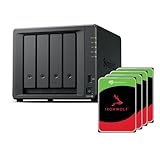
- Powerful performance: Equipped with an AMD Ryzen V1500B quad-core processor and 4 GB DDR4 ECC memory, expandable up to 32 GB.
- Flexible storage options: Four hot-swappable 2.5"/3.5" drive bays and expansion support for up to nine drives with a DX525 unit.
- High-speed connectivity: Dual 2.5 GbE LAN ports, two M.2 NVMe slots for cache or storage pools, and two USB 3.2 Gen1 ports.
- Versatile business applications: Ideal for data storage, virtualization, backup, and video surveillance in small to medium-sized business environments.
- Successor to the DS923+: Now compatible with third-party hard drives since DSM 7.3.
- Software and management: choose DSM or QTS based on the backup, file-sharing, surveillance, and application features you actually plan to use.
- Networking: compare standard ports and optional adapters, then check whether your switch and computers can use them. A 2.5GbE or 10GbE port alone does not create a faster network.
- Compute workload: check CPU, memory, and the specific software’s requirements for virtual machines, containers, or media transcoding. Transcoding depends on codecs, clients, software, and hardware; a bay count or sale price cannot establish performance.
- Compatibility and support: check the current drive, memory, SSD, and expansion-unit lists, plus the seller’s warranty and regional support terms. Do not assume every disk is guaranteed to work.
NAS-rated HDDs are generally the more appropriate choice for arrays designed for continuous operation and vibration from neighboring drives. Mixing capacities can be supported, but usable capacity in an array is commonly constrained by the smallest drive in the relevant layout. SSD-only arrays can cost more and have separate compatibility and endurance considerations.
Independent reader supportYour contribution helps us test, update, and keep practical guides available for everyone.What to buy now instead of an expired 2024 deal
Synology lists the DS923+ as discontinued. Its status page says it continues to receive full DSM updates and technical support, but remaining stock should be priced against current alternatives rather than judged by its old $509.99 deal price. See the Synology product-status page.
For a current four-bay Synology comparison
The DS925+ is Synology’s current comparable four-bay Plus model in the supplied product information: four SATA bays, two 2.5GbE ports, two M.2 NVMe slots, and expansion to nine drives with a DX525 unit. Compare its current price with any remaining DS923+ stock and account for the older model’s standard networking. Synology’s product page is here. No reliable current official price is established here, so verify the price with the seller before deciding.
Free tools Windows power users keep installed
One-click scans. No signup required.
Best Value

- Your Personal Streaming Server - Build your own Netflix-style media library and stream 4K movies, shows and photos to any device without monthly fees
- Create Your Own Cloud - Store your entire photo, video and music collection; access from anywhere with fast 282 MB/s transfer speeds
- Creator-Grade Backup Solution - Protect your irreplaceable content with automated backups to cloud services, external drives and remote NAS
- Multi-Layered Data Protection - Combine RAID redundancy, automated backups and snapshot technology to prevent data loss from any cause
- Smart Home Surveillance - Support up to 30 IP cameras with AI detection, instant alerts and secure remote monitoring
For a current eight-bay Synology comparison
The DS1823xs+ is an eight-bay option with built-in M.2 slots, 10GbE, and expansion to 18 drives; it is a higher-capability direction for buyers who need those features, not a like-for-like low-cost replacement. See Synology’s DS1823xs+ page. Synology also lists the DS1825+ as an eight-bay Plus alternative with dual 2.5GbE, M.2 support, and optional higher-speed networking in its Plus-series lineup. Verify the exact model’s specifications and current price.
For a current QNAP comparison
The TS-464 remains a model to compare if you want a four-bay QNAP, but its 2024 price is not a live quote. Check QNAP’s NAS store for the exact configuration, seller terms, and current availability. QNAP’s store also lists the TS-873A-8G-US among its products; treat any displayed promotional price as changeable and verify it directly at purchase. The official store is QNAP’s buying page.
How to decide whether a discount is genuinely good value
- Start with usable capacity: estimate the storage you need now and in three years, then select a RAID layout and drive sizes that meet it.
- Decide the bay count: choose four bays for a more modest household or small-office plan; choose eight when the capacity, RAID 6, or workload needs justify the bigger drive investment.
- Match the hardware to the workload: check network speed, CPU, memory, transcoding requirements, virtualization, camera support, and expansion costs for the specific model.
- Confirm the exact deal: compare the model suffix, RAM, new or refurbished condition, seller, regional warranty, and compatibility. Treat an old model’s discount cautiously if a current replacement better fits your needs.
- Price the complete system: add compatible drives, backup media, UPS, any required network equipment, and optional memory or cache before calling one enclosure the better value.
- Check the price at checkout: the 2024 figures were time- and retailer-dependent. Current QNAP and Synology listings can change, and an expired promotion should never be treated as a present offer.
Set up the NAS for recovery, not just storage
A practical minimum is three copies of important data: the working copy on the NAS, a separate local backup, and an off-site or cloud copy for irreplaceable files. Periodically test restoring files; a backup that cannot be restored is not a dependable recovery plan.
- Install compatible drives and configure the chosen RAID or SHR layout with the planned capacity and failure tolerance in mind.
- Create separate user accounts with only the access each person needs; enable multi-factor authentication where available and keep DSM or QTS and packages updated.
- Use snapshots where appropriate, but do not count snapshots on the same NAS as an independent backup.
- Keep a separate local backup on an external drive, second NAS, or direct-attached storage, and maintain an off-site or cloud copy of important data.
- Avoid exposing administrative services directly to the internet. Use carefully configured remote-access controls, firewall rules, and strong account security.
- Run periodic restore tests and confirm that the backup copy includes the files and services you would need after a failure.
RAID improves availability when a drive fails; it does not protect against accidental deletion, ransomware, theft, fire, or data corruption. A UPS can help a system shut down safely during a power failure, but it is not a backup.
Quick Recap
Product prices and availability are accurate as of the date/time indicated and are subject to change. Any price and availability information displayed on Amazon at the time of purchase will apply.




