Quick wins for a faster PC:
Clear out junk files and repair common Windows errorsFree Scan →Scan for outdated or missing drivers - takes under a minuteDriver Scan →Repair Windows errors before they cause bigger problemsFix Now →Rogers’ wireless connection fee was reported at $75 in February 2025, but that figure is historical—not a confirmed price for every signup channel today. Since June 12, 2026, CRTC rules have prohibited fees for activating or modifying a retail telecom plan, subject to exceptions for reasonable physical installation and additional products or services a customer explicitly chooses. The regulator has separately questioned Rogers’ device setup, shipping and SIM charges; its notice opened a show-cause process, not a final ruling.
What changed in Rogers’ $75 connection fee
MobileSyrup reported in February 2025 that Rogers had raised its wireless connection fee from $70 to $75, seven months after the prior increase. The report said the fee had risen from $60 to $70 in mid-2024. Rogers’ notice called the $75 charge a “Setup Service Fee.” MobileSyrup’s February 2025 report reproduces the notice and describes the increase.
That notice said the fee was waived for self-serve signup on rogers.com, but not for signup through Live Chat or Customer Service. It also said customers who later required device setup in a store would incur the $75 charge. These were the terms reported in February 2025; they do not establish Rogers’ signup terms today.
What the historical fee comparison does—and does not—show
In its February 2025 report, MobileSyrup described the increase as Rogers’ 11th since the fee was $15 in 2013. It also listed connection fees of $70 for Bell and TELUS and $45 for Freedom Mobile at that time. Those figures are a dated comparison, not current carrier prices. See the report’s fee-history and carrier comparison.
#1 Best Overall

- Multi‑Gig speed for today & tomorrow: DOCSIS 3.1 performance supports cable internet plans up to 2 Gbps, delivering ultra‑fast streaming, gaming, and downloads.
- Save on rental fees: Own your modem and avoid monthly equipment charges—check with your cable provider for plan compatibility.
- Compact, modern design: Space‑saving footprint with discrete LED indicators for power, upstream/downstream, and online status.
- Easy setup: Connect cable, power on, and activate with your cable provider. Then connect a Wi‑Fi router to the Ethernet port for home Wi-Fi coverage.
- Modem only: This cable modem requires a separate Wi-Fi router or mesh system for home Wi-Fi network.
How the CRTC’s activation-fee rules changed the picture
The CRTC’s Telecom Regulatory Policy 2026-43 defines activation or modification fees as charges incurred to activate a new retail telecommunications service plan or modify an existing one. The policy changes took effect June 12, 2026, and prohibit fees in that category, with exceptions for reasonable charges related to physical installation at a customer’s premises and fees for additional products or services the customer explicitly chooses.
The distinction is important: a charge for starting or changing a plan is not the same category as an optional product or service, or qualifying physical installation. The policy’s definition and exceptions—not simply the label a carrier puts on a charge—are the relevant framework.
Rank #2

- The Actiontec C3000A uses smart Wi-Fi to transition connected devices between 2.4 GHz and 5.0 GHz bands. The router supports WPA3, EasyConnect, Agile Multiband, and EasyMesh from the Wi-Fi Alliance.
- Leverage superior Wi-Fi performance with the C3000A's 802.11AC technology, perfect for gaming, HD streaming, and other high-bandwidth activities.
- Ensuring top-tier network security with a built-in firewall and advanced WPA3 encryption, your data and personal information are always safeguarded.
- The Actiontec C3000A's dual-band technology supports seamless, uninterrupted multi-device streaming, gaming, and web browsing, elevating your internet experience.
- Equipped with four Gigabit Ethernet ports, the C3000A offers high-speed wired connections for your devices, optimizing reliability and consistency.
Why the CRTC is examining separate Rogers charges
In a June 2026 notice, the CRTC identified a $40 device setup charge, a $25 shipping charge for devices ordered online, and an unspecified SIM fee introduced by Rogers. Rogers’ position, as recorded by the Commission, was that these charges related to optional device setup, delivery, or replacement physical SIMs. CRTC Notice 2026-155 records the concerns and the companies’ positions.
The Commission directed Rogers, Bell and TELUS to show cause why the charges should not be considered contrary to the policy. That notice expresses regulatory concern and begins a compliance process; it is not a final finding that Rogers violated the rules. The 2026 device setup charge is also a separate reported charge from the $75 connection/setup fee MobileSyrup described in 2025.
Recommended Free Tools
Rank #3

- ⚠️ CABLE INTERNET ONLY - NOT COMPATIBLE WITH: Fiber (Verizon FiOS, AT&T), DSL, Satellite, or Fixed Wireless. ONLY works with cable providers like Xfinity, Spectrum, Cox. Verify your internet type BEFORE purchase.
- 🚫 NO WiFi INCLUDED - ROUTER REQUIRED: This is a modem ONLY. You MUST buy a separate WiFi router to get wireless internet. Without a router, only ONE device can connect via Ethernet cable. This does NOT replace your current WiFi router.
- 🔌 CABLE INTERNET REQUIRED: Works EXCLUSIVELY with cable internet service (DOCSIS) from providers like Xfinity, Spectrum, or Cox. Will NOT work with fiber (Verizon FiOS, AT&T), DSL, satellite, or fixed wireless internet. Contact your ISP to confirm compatibility BEFORE purchasing.
- 🚀 MULTI-GIG PERFORMANCE: Supports internet plans up to 2.5 Gbps with 2.5 Gbps Ethernet port. Designed for plans 1 Gbps and faster from certified providers: Xfinity (up to 2.33 Gbps), Spectrum (1 Gbps), Cox (2 Gbps). Verify your plan speed and provider compatibility.
- 💡 SETUP REQUIREMENTS: You need: (1) Cable internet service, (2) Separate WiFi router with 2.5 Gbps port for full speeds, (3) ISP activation. This modem cannot create WiFi networks or connect multiple devices without additional equipment.
How to check what you would pay before signing up
- Review the current offer and checkout terms. Check Rogers’ current signup channel and the itemized charges displayed before you agree. The February 2025 online waiver is not confirmation of current terms.
- Identify what each charge is for. Separate a plan activation or modification charge from device setup, shipping, a SIM, or physical installation. The applicable CRTC policy treats these categories differently.
- Ask Rogers to explain any unclear fee in writing. Confirm the amount, whether it is one-time, what service triggers it, and whether it can be avoided by choosing another channel or declining an optional service.
- Consult the CRTC record if a charge appears to be for plan activation or modification. Policy 2026-43 sets out the rule and exceptions; Notice 2026-155 documents the regulator’s concerns and show-cause direction, not a final decision on the specific Rogers charges.
Other Rogers fees are not the same charge
Rogers’ administrative-fees page lists other categories, including an $80 transfer-of-responsibility fee, a $20 specialist-assisted price-plan-change fee, and a $75 residential service-call fee. These are distinct from the historical wireless connection fee and do not establish its current amount or resolve whether any particular fee complies with the CRTC policy.
Quick Recap
Best Value
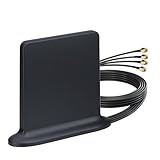
- Wide Frequency Coverage: Supports 5G & 4G LTE bands across 600-960MHz, 1710-2700MHz, 3400-3600MHz, and 4800-4900MHz. Features an SMA Male connector.
- Effortless Outdoor Installation: Plug-and-play setup with a 3-meter extension cable and powerful magnetic base. Easily mounts securely on rooftops, poles, or router exteriors without needing tuning.
- Rugged Reliability: Designed to operate in extreme temperatures, making it ideal for demanding outdoor or industrial environments.
- Universal Device Compatibility: Works with most 5G/4G cellular devices featuring SMA Female ports, including 5g 4g lte router, wireless home phone hotspot modem, cellular IoT industrial gateway, trail camera, security camera, GSM alarm system, vehicle 4g lte tracker, etc
- Broad Industry & Carrier Support: Compatible with industrial equipment (M2M terminals, SCADA modules, vending machines, signage) and major global carriers like Verizon, AT&T, T-Mobile, Rogers, Telus, Telcel, Movistar, and Digicel.
Rank #4

- MAXIMIZE YOUR CABLE INTERNET AND WHOLE-HOME WIFI: A cable modem and WiFi router in one device unlocks the full potential of your home internet with faster downloads, smoother WiFi for gaming and video calls, and reliable coverage in every room.
- APPROVED FOR YOUR PROVIDER AND PLAN: Works with Xfinity internet plans up to 800Mbps, Spectrum up to 1Gbps, and Cox up to 1Gbps. Not compatible with Verizon, AT&T, CenturyLink, DirecTV, DISH, or bundled voice plans. ISP activation required after setup.
- MULTI-GIG DOCSIS 3.1 SPEEDS: Get Gigabit+ cable download speeds on today's fastest plans, with headroom for the upgrades ahead. Real-world speeds depend on your plan and ISP network.
- WIFI 6 COVERAGE FOR THE WHOLE HOME: Stay connected in every room with dual-band AX6000 WiFi 6 covering up to 2,500 sq ft and capacity for 30+ connected devices across your home. Real-world coverage depends on home size, layout, and building materials.
- MULTI-GIG WIRED CONNECTIONS FOR YOUR FASTEST DEVICES: One 2.5 Gig Multi-Gig port and four Gigabit Ethernet ports keep gaming consoles, desktops, and streaming devices hardwired for the lowest latency and the most stable connection in your home.
Product prices and availability are accurate as of the date/time indicated and are subject to change. Any price and availability information displayed on Amazon at the time of purchase will apply.




