Quick wins for a faster PC:
Scan for outdated or missing drivers - takes under a minuteDriver Scan →Clear out junk files and repair common Windows errorsFree Scan →Fix the driver behind crashes, sound loss and screen glitchesFind Drivers →Lifeline is a federal program that lowers the monthly cost of eligible phone or internet service for qualifying U.S. consumers. In 2026, you may qualify through household income at or below 135% of the Federal Poverty Guidelines or participation in certain assistance programs. The standard benefit is up to $9.25 a month; eligible residents of qualifying Tribal lands may receive up to $34.25. It is a service discount—not a promise of a free phone or other device.
Who qualifies for Lifeline?
You may qualify if your household income is at or below 135% of the 2026 Federal Poverty Guidelines, or if you—or a child or dependent in your household—participate in a qualifying program. Eligibility is generally determined for the household, not separately for each person at an address.
Income limits for 2026
The following annual income ceilings are 135% of the 2026 Federal Poverty Guidelines. The figures are listed by household size and location by the Universal Service Administrative Company (USAC).
| Household size | Contiguous states, D.C. and territories | Alaska | Hawaii |
|---|---|---|---|
| 1 | $21,546 | $26,933 | $24,786 |
| 2 | $29,214 | $36,518 | $33,602 |
| 3 | $36,882 | $46,103 | $42,417 |
| 4 | $44,550 | $55,688 | $51,233 |
| Each additional person | Add $7,668 | Add $9,585 | Add $8,816 |
Qualifying assistance programs
USAC lists these programs as eligibility routes:
- Supplemental Nutrition Assistance Program (SNAP)
- Medicaid
- Supplemental Security Income (SSI)
- Federal Public Housing Assistance
- Veterans and Survivors Pension Benefit
For people living on qualifying Tribal lands, additional qualifying programs include Bureau of Indian Affairs General Assistance, Tribal Temporary Assistance for Needy Families (Tribal TANF), Tribal Head Start (subject to an income-qualification condition), and the Food Distribution Program on Indian Reservations. Check USAC’s eligibility guidance for the applicable conditions.
Recommended Free Tools
#1 Best Overall

- ❤️ 𝐌𝐞𝐝𝐢𝐜𝐚𝐥 𝐀𝐥𝐞𝐫𝐭 𝐏𝐞𝐧𝐝𝐚𝐧𝐭 𝐰𝐢𝐭𝐡 𝐅𝐚𝐥𝐥 𝐃𝐞𝐭𝐞𝐜𝐭𝐢𝐨𝐧: Designed for seniors and individuals with medical conditions, this wearable alert device automatically detects falls and immediately call and send SOS notification to preselected emergency contacts.
- ✅ 𝐄𝐚𝐬𝐲 𝐀𝐜𝐭𝐢𝐯𝐚𝐭𝐢𝐨𝐧 | 𝐌𝐨𝐧𝐭𝐡𝐥𝐲 𝐬𝐮𝐛𝐬𝐜𝐫𝐢𝐩𝐭𝐢𝐨𝐧 𝐫𝐞𝐪𝐮𝐢𝐫𝐞𝐝: $20 per month. Unlimited Fall Alerts, Unlimited Live Tracking, Assistive Speakerphone with Unlimited Voice Mins every month, Intelligent Alerts, Premium Safety Features, Unlimited Live 7 Days a week Customer Care, & more.
- 📞 𝐒𝐎𝐒 𝐁𝐮𝐭𝐭𝐨𝐧 𝐰𝐢𝐭𝐡 𝟐-𝐖𝐚𝐲 𝐂𝐚𝐥𝐥𝐢𝐧𝐠: One-touch emergency communication makes a cellular call just like a cellphone. Also receives calls easily with hands-free auto-answer feature for convenience and reliability. This personal emergency alert device allows direct, hands-free voice calls with caregivers or emergency contacts.
- 📍 𝐑𝐞𝐚𝐥-𝐓𝐢𝐦𝐞 𝐆𝐏𝐒 𝐓𝐫𝐚𝐜𝐤𝐢𝐧𝐠 & 𝐆𝐞𝐨𝐟𝐞𝐧𝐜𝐞 𝐙𝐨𝐧𝐞𝐬: Always know your loved one's location. Set custom safe zones with this medical alert system GPS and receive alerts when they enter or leave designated areas. 1 Year location history available
- 🧓 𝐄𝐚𝐬𝐲-𝐭𝐨-𝐔𝐬𝐞, 𝐒𝐞𝐧𝐢𝐨𝐫-𝐅𝐫𝐢𝐞𝐧𝐝𝐥𝐲 𝐃𝐞𝐬𝐢𝐠𝐧: Built for simplicity, the pendant features a clear display showing time, battery, and signal. Large SOS button and intuitive interface make it ideal for elderly users.
How Lifeline defines a household
A household is people who live at the same address and share income and household expenses. Lifeline generally allows one benefit per household, not one benefit for every eligible person. If multiple adults at one address apply, the Lifeline Household Worksheet may be required; the documents and forms guidance explains what to provide.
How much does Lifeline provide?
The standard maximum discount is up to $9.25 per month toward eligible phone or internet service. Eligible consumers living on qualifying Tribal lands may receive up to $34.25 per month. These are maximum support amounts, not cash payments: the discount is applied through a participating provider, and you still need to choose and enroll in an eligible service plan. See USAC’s Get Started guidance.
Voice-only service update
USAC reports that the FCC Wireline Competition Bureau paused the voice-only support phase-out on July 1, 2026. Under that update, basic voice-only support of $5.25 remains available through November 30, 2027. The same standards page lists $9.25 for broadband-only or broadband-qualified bundled service. Because the voice-only rule is time-sensitive, check the current Lifeline standards before making a service decision.
Rank #2

- NO MONTHLY FEES OR CONTRACTS – No subscriptions, monitoring fees, activation fees, or long-term contracts. 911 Help Now gives you a simple way to reach emergency services without the recurring monthly cost of a traditional monitored medical alert system.
- CALLS 911 DIRECTLY — NO MONITORING CENTER – Press and hold the SOS button for 3 seconds to place a call directly to 911. There is no third-party monitoring center or operator required to relay your emergency call.
- BUILT-IN MICROPHONE & SPEAKER – Speak directly with a 911 dispatcher through the built-in microphone and speaker after the call connects, allowing you to explain the emergency and communicate with the dispatcher without needing a separate phone.
- HELPS PREVENT ACCIDENTAL CALLS – The included protective safety cover combined with the 3-second press-and-hold SOS design helps reduce accidental activations while carrying the device in a pocket, purse, or bag.
- 4G CELLULAR & READY TO GO – Uses built-in 4G cellular connectivity and works throughout the United States wherever compatible cellular service is available. Includes 3 AAA batteries, protective cover, removable neck lanyard, and belt/clothing clip for convenient everyday carry.
What services can Lifeline cover?
Lifeline support may apply to eligible mobile phone, home phone, broadband, or bundled service, subject to program restrictions. The application describes limits on combinations such as mobile and home phone service or mobile and home internet or bundled service. You cannot stack multiple Lifeline benefits by signing up with more than one provider; review the official application (FCC Form 5629) for the restrictions.
Do these 3 things before closing this tab:
1Clear out junk files and repair common Windows errors2Scan for outdated or missing drivers - takes under a minute3Repair Windows errors before they cause bigger problemsAfter you qualify, compare participating plans based on service availability at your address, the bill after the discount, coverage, data limits and features, and provider support. USAC does not rank providers or identify one plan that is best for everyone. Lifeline eligibility does not itself enroll you in service or entitle you to hardware.
How to apply for Lifeline
The consumer site lists online, provider-assisted, and mail application routes. Oregon and Texas applicants are directed to their state application sites rather than the standard federal route. USAC says consumers must apply and then sign up with a participating phone or internet company; its Get Started page lays out the process.
Rank #3

- ONE TOUCH DIRECT CONNECTION TO 911: Just press and hold the red button and you will be connected directly with your local 911 operator and be able to talk with them.
- NO MONTHLY FEES EVER! No Subscription Costs, Contracts, Cancellation fees or deposits. Works for free for life right out of the box.
- PERFECT FOR ALL AGES: Great for Elderly, Children, or anybody looking for the added security of having 911 help a click away.
- WORKS ANYWHERE NATIONWIDE WITH AN AVAILABLE CELL SIGNAL: No landline, cellphone, or home hub needed EVER! Unlike other products that require you to be near a home base. 911 Help Now works anywhere there is cell signal available and offers the freedom to go anywhere with cell signal.
- Includes 3 AAA Batteries, Lanyard connection and Lanyard, Removable button protection shield
- Apply online: Start through the Lifeline consumer site. The February 2026 approval edition of FCC Form 5629 describes online application as the fastest route, but it does not guarantee a decision or set a processing time.
- Get help from a provider: Ask a participating phone or internet company about applying and enrolling in its service.
- Apply by mail: Print and complete the application, then mail it to Lifeline Support Center, PO Box 1000, Horseheads, NY 14845.
- Use your state route if applicable: Oregon and Texas consumers should follow the state application links on the Lifeline consumer site.
- Choose and enroll with a participating provider: Once your eligibility is confirmed, select an eligible plan and complete sign-up with the provider.
What documents might you need?
Some applications can be verified electronically; not every applicant will need to upload documents. If the program cannot confirm your information online, follow the specific request you receive. The USAC document guidance and FCC Form 5629 describe possible proof requirements.
Proof of income
Income documentation should show the applicant’s or dependent’s name, annual income, and an issue date within the last 12 months. Examples include a prior-year state, federal, or Tribal tax return.
Proof of program participation
A benefit letter or other official record may show participation in a qualifying assistance program. Submit the type of proof requested for your application rather than sending unrelated personal records.
Rank #4
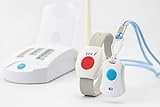
- EMERGENCY ALERT: Complete medical alert system featuring an SOS button pendant and base station for instant help when needed
- WATERPROOF DESIGN: Pendant can be safely worn while showering or washing hands, ensuring protection during vulnerable moments
- WEARABLE OPTIONS: Versatile device can be worn as a pendant with lanyard or on wrist with comfortable gray wristband
- ONE-TOUCH OPERATION: Large, easy-to-press button enables quick emergency activation, ideal for seniors or those with limited mobility
- BASE STATION INCLUDED: Reliable monitoring hub connects to pendant device, providing coverage throughout your living space
Identity documents
If online validation cannot confirm identity, the application may request documentation. Follow the notice from the program for what it accepts and how to submit it.
Independent reader supportYour contribution helps us test, update, and keep practical guides available for everyone.Do you have to renew Lifeline?
Yes. Lifeline consumers must recertify annually and keep their information current. If your income, household circumstances, or program participation changes, update your information as required. USAC’s consumer guidance explains the ongoing responsibilities.
Is there Lifeline support for survivors?
The Safe Connections Act of 2022 established a specific route for survivors of domestic violence, human trafficking, and related crimes seeking line separation. USAC says survivors who meet the program’s conditions and are experiencing financial hardship may receive emergency Lifeline support for up to six months, with a discount of up to $9.25 on phone, internet, or bundled service. This is not automatic for every survivor. For eligibility and application instructions, use USAC’s survivor-benefit guidance or contact the Lifeline Support Center.
Free tools Windows power users keep installed
One-click scans. No signup required.
Best Value
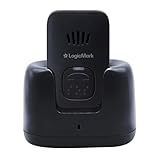
- NO MONTHLY FEES: Unlike other types of emergency devices, there are no monthly fees required to operate this device. That means you can call for help with a push of a button from anywhere, anytime.
- 24/7 PROTECTION: The ultimate personal emergency response device, providing safety at home and on the go with the touch of a button. Communicate directly with emergency personnel in the event of a medical or safety event.
- FALL DETECTION: Proprietary technology detects falls and sudden movements, triggering alerts to Emergency Services or an emergency contact — even if the person is unable to press the button.
- TWO WAY PENDANT: This Two-Way Voice Communication Pendant allows you to have full communication with emergency workers who will dispatch professionals to your home to provide help and care. Seniors can wear this device or keep it on its mount for easy access.
- NO LANDLINE NECESSARY: This at home device for seniors or those with a handicap works without the use of phones to connect you to 911 dispatchers. You do not need a landline phone or phone service to operate the handheld device.
Who can help with a Lifeline application or service problem?
The Lifeline Support Center can help with application status, eligibility documents, finding companies in your area, renewal, the one-per-household worksheet, and consumer portal account resets. The current contact details listed by USAC are:
- Phone: (800) 234-9473; press 1 for English or 2 for Spanish
- Email: [email protected]
- Hours: Seven days a week, 9 a.m.–9 p.m. Eastern Time
For a question about a specific phone, device, service, or bill, contact your provider. For application support and program questions, start with the Lifeline Support Center.
Quick Recap
Product prices and availability are accurate as of the date/time indicated and are subject to change. Any price and availability information displayed on Amazon at the time of purchase will apply.




