Quick wins for a faster PC:
Clear out junk files and repair common Windows errorsFree Scan →Scan for outdated or missing drivers - takes under a minuteDriver Scan →LinkedIn offers three separate places to upload a resume: save it in job application settings for reuse, attach it to an Easy Apply application, or display it on your profile. Choose based on whether you want to apply for jobs or make a resume visible to profile visitors—the profile upload cannot be used as an application resume.
Choose where your resume should go
| Route | Purpose | Who can see it | Reusable for applications? |
|---|---|---|---|
| Job Application Settings | Keep a resume ready for future applications made through LinkedIn. | LinkedIn says saved resume information may be used to personalize LinkedIn, including job recommendations; see its visibility and usage explanation. | Yes. LinkedIn says it keeps the four most recently uploaded resumes for reuse. |
| Easy Apply application | Attach a resume to the job application you are submitting. | The resume is shared with that hirer. | It is attached to that application; save resumes in settings if you want them ready for future LinkedIn applications. |
| Profile media | Display a resume on your profile. | Profile viewers can download it; it may also be visible off LinkedIn. | No. A profile resume is not available as the resume for a job application. |
These distinctions and LinkedIn’s stated handling of resumes are described in its resume upload instructions and resume visibility and usage guidance.
Save a resume for future LinkedIn applications
- Open Job Application Settings. Alternatively, go to Jobs > Preferences > Resumes and application data.
- Under Resume, upload the file you want available for later applications.
- Return to the same settings area when you want to manage or delete saved resumes. LinkedIn says it stores the four most recently uploaded resumes for reuse, and you can opt out of saving resumes.
LinkedIn says saved resume data may be used to personalize the service, including job recommendations, and may contribute to product improvements and generative AI model improvements subject to its practices and settings. Review its visibility and usage guidance and explanation of job application information if those uses matter to you.
Upload a resume during Easy Apply
- Open the job listing and select Easy Apply.
- Complete the required application fields and continue to the optional Resume section.
- Select Upload resume and choose your file. LinkedIn’s current help guidance specifies a Microsoft Word or PDF file and recommends keeping it below 2 MB.
- Review the application and submit it.
Check that the resume is attached before submitting. LinkedIn warns that if you submit an application without a resume, you cannot reopen that application to attach one or reapply to the same job post. An application resume is shared with the hirer. If the listing directs you to an employer’s website instead of Easy Apply, complete the application there; LinkedIn’s saved-resume workflow applies to applications made through LinkedIn.
Do these 3 things before closing this tab:
1Repair Windows errors before they cause bigger problems2Fix the driver behind crashes, sound loss and screen glitches3Clear out junk files and repair common Windows errors#1 Best Overall

- Note: Notepad, paper, and pen are NOT included; the package contains only the portfolio
- Perfect Size: The portfolio binder measures 9.6" x 12.6", designed to hold writing pads, A4 and letter-sized paper, ideal organizer for business, office, conference and school
- Premium Faux Leather: Crafted from premium faux leather with excellent stitching, this binder is lightweight, durable, and stain-resistant, perfect for a professional look
- Strong Metal Clip: Our folder features a versatile design with multiple slots and pocket, a pen loop, and a sturdy metal clip to securely hold your papers in place
- Classical & Practical: Our Padfolio clipboard is perfect for storing business cards, IDs, documents, pens, and tablets; it meets all your daily office needs in one compact design
Put a resume on your LinkedIn profile
To display a resume, add it as media on your profile rather than saving it in application settings. This is a visibility choice: LinkedIn says profile visitors can download the resume, and the attachment or post may be visible off LinkedIn. It does not make the file available as the resume for an application.
Only use this route if you want profile viewers to access the document. For applications, use Easy Apply or save the file in job application settings instead.
Rank #2

- ✅ STYLE MEETS FUNCTION – Elegant design featuring convenient, safe pockets ideal for documents, business cards, travel tickets, pitch proposals & resumes. Includes a pen holder & refillable writing pad
- ✅ SLEEK & PROFESSIONAL – Make a strong first impression with this modern portfolio with a classy piano black matte finishing. Fits most briefcases & bags
- ✅ PREMIUM DURABILITY – Ideal for today’s hectic business travel schedules, this document holder is water resistant and reinforced with accent stitching
- ✅ IDEAL GIFT – College graduation seeking out their first job? Looking to up your Wall Street game? This is the best gift for men & women!
- ++ ONE YEAR GUARANTEE ++ We stand fully behind the quality of our product & offer a full 1 YR WARRANTY
Manage, delete, or create a resume through LinkedIn
- Delete a saved resume: use Job Application Settings or Resumes and application data. LinkedIn says deleting a saved file does not affect applications already submitted.
- Get a PDF version of your profile: LinkedIn says members can download their profile as a PDF in a resume format.
- Create a custom resume: LinkedIn’s Resume Builder can create and download one, but LinkedIn says it is not currently available to all members.
For the exact current controls and any changes to them, consult LinkedIn Help’s resume upload guide.
Quick Recap
Best Value

- Perfect Pad Holder: Measuring 12.9" x 9.8", this portfolio binder fits letter-size/A4 paper and legal pads, lightweight and portable (pad, paper, and pen not included)
- Premium PU Leather: Crafted from premium PU leather with fine stitching, this portfolio offers a comfortable feel and reliable protection, making it perfect for daily use
- Efficient Organization: This padfolio features a pen loop, multiple slots and holders for files, receipts, cards, notepad, keeping your essentials neatly organized and secure
- Wide Use: This portfolio offers a sleek, professional look, perfect for school, office, business meetings, interviews, and corporate events
- Perfect Gift: This padfolio makes a practical and thoughtful gift for college graduates, interns, or anyone starting their career, leaving a great first impression in interviews and at work
Rank #4
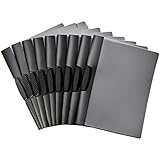
- 10-pack of clip report covers gives reports a sleek professional appearance
- PP plastic front cover helps protect papers from damage and offers a clear view of the title page
- Black back cover; black swing clip holds everything together and offers easy open and closure
- Won’t damage the edges of paper—no need for hole-punching; ideal for school, home, or work
- Measures 9 by 0.4 by 11.45 inches (LxWxH); the product is a 10-pack of swing clip report covers (9" x 11.45") that fits letter-size paper and holds up to 30 sheets (20lb)
Rank #3

- Package Includes: A set of 5 clear report covers with sliding bar. These folders are the perfect choice for organizing and presenting your work resume, school projects, presentations, documents, proposals, and portfolios
- Report Covers Size: The clear report covers measure 8.9 * 11.2 inches, they are great fit for both A4 size and US letter size paper (11 x 8.5 inches). No need for hole-punching and easy-to-load
- 70-Sheet Capacity: The clear report covers can hold approximately 70 sheets of paper. The sliding bars have a width of 10mm, ensuring that they won't easily slide off the clear report cover
- Premium Material: The Clear Front & Back Cover design help you easy to locate the required documents and information. These report covers are made of durable clear PP plastic material, which can protect reports from bends, dings, surface moisture
- Wide Applications: Clear report covers with sliding bar are suitable for use in schools, homes, and businesses. You can use them as homework folders, presentation folders. They are designed to keep your reports, school projects without damage
Product prices and availability are accurate as of the date/time indicated and are subject to change. Any price and availability information displayed on Amazon at the time of purchase will apply.
Recommended Free Tools




