Quick wins for a faster PC:
Fix the driver behind crashes, sound loss and screen glitchesFind Drivers →Clear out junk files and repair common Windows errorsFree Scan →Scan for outdated or missing drivers - takes under a minuteDriver Scan →To send money from a Wise balance, open Home, choose the currency balance, tap Send, select or add a recipient, enter the amount, then check the recipient, fee and delivery estimate before confirming. You can also start from Send or Recipients. Labels may vary by location.
Send money from an existing Wise balance
- Sign in to Wise and open Home.
- Select the currency balance you want to use and tap Send. Alternatively, start with Send or choose someone from the Recipients tab.
- Select an existing recipient or add one. To send money to your own bank, Wise’s instructions say to add yourself as a recipient using your bank details and select Myself.
- Enter the amount and currency. Depending on the transfer flow, you can specify either how much to send or how much the recipient should receive.
- Review the recipient and transfer details, including the fee and estimated delivery time shown for the available methods. Confirm only after checking that the details are correct.
Wise says, “You can send money from your Wise account to your bank account anytime.” It describes this as moving money between your own accounts or making a withdrawal. Wise Help Centre: How do I send money from my Wise account to my bank?

Choose the right destination
Your own bank account
Sending to your own bank moves money from Wise to an account you own. Add your bank details as a recipient and choose Myself when prompted. Check the destination account carefully before confirming.
Another person or a Wise account
You can send to a recipient’s bank account or Wise account. Select an existing recipient or add one with the details Wise requests for that destination. Required information depends on the route; follow the fields shown in your transfer rather than assuming every recipient needs the same details.
Do these 3 things before closing this tab:
1Clear out junk files and repair common Windows errors2Fix the driver behind crashes, sound loss and screen glitches3Repair Windows errors before they cause bigger problems#1 Best Overall
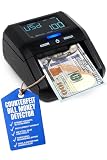
- INFRARED & MAGNETIC DETECTION MODES - Help you to quickly identify counterfeit bills
- MULTI-CURRENCY CAPABILITY - Able to detect US Dollars, Euros, British Pounds Sterling, and Mexican Pesos
- ADD & TOTAL VALUE FUNCTIONALITY - Automatically adds and provides total value of banknotes fed into machine for mixed denominations (i.e., $1, $5, $10 and so on) at the same time; bills can be fed in any direction (facing up, down, left or right)
- POWER CORD & RECHARGEABLE BATTERY - Conveniently sized at 4.75" x 5.75" x 3" with a power cord and rechargeable battery for flexibility
- VISUAL & AUDITORY FAKE BANKNOTE ALERT - When machine detects a fake bill, it will emit 3 beeps and display an error code on the screen
Wise’s general instructions for sending from an account are here: How can I send money from my Wise account?
Fees, funding options and delivery times
A transfer from a Wise balance is limited to money available in that account. If you set a fixed amount for the recipient and the balance cannot cover the amount plus any applicable fee, that balance may not be available as a funding choice.
Rank #2

- Powered by 4 AA batteries, power adapter not included, includes starter size paper roll
- Powered by 4 AA batteries, power adapter not included, includes starter size paper roll
Wise says sending from an account in the same currency is free for most currencies. Currency conversion has a fee, and sending to an external bank may also have a currency-dependent fee. The exact charge depends on the currencies, route and location, so use the review screen as the authoritative quote for your transfer.
If Wise offers more than one way to fund or complete a transfer, compare the displayed fee and estimated arrival time. Availability varies by region, currencies and amount. Wise describes bank transfer as usually the cheapest way to fund a transfer, but that does not mean it is available or cheapest for every person or route. Wise Help Centre: How do I pay for my transfer?
Rank #3

- PROTECTIVE HINGED COVER: Features a hinged, hard cover that protects the keys and display when stored, making this handheld calculator durable and easy to carry safely.
- DUAL-POWER SOURCE: Runs on solar energy with a battery backup, ensuring consistent and reliable use in any lighting condition or environment.
- LCD SCREEN SIZE: The 2-inch screen size, 8-digit LCD screen clearly shows each digit, helping to prevent reading errors and making numbers easy to read at a glance.
- CONVENIENT FUNCTION KEYS: Includes a 3-key independent memory, square root key, change sign key, automatic power down, and more to provide efficient, reliable everyday math.
- TRUSTED BY WORKPLACES FOR DECADES: Sharp has been a dependable name in office calculation for generations — practical tools built around the way people actually work.
Delivery estimates also depend on the route and method. As one specific example, Wise’s USD guide says some international USD Swift payments can take up to 6 working days; this is not a general estimate for all Wise transfers. Check the live estimate in your own transfer before sending. Wise Help Centre: Guide to USD transfers
When you are adding money from an external bank
Using money already available in a Wise balance is different from funding a transfer with a separate bank account. If you choose an external bank as the funding source, Wise generally requires the account name to match the Wise account holder’s name. Wise describes exceptions for qualifying joint and business accounts. Wise Help Centre: What if the name on my bank account is different to my Wise account?
Independent reader supportYour contribution helps us test, update, and keep practical guides available for everyone.Before confirming
- Confirm the recipient and bank details, especially when sending to a newly added recipient.
- Check which Wise currency balance is being used and whether the transfer includes conversion.
- Review the fee, available payment method and estimated arrival time shown for this transfer.
- If the balance is missing as an option, check whether it has enough available funds to cover the transfer amount and fee.
Exact supported methods, recipient requirements, fees, limits and delivery times vary by route and region. For example, Wise’s USD guidance covers ACH, wire and Swift routes with different details and limits; those USD rules should not be treated as global limits.
Quick Recap
Best Value
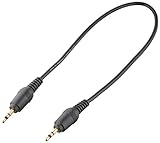
- Transfer and play games with other calculators
- Connects one calculator to another
- Made in China
- Package Dimensions : 1.0 L x 1.0 H x 1.0 W (inches)
Product prices and availability are accurate as of the date/time indicated and are subject to change. Any price and availability information displayed on Amazon at the time of purchase will apply.




