Free tools Windows power users keep installed
One-click scans. No signup required.
You can pay a BESCOM electricity bill online either through Quick Payment without registering or, if you use a registered account, through Account Summary → Pay Bill. Start at BESCOM’s official website, use the identifier requested by the payment page, check the fee and total before authorising payment, and save the acknowledgement. If your bank debits the money but no acknowledgement appears, BESCOM’s specific instruction is to wait 24 hours rather than immediately paying the same bill again.
How can I pay my BESCOM bill online?
BESCOM’s FAQ describes two online routes. You can use Quick Payment without registration, or sign in to the consumer portal and pay from your account summary.

- Quick Payment, no registration: Open BESCOM Quick Payment from BESCOM’s official website and select “Online Payment.” Enter the identifier and other details the page requests, verify the bill and amount, then choose a payment method and complete checkout.
- Registered account: Sign in to the BESCOM consumer portal, select the relevant Account ID, then go to Account Summary → Pay Bill and follow the payment prompts.
BESCOM’s home page also provides a Quick payment entry point and a “Last Online Payment Status” option. Use the official site at bescom.co.in as your starting point rather than relying on a link in an unsolicited message.
Use the identifier the page asks for
Your Account ID is a 10-digit unique number printed on the electricity bill and used for consumer-portal registration and future utility communication. BESCOM’s FAQ describes the RR No. as the power-supply connection number printed on the meter board and monthly bill. They are distinct identifiers, so do not substitute one for the other; enter whichever the payment page specifically requests.
Recommended Free Tools
#1 Best Overall

- STAY ON TOP OF EVERY MONTHLY BILL IN ONE PLACE – This bill tracker notebook is designed to help you organize rent, utilities, insurance, credit cards, subscriptions, and other recurring expenses in one easy system. As a practical monthly bill tracker and bill payment organizer, it helps households, busy families, couples, seniors, and anyone managing monthly bill payment keep everything clear, simple, and easy to review
- BUILT FOR REAL HOME AND PERSONAL FINANCE USE – More than a basic bill book organizer, this bill organizer notebook includes an annual overview, subscription and auto pay tracking pages, and detailed bill record pages for day-to-day use. Whether you use it at your kitchen counter, home office desk, family command center, or during monthly budgeting sessions, this monthly bill planner helps support better bill organization and a more consistent monthly bills payment checklist routine
- EASY-TO-USE BILL LOG PAGES THAT HELP REDUCE MISSED PAYMENTS – Each layout is made for simple tracking with space for paid status, bill name, due date, amount due, amount paid, unpaid balance, and notes. This bill payment checklist, payment tracker notebook, and monthly payment book gives you a clear way to track due dates, follow your payment plan, record your monthly payment plan, and keep important reminders in one organized place
- A4 SIZE WITH BLACK SPIRAL BINDING AND STORAGE POCKET – Designed as a durable bill organizer book and notebook for bills, this planner features a roomy A4 format that gives you more writing space than smaller books, plus black spiral binding for easy flipping and lay-flat use. A transparent storage pocket is placed before the back cover, making it convenient to hold receipts, statements, notices, or loose documents—ideal for anyone wanting a pay bills organizer book, monthly bill payment organizer, or bills book organizer monthly setup at home
- STURDY COVER, SMOOTH WRITING PAGES, AND A CLEAN PROFESSIONAL LOOK – Made with a 300 gsm coated paper cover and 100 GSM interior pages, this bill ledger book monthly for home is designed for regular monthly use while keeping a neat and polished appearance. It works well as a bill tracker notebook monthly bills organize solution for personal budgeting, household paperwork, and recurring bill management, making it a smart choice for anyone looking for a bills book, bill book monthly, best bill organizer book, or dependable bill payment record book
Which payment methods does BESCOM accept, and are there extra charges?
BESCOM’s Quick Payment page lists debit card, RuPay debit card, credit card, net banking and UPI. The same page displays the following payment-mode charges. They are the terms shown on BESCOM’s page when checked for this guide; fees can change, so check the live table and the final checkout amount before authorising a payment.
| Payment method | Charge displayed by BESCOM |
|---|---|
| Debit card | 0.40% of the bill amount for an amount less than or equal to Rs. 2,000; 0.80% for more than or equal to Rs. 2,000. The displayed brackets overlap at exactly Rs. 2,000, so confirm the fee shown for your transaction. |
| RuPay debit card | Currently nil on BESCOM’s payment page. |
| Credit card | 0.75% of the bill amount. |
| Net banking | Rs. 3 per transaction. |
| UPI | Currently nil on BESCOM’s payment page. |
BESCOM attributes the nil RuPay debit card and UPI charges to RBI guidelines; where a charge is listed, the page says it is borne by the consumer. Do not assume an old fee table still applies: review the current payment-page terms and the amount presented at checkout.
Rank #2

- MONTHLY ORGANIZER FOR 31 DAYS - Equipped with 31 slots for each day of the month
- USEFUL - Organizes bills, letters, cards and more
- HIGH QUALITY - Made by high quality brown wood and black wire.
- SPACE SAVER - Compact design will take less countertop space than larger units.
- MEASURES - 15.7 L x 7.5 W x 2.6 H inches.
How do you know the payment went through?
BESCOM says a successful payment produces an on-screen confirmation message, makes a printable acknowledgement available, and sends an e-receipt to the email address entered during payment. Save or print the acknowledgement and retain the email receipt. If you need to verify a transaction later, use the “Last Online Payment Status” option on BESCOM’s home page.
What if money was debited but the receipt is missing?
For a BillDesk payment where your bank debited the amount but no payment acknowledgement or receipt ID was generated, BESCOM’s FAQ gives a specific procedure:
- Do not pay the same bill again immediately.
- Wait 24 hours for BillDesk to confirm the transaction with the bank and update the payment.
- After bank confirmation, expect an acknowledgement email.
This 24-hour wait applies to the specific case of a debit without an acknowledgement. BESCOM’s Quick Payment page separately warns that it is not responsible for double or excess payments and directs consumers to contact their bank about online-payment failures and auto-refunds. It also says a refund is not entertained after successful payment and acknowledgement generation. For payment questions, BESCOM lists customer care at 1912; the home page also displays “Call 1912 for Help.”
What does BESCOM say about payment security?
BESCOM says it has tied up with multiple payment gateways to offer a “simple, convenient and a secured way” to pay electricity bills online. That is the utility’s own description, not an independent technical assessment. Its cited payment instructions do not specify particular encryption standards, authentication factors, data-retention practices, fraud guarantees or an independent gateway security audit, so those controls should not be assumed from the general statement.
Rank #4

- MASTER YOUR FINANCES WITH EASE: Track your spending, manage your monthly bills, and budget effectively with Current’s bill paying organizer book, featuring 14 spacious pockets and 32 label stickers to keep every receipt and statement in its place
- DURABLE DESIGN FOR LONGTERM USE: Crafted with thick, high-quality paper stock, a coated cover, and a sturdy spiral bound spine, this organizer withstands daily use without tearing, making it a reliable companion for your financial journey year-round
- STAY ON TRACK WITH HELPFUL TIPS: Includes a personal finance tips section filled with practical suggestions to simplify budgeting and optimize your savings, plus large pockets to store tax documents and important bills for easy year-end reference
- CONVENIENT & FUNCTIONAL SIZE: Perfectly sized at 9" x 12", this organizer fits seamlessly into your home office setup while providing ample room for notes, receipts, and monthly tracking, making bill management both efficient and clutter free
- AMERICAN MADE EXCELLENCE: Carefully crafted in the USA, Current’s financial planners come in a variety of stunning patterns, colors, and styles to reflect your personal taste, turning a chore into an enjoyable part of your weekly routine
- Begin at BESCOM’s official website and navigate to its consumer payment service.
- Check the consumer identifier, bill, amount and any displayed charge before approving the transaction.
- Keep the acknowledgement or receipt and the email entered during payment available for your records.
Can you pay in advance, and when is a bill due?
BESCOM’s FAQ says consumers can make an advance bill payment through the customer portal using the “pay in advance” option and entering an amount. The Conditions of Supply state that advance payments toward electricity charges are allowed and adjusted against subsequent bills.
The Conditions of Supply also state that consumers should be given 15 days from the bill date to pay, and that the next working day applies when the due date is a public holiday. These provisions are regulatory-document context, not a replacement for the due date shown on your current bill; check that bill for the amount and applicable deadline.
Quick wins for a faster PC:
Clear out junk files and repair common Windows errorsFree Scan →Fix the driver behind crashes, sound loss and screen glitchesFind Drivers →Repair Windows errors before they cause bigger problemsFix Now →Quick Recap
Best Value
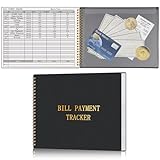
- Easy To Track Your Bills: Keep track of small business or personal expenses with the HAUTOCO bill tracker notebook, which helps to organize complex accounts and bookkeeping for efficient and clear financial management
- Premium Material: The bill book is spiral bound with 120 pages and 3,000 lines of entries. Made of 100 GSM thick paper to reduce ink leakage; it is equipped with a waterproof and sturdy PP cover to protect the inner pages
- Practicality: The bill payment tracker measures 10.1 x 7.8'', and the large size gives you enough space to record each of your transactions; there are 2 PE large pockets at the back of the bill book to store important tickets and loose items
- All-in-One Bill Tracker: The undated bill payment tracker has plenty of space for you to meticulously record every transaction, featuring sections for paid, bill description, due date, amount date, amount paid, and unpaid balance
- Ideal Tool for Organizing Your Bills: The bill tracker notebook can easily analyze your financial activities and generate effective financial statements, perfect for small business, personal use, or household expense tracking
Product prices and availability are accurate as of the date/time indicated and are subject to change. Any price and availability information displayed on Amazon at the time of purchase will apply.




