Crashes, No Sound, or Screen Glitches?
Random freezes, missing sound and display glitches usually trace back to one bad driver. Find and replace yours safely.Free scan · under a minutePC Slower Than It Used to Be?
A free scan shows the junk files, broken settings and background clutter dragging Windows down - then fixes them in one click.Free scan · Windows 10 & 11A PayPal “Access Denied” message usually means a web request was rejected by a security check—not that you entered the wrong password. The cause may be your browser, VPN, network, PayPal’s security systems, or a merchant’s payment integration. First verify that you are on PayPal’s real website, then test a clean browser session and another network. If a payment may have been submitted, check its status before trying again.
First, make sure the page is really PayPal
Check the address bar before signing in or entering payment details. If the page came from an unsolicited email, text, social post, or pop-up, close it and type PayPal’s address into the browser yourself. Do not call a support number shown on an unfamiliar page or give anyone your password or one-time code to “unblock” your account.
An old link or a path such as /cgi-bin/webscr is not, by itself, proof of a scam; older payment flows may use legacy paths. The important check is whether the domain is genuinely PayPal-owned and whether you reached it through a trusted route. For help, use PayPal’s Help Center or contact page. These are U.S. help routes; available options can vary by country and login status.
What “Access Denied” means—and what it does not tell you
The message is consistent with a web security system rejecting a request because of its IP address, session, cookies, browser settings, proxy, request details, or another security signal. Generic access-denied responses can be associated with blocked IPs or firewall rules, but they do not reveal which rule applied. See Mozilla’s explanations of common access-denied causes and site cookies, IP blocks, and privacy tools; Cloudflare documents similar security-layer denials for blocked client IPs and firewall rules.
What’s actually slowing this PC down?
Pick the symptom - the matching free tool is one click away.
#1 Best Overall
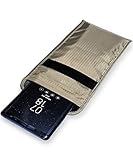
- POWERFUL CELL PHONE RADIATION PROTECTION: Reduces your exposure to cellular phone radiation by up to 99%, to shield your body and reproductive organs from harmful wireless EMF / EMR. It will be good for pregnant women and babies,and the one who want to take fewer radiation from phone as well.
- ANTI SIGNAL :When you do not want to answer the phone,you do not need to turn off the phone any more,you just need to put the phone into the silvery lining back pocket of the pouch(please make sure you put your phone in this functional pocket and close the bag well),the signal will be blocked in a few seconds and the phone will be disconnected.
- RFID BLOCKING& ANTI-RADIATION:It will prevent electronic information from leakage.If the phone is placed in this pocket,the radiation from the phone will be greatly reduced.This high tech fabric creates a Faraday Cage around your cell phone that shields and protects it from being hacked, tracked and cloned! Stops signals and radiation like RFID, Bluetooth, GPS, Wifi, EMI, EMF and EMP.
- CONVENIENT DESIGN: Made of extremely high-shielding fabric with velcro closure, makes it easy to slide phone in and out.
- SIZE:18.5cm(7.28")x10.5cm(4.13").Suitable for a variety of mobile phone models.Durable, Portable and Easy to Use.
A generic web-server denial is different from an incorrect-password notice, an explicit account limitation, a request for identity verification, or a payment hold. Follow the specific notice shown inside your account for those issues. The generic message alone does not establish that your account is banned or that your IP is permanently blocked.
Fixes to try, in order
- Open a clean session. Close PayPal tabs, open a private or incognito window, type PayPal’s address manually, and try once. If it works there, the cause may be stored site data or an extension in your regular browser profile.
- Turn off VPNs and proxies temporarily. Disable a commercial VPN, browser VPN extension, corporate proxy, private-relay service, or traffic-filtering gateway, then retry on your ordinary connection. A shared VPN exit IP or routed traffic can trigger a security check; Norton describes poor IP reputation as one general cause of access-denied messages. Do not repeatedly cycle through VPN locations while attempting a payment.
- Clear PayPal site data. If you can, sign out first. Delete cookies and site data for
paypal.comand relevant PayPal subdomains, close the browser, reopen it, and navigate to PayPal directly. This signs you out and may remove locally stored preferences, but is less disruptive than clearing all browsing data. Browser menu names vary by version. - Check extensions and privacy settings. If private browsing worked, disable extensions one at a time in your regular browser, starting with ad blockers, anti-tracking and script-control tools, VPN extensions, and antivirus browser plug-ins. Check that PayPal is allowed to use cookies and JavaScript. Use the smallest temporary exception needed; do not permanently turn off browser security.
- Try another current browser or device. Use a mainstream browser with its default settings. If another browser works on the same device, focus on the original browser profile, extensions, or site data. PayPal Community guidance also suggests trying another browser or device, clearing cookies, and contacting support if needed; it is community guidance, not a formal technical bulletin.
- Test a different trusted network. Try cellular data instead of Wi-Fi, or another trusted Wi-Fi network. Avoid using an unfamiliar public network for a sensitive payment if you can. A network change is a diagnostic test or temporary workaround, not proof of a permanent fix.
- Update the device environment. Update your browser and operating system through their official update tools, restart the device, and check that its date and time are set correctly. Older browser or encryption failures have been reported in historical support discussions, but those reports do not establish current PayPal minimum-version requirements; see this historical browser-related case.
- Stop rapid retries and escalate if needed. Repeated requests can look automated and make diagnosis harder. If the error persists across browsers and networks, affects only your account, or displays a reference number, contact PayPal through its official help or contact route.
Use the pattern of failures to narrow the cause
| What you observe | What it suggests | Next useful test |
|---|---|---|
| Same device works in another browser | Browser profile, extension, privacy setting, or cookie issue is more likely. | Disable extensions one at a time and clear PayPal site data in the affected browser. |
| Several devices fail on the same Wi-Fi | The network, public IP, DNS filtering, or a network proxy may be involved. | Try a trusted cellular or alternative network. |
| Same device works on cellular data but not Wi-Fi | The Wi-Fi network, router-level filtering, ISP, or public IP is a stronger suspect than the device alone. | Ask the network administrator or ISP about filtering or proxying; do not rely on repeated router resets. |
| PayPal fails across devices and networks | A PayPal-side issue, account-specific security check, or broader block is possible. | Check PayPal’s official help channels and contact support with the error details. |
| Only one merchant button or checkout fails | The merchant’s redirect, payment request, plugin, or integration may be involved. | Save the page details and ask the merchant to investigate its PayPal flow. |
| Only one PayPal account is affected | An account-specific security or access issue is possible; the generic page does not identify it. | Use PayPal’s official support route rather than creating another account or changing payment data. |
Testing one variable at a time makes the result more useful. For example, if a phone succeeds on cellular data while a computer fails on home Wi-Fi, both the device and the network changed; repeat the test with the same device across networks to isolate the difference.
Rank #2

- Durable and Universal Size: Made from robust nylon fabric, this phone holder serves as a large belt smartphone pouch for men. The dual phone cases boast exceptional abrasion resistance and will last through harsh environments. Measuring approximately 7.8 x 3.9 x 1.5 inches, this double phone holder is universally compatible with most smartphones under 7 inches. Even with protective cases, the device easily fits into a waist pack
- Multi-Compartment Storage: This cell phone belt holder for men serves as a cell phone holder with cell phone covers included. The phone pouch features multiple pockets to securely store two phones, keeping you organized and efficient. The pouch also includes built-in card slots for memory cards and elastic pen sleeves on both sides for carrying multiple pens and markers. This multi-functional organizer keeps essentials organized in one easily accessible waist pack
- Multi-Functional Attachment System: This dual phone holder function as a phone cover for men belt. The design of double phone cases features a sturdy metal belt clip and a hook and loop closure. The waist pack offers multiple wearing options: securely attach the device to a belt, waistband, backpack, or other gear via the belt clip, or thread horizontally or vertically through a belt. The sturdy, secure design prevents the phone from slipping, making this accessory suitable for outdoor activities such as hiking, camping, or work
- Flexible and Reliable Closure: This cell phone pouch is one of the belt pouches for men; the waist cellphone holder features a hook and loop closure to ensure the device is securely held. This design allows for easy one-handed access to the phone, suitable for outdoor hiking. The inner pocket of this phone bag fits snugly, effectively preventing accidental drops and providing all-around security whether on a construction site or in a formal setting
- Practical Design: The multi-functional organizer is more than just phone cases; the organizer is a multi-functional storage bag. This phone holder with strong metal belt clip also serves as a pouch with card holder made of sturdy nylon material dual phone holder. This practical design frees up your hands, conveniently storing phones, cards, and pens, making the product a thoughtful gift for professionals and outdoor enthusiasts
If you were paying when the error appeared
Do not submit the payment again until you know whether the first attempt completed. Check PayPal Activity, any PayPal email notification, the merchant’s order status, and—if appropriate—the linked bank or card account. If the status is unclear, contact the merchant or PayPal before retrying. This reduces the risk of a duplicate payment.
If the error appears only at one merchant
A denial after clicking a merchant’s button may involve more than your browser. The flow can include a hosted button, redirect, submitted form fields, URL encoding, a plugin, or a server-side request. Reports from merchants describe access-denied failures on PayPal payment paths, including /cgi-bin/webscr, but those reports do not establish a universal PayPal rule or prove which party caused a specific failure. See the payment-button report and additional community discussion.
Rank #3

- Anti-lost Cards Design: Are you still worried that it doesn't fit 1 card? It can only hold 1 card, you don't worry the card will fall out. Put your cards or some cash in this high-quality silicone material phone wallet, will not be lost, convenient and suitable for shopping near home, walking, walking the dog.
- Wide Compatibility: SHANSHUI phone wallet is compatible for iPhone,Samsung Galaxy and all most smartphones. ★Note - Glass Back for iPhone 11/X/8/8+ has an anti-fingerprint coating on the back of these devices that doesn't allow adhesive so we recommend a case with these phone models.
- Strong Adhesion & No Residue: Made of strong 3-m Adhesive, it can be firmly attached to the back of your phone. If you didn't stick it perfectly at the first time, peel off, adjust and re-stick. No sticky residue will be left after removing it.
- Strong Storage & Slim: Replace your bulky wallet or purse with a slim phone pocket comfortably holds up to 4 cards (credit cards, ID card, drivers license, business card, debet card and some cash).It's ultra-slim and easy to carry, you can put it in your pocket.
- Used For Various Scenarios:Widely used for computer back, glass,car window,car dash,desk,refrigerator door or home front door. It holds pencil, small ruler,makeup brush,comb and more.
Tell the merchant when and where the denial appeared, and provide the page or checkout path without sharing passwords, one-time codes, or private tokens. Ask whether the same button fails for other customers. If it does, the merchant should investigate the integration rather than asking every customer only to clear cookies.
For merchants and developers: investigate the payment flow
If several customers are affected, or the failure is tied to one button, product, country, or checkout path, treat it as an integration or service investigation—not automatically as a customer-browser fault. PayPal’s generic message does not expose enough information to identify an internal security rule; only PayPal can confirm the cause from its logs.
Rank #4

- Anti Theft Phone Strap for Active Days: This cell phone strap keeps your device physically connected to a backpack, purse or belt loop to help reduce accidental drops, loss and opportunistic grabs while traveling, commuting, attending concerts or moving through crowded festivals
- Retractable Lanyard with Steel Wire Reel: Extending approximately 60 cm / 23.6 in, this lanyard with retractable reel gives you room to take photos, check maps, scan tickets, make payments or answer calls without unclipping, then retracts neatly after use
- Heavy Duty Locking Carabiner: Secure the screw-lock steel clip to a backpack strap, purse handle, belt loop or D-ring; the carabiner with strap connection helps prevent accidental release. For phones and small personal items only; not for climbing or load bearing
- Two Case Connections: Place the included phone lanyard tab inside most full-coverage cases, or use the strap loop with a side or corner lanyard hole. A securely fitted case is required
- Travel and Outdoor Ready: A practical fishing lanyard for your phone and a compact addition to hiking essentials, festival essentials and backpack accessories. The color-matched braided rope and metal clip keep a clean look on backpacks, purses and belts
- Reproduce carefully. Test in a clean browser and, where practical, a separate network. Establish whether the issue affects one customer, many customers, a region, one payment button, or all PayPal transactions.
- Capture the flow. Record the exact PayPal path, the button or checkout type, the redirect sequence, the timestamp with time zone, and any reference number shown. Preserve request IDs where available, but remove credentials, tokens, and other sensitive customer data.
- Review recent changes. Check for a CMS, plugin, checkout, server, encoding, URL, or proxy change around the time failures began. Review malformed redirects, unexpected query-string or form data, return and cancel URLs, and whether the integration is current and supported.
- Test documented integration paths. Use PayPal’s current developer documentation at developer.paypal.com rather than guessing at undocumented restrictions. Legacy button flows may still be present in a store, but the error alone does not prove they are the cause.
- Escalate with evidence. Contact PayPal merchant or developer support with reproducible steps, affected endpoints, timestamps, reference numbers, integration type, and the scope of impact. Avoid randomly stripping characters or customer data from payment requests; community theories about blocked terms or characters are not a documented universal rule.
- Keep checkout available where possible. If sales are being interrupted, offer an existing alternative payment method while investigating. A separate provider can support business continuity, but it does not resolve a PayPal account, security, or integration restriction.
What to send PayPal support
A reference number or Ray ID, if shown, is worth saving because it may help support correlate a failed request with server logs. It is not generally a self-service code that reveals the cause or can be entered into a public repair tool. Provide:
- The exact error text and a screenshot with personal or payment information concealed.
- The full URL or endpoint, excluding private tokens and credentials.
- The reference number or other identifier shown on the page.
- The date and time, including time zone, and your country or approximate location.
- Your browser and operating-system versions, plus whether a VPN or proxy was active.
- Whether the problem reproduces on another browser, device, or network.
- What you were doing—signing in, checking out, withdrawing, or opening a merchant button—and whether a payment’s status is known.
If a merchant is involved, have the customer share their screenshot, timestamp, browser, and network test results; the merchant can add the button URL, integration type, request details, and reproduction results. That gives PayPal evidence from both sides without guessing who is at fault.
Best Value

- FOLIO STYLE WALLET neatly and securely attaches to the back of your cell phone or non-silicone phone case, without blocking your camera, buttons or ports.
- Card wallet features FOUR CARD SLOTS including a TRANSPARENT I.D. SLOT. DURABLE SNAP CLOSURE keeps your cards secure. PLEASE NOTE: Each card slot is designed to hold ONLY 1 card or ID per slot.
- RFID protection against unauthorized RFID scans which can protect you from electronic pickpocketing.
- COMPATIBLE WITH MOST PHONES, with or without a phone case, including iPhone 12, 12 Pro, 12 Pro Max, 12 Mini, 11, 11 Pro, 11 Pro Max, X, Xs, Xs Max, Xr, 8 Plus, 8, 7 Plus, 7,6 Plus, 6, Galaxy S20, S20 Ultra, S20+, S20 UW, S20 FE, S10, S10e, S10 Plus (S10+), S9, S9 Plus, S8, S8 Plus, Galaxy Note 20, Note 20 Ultra, Galaxy Note 10, 10 Plus (10+), 9 and 8.
- POCKET FRIENDLY DESIGN. The wallet adds minimal depth to your phone or case so it easily slides into and out of your pocket. Perfect for both men and women.
When to stop troubleshooting yourself
- The page is not on a verified PayPal domain, or you are unsure whether it is genuine.
- The failure continues across browsers and networks, or affects only your account.
- A payment may have gone through and its status remains unclear.
- Multiple customers encounter the same merchant checkout failure.
- The message includes a reference identifier that support can use to investigate.
For a wider or current service problem, rely on PayPal’s official help channels rather than assuming an outage from a generic denial. The country-specific help and contact options are available through the U.S. Help Center and U.S. contact page.
Quick Recap
Product prices and availability are accurate as of the date/time indicated and are subject to change. Any price and availability information displayed on Amazon at the time of purchase will apply.




