Slides IQ presents its pitch-deck service as a mix of fundraising narrative, content refinement and visual design. TechBullion has reported four startup funding examples associated with the service, but the available accounts do not establish that the decks caused those investments. For founders, the useful takeaway is narrower: a well-structured deck can help explain a business to investors, while funding still depends on the company and the investment decision.
What Slides IQ says its pitch-deck service includes
Slides IQ says it creates investor-ready presentations for startups and growing businesses across Seed, Series A, Series B and later fundraising rounds. Its service description goes beyond slide styling: it includes narrative development, deck structure, value proposition and market positioning, business-model and growth-story development, pitch review, presentation design and data visualization. Slides IQ’s service page
The company says it has helped more than 500 startups communicate their vision, secure investor interest and contribute to raising millions. Those are company-reported claims; the page does not establish how the count was measured or independently audit the outcomes. Slides IQ’s service page
What the reported funding examples show—and what they do not
A TechBullion article, published approximately in 2024 according to its displayed relative date, lists four startups and funding amounts: Garage Works, USD 1 million in pre-series funding; Econolytics, USD 30,000 in pre-seed funding; Digital Manager Guru, EUR 300,000 in seed funding; and Talent4Gig, USD 213,500 in pre-seed funding. TechBullion attributes a role to Slides IQ’s decks, but the inspected article does not independently verify all the amounts or isolate the decks’ contribution to the funding decisions. TechBullion’s article
Do these 3 things before closing this tab:
1Clear out junk files and repair common Windows errors2Fix the driver behind crashes, sound loss and screen glitches3Repair Windows errors before they cause bigger problems#1 Best Overall

- Presenter mode, built-in Class 2 red laser pointer for presentations, intuitive touch-keys for easy slideshow control. AAA batteries required (best with Polaroid AAA batteries)
- Bright red laser light - Easy to see against most backgrounds, works as a pointer clicker for presentation and clicker for powerpoint presentations
- Up to 50-foot wireless range for freedom to move around the room
- There's no software to install. Just plug the receiver into a USB port to begin. This power point clicker wireless solution makes presentations easy, and you can store the receiver in the presentation remote after use.
- 2.4GHz RF wireless technology, built-in docking bay stores receiver for easy pack up and portability; works well as a presenter clicker wireless or computer clicker for presentations.
These examples are best understood as reported outcomes, not proof that hiring a deck designer secures investment. A deck may help founders communicate their business and start investor conversations. The evidence cited here does not separate its effect from factors such as the company’s fundamentals, traction, team, founder execution, investor fit or other fundraising work.
What client accounts and portfolio examples add
Slides IQ’s portfolio describes work on a health and wellness pitch deck and a marketplace and delivery platform pitch deck. The company says client confidentiality prevents it from showing many projects publicly. Portfolio descriptions can indicate the kinds of presentations the agency says it has designed, but they do not verify fundraising results. Slides IQ’s portfolio
Rank #2

- 【PLUG & PLAY】This presentation clicker supports page up/down, hyperlink navigation, volume control, power on/off, and full screen/black screen switching. No software or driver is required, just plug the USB receiver into your computer's USB port and you're ready to start the show (Requires one AAA battery, not included)
- 【BRIGHT RED POINTER LIGHT】This powerpoint clicker emits a bright red light that helps you clearly mark key parts of each slide so your audience can easily follow your main points. It remains clearly visible even in large conference rooms or lecture halls
- 【328FT LONG WIRELESS RANGE】This clicker for PowerPoint presentations delivers a control distance of up to 328 ft, allowing you to roam the entire hall and interact directly with your audience. Step away from the limits of a stationary podium to deliver a more dynamic presentation
- 【BROAD COMPATIBILITY】This wireless presenter remote works smoothly across different systems and software, compatible with Mac OS and Windows laptops. It supports software such as PowerPoint, Keynote, Google Slides, Excel, ACDSee, and Prezi
- 【PORTABLE SLIDE CLICKER】This presentation pointer includes a convenient clip that attaches to a notebook or pocket for easy carrying. It is a helpful tool for meetings, classrooms, training sessions, and presentations, and it is also suitable for sharing with colleagues and friends
Clutch includes a client-reported account from a logistics and supply-chain business that commissioned sales and financial materials intended to attract investors; the client described gaining potential investors and partners. Clutch also lists a parenting-app pitch-deck project. These accounts support that Slides IQ has worked on investor-facing presentations, but they do not establish that a deck closed an investment. Slides IQ’s Clutch profile
How to judge whether a pitch-deck service is worth considering
For a founder, the central question is whether the provider can improve the fundraising argument—not just make slides look polished. Before hiring any service, clarify the scope and compare it with your needs:
Windows Errors? Fix Them Before They Spread
Repair common Windows errors and clear accumulated junk for a smoother, more stable PC - no reinstall needed.Free scan · no reinstallOutdated Drivers Are Slowing You Down
One free scan finds every outdated or missing driver and matches the right update for your exact hardware.Free scan · exact hardware matchRank #3

- 【USB-A & USB-C Built-in Receiver – One for All Devices】No more dongles or adapter hunting. This presentation clicker features a receiver with both USB-A and USB-C connectors built right in. Whether you have a new Mac with Type C ports or an old PC with USB A, it works instantly – just plug and present. Perfect for presentation clicker usb c users.
- 【Plug & Play – No Software, No Setup】Simply plug the 2.4GHz receiver into your computer’s USB port and you're ready. This clicker for powerpoint presentations requires no driver or software installation. It works seamlessly with Mac OS, Windows, Linux, and supports PowerPoint, Keynote, Google Slides, and Prezi. Ideal as a computer clicker for presentations.
- 【Bright Red Light Pointer + Long Wireless Range】The bright red light pointer helps you highlight key content on any slide – visible even in large conference halls (pointer distance up to 100M). With a wireless control range of up to 100ft (30M) , this wireless presenter lets you walk freely and interact with your audience. A true slide advancer for dynamic talks.
- 【Full Function Control & Ergonomic Comfort】This powerpoint clicker gives you complete command: Page Up/Down, Full Screen / Black Screen, Volume Increase/Decrease, and Switch Windows. The ergonomic body with soft touch oil coating and contoured keys fits naturally in your hand – your show stays smooth even in a dark room. Also works as a pointer clicker for presentation.
- 【Low Power Consumption & Magnetic Receiver Storage】 Powered by 2x AAA batteries (not included), this presenter clicker wireless features intelligent low power consumption with auto sleep technology – 30+ days standby time on a single set of batteries. A magnetic slot at the bottom securely holds the receiver – never lose your USB A & USB C receiver again. Ideal for wireless presentation clicker users who value energy efficiency.
- Story and content: Does the provider help shape the narrative, market positioning, business model and growth case, or only format material you supply?
- Evidence and charts: Ask how the team will make market data, financial assumptions and traction legible without overstating what the numbers show.
- Relevant examples: Review work in a comparable sector or business model where possible. Ask what can be shared under confidentiality restrictions.
- Deliverables and workflow: Confirm the file format, editability, presentation software compatibility and who will own or maintain the source files.
- Scope, revisions and timing: Get the revision limit, timeline, rush terms and any extra fees in writing.
- Confidentiality: Ask how sensitive business, customer and financial information is handled and whether the provider will use work in its portfolio.
- Price: Compare the quoted total against the actual work included rather than relying on a per-slide starting figure.
Slides IQ’s current homepage advertises an eight-hour rush turnaround and pricing starting at $10 per slide. These are changeable advertising claims, not a quote for a particular project; check the company’s current terms before relying on them. Slides IQ’s homepage
Independent reader supportYour contribution helps us test, update, and keep practical guides available for everyone.Does a pitch-deck designer help raise funding?
A designer can help a founder present the business more clearly, organize the investment case and make complex information easier to follow. That is different from demonstrating that design causes fundraising success. Slides IQ’s own service materials, TechBullion’s funding examples and client accounts describe services or reported experiences, not a controlled comparison of fundraising outcomes. The evidence here therefore supports considering the service for communication and presentation work, not treating it as a funding guarantee.
Quick Recap
Best Value

- 【USB-A & USB-C 2 in 1 Presentation Remote】The wireless presenter clicker features both USB-A and USB-C connections, allowing it to suitable for different types of device,such as macbook,laptop,pc
- 【Functional Clicker for Presentations】The remote control for powerpoint presentations combines the features of page forward/backward, volume control, switch windows, full/black screen, hyperlink. Plug and play,it doesn’t require any drivers.(For Mac users, you may need to complete an simple set-up first)
- 【Bright Red Light & Long Control Range】The usb c presentation clicker with a bright light is easy to highlight your points and draw audience's attenion (Not recommended for LED, LCD screens).It is a efficient basic presentation essentials to use in class or conference.Wireless Presenter Remote control range: 98-165FT, Red light range: 328F
- 【Easy to carry】Usb receiver is conveniently stored inside the back of presenter near to compartment, making it easy to carry and avoid to loss when you're done using it.Its compact build, shape and pen clip design allow the ease of carrying on pocket or briefcase slot
Rank #4
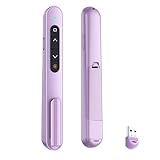
- 【PLUG & PLAY】This presentation clicker supports page up/down, hyperlink navigation, volume control, power on/off, and full screen/black screen switching. No software or driver is required, just plug the USB receiver into your computer's USB port and you're ready to start the show (Requires one AAA battery, not included)
- 【BRIGHT RED POINTER LIGHT】This powerpoint clicker emits a bright red light that helps you clearly mark key parts of each slide so your audience can easily follow your main points. It remains clearly visible even in large conference rooms or lecture halls
- 【328FT LONG WIRELESS RANGE】This clicker for PowerPoint presentations delivers a control distance of up to 328 ft, allowing you to roam the entire hall and interact directly with your audience. Step away from the limits of a stationary podium to deliver a more dynamic presentation
- 【BROAD COMPATIBILITY】This wireless presenter remote works smoothly across different systems and software, compatible with Mac OS and Windows laptops. It supports software such as PowerPoint, Keynote, Google Slides, Excel, ACDSee, and Prezi
- 【PORTABLE SLIDE CLICKER】This presentation pointer includes a convenient clip that attaches to a notebook or pocket for easy carrying. It is a helpful tool for meetings, classrooms, training sessions, and presentations, and it is also suitable for sharing with colleagues and friends
Product prices and availability are accurate as of the date/time indicated and are subject to change. Any price and availability information displayed on Amazon at the time of purchase will apply.




