What’s actually slowing this PC down?
Pick the symptom - the matching free tool is one click away.
Apple Pay works at most U.S. merchants with an enabled NFC contactless terminal, but there is no permanent, official Apple directory of every participating store. Acceptance can vary by location, payment network, register, self-checkout, fuel pump, drive-through, app, or website.
This guide covers major U.S. and Puerto Rico chains, identifies important holdouts, and explains how to verify a specific location before you leave home.
As an Amazon Associate I earn from qualifying purchases.
Quick answer: where Apple Pay works
In general, you can use Apple Pay wherever the merchant accepts contactless payments and accepts the card network attached to the card in your Apple Wallet. Look for the Apple Pay logo or contactless symbol, but do not treat either as an absolute guarantee: Apple says a terminal may display the symbol even when contactless payments are not currently enabled. See Apple’s current guidance.
Quick wins for a faster PC:
Fix the driver behind crashes, sound loss and screen glitchesFind Drivers →Clear out junk files and repair common Windows errorsFree Scan →Scan for outdated or missing drivers - takes under a minuteDriver Scan →The lists below are useful chain-level references, not guarantees for every branch. Franchisees, older terminals, kiosks, fuel pumps, and regional payment systems can behave differently.
#1 Best Overall

- With Square Terminal, you can ring up sales, accept payments, and print receipts, all with one device. Use it at the counter or ring up customers anywhere in your store.
- Accept all major credit and debit cards and pay one low rate with no hidden fees and no long-term contracts.
- Process chip cards in just two seconds.
- Get your money as soon as the next business day.
- Use it cordlessly with the built-in battery, designed to last all day.
| Chain | In-store | App | Website | Status |
|---|---|---|---|---|
| Target | Generally yes | Where offered | Where offered | Generally accepted |
| Best Buy | Generally yes | Where offered | Where offered | Generally accepted |
| CVS | Generally yes | Where offered | Where offered | Generally accepted |
| Walgreens | Generally yes | Where offered | Where offered | Generally accepted |
| Walmart | Generally no | Walmart Pay instead | Varies by checkout | Major holdout |
| Home Depot | Verify locally | Verify | Verify | Unconfirmed or variable |
| Kroger-family stores | Select or variable | Verify | Verify | Location or rollout dependent |
Department stores, electronics, clothing, and general retail
These major retailers are commonly reported as accepting Apple Pay at participating physical locations and, in many cases, in their digital checkout:
- Target
- Best Buy
- Macy’s
- Bloomingdale’s
- Nordstrom
- Kohl’s
- Apple Store
- Nike
- Sephora
- Ulta Beauty
- Ace Hardware
- Old Navy
- Gap
- Athleta
- Pottery Barn
- Williams Sonoma
- Crate & Barrel
- Etsy
- Wayfair
For online retailers, “accepts Apple Pay” means the Apple Pay button appears at checkout for an eligible customer. It does not necessarily mean every product, browser, device, shipping address, or transaction type supports it.
Grocery stores and warehouse clubs
Apple Pay is commonly available at many major grocery chains, although terminal and store-level exceptions remain possible:
- ALDI
- Publix
- Whole Foods Market
- Trader Joe’s
- Safeway
- Albertsons
- Vons
- Shaw’s
- Jewel-Osco
- ACME
- Meijer
- Wegmans
- H-E-B, subject to local and channel-specific verification
- Kroger-family stores, where availability may depend on rollout and location
- Costco, subject to the terminal and the card network accepted at that location
Do not assume that every Kroger-family store has identical support. Costco acceptance also depends on whether the card in Apple Wallet uses a network accepted by Costco.
Rank #2

- Use the, easy-to-use, and customizable POS to get started.
- Accept contactless payments, chip cards, Apple Pay, and Google Pay from anywhere, with improved connectivity, extended battery life, and enhanced security. Pay one low rate for every tap or dip.
- No long-term commitments or contracts, no monthly fees- and with offline payments, keep taking payments for up to 24 hours.
- Safely and securely accepts payments anywhere. Plus, get data security, 24/7 fraud prevention, and payment-dispute management at no extra cost.
- Use the, easy-to-use, and customizable POS to get started.
Pharmacies and drugstores
- CVS Pharmacy
- Walgreens
- Rite Aid, where locations remain open
- Duane Reade
- Pharmacies inside participating grocery stores
- CVS pharmacies inside Target, where the payment terminal is part of the Target checkout environment
A chain may accept Apple Pay at its front register while a pharmacy counter, kiosk, or self-checkout uses different equipment. App and website support are separate from in-store acceptance.
Restaurants and fast food
Commonly cited Apple Pay restaurants and food services include:
- McDonald’s
- Starbucks
- Dunkin’
- Chick-fil-A
- Subway
- Taco Bell
- Panera Bread
- Chipotle
- KFC
- Wendy’s
- Burger King
- Shake Shack
- Domino’s
- Pizza Hut
- Jersey Mike’s
- Jimmy John’s
- Five Guys
- DoorDash and other participating delivery platforms
Restaurant support is especially channel-dependent. A chain’s app may accept Apple Pay even when a particular restaurant does not have a contactless reader. Counter service, self-service kiosks, drive-through lanes, and delivery checkouts may all use different payment systems.
Do these 3 things before closing this tab:
1Clear out junk files and repair common Windows errors2Scan for outdated or missing drivers - takes under a minute3Repair Windows errors before they cause bigger problemsAt a drive-through, ask whether the employee can bring a handheld contactless terminal to your vehicle. Many lanes do not have a customer-facing NFC reader.
Rank #3

- 【Universal Compatibility】 - The MDB Payment Device to PC Converter is designed to connect a variety of MDB devices such as acceptors, bill receivers, and card readers effortlessly. It offers seamless integration with any vending equipment compliant with MDB specifications, ensuring versatility in your payment solutions.
- 【User-Friendly Interface】 - This USB adapter features a straightforward setup process. Simply connect it to your computer, and the adapter transforms MDB protocols into RS-232 serial protocols. This allows for easy communication between your vending machine and your PC, simplifying operations while providing reliable performance.
- 【Enhanced Control】 - With capabilities to control up to eight MDB-compatible devices simultaneously, this converter enhances your management efficiency. Whether you’re handling dispensers or bill acceptors, experience effective monitoring and command over your vending machine operations like never before.
- 【Robust Functionality】 - The MDB-PC USB converter supports a variety of interfaces, including cash interfaces (10H and 60H) and USD interfaces (40H). This broad support mechanism ensures compatibility across multiple configurations, making it an ideal solution for complex setups.
- 【Comprehensive Package】 - Each converter comes complete with required cables, a user guide, and a user agreement, providing everything you need for successful installation. Designed for easy implementation, enjoy a plug-and-play experience with reliable support for all essential MDB functions.
Gas stations and convenience stores
Major chains commonly associated with Apple Pay include:
- Shell
- Chevron
- Exxon
- Mobil
- BP
- Speedway
- 7-Eleven
- Wawa
- Casey’s
- Circle K
- QuikTrip
- Sheetz
- Cumberland Farms
- Pilot
- Flying J
- Love’s
Pay-at-the-pump and pay-inside acceptance are separate questions. A station may have an NFC-enabled cashier terminal but older pumps, or contactless pumps but a different inside register. Some pumps require you to tap before selecting fuel. Debit and credit cards may also show temporary preauthorization holds.
Online stores, apps, and services
Apple Pay may appear at checkout for eligible users on services including:
- Apple Store, App Store, Apple Music, Apple TV, Apple News+, and iCloud
- Target
- Best Buy
- Nike
- Etsy
- Wayfair
- Walgreens
- CVS
- Starbucks
- Uber
- Lyft
- DoorDash
- Grubhub
- Instacart
- Airbnb
- Ticketmaster, where offered at checkout
Apple says Apple Pay can be used on the web and in apps when the Apple Pay button or payment option appears. Availability can depend on your device, operating-system version, browser, region, card issuer, shipping address, subscription rules, and the merchant’s integration. More details are available from Apple’s payment instructions and Apple’s Apple Pay overview.
Rank #4

- Effortless payments and printing: Accept card payments and print payment receipts on the spot with the built-in 40 mm thermal printer.
- Faster sales processing: Use pre-set menus and catalogs to make transactions faster and smoother for you and your customers.
- Reliable and portable: Featuring a 6.5" HD touchscreen made from Corning Gorilla Glass and a powerful battery that lasts all day.
- Seamless connectivity: Stay connected with free mobile data and WiFi, ensuring uninterrupted transactions.
- Real-time payment tracking: Monitor payments and issue refunds right from your device, so you're always in control.
Major stores that do not accept Apple Pay or need special verification
| Retailer | Practical status | What to use or check |
|---|---|---|
| Walmart | Generally unavailable at U.S. checkout | Walmart Pay and other Walmart app payment features |
| Sam’s Club | Likely retailer-wallet case | Do not confuse Scan & Go or the Sam’s Club app with Apple Pay |
| Home Depot | Not confirmed nationwide | Check the specific store, register, and current merchant policy |
| Kroger-family stores | Variable or rollout dependent | Confirm the location and terminal |
| Menards | Location-level confirmation advised | Ask before relying on Apple Pay |
| Hobby Lobby, Dollar General, Dollar Tree, Family Dollar, Food Lion, WinCo | Not confirmed as a universal chain-wide status | Verify locally |
Walmart generally does not accept Apple Pay at U.S. checkout. Its payment alternatives include Walmart Pay and related in-app features. Retailer policies can change, so check Walmart’s current payment options if Apple Pay is essential.
Home Depot should not be labeled a permanent nationwide yes or no based only on old articles or user reports. Lowe’s and other hardware chains may also have differences between newer and older terminals.
What “accepts Apple Pay” actually means
- In-store NFC payment: You tap an iPhone or Apple Watch on a compatible contactless reader.
- Retailer app: You select Apple Pay inside the merchant’s app. This does not prove the physical store accepts tap-to-pay.
- Website: You select the Apple Pay button during online checkout.
- Account funding: Apple Pay may be available to add money to a retailer balance or gift card.
- Retailer wallet or QR payment: Walmart Pay, Kroger Pay, Starbucks barcode payments, Target-specific payment features, and similar systems are not automatically Apple Pay.
- Apple Wallet loyalty pass: Adding a store card or loyalty pass to Wallet does not prove that the store accepts Apple Pay for purchases.
The merchant must support Apple Pay and accept the payment network used by your Wallet card. A store that accepts Visa through Apple Pay may not accept every other network or card type.
How to find Apple Pay stores near you
- Check the location. Look for the Apple Pay or contactless symbol at the entrance, register, kiosk, pump, or drive-through terminal.
- Use Apple Maps. Search the business name plus “Apple Pay” or search for Apple Pay near you. Apple recommends Maps as one way to find participating merchants.
- Check the merchant’s current FAQ or app. Look specifically for separate information about stores, apps, websites, fuel pumps, and drive-throughs.
- Ask about the exact payment point. Confirm that the specific register, pump, self-checkout, or kiosk accepts contactless payments.
- Check your card. Confirm that the card is supported by Apple Pay and that its payment network is accepted by the merchant.
Apple’s official location and acceptance guidance is at support.apple.com/en-us/120364. Apple also lists the United States and Puerto Rico among supported Apple Pay markets; international branches of the same retailer may follow different rules. See Apple’s country and region information.
Best Value
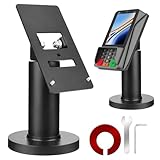
- Compatibility - This POS display stand is compatible for Pax A35, Pax S300. Note: Please carefully confirm the POS machine model before purchasing.
- Easy Installation - Installs quickly using the included type adhesive tape or can be permanently installed to any surface via a drilled hole and bolt mount. And can be removed by heating the area with a hairdryer and using string/thread to detach it if needed.
- Adjustable Card Terminal Mount - The 360-degree swivel allows cashiers to effortlessly turn the device left and right to assist customers without leaving their side, while the 65-degree tilt ensures the terminal is positioned at the optimal angle for various counter heights.
- Commercial Strength - Steel construction gives this universal POS stand durability for use as counter payment terminal in almost any setting.
- Perfect Height - The Pax A35 credit card payment machine stands' ideal height of 4.7" is designed for optimal counter alignment. It provides ample clearance for card insertion and can be adjusted using the tilt feature. Once the perfect tilt angle is set, secure it in place with the included Allen key and wrench to prevent unwanted movement.
How to pay with an iPhone or Apple Watch
On a Face ID iPhone, double-click the side button, authenticate with Face ID or your passcode, then hold the top of the iPhone near the reader. On a Touch ID iPhone, double-click the Home button, authenticate, and hold the phone near the reader. Choose a different Wallet card before presenting the phone if necessary.
With Apple Watch, double-click the side button, hold the display near the contactless reader, and wait for the confirmation vibration or checkmark. Apple’s current device instructions cover model-specific variations.
What to do if Apple Pay fails
- Try another register, reader, or lane.
- Ask whether contactless payments are enabled on that particular terminal.
- Try a different card in Apple Wallet.
- Confirm that the merchant accepts the card’s payment network.
- Check whether your issuer declined the transaction or requires verification.
- Try the physical card if the problem appears device-specific.
- Use the retailer’s own wallet or app if Apple Pay is unavailable.
- For a drive-through, ask for a handheld terminal or pay at the counter instead.
A contactless symbol does not guarantee a working Apple Pay transaction. The terminal may be disabled, configured for limited contactless use, positioned unexpectedly, or unable to route your particular card network. A store can also support Apple Pay in its app while lacking compatible in-store equipment.
Free tools Windows power users keep installed
One-click scans. No signup required.
Apple Pay alternatives
If Apple Pay is unavailable, use a physical card, cash, the merchant’s own wallet, an in-app payment method, or an online option such as PayPal where available. Retailer wallets may provide coupons, loyalty tracking, receipts, or scan-and-go features that Apple Pay does not, but they may require an account, app, store tracking, or a separate setup.
Apple Pay is also different from Apple Cash. Apple Cash is a U.S. Wallet feature for sending and receiving money; Apple Pay is the purchasing service used at participating stores, apps, and websites.
Quick Recap
Product prices and availability are accurate as of the date/time indicated and are subject to change. Any price and availability information displayed on Amazon at the time of purchase will apply.




