Recommended Free Tools
An E-ZPass scam text is a form of smishing: a criminal sends an SMS pretending to be a toll agency, claims you have an unpaid balance, and directs you to a payment page. The page may copy official branding but is built to collect your card number, bank details, driver’s-license information, login credentials, or Social Security number.
These messages are often sent in bulk. You may receive one even if you have never had an E-ZPass account or driven on a toll road. Do not click the link or pay through the text. Verify any possible toll balance through the agency’s independently located website, app, or phone number.
What an E-ZPass scam text looks like
The typical message combines three elements:
- It claims you owe a small unpaid toll or administrative balance.
- It creates urgency by threatening a late fee, penalty, registration problem, or collection action.
- It provides a link and asks you to pay immediately.
The scam is not limited to the E-ZPass name. Criminals have also impersonated Peach Pass, SunPass, FasTrak, TxTag, and other toll programs. The same campaign may use different agency names depending on the recipient’s location.
A message can look polished and still be fraudulent. Spelling mistakes are a clue when they appear, but correct grammar, official-looking logos, and a familiar agency name do not make a payment link safe.
#1 Best Overall

- [E-ZPASS NETWORK] Works everywhere the E-ZPass(SM) is accepted (see map image for details)
- [CLASS 2 VEHICLES] For Class 2 (2 axle vehicles). If you need a different class, please visit the indianatollroad website
- [ACTIVATION] Must activate on indianatollroad website once received, includes $8 prepaid funds
- [MOUNTING & ACTIVATION] Mounting and activation directions included
- [WINDSHIELD RESTRICTIONS] Certain vehicles may require a bumper transponder due to a heated/infrared windshield, etc. Please see our alternative mounting vehicle list in images to determine whether your vehicle will require a bumper transponder, please visit the indianatollroad website to purchase bumper transponder.
Warning signs to check
| Warning sign | Why it matters |
|---|---|
| Unexpected demand for payment | You were not expecting a balance, statement, or agency notification. |
| Immediate deadline or threat | Scammers want you to act before you have time to verify the claim. |
| Link in the text | The link can lead to a fake payment page or a site that harvests personal information. |
| Odd web address | Look-alike domains, extra characters, random words, and unsecured or shortened links can indicate fraud. |
| Request for sensitive information | A toll-payment text should not be used as a reason to provide your Social Security number, driver’s-license details, bank login, or unrelated account credentials. |
| Random phone number | A long mobile number is suspicious, although sender-number rules vary by toll agency. |
Do not assume a link is safe because it contains “ezpass,” a state name, or another official-sounding phrase. Scammers register addresses designed to look close to legitimate sites. The FBI has also reported campaigns in which the sending numbers changed between states.
Are all E-ZPass texts fake?
No. There is no single national E-ZPass customer-service operation that manages every customer account. The E-ZPass Group says individual member agencies handle customer accounts and toll collection, so notification practices differ.
For example, E-ZPass Virginia identifies 1-844-548-0707 and 1-844-718-2368 as authorized notification numbers. Pennsylvania takes a different approach: the Pennsylvania Turnpike says it does not text E-ZPass or Toll By Plate customers about unpaid balances and begins overdue-balance communications by U.S. mail. Its collection partners may text customers with significant overdue balances, but those messages should identify the company and should not request payment through random links, Zelle, or Venmo.
These agency-specific differences make a blanket rule unreliable. The safe rule is simpler: never use the payment link in an unexpected toll text. Check your account through a website or app you find independently, or use a phone number from a prior statement, account card, or official government website.
Quick wins for a faster PC:
Repair Windows errors before they cause bigger problemsFix Now →Scan for outdated or missing drivers - takes under a minuteDriver Scan →Rank #2

- E-PASS ACCOUNT & ACTIVATION REQUIRED: E-PASS toll account is required to activate the Uni toll pass. If you do not have an E-PASS account, you will be prompted to create one during the activation process. The Uni toll pass cannot be added to a SunPass or E-ZPass toll account. E-PASS is managed by the Central Florida Expressway Authority. Activation may take up to 24 hours. Detailed instructions are on the packaging.
- TOLL ROAD ACCESS IN 19 STATES: Accepted on all Florida toll roads and express lanes, including “SunPass Only” and I-4 Express lanes, plus toll roads in: Georgia, North Carolina, Virginia, West Virginia, Maryland, Delaware, New Jersey, New York, Pennsylvania, Massachusetts, Rhode Island, New Hampshire, Maine, Ohio, Indiana, Illinois, Kentucky, and Minnesota. Accepted for parking at Orlando International Airport (including the Brightline station) and Port Canaveral Cruise Terminal 3.
- SAVE ON FLORIDA TOLL ROADS: Enjoy lower toll rates than Pay By Plate rates in Central Florida, plus additional savings with exclusive E-PASS Volume Toll Discounts on Central Florida Expressway Authority roads. No monthly or annual account fees.
- PORTABLE: Attaches to the interior windshield behind the rearview mirror with suction cups for easy transfer between 2-axle vehicles, including rental cars. If you transfer the Uni between vehicles, make sure you update your E-PASS account with the new vehicle’s license plate. For motorcycles, place the transponder in a saddlebag or storage compartment. Not for trailers or multi-axle vehicles.
- RENTAL CAR USE: A Uni toll pass can be used with rental cars of the same class — 2-axle vehicles. Make sure to add the rental vehicle's license plate to your E-PASS account. It may take up to 24 hours to link; during this time, tolls may be processed as an invoice. Make sure to remove the plate from your account after returning the vehicle to avoid charges from subsequent renters.
What to do when you receive a suspicious text
- Do not reply. A response confirms that your phone number is active and does not help establish whether the message is legitimate.
- Do not click the link, scan a QR code, or call the number in the message. Any of those actions can take you to the scammer’s site or connect you with the scam operation.
- Verify separately. Type the known toll agency’s address into your browser, open its official app, or call a number from an earlier statement or independently found official site. Sign in only through that route.
- Report the text to your carrier. Press and hold the message, choose Forward, enter 7726—which spells “SPAM”—and send it. If your messaging app offers Report junk or Report spam, use that option as well.
- Report the fraud to the FTC. Submit the details at ReportFraud.ftc.gov.
- Report it to the FBI’s Internet Crime Complaint Center. Go to IC3.gov, select File a Complaint, and include the sender’s number and the website address shown in the text.
- Delete the message after reporting it. Do not keep returning to the link or forwarding it to other people.
If you clicked the link but entered nothing
Close the page. Do not download an app, install a browser extension, approve a notification request, or enter information later. If the site downloaded a file or prompted you to install software, update your security software and run a scan. Remove anything identified as malicious.
Also watch for follow-up messages. A scammer who knows that a number interacted with a page may send additional payment demands or account-reset messages.
If you entered personal or financial information
Act quickly, using the response that matches what you exposed:
| Information or action | What to do next |
|---|---|
| Credit or debit card | Call the card issuer using the number on the card. Report the fraudulent transaction, ask whether the card should be replaced, and request that the charge be reversed. |
| Bank account, unauthorized debit, or transfer | Contact the bank immediately, report the unauthorized transaction, and ask about stopping or reversing it. |
| Username or password | Change the password immediately. Change it anywhere else you reused it, and turn on multifactor authentication where available. |
| Social Security number | Use IdentityTheft.gov for recovery and credit-monitoring steps. |
| Driver’s-license information | Contact your state motor-vehicle agency for guidance on replacement or fraud precautions, and monitor accounts for identity-theft activity. |
| Device access or software installation | Disconnect if necessary, update security software, run a scan, and remove malicious software. Change important passwords from a clean device. |
Review bank, card, email, and other important accounts for unfamiliar charges, password changes, new payment methods, or security alerts. Keep screenshots of the text, the website address, transaction records, and your reports. That information can help your bank, the FTC, or law enforcement investigate.
Crashes, No Sound, or Screen Glitches?
Random freezes, missing sound and display glitches usually trace back to one bad driver. Find and replace yours safely.Free scan · under a minuteWindows Errors? Fix Them Before They Spread
Repair common Windows errors and clear accumulated junk for a smoother, more stable PC - no reinstall needed.Free scan · no reinstallRank #3

- SunPass PRO is a portable transponder that works in Florida plus 23 other states, including everywhere E-ZPass is accepted. SunPass PRO offers drivers the convenience of paying tolls automatically allowing nonstop travel with just one toll account.
- SunPass PRO works on all toll roads and most bridges in Florida plus, Delaware, Georgia, Illinois, Indiana, Kansas, Kentucky, Maine, Maryland, Massachusetts, Minnesota, New Hampshire, New Jersey, New York, North Carolina, Ohio, Oklahoma, Pennsylvania, Rhode Island, parts of Texas, Virginia, and West Virginia.
- Benefit from reduced toll rates and reloadable convenience, empowering you to manage expenses efficiently while enjoying the convenience of SunPass Pro on your travels.
- With a straightforward windshield attachment, SunPass Pro is effortlessly installed without tools or complex setups, getting you on the road swiftly.
- Stay in control of your toll expenses with easy access to transaction monitoring, balance checks, and account management via the SunPass mobile app or online portal, ensuring peace of mind on every trip.
How to verify a real toll balance safely
- Identify which agency could actually have billed you. Consider where you drove, whether you rented a vehicle, and whether the message names a specific state or toll road.
- Find the agency’s website independently. Use a saved bookmark, a statement, the back of your transponder materials, or an official state or toll-road website—not the SMS link.
- Open the agency’s account-login or payment page manually.
- Check the balance, vehicle details, and recent trips. If the agency cannot find an account or transaction, do not provide payment information to the text sender.
- Call customer service using the independently verified number if the account information is unclear.
Remember that a real unpaid toll can still exist even when the text is fake. Verify the balance through the proper channel rather than ignoring every toll notice or paying an unverified demand.
Why these scams are convincing
The requested amount is often small enough to encourage an impulsive payment. The message also exploits a plausible uncertainty: you may have driven through an unfamiliar toll lane, used a rental car, or crossed state lines. Once a victim reaches the fake payment page, the criminal can collect more than the supposed toll by asking for card, bank, identity, and login data.
E-ZPass Virginia has said that recipients of one scam campaign included people who were not E-ZPass customers and that the messages were not evidence of an E-ZPass Virginia data breach. Receiving a text, therefore, does not prove that a toll agency—or your account—was hacked.
Independent reader supportYour contribution helps us test, update, and keep practical guides available for everyone.Bottom line for your phone
Treat an unexpected toll-payment text as untrusted communication. Do not click, reply, call, or pay from it. Verify independently, forward it to 7726, report it at ReportFraud.ftc.gov and, when appropriate, IC3.gov. If you submitted information, contact the relevant bank or card issuer immediately and begin identity-recovery steps for any exposed personal data.
Do these 3 things before closing this tab:
1Repair Windows errors before they cause bigger problems2Fix the driver behind crashes, sound loss and screen glitches3Clear out junk files and repair common Windows errorsRank #4
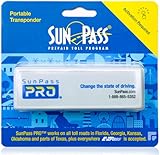
- SunPass PRO is a portable transponder that works in Florida plus 21 other states, including everywhere E-ZPass is accepted. SunPass PRO offers drivers the convenience of paying tolls automatically allowing nonstop travel with just one toll account.
- SunPass PRO works on all toll roads and most bridges in Florida plus, Delaware, Georgia, Illinois, Indiana, Kansas, Kentucky, Maine, Maryland, Massachusetts, Minnesota, New Hampshire, New Jersey, New York, North Carolina, Ohio, Oklahoma, Pennsylvania, Rhode Island, parts of Texas, Virginia, and West Virginia.
- Benefit from reduced toll rates and reloadable convenience, empowering you to manage expenses efficiently while enjoying the convenience of SunPass Pro on your travels.
- With a straightforward windshield attachment, SunPass Pro is effortlessly installed without tools or complex setups, getting you on the road swiftly.
- Stay in control of your toll expenses with easy access to transaction monitoring, balance checks, and account management via the SunPass mobile app or online portal, ensuring peace of mind on every trip.
FAQ
How do I know if an E-ZPass text is a scam?
An unsolicited demand for a small toll balance, an urgent threat of penalties, and a payment link are strong warning signs. An unfamiliar domain, random sender number, or request for sensitive personal information adds to the concern. Verify through the toll agency’s independently located website, app, or phone number.
What number do I forward an E-ZPass scam text to?
Forward the message to 7726, which spells “SPAM.” In your messaging app, press and hold the text, select Forward, enter 7726, and send it. Use the app’s Report junk or Report spam feature too, if available.
What if I clicked an E-ZPass scam link?
Close the page and do not enter information or install software. If you entered card or bank details, contact the financial institution immediately. Change any exposed or reused passwords, scan the device if software was installed, and use IdentityTheft.gov if you provided your Social Security number.
Do legitimate E-ZPass agencies ever send text messages?
Some agencies do send legitimate alerts, while others do not use texts for unpaid balances. Practices vary because individual E-ZPass agencies manage their own customers. Never rely on a general claim that every E-ZPass text is fake or real; verify through the specific agency’s official channels and never use an unexpected payment link.
The Tool Desk
Outbyte PC Repair FREEClear out junk files and repair common Windows errorsFree Scan →Outbyte Driver Updater FREEFix the driver behind crashes, sound loss and screen glitchesFind Drivers →The Bottom Line
Never pay an unexpected toll demand through its text-message link. Verify the balance independently, report the message to 7726 and the FTC, and contact your bank or card issuer immediately if you shared financial information.
Quick Recap
Product prices and availability are accurate as of the date/time indicated and are subject to change. Any price and availability information displayed on Amazon at the time of purchase will apply.




