What’s actually slowing this PC down?
Pick the symptom - the matching free tool is one click away.
Classplus is a subscription platform for educators and coaching businesses, combining a branded app and website with tools for courses, live classes, tests, and student administration. Its public pricing pages showed materially different prices and subscription terms in 2026, so there is no single reliable price to quote without naming the offer. Get a written quote for your exact plan before committing, including tax, renewal and payment charges, included features, and cancellation and data-export terms.
What Classplus does
Classplus is software for running an education business, rather than a physical product purchase. Its new-web offer page lists an Android app, website, admin portal, recorded courses, live classes, student enrollment, storage, and AI-powered leads. The Classplus for Creators page lists a branded app and website, test portal, WhatsApp automation, and marketing support; higher plans add features such as integrations, an iOS app, and custom UI.
Classplus positions the service toward educators and content creators. The company’s comparison with other platforms describes its focus as Indian teachers, tutors, and coaching institutes; that is vendor positioning, not independent evidence that it is the right fit for every educator.
Classplus pricing in 2026
Public prices differ by page, plan, and term. The figures below were observed in 2026; they are not a guarantee that an offer remains available or will apply to a particular buyer.
Crashes, No Sound, or Screen Glitches?
Random freezes, missing sound and display glitches usually trace back to one bad driver. Find and replace yours safely.Free scan · under a minutePC Slower Than It Used to Be?
A free scan shows the junk files, broken settings and background clutter dragging Windows down - then fixes them in one click.Free scan · Windows 10 & 11#1 Best Overall

- Word-first 16K Pressure Levels: The upgraded stylus features 16,384 levels of pressure sensitivity and supports up to 60 degrees of tilt, delivering smoother lines and shading for a natural drawing experience. With no battery or charging needed, it operates like a real pen, making it easy for beginners to create effortlessly. This functionality helps novice artists develop their skills and explore their creativity without the intimidation of complex tools
- Designed for Beginners: This drawing pad desinged with 8 customizable shortcuts for both right and left-hand users, express keys create a highly ergonomic and convenient work platform
- Perfectly Adapted for Android: The XPPen Deco 01 V3 art tablet supports connections with Android devices running version 10.0 and above. It is recommended to download the XPPen Tools Android application, which adapts to your smartphone's screen aspect ratio, ensuring accurate mapping. It also supports mapping on Android screens with different aspect ratios in portrait mode
- Large Drawing Space, Bigger Bold Inspiration: This expansive drawing pad has10 x 6.25-inch helps you break through the limit between shortcut keys and drawing area
- Easy Connectivity for Beginners: The Deco 01 V3 offers USB-C to USB-C connectivity, plus adapters for USB C. This ensures easy connection to various devices, allowing beginner artists to set up quickly and focus on their creativity without compatibility concerns. Whether using a laptop, tablet, or desktop, the Deco 01 V3 provides a seamless experience, making it an ideal choice for those just starting their digital art journey
| Source and offer | Displayed price and term | Tax qualification |
|---|---|---|
| Classplus /new-web page | ₹29,999 for one year. Its search-result capture also showed ₹39,999 for two years. | GST treatment was not stated in the captured page text. |
| Classplus for Creators | Starter: ₹19,999 for one year; Growth: ₹26,999 for three years; Pro: ₹35,999 for five years. Each card directs prospects to book a free demo. | Prices are explicitly exclusive of GST. |
| Peerseek audit of Classplus-owned sites | Reported a limited-time ₹1,000/month offer on monthly.classplusapp.com, ₹19,999/year on classplusforcreators.co, and ₹29,999/year on classplusapp.com/new-web. It also reported that the main site listed no price. | The audit reported the creators price as plus GST; the other offers’ tax treatment was not stated in the audit summary. |
| G2 listing | Search-result listing showed ₹19,999/year, ₹22,999 every two years, and ₹24,999 every three years. | Tax treatment was not stated in the listing information available. |
Peerseek said it checked four Classplus-owned sites from an Indian connection on September 21, 2026, and found no transaction percentage on the pages it checked. That does not establish that a specific buyer’s contract or payment setup has no transaction or payment-processing charges. G2’s figures are a third-party listing, not definitive checkout pricing. For a purchase, the checkout page and signed terms control.
What to get in writing before paying
- The exact plan, subscription length, total due, and whether GST is included or added.
- The renewal price and whether the subscription renews automatically.
- Any transaction, payment-processing, or other fees, including how they are calculated.
- Which app and website are included, whether iOS is included, and what customization is available.
- Student limits, storage limits, and which course, live-class, test, marketing, and integration features are part of the quoted plan.
- Setup and support scope, cancellation conditions, and how you can export student and course data if you leave.
What reviews and ratings establish
Available review evidence is too limited to support a blanket conclusion that customers are satisfied or dissatisfied with the complete paid platform.
Rank #2

- Ultra thin tablet: Active Area 4 x 3 inches. Fully utilizing our 8192 levels of pen pressure sensitivity―Providing you with groundbreaking control and fluidity to expand your creative output. Please note: The 4 x 3 inches is very small, please confirm that it will meet your needs before you purchase it
- OSU game: Designed for OSU! gameplay, drawing, painting, sketching, E-signatures etc. No need to install drivers for OSU! It's also designed for both right and left hand users
- Accurate Pen Performance: StarG430S computer graphics tablet is the perfect replacement for a traditional mouse! The XPPen advanced Battery-free PN01 stylus does not require charging, allowing for constant uninterrupted Draw and Play, making lines flow quicker and smoother, enhancing overall performance
- Compact and Portable: The G430S art tablet is only 2 mm thick, it’s as slim as all primary level graphic tablets,Ultra-thin and portable, allowing you hold it in one hand and carry it on the go. This graphic drawing tablet supports Mac. However, since the product interface is micro USB to USB-A, if your computer is a Mac and does not have a USB-A port, you will need to purchase an OTG transfer adapter to ensure compatibility with your Mac. So please confirm your computer port before you purchase it
- PLEASE NOTE: The XPPen StarG 430 is compatible with the Windows system 11/10/8/7(32/64 bit), and the Mac OS X version 10.10 or later, but it is incompatible with iOS and iPad OS. If your computer is a Mac, you need to grant permission to the Mac preferences first. Please go to our official website, and according to the guide: XPPen>Support>FAQ, find out the Star G430 and click, then click the question according to your Mac system. There are detailed guidelines for installing the driver so your tablet will work correctly. It's possible incompatible with the customer's own EMR system or other signature system. Please feel free to contact us to confirm the compatibility before your purchase
One dated G2 review
G2’s returned listing includes a review by Joydeep D., identified there as a regional key account manager at a small business, dated 10/12/2022. He praised the ability to run classes and exams and sell course content through the software, while criticizing the similarity of branded apps and lack of customization. This is one review from 2022, not a representative survey or proof of what current plans permit.
Apple App Store rating
Apple’s India App Store listing showed 4.6/5 from about 50,000 ratings when observed in 2026. That rating belongs to the app listing, can change, and does not measure the complete paid institution platform. The listing describes app features including batches, notices, notes, quizzes, fee receipts, attendance, reports, and student-tutor communication.
Do these 3 things before closing this tab:
1Clear out junk files and repair common Windows errors2Fix the driver behind crashes, sound loss and screen glitches3Repair Windows errors before they cause bigger problemsRank #3

- 【Broad Compatibility】XOPPOX upgraded drawing tablet is compatible with Windows XP/7/8/10/11, Android 4.4 and above, and macOS 11 or later (not compatible with iPhone, iPad, or Chromebook). Note: For Mac users, permissions for Accessibility, Input Monitoring, and Full Disk Access are required in Security & Privacy after installation
- 【No-Battery Pen】The digital drawing tablet comes with a battery-free pen featuring 8192 levels of pressure sensitivity, making lines smoother and more natural. This pen does not need to be charged, so you don’t have to worry about battery power. The package includes 20 replacement nibs
- 【Convenient Shortcut Keys】Designed with 12 customizable shortcut keys and 10 multimedia keys (only compatible with Windows), this drawing pad for pc provides greater convenience and helps improve productivity and efficiency by allowing you to set shortcuts for many different software in the driver settings
- 【Easy to Install】When connecting the graphics tablet to the computer, you can find the installation driver on the removable disk of your computer and install it. Note: After installation, you need to perform some settings and restart your computer before use. If you have any questions about the drawing tablet for pc, please reach out to us directly via "Get Product Support" on the Amazon order page or after-sales email
- 【Wide Range of Use】XOPPOX drawing tablet is compatible with office software such as Microsoft Word, Excel, PowerPoint. It is ideal for online teaching, online classes, remote work, web conferences, presentations, and so on. The art tablet is also compatible with most major software, including Photoshop, SAI, FlipaClip, MediBang, Adobe Illustrator, Lightroom, and more
Questions to resolve for your education business
Use the demo and written quote to check how the service works for your operating model, not just whether a feature appears on a plan card.
- Branding: Will the app use your coaching name, and what branding or custom UI changes are permitted?
- Students and tests: Can you add offline students, are there student limits, and can teachers create and conduct tests?
- Delivery: Which live-class, recorded-course, storage, and test features are included in the quoted plan?
- Availability: Is an Android app included, and does your plan include an iOS app? Confirm app-store publication responsibilities and any related conditions.
- Business terms: What will renewal cost, what fees apply to payments, and what happens to your data and branded app if you cancel?
These are not minor details: the public pages do not settle individualized transaction charges, renewal obligations, support scope, or exit terms. Treat verbal assurances as unconfirmed until they appear in the quote or contract.
Quick Recap
Best Value

- Equipped with two styluses: YP30 electromagnetic pen supports direct writing on the tablet; YP20 ink pen can write on clipped paper, leaving physical handwriting on paper while synchronizing digital strokes to your device. You can easily switch between pure digital creation and traditional paper note-taking
- True Real Paper Handwriting Sync TechnologyWrite directly on regular A4 paper clipped on the board with the pen, every stroke will be synced in real-time to your connected laptop/desktop. No need to adapt to slippery plastic tablet surfaces, keep your natural handwriting habit while going digital
- Practical Clipboard Design for ScenariosBuilt-in sturdy clipboard clamp holds loose paper firmly, perfect for engineering formula drafting, classroom tutoring notes, business meeting minutes, homework correction and technical diagram drawing. Ideal for teachers, engineers, designers, corporate office workers and students
- High Precision Handwriting CaptureCaptures every tiny detail of your formulas, geometric graphs and annotations with high accuracy, keeping the thickness and pressure variation of your original handwriting. Your paper drafts can be edited, saved, shared directly on the computer without retyping or re-drawing
- Wide Compatibility & Plug-and-Play USB ConnectionWired USB plug-and-play design, no complicated wireless pairing or frequent battery charging needed. Fully compatible with Windows and macOS systems, works seamlessly with mainstream whiteboard like zoom, note-taking and drawing software for live online classes, remote presentations
Rank #4
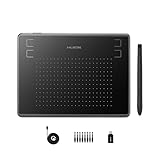
- Huion H430P supports Linux(Ubuntu), MacOS 10.11 and above, Windows 7 and above, and Android 6.0 and above. It can easily connect to your PC, laptop via USB cable for both left and right handed users.
- Digital pen PW201 is battery-free, no need to be charged. 4096 levels of pressure sensitivity with 233pps report rate provides you responsive and natural drawing and handwriting experience with control. 8 replacement nibs are included.
- 135g in weight,6.3mm in thickness,H430P graphics tablet is portable and compact. 4.8x3 inch active area offers perfect creative space for limited desktop areas.4 express keys on the top can be programed to your favourite shortcuts such as Scroll,Undo,Eraser.It will help you work more smoothly and efficiently.
- Compared with computer mouse,it couldn't be easier to draw,edit photos,annotate document,take notes,write formulas and equations with a digital pen. H430P is ideal for collegers and teachers to collaborate, share,interact in online class and video conferencing. No need to install driver for basic writing, annotation and OSU playing.
- H430P pen tablet is compatible with most mainstream drawing softwares like Corel Painter, Adobe Photoshop,Illustrator, SAI and so on. It also work with most softwares for education and business meeting such as Word, PowerPoint, OneNote,Google slides,Zoom,Skype and more.
Product prices and availability are accurate as of the date/time indicated and are subject to change. Any price and availability information displayed on Amazon at the time of purchase will apply.




