Checklists can make repeatable tasks more reliable by prompting people to remember critical steps and, in team settings, communicate about them. They are not a guarantee of good performance: a poorly fitted list, shallow box-checking, or a process that leaves no room for judgment can create false confidence. Evidence of benefit is strongest in surgical settings, so it should not be treated as proof that every checklist works in every setting.
What checklists can do well
Keep critical steps visible
A checklist externalizes memory: instead of relying entirely on recall, a user can verify that specified actions have been addressed. This can be useful when a task is repeatable and omissions matter. The 2024 review by Alfred and colleagues describes checklists as cognitive aids that guide task performance and notes their adoption as a safety intervention in high-risk industries (BMJ Quality & Safety review record).
Support team coordination
A shared checklist can give a team a structure for calling out hazards, confirming actions, and surfacing uncertainty. A 2014 systematic review of 33 surgical studies found associations between checklist use and better hazard detection, fewer surgical complications, and improved communication among operating-room staff (Treadwell, Lucas, and Tsou, 2014). These findings concern surgical care; they do not establish an equivalent effect for personal or workplace lists generally.
What the surgical outcome evidence says
A 2012 systematic review of surgical safety checklists reported a relative risk of mortality of 0.57 and a relative risk of any complications of 0.63 in the included studies (Borchard and colleagues, 2012). These are review estimates from surgical settings, not a prediction that introducing any checklist will reduce deaths or complications by the same amount. A 2022 systematic review encompassed 300 studies and more than 7,302,674 operations and 2,480,748 providers and patients; however, only 38% of studies described at least some detail about how the checklist was completed. The size of that evidence base should not be mistaken for uniform evidence of benefit across all included studies.
Free tools Windows power users keep installed
One-click scans. No signup required.
#1 Best Overall

- ✅ Write down your priorities that need to be accomplished — feel the joy of finally crossing them off!
- ✅ 180 pages — one checklist per day to fuel six months of boosted productivity
- ✅ Separate sections for work, personal life, and self-improvement — make progress in every part of your life
- ✅ Clean, simple layout that helps you stay focused on what matters
- ✅ Daily savings tracker to help you save more, spend smarter, and build wealth faster
Where checklists fall short
Having a list does not mean it is used well
In the 2012 surgical review, checklist compliance varied from 12% to 100% across studies, with a mean of 75%. Differences in setting and measurement matter, but the range makes one point clear: adopting a form does not ensure that people use it as intended. The 2014 review also describes surgical settings where formal or reported compliance did not mean checklist items had been fully completed. A recorded tick is not proof that the underlying action was performed thoughtfully.
Poor fit can miss the real risk
A list may be too generic, aimed at the wrong failure, or mismatched to the experience of its users. It can also become burdensome if it repeats information already collected elsewhere or adds too many items. In surgical implementation literature, avoiding redundant information collection and adapting the checklist to local context were identified as useful strategies (Treadwell, Lucas, and Tsou, 2014).
Rank #2

- TASK PLANNER NOTEPAD FOR WORK – Structured task planner and productivity planner designed as a task organizer and workflow planner with expanded layout
- REDUCE OVERWHELM & IMPROVE EXECUTION – Use this task planner, productivity planner, and task tracker to organize workflow and improve execution
- TASK PLANNING + ACTIVITY TRACKING IN ONE FORMAT – Use as a productivity planner, task organizer, and workflow planner to manage tasks and execution
- ANALOG TASK & ACTIVITY SYSTEM THAT WORKS – Writing tasks improves memory and reduces missed steps
- STRUCTURED CHECKLIST + LOG FORMAT – Combines task planning and activity tracking with expanded space for detailed workflow management
False assurance and inflexibility
A checklist cannot make a flawed process sound, keep outdated instructions current, or resolve every unusual circumstance. Treating completion as a substitute for competence or judgment risks overlooking exceptions. A discussion of checklist use in aviation and healthcare likewise cautions against treating checklist compliance as proof of task quality (BMJ Quality & Safety, 2015).
When a checklist is worth using
Consider a checklist when a task is repeated, has identifiable critical steps or known error types, and benefits from a pause to verify work or coordinate a team. The task and its risk should determine the list—not the availability of a template. Alfred and colleagues’ 2024 review notes that guidance on choosing among checklist types is limited and proposes an algorithm to support selection and design (review record).
Rank #3

- Stay Organized with Ease: Our To Do List Notepad provides multiple sections with plenty of space to jot down all of your important tasks.A versatile office supply perfect for daily task management, helping you keep track of everything that needs to be done and prioritize effectively.
- Achieve Your Productivity Goals: Begin each day on a positive note, reminding you of your potential, strength, and the significance of staying focused on your goals. Our Daily Checklist Notepad is the ultimate tool to streamline your daily planning and elevate your productivity. With a clear and concise overview of your tasks, you can effortlessly prioritize what truly matters and make consistent strides towards achieving your goals.
- Reliable and Stylish: Our to do list planner combines functionality with durability. With a transparent PP cover, the inner pages are well-protected from dirt and wear. Additionally, the back cover is crafted with thick paperboard, offering a stable surface for your writing needs. Each notepad includes 52 pages of high-quality, 100gsm paper, which is thick and non-bleeding, resulting in a smooth and enjoyable writing experience.
- Versatile Use: This daily checklist notepad, suitable for teacher supplies and a wide range of applications, proves invaluable in various settings including work, school, and home. Whether you need to organize your daily tasks, plan a project, or create a grocery list, this notepad serves as the ideal tool. Its compact size ensures easy portability, allowing you to conveniently carry it with you throughout your day.
- Perfect Present for Anyone: Our Daily To-Do List Notepad is the perfect present for those who value organization and productivity. With its stylish design and versatility, this office desk accessory is also a practical addition to school supplies. Suitable for students, professionals, and homemakers alike, it helps keep tasks and priorities in check effortlessly.
Before adopting one, ask:
- What specific omission or failure should this list help prevent?
- Do the items match the actual task, tools, equipment, and users’ experience?
- At what point in the workflow will it be used, and will it duplicate another record?
- Should one person perform and verify the steps, or should a team call out and confirm them together?
- How will you tell whether items were meaningfully completed rather than merely checked off?
Aviation guidance and healthcare literature discuss different checklist approaches; interaction style should follow the task and operating context rather than a universal rule (EASA checklist design report).
How to design and use a checklist effectively
- Name the process and the risk. Define the task and the particular error the checklist is meant to address. Avoid adding items simply because they seem generally useful.
- Choose the form and level of detail for the users. Match prompts to what users know, the tools involved, and the points where a reminder or verification can prevent an omission. A checklist for an expert team may need a different interaction and level of detail from one for a novice working alone.
- Involve the people who will use it. Ask intended users to review and try the list in the real workflow. Revise unclear items, remove unnecessary duplication, and adapt it to local conditions. These are among the implementation strategies discussed in the surgical review literature (2014 systematic review).
- Make completion meaningful. Use the checklist to prompt an action, verification, or team exchange—not as a box-ticking exercise. For team use, agree on who leads the check and how concerns or missed items are handled.
- Evaluate the intended result. Look beyond completion percentages. Check whether the targeted steps were performed, communication improved where relevant, and the process became more reliable. Compliance measures alone do not establish quality.
- Allow for exceptions and judgment. Explain how users should respond when an item does not apply or circumstances differ from the expected process. A checklist should support trained decision-making, not forbid it.
Choosing between paper, digital, and team checklists
The medium is secondary to fit. A paper or digital list can both prompt individual verification; a team checklist can structure spoken confirmation. Choose the approach that fits the risk, workflow, users, and need for coordination. Digital tools may help incorporate prompts into an existing workflow, but they do not by themselves ensure that steps are understood or completed. Whatever the format, evaluate quality of use and the process outcome—not the number of filled boxes.
Quick Recap
Best Value
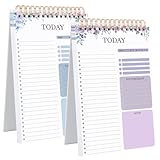
- 【Undated Daily To Do List Notepad】This to do list is non dated, which can help you plan daily planner or appointment without causing waste of pages.2 pack to do list notepad totally 208 pages can meet your daily needs. The product is made of FSC-certified paper.
- 【100GSM Paper & Protective Cover】The planner has a plastic protective cover that protects the inner pages from getting wet, dirty or damaged. The inner pages are made of 100gsm paper, easy to write down and suitable for many types of pens.
- 【Spiral Binding To Do Notebook】The to do list notepad is bound in spirals, which is convenient for turning pages or tearing off used pages to make plans again.
- 【A5 To Do List Planner】The to do list notebook for work is A5 size, measuring 8.3*5.5'', which is very suitable for carrying around and tracking the completion of the to-do list at any time.
- 【Widely Used】The to do list notebook has top priorities, tomorrow plans, don't forget and notes parts to effectively manage your time.It is a home office essential for men and women to plan their life.
Rank #4

- TO DO LIST NOTEPADS FOR WORK – Structured to do list notepad and checklist notepad designed as a daily to do list planner to organize tasks and improve execution
- REDUCE OVERWHELM & IMPROVE EXECUTION – Use this daily to do list and task list notepad to capture priorities, manage workflow, and stay focused without relying on memory
- DAILY TASK ORGANIZER FOR WORK, PROJECTS & CLIENT MANAGEMENT – Use as a daily task planner, productivity planner, and task organizer to manage responsibilities, projects, and workflow across multiple priorities
- ANALOG TASK MANAGEMENT THAT WORKS – Using a physical to do list and workflow planner helps reinforce memory, reduce repeated work, and keep priorities visible so you can execute tasks more efficiently
- PRIORITY + CHECKLIST SYSTEM FOR TASK TRACKING – Structured checklist planner layout with priority sections helps organize tasks, manage workflow, and complete work efficiently
Product prices and availability are accurate as of the date/time indicated and are subject to change. Any price and availability information displayed on Amazon at the time of purchase will apply.




