The Tool Desk
Outbyte Driver Updater FREEFix the driver behind crashes, sound loss and screen glitchesFind Drivers →Outbyte PC Repair FREERepair Windows errors before they cause bigger problemsFix Now →A refurbished Mac can be a smart way to reduce the upfront cost of a computer, but the cheapest listing is not automatically the cheapest purchase. Warranty length, battery condition, included accessories, return shipping, and future macOS support can easily outweigh a $100 price difference.
For most buyers, Apple Certified Refurbished is the best overall choice. It costs more than some marketplace listings, but it combines functional testing, genuine Apple replacement parts as needed, a one-year Apple limited warranty, and AppleCare eligibility on eligible Macs. If your priority is the lowest purchase price, compare Back Market and Swappa—but treat each listing and seller separately.
Where should you buy a refurbished Mac?
| Retailer | Best for | Protection | What to watch |
|---|---|---|---|
| Apple Certified Refurbished | Lowest risk and the closest experience to buying new | One-year Apple limited warranty, full functional testing, genuine Apple replacement parts as needed, and AppleCare on eligible Macs | Prices are not always the lowest, and inventory changes frequently |
| Back Market | Broad selection and aggressive prices | 30-day returns and a one-year limited warranty supplied by the seller | Battery condition, accessories, quality, and support vary by seller |
| Swappa | Finding a specific used configuration | Marketplace warranty on qualifying purchases | Verify the individual listing, serial number, Activation Lock status, and any remaining Apple coverage |
| Best Buy Outlet | Local pickup and open-box bargains | Return and Exchange Promise; manufacturer warranty varies; Geek Squad Protection may be available | Many products are open-box or clearance rather than professionally refurbished |
| Amazon Renewed | Convenience and occasional discounts | Renewed listings generally have a 90-day Renewed Guarantee; Renewed Premium listings may have a one-year return period | The seller, cosmetic grade, charger, and other accessories vary |
Best overall: Apple Certified Refurbished
Apple is the default recommendation when the price difference is reasonable. Apple says its refurbished Macs receive full functional testing, use genuine Apple replacement parts as needed, include accessories and the operating system, and come with a one-year limited warranty. Eligible products can also receive AppleCare coverage.
That protection has financial value. If a third-party Mac is $150 cheaper but has only a short return period, a worn battery, or a seller warranty with broad exclusions, the apparent saving may disappear after one repair or replacement. Apple’s catalog also includes refurbished MacBook Air, MacBook Pro, Mac mini, iMac, Mac Studio, and Mac Pro models, although a particular configuration may sell out.
Quick wins for a faster PC:
Clear out junk files and repair common Windows errorsFree Scan →Scan for outdated or missing drivers - takes under a minuteDriver Scan →Repair Windows errors before they cause bigger problemsFix Now →#1 Best Overall

- Quad-core 8th-Generation Intel Core i5 Processor
- Brilliant Retina Display with True Tone technology
- Touch Bar and Touch ID
- Intel Iris Plus Graphics 645
- Ultrafast SSD
One important qualification: Apple’s refurbished page promises a new battery and outer shell for refurbished iOS devices. It does not establish that every refurbished MacBook has a new battery. Assume a MacBook battery is used unless the listing or Apple specifically says otherwise.
Best low-price options: Back Market and Swappa
Back Market
Back Market is a marketplace, not a single refurbishing company. That makes the individual seller more important than the marketplace name. U.S. listings generally include a 30-day return period and a one-year limited warranty provided by the seller.
Before buying, open the complete listing and check:
- the seller’s rating and number of completed sales;
- the cosmetic grade;
- the stated battery policy or minimum battery capacity;
- whether the charger and cable are included;
- who pays return shipping and how refunds are handled; and
- the warranty exclusions.
Back Market’s warranty does not cover ordinary wear, reduced battery capacity, significant impact damage, liquid damage, or repairs and modifications by unauthorized parties. A Mac that works but has poor battery life may therefore be outside the protection you thought you were buying.
What’s actually slowing this PC down?
Pick the symptom - the matching free tool is one click away.
Rank #2

- Apple-designed M1 chip for a giant leap in CPU, GPU, and machine learning performance
- Go longer than ever with up to 18 hours of battery life
- Up to eight GPU cores with up to 5x faster graphics for graphics-intensive apps and games
Swappa
Swappa is useful when you want to compare exact specifications rather than shop by a broad label such as “MacBook Pro M1.” Eligible purchases may receive a one-year limited marketplace warranty, but that is not the same as an Apple warranty. Check the listing for remaining manufacturer coverage or AppleCare, then verify it with the serial number.
Because Swappa listings are highly specific, compare memory, storage, screen size, chip, model year, keyboard layout, and included accessories. A lower price for an 8GB model is not necessarily a bargain if a similarly priced 16GB model will remain useful for several more years.
Best Buy Outlet and Amazon Renewed: useful, but not uniform
Best Buy Outlet
Best Buy can make sense if local pickup and a straightforward store return are worth paying for. However, its outlet inventory includes open-box and clearance products as well as refurbished items. Best Buy describes open-box products as customer returns or display units that have been inspected; warranty coverage varies by product.
Do not assume an item marked “refurbished” was refurbished by Apple. Also note that Best Buy’s price-match guarantee does not apply to clearance or open-box products. Read the exact product page and inspect the return terms before using a competing price as your benchmark.
Rank #3

- STRIKINGLY THIN DESIGN — The redesigned MacBook Air is more portable than ever and weighs just 2.7 pounds. It’s the incredibly capable laptop that lets you work, play or create just about anything — anywhere
- SUPERCHARGED BY M2 — Get more done faster with a next-generation 8-core CPU, up to 10-core GPU and up to 24GB of unified memory
- BIG, BEAUTIFUL DISPLAY — The 13.6-inch Liquid Retina display features over 500 nits of brightness, P3 wide color and support for 1 billion colors for vibrant images and incredible detail
- ADVANCED CAMERA AND AUDIO — Look sharp and sound great with a 1080p FaceTime HD camera, three-mic array and four-speaker sound system with Spatial Audio
- VERSATILE CONNECTIVITY — MacBook Air features a MagSafe charging port, two Thunderbolt ports and a headphone jack
Amazon Renewed
Amazon Renewed is a program with requirements for inspection, testing, cleaning, and refurbishment, but it is not a single condition standard. Renewed products may include compatible rather than original accessories, and listings can have different cosmetic grades. Standard Renewed coverage is generally 90 days; Renewed Premium has different terms, and the product page controls.
Do not confuse Renewed with an ordinary Amazon Used listing. The latter may not have the same program protections or refurbishment claims.
Which refurbished Mac is the best value?
For most buyers, prioritize an Apple-silicon Mac: M1, M2, M3, M4, or M5. An older Intel MacBook Pro may look attractive because it was expensive when new, but its remaining software-support period, battery age, and repair risk matter more than its original retail price.
An M-series MacBook Air with at least 16GB of unified memory is often a better long-term financial choice than an older, higher-tier Intel MacBook Pro. It should handle ordinary work, school, browsing, and personal-finance tasks without paying for performance you do not need.
Recommended Free Tools
Rank #4
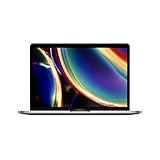
- Touch Bar and Touch ID
- Backlit Magic Keyboard
- Brilliant Retina display with True Tone technology
Before buying an older model, check its exact model identifier against Apple’s current macOS compatibility list. Do not rely only on a name such as “MacBook Air” or “MacBook Pro.” Apple’s listed macOS Tahoe 26 compatibility, dated June 8, 2026, supports MacBook Air models from M1 onward and MacBook Pro models from M1 onward in the listed configurations, while some 2019 Intel MacBook Pro models remain supported. Many older Macs do not.
How to inspect a third-party refurbished Mac
- Verify the configuration. On the Mac, choose Apple menu > About This Mac. For detail, hold Option while choosing Apple menu > System Information, then select Hardware. Confirm the chip, memory, SSD capacity, screen size, color, keyboard layout, and model year against the listing.
- Check the serial number. Use Apple’s coverage-checking service to identify the model and see whether Apple warranty or AppleCare remains. Keep the retailer invoice; Apple may require the original sales receipt to correct an inaccurate estimated warranty date.
- Test for Activation Lock. Start setup or erase the Mac before the return period expires. If it asks for another person’s Apple Account, return it immediately. The previous owner must remove it through Apple menu > System Settings > [their name] > iCloud > See All > Find My Mac > Turn Off, or through icloud.com/find by selecting the Mac and choosing Remove This Device.
- Look for organization management. A former business- or school-owned Mac may still be managed remotely. The organization’s IT department or manager must remove that management. Do not keep a Mac that cannot be enrolled in your own account and reset normally.
- Check battery health and cycles. Go to Apple menu > System Settings > Battery. “Normal” means the battery is functioning normally; “Service Recommended” means its ability to hold a charge has declined and replacement may be appropriate. For cycle count, hold Option while opening System Information, then choose Hardware > Power.
- Test the practical basics. Check the display for dead pixels, all ports, Wi-Fi, Bluetooth, speakers, microphone, webcam, keyboard, trackpad, Touch ID if present, charger, and sleep/wake behavior. A cosmetic grade does not replace functional testing.
Do not treat a seller’s claim that the battery is “100%” as proof of a new battery. Apple says capacity can display slightly below 100% depending on when a Mac was manufactured and first used. Batteries are consumable components, and normal capacity reduction may not be covered by warranty.
Independent reader supportYour contribution helps us test, update, and keep practical guides available for everyone.Calculate the real price before comparing listings
Use this simple comparison rather than looking only at the checkout total:
| Cost or risk | Question to ask |
|---|---|
| Purchase price | Is sales tax, shipping, and any required protection plan included? |
| Battery | Could a replacement be needed soon, and is reduced capacity excluded from the warranty? |
| Accessories | Does it include a genuine Apple charger and cable, or compatible substitutes? |
| Warranty | Who provides it, for how long, and what damage or wear is excluded? |
| Return policy | How many days do you have to test Activation Lock, battery, and specifications? |
| Useful life | How many years of macOS and security updates are likely based on the exact model? |
For example, a $500 marketplace Mac with a 30-day return period may be better value than a $650 Apple refurbished model—but only if the configuration is correct, the battery is acceptable, and the seller warranty is usable. Conversely, a $450 Intel Mac with an aging battery and a shorter software horizon may cost more over time than a $600 M-series MacBook Air.
Windows Errors? Fix Them Before They Spread
Repair common Windows errors and clear accumulated junk for a smoother, more stable PC - no reinstall needed.Free scan · no reinstallOutdated Drivers Are Slowing You Down
One free scan finds every outdated or missing driver and matches the right update for your exact hardware.Free scan · exact hardware matchBest Value

- Stunning 13.3-inch Retina display
- Touch ID and the latest Apple-designed keyboard
- Dual-core 8th-generation Intel Core i5 processor with Intel UHD Graphics 617
- Fast SSD storage and 8GB memory
- Stereo speakers with wider stereo sound
Claims to ignore when shopping
- “Every refurbished Mac has a new battery.” Not supported. Apple’s new-battery promise applies specifically to refurbished iOS devices, not universally to Macs.
- “Best Buy refurbished means Apple refurbished.” It does not. Best Buy sells open-box, clearance, refurbished, and marketplace products under different terms.
- “Amazon Renewed always includes a one-year warranty.” Standard Renewed coverage is generally 90 days. Confirm the exact listing.
- “It boots, so it is safe.” A Mac can boot normally and still be Activation Locked, organization-managed, incorrectly configured, or nearly due for a battery replacement.
- “The lowest sticker price wins.” A missing charger, weak return policy, old Intel processor, or excluded battery wear can erase the saving.
FAQ
Is Apple Certified Refurbished worth the extra money?
Usually, yes, when the price gap is reasonable. Apple includes full functional testing, genuine Apple replacement parts as needed, a one-year limited warranty, and AppleCare eligibility on eligible Macs. A third-party listing can still be the better deal if its configuration and protections are clearly superior.
Is Back Market safe for buying a refurbished Mac?
It can be, but Back Market is a marketplace rather than one refurbisher. Check the individual seller, battery disclosure, condition grade, accessories, warranty exclusions, and 30-day return terms. Do not assume every listing has the same quality.
What is the minimum memory to buy in a refurbished MacBook?
For most buyers seeking several years of use, 16GB of unified memory is the safer target. An 8GB model may be adequate for light use and a very low price, but compare the exact workload, expected ownership period, and price difference before choosing it.
How can I tell whether a used Mac is locked to its previous owner?
Start setup or erase the Mac before the return window closes. If it requests another person’s Apple Account, Activation Lock remains enabled; return the computer unless the previous owner can remove it. Also check for organization management on former business- or school-owned Macs.
The Bottom Line
Buy Apple Certified Refurbished when you want the safest combination of testing, warranty, genuine parts, and Apple support. Choose Back Market or Swappa when the savings are substantial and you are willing to inspect the seller, exact configuration, battery, Activation Lock status, and warranty. Consider Best Buy Outlet mainly for convenient open-box purchases, and treat Amazon Renewed as a seller-by-seller decision.
The best financial choice is usually an Apple-silicon Mac with enough memory for your expected ownership period—not necessarily the model with the biggest original price or the lowest used price.
Quick Recap
Product prices and availability are accurate as of the date/time indicated and are subject to change. Any price and availability information displayed on Amazon at the time of purchase will apply.




