Free tools Windows power users keep installed
One-click scans. No signup required.
For a polished, editable agenda in Microsoft Office, start with Microsoft’s official Word meeting-agenda templates. For a document several people can edit and comment on live, use Google Docs. Choose Excel or Google Sheets when the agenda also needs calculated time blocks or action tracking; use PowerPoint for a visual workshop or event program.
Quick comparison: which agenda format should you use?
| Best for | Starting point | Collaboration and tracking | Main trade-off |
|---|---|---|---|
| Formal or document-heavy meetings | Microsoft Word agenda template | Editable online, shareable, and suitable for PDF distribution | Check that the chosen design includes owners, decisions, and follow-up fields you need |
| Live group editing | Google Docs Template Gallery or a shared Doc | Comments, suggestions, and shared editing | Gallery contents can vary by account, organization, region, and administrator settings |
| Timed agendas and action registers | Excel or Google Sheets | Supports structured owner, status, and due-date columns; formulas can calculate timing | Can be cumbersome for a short meeting with only a few topics |
| Projected workshops and event programs | PowerPoint or Google Slides | Visual session blocks and speaker details | Less efficient than a document or spreadsheet for routine agenda edits |
| Cross-format or project-specific options | Smartsheet’s team meeting templates or project meeting templates | Template options include Word, Excel, PowerPoint, and Google Docs formats | Smartsheet is a third-party publisher; a downloadable template is distinct from its paid work-management platform |
“Best” depends on the job: a board agenda, a weekly check-in, and a workshop need different fields. Before choosing a design, check whether it makes the meeting’s purpose, time, discussion owners, decisions, and follow-up actions easy to find.
Best Microsoft Word meeting-agenda templates
Microsoft’s official agenda-template collection is the natural first stop for readers who already work in Word, Teams, Outlook, or SharePoint. Microsoft describes templates for team, project, board, workshop, administrative, school, and business-review meetings. The collection is designed for Word, and Microsoft says users can edit a template online, then save, share, or export it as a PDF.
Choose a layout for the meeting, not just its appearance
- Team meeting: Look for space for priorities, blockers, decisions, and next steps.
- Project meeting: Prefer fields for milestones, risks, dependencies, owners, and due dates.
- Board or staff meeting: Use formal numbering and distinguish items for information, discussion, and decision.
- Workshop: Choose a layout with session times, facilitators, activities, materials, and expected outputs.
- Business review: Leave room for reports, key questions, decisions, and assigned follow-up.
A template’s visual polish does not guarantee it has the fields your meeting needs. Inspect the selected layout before using it: a design may omit an objective, action owner, decision record, or space for pre-reading.
The Tool Desk
Outbyte Driver Updater FREEFix the driver behind crashes, sound loss and screen glitchesFind Drivers →Outbyte PC Repair FREERepair Windows errors before they cause bigger problemsFix Now →#1 Best Overall
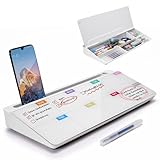
- PERFECT DESIGN: Quickly record your weekly schedule-Sunday through Monday. Maximize your work area. The desktop weekly calendar whiteboard is designed to sit perfectly between a keyboard and monitor and is slope angled for comfortable reading and writing, or typing when you are using it as a keyboard stand.
- SMOOTH WRITING & EASY TO WIPE: TSJ OFFICE mini desktop computer pad comes with a smooth and durable temple glass dry erase writing surface. This white board allows you to write and wipes clean with ease over and over. Our easel whiteboard always stays white and easy to read.
- HIDDEN STORAGE & PAD/MOBILE TRAY: De-clutter your desk by storing markers, magnetic eraser and other desktop accessories in the opening drawer or place markers on the accessory tray for quick access. And one more long tray on the top of the dry erase white board for your pad or mobile.
- BEST GIFT IDEA: Best Gift as a tabletop whiteboard, note taking supplies, desk to do list notepad, keyboard stand, desk organizer, memo board for Your Office, Home or Classroom! All ages will like this premium small white board. The clear desk pad brings them better organization, teaching and learning without paper large wasting.
- 100% SATISFACTION AFTER-SALES SERVICE - Your satisfaction and happiness are our top priority. Our hassle-free customer service team will work hard to resolve any issues that you have with our whiteboard. If you're not satisfied with your order, please contact with us, we promise to return your hard-earned money.
Open and customize a Microsoft template
- Open Word for the web and browse Microsoft’s meeting-agenda templates.
- Select a layout that fits the meeting type and replace its sample content with the meeting title, date, time, attendees, objective, topics, and preparation materials.
- Add an owner and time estimate to each agenda item, and identify whether it is for information, discussion, a decision, or a specific output.
- Save the document. Share it through an appropriate link, or export a PDF when recipients need a fixed print-ready copy.
Microsoft also maintains a separate meeting-agenda page with examples and workflow guidance. For desktop Word, pre-built templates may also be available from within Office; Microsoft notes that the interface can differ among Microsoft 365, Office 2024, Office 2021, and older editions. See its instructions for accessing built-in Office templates.
Best Google Docs meeting-agenda templates
Google Docs is the stronger fit when participants need to revise the same agenda together, leave comments, or suggest changes before a meeting. Google’s official instructions say to open Docs on a computer and select Template Gallery. The available designs are not necessarily identical for every user: account, organization, region, and administrator settings can affect what appears.
Use the gallery or make a reusable document
- On a computer, open Google Docs and choose Template Gallery.
- Select a suitable template, replace the placeholder text, and rename the document.
- Set sharing permissions for the people who need to view, comment, or edit. Use comments or suggestions when you want review without giving everyone direct editing control.
- For a recurring meeting, use File → Make a copy to create a separate agenda for the next date.
If the gallery does not offer a suitable design, create a blank Doc and add the sections in the sample structure below. Google’s Template Gallery help page covers Docs, Sheets, Slides, and Forms. Its documented workflow is for desktop; mobile apps may expose fewer template-management controls.
Import and export carefully
Google Docs can download a document as a Word-compatible .docx file or a PDF through File → Download. You can also open a Word file in Docs, but compatibility is not perfect. Before sending or printing a converted agenda, inspect table widths, headers and footers, page breaks, fonts, numbering, checkboxes, hyperlinks, comments, and embedded objects. Exporting to PDF is not a substitute for checking that the layout survived conversion.
Rank #2

- PERFECT DESIGN: Maximize your work area. The desktop whiteboard is designed to sit perfectly between a keyboard and monitor and is slope angled for comfortable reading and writing, or typing when you are using it as a keyboard stand.
- SMOOTH WRITING & EASY TO WIPE: TSJ OFFICE mini desktop computer pad comes with a smooth and durable temple glass dry erase writing surface. This white board allows you to write and wipes clean with ease over and over. Our easel whiteboard always stays white and easy to read.
- HIDDEN STORAGE & PAD/MOBILE TRAY: De-clutter your desk by storing markers, magnetic eraser and other desktop accessories in the opening drawer or place markers on the accessory tray for quick access. And one more long tray on the top of the dry erase white board for your pad or mobile.
- CONTAINS EVERYTHING YOU NEED - This small glass whiteboard kit includes a W 15.8 " x D 7.1 " x H 1.9 " Desktop glass whiteboard, 4 markers and 1 eraser. It comes with everything you need. Enjoy the standing whiteboard as soon as you receive it!
- BEST GIFT IDEA: Best Gift as a tabletop whiteboard, note taking supplies, desk to do list notepad, keyboard stand, desk organizer, memo board for Your Office, Home or Classroom! All ages will like this premium small white board. The clear desk pad brings them better organization, teaching and learning without paper large wasting.
When Excel or Google Sheets is the better agenda
A spreadsheet is useful when the agenda needs to behave like a tracker rather than a formatted letter: several owners, recurring status updates, sortable actions, or time calculations. It can also hold an action register that remains useful after the meeting.
| Start | Duration | Topic | Owner | Desired outcome | Pre-read | Decision or action | Due date |
|---|---|---|---|---|---|---|---|
| 9:00 | 10 min | Example topic | Person responsible | Update, discussion, or decision | Link or document | Record outcome | Date |
Use formulas for end times only if they are genuinely helpful, and keep fields consistent so a recurring agenda can be sorted or filtered. For a brief leadership conversation or one-to-one, a spreadsheet may add work without adding clarity; a compact document is usually easier to scan.
When PowerPoint or Slides makes sense
Use slides when the agenda is also the on-screen program: a workshop, training day, conference, town hall, or project kickoff with distinct sessions and speakers. Visual blocks can show sequence, breaks, presenters, and activities at a glance. For an ordinary internal meeting, a Word or Google Doc is usually faster to update and easier to maintain than a slide deck.
Match the agenda to the meeting type
Weekly team meeting
Keep it short: objective, quick updates, priorities and blockers, decisions needed, action review, parking lot, and next meeting. Avoid turning a routine check-in into a bulky minutes form.
Rank #3

- Stay Organized Every Day: This 9x13" acrylic dry erase to-do list board features a "Top Priorities" section, helping you focus on your most important tasks while keeping track of daily appointments and reminders. Perfect for improving productivity and staying organized.
- Durable, Scratch-Resistant Surface: Made from thickened acrylic, this board offers a strong, long-lasting surface with a back-printed design that ensures it remains clear and scratch-free. Enjoy smooth writing and erasing without worrying about wear over time.
- Complete Planner Set: The board comes with 3 dry erase markers with eraser tips, so you have everything you need to start organizing and planning right away.
- Versatile Use for Any Space: Whether for your office, kitchen, study room, or classroom, this board is perfect for making to-do lists, jotting down goals, organizing reminders, and more. Ideal for students, professionals, and homemakers alike.
- Sleek, Space-Saving Design: The frameless acrylic design adds a modern touch to any desktop, while the included stand keeps the board upright and easy to use. Stylish and practical, this board helps you stay on top of your tasks while enhancing your workspace.
Project-status meeting
Include project name and overall status, milestones, risks and issues, dependencies, decisions required, workstream owners, next steps, and due dates. If many workstreams or actions must be tracked across meetings, use a spreadsheet or a structured project template such as Smartsheet’s project-management agenda collection.
Board or executive meeting
Use a formal order such as call to order, approval of prior minutes, chair or executive update, financial or operational report, strategic decisions, governance or compliance items, executive session, and adjournment. Mark each item as information, discussion, or decision so participants know what is expected.
Workshop or training
For each session, state the title, facilitator, start and end time, learning or activity objective, required materials, and expected output. Include breaks; use a table or visual program when participants need to navigate the day.
One-to-one
Use a few prompts: wins since the last meeting, current priorities, challenges or support needed, feedback, development topics, and decisions or follow-ups. A large corporate template is usually too much structure for a short conversation.
Rank #4

- NOT INTENDED FOR USERS UNDER 15.Dry Eraser Whiteboard Kit: The whiteboard kit includes 10 Markers of 8 colors, 6 Magnets,1 Eraser, 1 Pen Clip. Both surfaces of the desktop dry erase board are made of smooth and durable materials,easily to write on and wipe off without stain. It also has a duty aluminum frame supplying a very good protection for the desktop whiteboard. This dry erase board is very durable and resistant to drops
- Portable Dry Erase Whiteboard with Stand: This magnetic desktop whiteboard is lightweight enough for you to take it anywhere. 360° adjustable knob makes it possible for you to adjust the the placement angle you want. The newly upgrade reinforced gear allows the dry erase board to stand stably at all angles. So you can make it place the way you like, convenient for you to write and hold.You can lay it down as a flat whiteboard, or make it stand on a desk
- The whiteboard is made of high-quality materials with a smooth and clean surface. The writing marks are clearly visible and the colors are bright and beautiful. The writing marks are easy to wipe off to make it white and clean again. It is equipped with a variety of color markers with diverse and bright colors. It is equipped with strong magnets,so you can stick documents and papers on the whiteboard
- Double-Sided Design Dry Erase Board: The desktop whiteboard is double-sided designed,one side is whiteboard and another is weekly planner board. You can do two projects meanwhile with this weekly calander whiteboard. Using weekly whiteboard calendar, you can make your week schedule, work, study, lessons or other to-do lists. The whiteboard is a desk buddy for distance learning, teaching, small group discussion, presentation. It is a good
- Suitable forffice: This whiteboard is suitable fg, office meetings, planning presentations, writing drafts, home schedule planning, memo note recording boards. It can bors,teaching favor, it can also be given as a gift to as a drawing tool or writing practice tool.And you can also use it as a bulletin board to post photos
Committee, school, nonprofit, or community meeting
Consider welcome and attendance, approval of previous minutes, reports, old business, new business, public or member comments, decisions, assignments, and the next meeting. For formal groups, check the organization’s own rules for required order or notice; a general-purpose template does not replace them.
Independent reader supportYour contribution helps us test, update, and keep practical guides available for everyone.What an effective agenda template should include
Choose fields that help people prepare and make progress, not fields that merely fill the page. A practical template should cover:
- Meeting details: title, date, start and end time, location or meeting link, facilitator, note-taker, and attendees.
- Objective and output: why the group is meeting and what should be true by the end.
- Preparation: pre-reads, links, reports, questions, and who is responsible for providing them.
- Time and ownership: a timebox and topic owner for each discussion item.
- Purpose per item: label it as inform, discuss, decide, create, or assign.
- Decision and action records: space to capture decisions and action, owner, due date, and status separately from general notes.
- Follow-up: parking-lot topics, next meeting, and unresolved actions to carry forward.
A reusable meeting agenda structure
Copy this outline into Word or Google Docs, or turn it into spreadsheet columns if you need tracking:
- Meeting title: [Title]
- Date and time: [Date, start–end, time zone if participants are remote]
- Location or meeting link: [Room or link]
- Facilitator / note-taker / attendees: [Names]
- Objective: [What the meeting must accomplish]
- Desired decisions or outputs: [Specific results]
- Preparation / pre-reads: [Document or link; owner; preparation needed]
- Agenda items: Welcome and previous actions; updates; discussion; decisions; risks or blockers; next steps. For each item, add duration, owner, purpose, and desired outcome.
- Action items: [Action | owner | due date | status]
- Decisions: [Decision | date | decision-maker | notes]
- Parking lot: [Deferred topic | owner | revisit date]
- Next meeting: [Date or scheduling note]
Customize, share, and reuse the template well
Prepare before sending
Write the objective first, then include only topics that support it. Give participants enough context to prepare by linking pre-reads and naming who is responsible for them. Assign realistic timeboxes; a list of topics without time estimates or desired outcomes can invite discussion that runs past the meeting’s end.
Quick wins for a faster PC:
Repair Windows errors before they cause bigger problemsFix Now →Fix the driver behind crashes, sound loss and screen glitchesFind Drivers →Keep recurring agendas versioned
- Keep a clean master template separate from meeting-specific copies.
- Duplicate it for each meeting and update the date, attendees, links, and agenda.
- After the meeting, archive the agenda with the minutes or other records used by your organization.
- Carry forward unresolved actions, not every old discussion topic; remove obsolete sample text.
Overwriting one agenda repeatedly can make it difficult to tell which version participants reviewed. A separate copy for each meeting gives the group a clearer record.
Check sharing and confidentiality
Agendas can include personnel matters, financial information, legal advice, customer details, security incidents, or executive-session topics. Confirm who can view or edit the file, and avoid “anyone with the link” access for confidential material. Where appropriate, keep restricted papers separate from the general agenda and share them only with authorized participants.
Quick Recap
Make the document accessible and print-ready
- Use built-in heading styles and a logical reading order instead of manually enlarging text to imitate headings.
- Use descriptive link text, readable type, and adequate contrast.
- Keep tables simple, with clear headers; avoid embedding essential text in images.
- Label checkboxes and action fields meaningfully.
- Before distribution, export or print to PDF and check page breaks, clipped tables, and awkward blank space.
Common template problems to avoid
- Topics without outcomes: Add whether the item is for information, discussion, decision, creation, or assignment.
- No owner or time estimate: Give each item a responsible person and a reasonable timebox.
- Decisions buried in notes: Record decisions and assigned actions in their own fields.
- Too much design or structure: Decorative elements and unnecessary fields make a short agenda harder to scan.
- Agenda confused with minutes: An agenda plans the meeting; minutes record what happened. A combined agenda-and-notes document can work when a group wants one file for both, but it can clutter preparation if every minutes field is required in advance. Microsoft provides separate agenda and meeting-minutes template collections.
- Conversion surprises: Recheck layout and links after moving between Word and Google Docs rather than assuming the files are identical.
- Unreviewed remote details: For remote or hybrid meetings, include the video link, dial-in details if needed, recording policy, shared notes location, accessibility or interpretation needs, and how absent participants can contribute to decisions.
- Placeholder text left in: Search for sample names, dates, and instructions before sharing the final copy.
Product prices and availability are accurate as of the date/time indicated and are subject to change. Any price and availability information displayed on Amazon at the time of purchase will apply.




