For most Pixel 10a owners, the Google Pixel 10a Case is the straightforward everyday pick; choose OtterBox’s Commuter Series if you want more protection. Add a screen protector made for the 10a if scratch protection matters, and buy a 45 W USB-C PPS charger only if you do not already own a suitable one. One important compatibility catch: Google lists the Pixel 10a as Qi-wireless-charging compatible, but does not list it among Pixelsnap-compatible phones. Prices, stock and options can change; check the linked US product pages before ordering.
Pixel 10a accessory picks at a glance
| Pick | Best for | What is established | Main trade-off |
|---|---|---|---|
| Google Pixel 10a Case | Everyday use and official color matching | Designed for Pixel 10a; Google describes silicone and polycarbonate construction and says it is designed for charging. | Not presented by Google as a maximum-protection case. |
| OtterBox Commuter Series | More protection for commuting and daily handling | OtterBox describes dual layers, raised edges, port covers and wireless-charger compatibility. | Bulkier than the Google case. |
| OtterBox Profile Series | A slimmer OtterBox option | OtterBox markets this Pixel 10a-specific case as ultra-thin. | The available product information does not establish a drop rating or detailed measurements. |
| Pixel 10a-specific screen protector | Reducing scratches and surface wear | Google’s Force Screen Protector is a model-specific PMMA option; Google also lists other protectors compatible with fingerprint unlocking. | Installation and case fit matter; a protector does not guarantee against a cracked screen. |
| 45 W USB-C PPS charger | Google’s stated fast-charging setup | Google specifies a 45 W USB-C PPS charger or higher for its advertised charging claim. | Sold separately; confirm the charger’s supported profiles. |
Product claims in this guide are attributed to Google or the manufacturer; they are not independent test results. The phone measures 153.9 × 73.0 × 9.0 mm and weighs 183 g, according to Google’s Pixel specifications.
Which Pixel 10a case should you choose?
Best everyday case: Google Pixel 10a Case
Google’s official case is the simplest choice if you want a model-specific fit, matching colors and a relatively light everyday cover. Google lists silicone and polycarbonate construction, dimensions of 6.2 × 3.0 × 0.5 inches, and a weight of 1.2 ounces. It says the case has been drop-tested for hundreds of hours and contains at least 36% recycled plastic, with the polycarbonate shell made from 75% recycled plastic. Those are Google’s product claims, not a guarantee against damage or an independent environmental ranking.
The case is offered in Lavender, Berry, Fog and Obsidian, subject to current availability. Google describes it as designed for charging and normal phone operation. Its product information does not establish a built-in stand, wallet, belt clip or maximum-drop-protection rating. Check the Google Pixel 10a Case listing for current US price, colors and terms.
Outdated Drivers Are Slowing You Down
One free scan finds every outdated or missing driver and matches the right update for your exact hardware.Free scan · exact hardware matchPC Slower Than It Used to Be?
A free scan shows the junk files, broken settings and background clutter dragging Windows down - then fixes them in one click.Free scan · Windows 10 & 11#1 Best Overall

- Compatibility: This case Fit for Google Pixel 10a (6.3 inch, Released in 2026). Please confirm your phone model before purchasing
- Strong Magnetic Charging: This Pixel 10a Case has built with 38 super-strong N52 magnets, delivering 2400 gf magnetic attraction—over 7× stronger than standard cases. Ensures a secure, stable connection to Magnetic chargers, power banks, car mounts, and wireless charging stands. Perfectly aligned for fast, stable charging every time
- Tempered Glass Screen Protector: Google Pixel 10a Case includes 1× premium tempered glass screen protector that preserves original touch sensitivity and HD clarity. Offers reliable scratch and drop defense for your Screen, without compromising responsiveness or display quality
- Translucent Matte Back: This Google 10a Case crafted from high-quality matte TPU and translucent PC, this case reveals the phone logo with an elegant, refined finish. The frosted texture delivers a comfortable, non-slip grip, while the nano antioxidant layer effectively resists stains, sweat, and minor scratches—keeping your case clean and clear longer
- 14FT Military Grade Drop Protection: 10a Case has rigid polycarbonate backplate paired with flexible, shock-absorbing TPU bumpers around the edges, plus 4 built-in corner airbags. Provides comprehensive protection against accidental drops, bumps, and impacts
Best more-protective everyday option: OtterBox Commuter Series
OtterBox’s Commuter Series is the better fit if you value added protection over keeping the phone as small as possible. OtterBox describes an inner rubber cover and rigid outer shell, port covers, raised edges around the display and camera, and compatibility with wireless chargers. Its published dimensions are 6.33 × 3.15 × 0.58 inches and its weight is 1.92 ounces, according to the Google Store listing.
OtterBox says the case was tested three times to military drop standard 810G-516.6. That is a manufacturer-described test, not a promise that the phone will survive every drop, height or surface. Port covers can also be inconvenient if you connect a cable frequently. See the OtterBox Commuter Series product page for its current warranty and purchase terms.
Slimmer alternative: OtterBox Profile Series
OtterBox markets its Pixel 10a Profile Series as ultra-thin. It may suit someone who wants a more minimal case from a known case maker, but the available product information does not establish its weight, drop rating or detailed protection features. Confirm those details, as well as current price and wireless-charging information, on the Profile Series product page before choosing it.
Clear, wallet and magnetic cases
A clear case can show the phone’s color, but do not assume that a magnetic ring makes it an officially supported Pixelsnap case. Third-party coverage has identified Spigen Ultra Hybrid MagFit as a Pixel 10a candidate, but magnetic attachment does not establish Google compatibility, charging performance or safety. Google’s current Pixelsnap Charger compatibility information lists Pixel 10, Pixel 10 Pro, Pixel 10 Pro XL and Pixel 10 Pro Fold—not Pixel 10a.
What’s actually slowing this PC down?
Pick the symptom - the matching free tool is one click away.
Rank #2
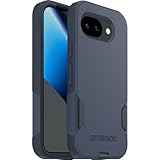
- The slim and protective Commuter Series case for Google Pixel 10a undergoes thousands of hours of drop testing to ensure your smartphone gets the utmost protection.
- Protect your smartphone with Commuter Series, the Google Pixel 10a case that's easy to install and has 3 times as many drops as military standard ( MIL-STD-810G 516.6 ).
- OtterBox Commuter case has raised edges to protect your smartphone's camera and screen from serious drops and scrapes. It also has port covers that block dirt, dust and lint from getting into jacks and ports.
- Made from 35% recycled plastic, OtterBox Commuter Series is a ultra-slim, pocket-friendly case with secure grip. While its raised edges protect your smartphone's camera and screen from serious drops and scrapes.
- Pair your case with a scratch resistant and durable OtterBox screen protector for total, 360-degree protection.
Wallet cases and cases with kickstands can add useful function, but cards, thick back panels and metal parts may interfere with wireless charging. The evidence here does not establish a specific Pixel 10a wallet or stand case as a verified recommendation. If you buy one, look for explicit Pixel 10a fit and a manufacturer statement about charging compatibility.
Will a Pixel 9a or Pixel 10 case fit the Pixel 10a?
Do not assume it will. Buy a case whose manufacturer explicitly names Google Pixel 10a. Similar screen size or family branding does not establish matching camera geometry, buttons, ports, microphones, corners or charging alignment. A poor fit can leave the camera exposed or obstruct a control or opening. Google treats the 10a separately in its Pixel comparison tool; the fact that a listing says “Pixel 10 series” is not enough to verify 10a fit.
Does the Pixel 10a support wireless charging and Pixelsnap?
The Pixel 10a supports Qi-certified wireless charging. Google does not currently include it in the compatibility list for its Pixelsnap accessories, which is a separate, magnetic accessory ecosystem. A third-party magnetic ring may physically attach, but that does not establish official Pixelsnap support or equivalent alignment, performance or safety.
For ordinary Qi charging, favor a reasonably slim case with no metal plate, ring, stand or thick card compartment over the charging area. The Google case is described as designed for charging; OtterBox says its Commuter case works with wireless chargers. Actual results can still vary with alignment, case materials, charger, temperature and the phone’s position. Google’s safety guidance warns against metal components in device accessories such as cases and holsters. If charging becomes unreliable after adding a mount plate or ring, remove it and test with a plain case or no case.
Do these 3 things before closing this tab:
1Scan for outdated or missing drivers - takes under a minute2Clear out junk files and repair common Windows errors3Fix the driver behind crashes, sound loss and screen glitchesRank #3

- Made from TPU for durability
- Matte textured design for a non-slip grip
- Raised edges for screen and camera protection
- Military-grade drop protection via Air Cushion Technology
- Spigen Liquid Air compatible with Google Pixel 10a Case
A Qi charger is the sensible default for a Pixel 10a bedside or desk setup. Google’s Pixelsnap charger should not be bought on the assumption that the 10a is officially supported unless Google updates its compatibility information.
Should you add a screen protector?
The Pixel 10a has Corning Gorilla Glass 7i, but a protector can help reduce fine scratches and abrasion from grit or pocket debris. It is not a substitute for a case with a raised screen edge, and no protector guarantees shatter protection.
Google Force Screen Protector
Google lists its Force Screen Protector specifically for Pixel 10a. It uses PMMA, is about 0.019 inches thick and includes an installation kit. Google’s page calls it “5x stronger than regular glass”; treat that as Google’s product claim, not an independently verified measurement. Check the Force Screen Protector listing for current price and availability.
Fingerprint compatibility and installation
If you prefer another brand, start with Google’s fingerprint-unlock compatibility list, which names Pixel 10a protectors from Case-Mate, Casefinite, OtterBox and Mous. Confirm the exact product model before ordering; brand presence alone does not verify every protector the company sells.
Rank #4

- Strong Magnetic Attraction: Compatible for Magnetic chargers and other Qi Wireless chargers without signal influence. The Google Pixel 10a magnetic case has built-in 38 super N52 magnets. Its magnetic attraction reaches 2400 gf
- Crystal Clear & Never Yellow: Using high-grade Bayer's ultra-clear TPU and PC material, allowing you to admire the original sublime beauty for Google Pixel 10a while won't get oily when used. The Nano antioxidant layer effectively resists stains and sweat
- 10FT Military Grade Protection: Passed Military Drop Tested up to 10 FT. This Google Pixel 10a clear case backplane is made with rigid polycarbonate and flexible shockproof TPU bumpers around the edge and features 4 built-in corner Airbags to absorb impact
- Screen & Camera Raised Edges: The tiny design of 2.5 mm lips over the camera, 1.5 mm bezels over the screen, and 0.5 mm raised corner lips on the back provides extra and comprehensive protection, can minimize and reduce scratches
- Compatibility & Secure Grip: This clear case is only designed for (Google Pixel 10a 6.3 inch). Precise cut and design allow easy access to all ports, buttons, cameras, sensors, and other features. The clear case can totally achieve a great grip feeling
- Install in a clean, dust-free room. Clean and dry the screen completely.
- Use the alignment tools and instructions supplied with the protector; check that it does not cover sensors or obstruct the display.
- Test touch response and fingerprint unlocking before discarding the packaging.
- If fingerprint recognition worsens, check adhesion and cleanliness, then delete and re-register fingerprints. If the issue persists, consult Google’s compatible-protector list and replace the protector if needed.
A case can push against a protector that is too large, causing edge lift. Choose a known compatible case-and-protector pairing where possible; persistent bubbles, dust, poor touch response or lifted edges are reasons to replace the protector rather than press it back down repeatedly.
Independent reader supportYour contribution helps us test, update, and keep practical guides available for everyone.What charger and cable does the Pixel 10a need?
Google specifies a 45 W USB-C PPS charger or higher for its stated fast-charging behavior—up to approximately 50% in 30 minutes under Google’s stated conditions. That is a manufacturer specification, not a guarantee for every battery level, temperature or use pattern. A higher headline wattage alone is not enough: confirm USB-C Power Delivery and PPS support and use a reputable charger. The phone negotiates the power it can use; a 65 W or 100 W adapter does not force it to draw that full output.
The Pixel 10a box includes a 1-meter USB-C-to-USB-C cable and SIM tool, but no 45 W power adapter. Google identifies the included cable as USB 2.0, so a reader who needs faster wired data transfer should check the cable’s data rating rather than assume that every USB-C cable is equivalent. See Google’s Pixel 10a product page and specifications for the included items and charging details.
Charger checklist
- USB-C output with USB Power Delivery and PPS support.
- At least 45 W if you want to match Google’s stated fast-charging setup.
- Safety certifications appropriate to your region and a reputable seller.
- For a multiport adapter, check how power is shared when several devices are connected.
- Use a cable rated for the charging power you intend to draw; buy another only if you need a longer, more durable or spare cable.
An existing laptop charger may be suitable if its specifications support the required USB-C charging profile and it is in good condition. A wireless charger is convenient but generally slower than wired charging, more sensitive to placement and capable of producing more heat; use a Qi charger and remove metal accessories if charging is inconsistent.
Best Value

- [Compatible] Only compatible with Google pixel 10a phone. Precise cutouts for easy access to all ports, buttons, sensors and cameras of pixel 10a. Sensitive buttons with good response, are easy to press.
- [Magnetic Designed] Built-in magnet ring aligns perfectly and locks into place making wireless charging faster and easier than ever. This google 10a case will not fall off no matter how it rotates with super adsorption capacity.
- [Thorough Camera & Screen Protection] 1.5mm raised lips over screen and 1.5mm raised lips over camera relieves impact and protects the phone screen and camera against drop damage, cracks and scratches. Reinforced corner effectively absorb bumps from any angle drop.
- [Zero Fingerprints] SPIDERCASE pixel 10a case case for google 10a with a smart Nano Oleophobic Coating design that prevents fingerprints, watermarks, oil, and dust, fresh and clear.
- Shock Protection: Passing military drop tests up, your device is effectively protected from violent impacts and drops
Car mounts, grips and other add-ons
A clamp-style vent or dashboard mount avoids relying on a magnetic plate attached to the phone. Before buying a mount or grip, check that it does not block the camera, weaken the case, press against the back of the phone or leave adhesive where you do not want it. A removable grip may need to come off for wireless charging.
A metal plate intended for a magnetic car mount can interfere with wireless charging and conflicts with Google’s accessory guidance about metal components. If you need both mounting and charging, prioritize a nonmetal or clamp-based setup, or follow the accessory maker’s instructions and test charging without assuming compatibility.
A practical buying plan
- Keep spending minimal: Buy a case explicitly made for Pixel 10a and use a suitable USB-C charger you already own.
- Choose a balanced setup: Pair the Google case or OtterBox Commuter with a protector listed for Pixel 10a; add a 45 W PPS adapter only if you need one.
- Prioritize convenience: Add a Qi charger for a desk or bedside and a nonmetal or clamp-style car mount if those solve a real need.
- Avoid unnecessary purchases: Do not buy Pixelsnap accessories for another Pixel 10 model on the assumption they work with the 10a.
Before checkout, verify the exact phone model, camera cutout, charging statement, protector fingerprint compatibility, return policy, warranty, current US price and stock. For warranty terms, check the manufacturer’s live product page; OtterBox’s product information describes a limited warranty and says approved replacements may exclude shipping, handling and applicable taxes.
Quick Recap
Product prices and availability are accurate as of the date/time indicated and are subject to change. Any price and availability information displayed on Amazon at the time of purchase will apply.
Quick wins for a faster PC:
Fix the driver behind crashes, sound loss and screen glitchesFind Drivers →Clear out junk files and repair common Windows errorsFree Scan →



