A day-and-date calendar clock is a practical starting point when someone needs help checking the day, date, and time. The right choice depends on what the person can comfortably read and use: some clocks add a morning-or-evening cue, spoken time, or routine reminders, but no clock is proven to work for everyone or to improve cognition.
Which type of clock may suit the person’s needs?
Clocks for people with dementia range from simple calendar displays to devices that issue task alerts. Start with the cue the person is missing rather than choosing the model with the most features. The Alzheimer’s Society describes calendar clocks as showing date and time; automatic models may also show the day of the week, and some show whether it is morning or evening. These cues may support orientation, but a display cannot guarantee that someone will interpret or remember the information. Alzheimer’s Society technology guidance
| Clock type | What it offers | What to check |
|---|---|---|
| Calendar or day/date clock | Displays time and date; many models also show the day of the week. | Whether the day is written in full or abbreviated, how clearly the display can be read from the intended spot, and whether it also indicates time of day. |
| Day-and-night clock | Adds a morning/evening or day/night cue on some models. | Whether that cue is easy to understand and useful in the room where the clock will be placed. |
| Talking clock | Speaks the time, often when a button is pressed. | Hearing, volume, whether spoken prompts are welcome, and whether the button is easy to reach and use. |
| Reminder or task clock | Can alert someone to routine activities; some models indicate tasks that are complete or still pending. | Whether tasks are recurring or change frequently, alert options, how to dismiss or mark a task complete, setup help, and access to a power point. |
| Smart reminder clock | May let a trusted family member or caregiver manage reminders, messages, notes, or events remotely. | App and connectivity setup, who will manage it, privacy expectations, cost, and whether remote features are needed. |
| Analogue/digital dual-display clock | Provides two ways to read the time. | Whether both styles help the person or make the display harder to process. Available descriptions do not establish that a dual display is more effective. |
A basic dementia day clock is a reasonable first option if the main need is seeing the day and date. Consider a reminder clock only when alerts address a specific routine and someone can help set it up if needed.
How to assess readability, reminders, and setup
Features matter only if the person can and wants to use them. If possible, assess the clock together in the room where it will stay, at the distance and lighting in which it will normally be viewed.
#1 Best Overall

- ✔ Large font display, clear and easy to read: Mitoart digital dementia clock is equipped with a 7-inch large digital display screen, which clearly displays the week, month, and date in large bold letters without complex abbreviations. It can be easily viewed even with poor vision and is designed specifically for the elderly.
- ✔ Voice timing function: Lightly press the back of the digital clock ⏯️ Press the "OK" button on the key or remote control to automatically voice time, supporting 9 languages, especially suitable for elderly people with weak vision.
- ✔ Intelligent alarm clock and reminder function: Clock with day and date for elderly supports setting multiple alarms, providing medication reminders, schedule reminders, and other functions to help elderly people with dementia, Alzheimer's disease, or memory loss improve their convenience in life.
- ✔ Automatic dimming option: The digital date display screen darkens at 7:00 pm every night (50cd/㎡) and brightens at 7:00 am during the day (250cd/㎡), suitable for visually impaired people. The light adjustment is soft and eye friendly.
- ✔ Simple and easy to operate, one click setup: Clocks for seniors interface is simple, the operation is intuitive, and there is no need for complex settings. Even elderly people can easily get started, suitable for daily use.
- Readability: Look at the size and contrast of the time and date, and whether the day appears as a full word. A 2017 Alzheimer’s Society user-panel account reported preferences for a larger, more distinct time display and contrast; it is historical feedback, not a substitute for checking the current model with the intended user. Alzheimer’s Society user-panel account
- Time format: Check whether the clock uses 12-hour or 24-hour time and whether the person is comfortable with that format. In one Alzheimer’s Society account of people trying a Day Hub at home, a participant found the 24-hour display confusing and switched it to 12-hour time. Alzheimer’s Society Day Hub account, 28 March 2024
- Reminders: Decide whether alerts should be audible, visual, or both, and how the person will dismiss them or indicate that a task is complete. A device designed around repeated daily tasks may be a poor fit if the person’s needs change from day to day.
- Setup and power: Check who will configure the clock and whether it needs to be near an electrical outlet. In the Day Hub account, a participant’s son set the device up and said he did not think his mother could have done so alone; the account also notes that the device needs to be near a power point. Those are individual experiences, not a universal rule for other clocks.
- Placement: Put the clock where the person can comfortably see and reach it without adding clutter or creating a hazard.
What do product examples and user accounts tell you?
Product descriptions establish what a device is intended to do; individual accounts describe how it worked for particular people. Neither establishes that it will benefit everyone. In the 2024 Alzheimer’s Society account, the Day Hub displayed time and date alongside daily tasks, used flashing and sound alerts, and let the user mark tasks complete with a button. One participant, Julia, said, “I look at it all the time,” and another participant, Ann, described reassurance about remembering medication. These are personal reports, not controlled evidence of a clinical effect.
The Alzheimer’s Society describes its Idem Smart Clock as allowing family or caregivers to manage reminders, messages, photos, notes, and events through an app, with alerts and notifications when a reminder has not been seen or followed. These are stated product functions, not evidence that the device improves cognition or replaces personal support. Alzheimer’s Society technology guidance
Rank #2

- 【HD Display & Larg Font】The 𝗰𝗹𝗼𝗰𝗸 𝘄𝗶𝘁𝗵 𝗱𝗮𝘁𝗲 𝗮𝗻𝗱 𝘁𝗶𝗺𝗲 𝗳𝗼𝗿 𝗲𝗹𝗱𝗲𝗿𝗹𝘆 features a 7-inch 1024x600P HD LCD display that clearly displays the TIME, DATE, DAY of the WEEK, six time periods of the day[ MORNING, NOON, AFTERNOON, EVENING, NIGHT, MIDNIGHT, BEFORE DAWN ], and displays the ICONS of each time period in a bright Sun🌞 Moon🌙 visuals, ensuring that elderly individuals can easily understand the time & date.
- 【20 Normal Alarms & 20 Custom Reminders】Our 𝗱𝗲𝗺𝗲𝗻𝘁𝗶𝗮 𝗰𝗹𝗼𝗰𝗸𝘀 𝗳𝗼𝗿 𝘀𝗲𝗻𝗶𝗼𝗿𝘀 𝗲𝘅𝘁𝗿𝗮 𝗹𝗮𝗿𝗴𝗲 has Up to 20 normal alarms(every day, weekdays or weekends, specific dates) and 20 reminders for personal need such as taking medicine and drinking water. More uniquely, you can customize your special reminders for specific date and time, such as Birthday or Meetings Plan. When the alarm goes off, the clear colorful icon with specific words will also help your get rid of misunderstanding
- 【One-Touch Sleep Mode & 10-Level Brightness】Simply press the top button to activate sleep mode—the display turns off instantly for completely dark, undisturbed sleep. With 10 adjustable brightness levels ranging from 10% to 100%, you can easily customize the screen to suit day or night, reducing eye strain and promoting better rest by lowering brightness or turning it off completely at night.
- 【12 Themes and More Color Options】Compared with other alarm clocks with only black and white fonts, this 𝗱𝗶𝗴𝗶𝘁𝗮𝗹 𝗰𝗹𝗼𝗰𝗸 𝗹𝗮𝗿𝗴𝗲 𝗱𝗶𝘀𝗽𝗹𝗮𝘆 boasting 12 stunning display themes and different color options, you can customize different colors and themes according to your needs and different indoor scenes, each interface can meet the needs of different people such as students, vision impaired or elderly seniors with color blindness.
- 【Volume Control & 3/5/9 Minute Snooze】With 9 adjustable volume levels and 18 ringtones, you can set the alarm as loud as a rock concert or as soft as a whisper, it's a great choice whether you're a light or heavy sleeper. If you have trouble getting out of bed, the snooze function provides the perfect wake-up cushion. You can customize a 3, 5 or 9-minute nap time, and the alarm will go off again when the time is up.
What do clocks cost, and what should you verify?
The Alzheimer’s Society shop catalogue accessed on 8 October 2026 listed the following UK retailer prices. They are not Amazon prices or guaranteed current prices; confirm stock, price, VAT eligibility, and regional availability with the retailer before buying. Alzheimer’s Society shop clock listings
| Example listed | Price shown at access | Price shown with VAT relief |
|---|---|---|
| Radio-controlled day clock | £44.99 | £37.49 |
| Day Hub | £179.99 | £149.99 |
| Idem smart reminder clock | £268.88 | £224.07 |
Whether VAT relief applies depends on eligibility; check the retailer’s current terms rather than assuming the reduced amount is available to every buyer.
Crashes, No Sound, or Screen Glitches?
Random freezes, missing sound and display glitches usually trace back to one bad driver. Find and replace yours safely.Free scan · under a minuteWindows Errors? Fix Them Before They Spread
Repair common Windows errors and clear accumulated junk for a smoother, more stable PC - no reinstall needed.Free scan · no reinstallRank #3
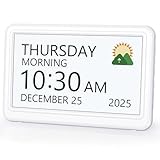
- 𝗣𝗟𝗘𝗔𝗦𝗘 𝗡𝗢𝗧𝗘! Power adapter (included) is required as the power source of this product and 2 AA batteries (not included) only work for storing the clock settings in the case of power cut. It automatically resets to the correct time and date when the power returns.
- 【HD Display & Larg Font】This 𝗹𝗮𝗿𝗴𝗲 𝗱𝗶𝗴𝗶𝘁𝗮𝗹 𝗰𝗹𝗼𝗰𝗸 𝗳𝗼𝗿 𝘀𝗲𝗻𝗶𝗼𝗿𝘀 features a 7-inch 1024×600P high-definition LCD screen that clearly displays the TIME, DATE, DAY of the WEEK. It also divides the day into six distinct time periods:MORNING, NOON, AFTERNOON, EVENING, NIGHT, MIDNIGHT, BEFORE DAWN, each paired with bright sun🌞 and moon🌙 icons to visually represent the time of day, ensuring that elderly individuals can easily understand the time & date.
- 【20 Alarms & 20 Custom Reminders】Never miss an important task or event! This 𝗰𝗹𝗼𝗰𝗸 𝘄𝗶𝘁𝗵 𝗱𝗮𝘆 𝗮𝗻𝗱 𝗱𝗮𝘁𝗲 𝗳𝗼𝗿 𝗲𝗹𝗱𝗲𝗿𝗹𝘆 supports up to 20 standard alarms(every day, weekdays or weekends, specific dates) and 20 customizable reminders for personal needs such as taking medication, drinking water, waking up, or custom special reminders daily or specific date for your need. When the alarm is triggered, a clear colorful icon with specific words will also help your get rid of misunderstanding.
- 【One-Touch Sleep Mode & 10-Level Brightness】Simply press the top button to activate sleep mode—the display turns off instantly for completely dark, undisturbed sleep. With 10 adjustable brightness levels ranging from 10% to 100%, you can easily customize the screen to suit day or night, reducing eye strain and promoting better rest by lowering brightness or turning it off completely at night.
- 【12 Themes and More Color Options】Compared with other alarm clocks with only black and white fonts, this 𝗱𝗶𝗴𝗶𝘁𝗮𝗹 𝗰𝗹𝗼𝗰𝗸 𝗹𝗮𝗿𝗴𝗲 𝗱𝗶𝘀𝗽𝗹𝗮𝘆 boasting 12 display themes and different color options, you can customize different colors and themes according to your needs and different indoor scenes, which can meet the needs of different people such as students, vision impaired or elderly seniors with color blindness.
How to choose and introduce a clock
- Identify the main need. Is the difficulty knowing the day or date, distinguishing morning from evening, hearing the time, or remembering a regular task?
- Choose the simplest suitable feature set. Start with a clear day/date display for orientation cues. Add spoken time or reminders only if they meet a specific need.
- Check the practical details. Confirm display clarity, time format, power needs, alert style, and who can help with setup or changes.
- Try it in place and watch the response. Notice whether the person looks at it, understands it, and finds it reassuring or frustrating. Adjust the format or placement when possible.
- Review whether it remains useful. A clock that becomes confusing, distressing, or difficult to maintain may not be the right aid; a professional can help consider alternatives.
Assistive products are intended to support independence, but the Alzheimer’s Society cautions that they can also cause distress or restrict freedom if used poorly, and may replace human contact. Consider advice from an occupational therapist, GP, or local-authority social-services department, particularly when needs are complex; local services may also assess needs or provide products. Alzheimer’s Society guidance on technology and dementia
A clock alert is not the same as a medication dispenser or medication-management plan. Do not rely on a clock alone to ensure medicines are taken; ask a pharmacist about medication aids or consult the person’s clinician when medication support is needed. Alzheimer’s Society technology guidance
Quick Recap
Best Value

- Designed with Quality Materials: This large display day clock is crafted with well-made components suitable for everyday home use. Its solid housing supports regular handling and features a clear digital calendar layout, making it a practical digital clock for seniors, a senior friendly clock for daily routines, and a convenient digital calendar clock or clock for elderly individuals who prefer straightforward time, day, and date visibility.
- Easy to read display: The day of the week clock has a large, clear display that is easy to read, ensuring that elderly individuals can easily understand the time & date. The high contrast display of digital clock large display makes it easy to read even in low light conditions.
- Simple setup: The clock with day and date for the elderly is easy to set up and operate. The digital clock with date and day of week comes with an easy-to-read manual that guides the user through the setup process, so that the clock can be up and running in no time.
- Customizable alarms: The American Lifetime dementia clock for seniors extra large offers multiple alarm options, allowing individuals to set reminders and up to 5 daily alarms for important events, such as taking medication or appointments.
- Auto-dimming feature: The large digital wall clock automatically adjusts its brightness to match the ambient light in the room, making it easy to read in any lighting conditions. whether it's a brightly lit room or a dimly lit bedroom.
Rank #4

- ⏰ Large font display, clear and easy to read: Nimukol dementia clock is equipped with a 7 inch large digital display screen, which clearly displays the week, month, and date in large bold letters without complex abbreviations. It can be easily viewed even with poor vision and is designed specifically for the elderly.
- ⏰Intelligent alarm clock and reminder function: Clock with day and date for elderly supports setting multiple alarms, providing medication reminders, schedule reminders, and other functions to help elderly people with dementia, Alzheimer's disease, or memory loss improve their convenience in life.
- ⏰Voice timing function: Lightly press the back of the digital clock ⏯️ Press the "OK" button on the key or remote control to automatically voice time, supporting 9 languages, especially suitable for elderly people with weak vision.
- ⏰Automatic dimming option: The digital date display screen darkens at 7:00 pm every night (50cd/㎡) and brightens at 7:00 am during the day (250cd/㎡), suitable for visually impaired people. The light adjustment is soft and eye friendly.
- ⏰Simple and easy to operate, one click setup: Clocks for seniors interface is simple, the operation is intuitive, and there is no need for complex settings. Even elderly people can easily get started, suitable for daily use.
Product prices and availability are accurate as of the date/time indicated and are subject to change. Any price and availability information displayed on Amazon at the time of purchase will apply.




