What’s actually slowing this PC down?
Pick the symptom - the matching free tool is one click away.
The safest way to stop an unwanted Microsoft 365 charge is to sign in to the Microsoft account that paid for the subscription, open Services & subscriptions, select Manage, and turn off recurring billing before the displayed renewal date. Microsoft normally lets you keep using the subscription until the expiration date. Turning off recurring billing does not, by itself, refund a charge that has already posted.
What to check before Microsoft 365 renews
“Auto-renewal trap” is best understood as a collection of easy-to-miss billing details—not proof that every recurring charge is improper. A free trial may become paid, an introductory price may disappear, an annual plan may produce a large single charge, or the subscription may be attached to a different account or billing partner than you expect.
Before changing anything, record these four details:
- Who billed you: Microsoft, Apple, Google Play, a retailer, PayPal, or a reseller.
- Which account owns the subscription: the account used to purchase it may not be the account currently signed in to Word or Windows.
- When it renews: note the date shown in the subscription-management page, email, or invoice.
- How much and how often it renews: check whether the plan is monthly or annual and whether a promotional price ends before the next term.
A renewal date or upcoming-charge notice generally indicates that recurring billing is active. If the account instead says Expires on or offers Turn on recurring billing, Microsoft says the subscription is already set to expire and should not automatically renew. See Microsoft’s recurring-billing instructions.
The Tool Desk
Outbyte Driver Updater FREEScan for outdated or missing drivers - takes under a minuteDriver Scan →Outbyte PC Repair FREEClear out junk files and repair common Windows errorsFree Scan →#1 Best Overall

- 💻 ✔️ EVERY ESSENTIAL SHORTCUT - With the SYNERLOGIC Reference Keyboard Shortcut Sticker, you have the most important shortcuts conveniently placed right in front of you. Easily learn new shortcuts and always be able to quickly lookup commands without the need to “Google” it.
- 💻✔️ Work FASTER and SMARTER - Quick tips at your fingertips! This tool makes it easy to learn how to use your computer much faster and makes your workflow increase exponentially. It’s perfect for any age or skill level, students or seniors, at home, or in the office.
- 💻 ✔️ New adhesive – stronger hold. It may leave a light residue when removed, but this wipes off easily with a soft cloth and warm, soapy water. Fewer air bubbles – for the smoothest finish, don’t peel off the entire backing at once. Instead, fold back a small section, line it up, and press gradually as you peel more. The “peel-and-stick-all-at-once” method only works for thin decals, not for stickers like ours.
- 💻 ✔️ Compatible and fits any brand laptop or desktop running Windows 10 or 11 Operating System.
- 💻 ✔️ Original Design and Production by Synerlogic Electronics, San Diego, CA, Boca Raton, FL and Bay City, MI, United States 2020. All rights reserved, any commercial reproduction without permission is punishable by all applicable laws.
How to turn off Microsoft 365 recurring billing
- Go to account.microsoft.com/services.
- Sign in with the Microsoft account used for the purchase.
- Find the relevant Microsoft 365 subscription. Check the plan name if more than one product is listed.
- Select Manage.
- Review the renewal date, billing interval, and renewal price.
- Select Turn off recurring billing and complete the confirmation steps.
- Return to the subscription page and verify that recurring billing is disabled or that an expiration date is displayed.
Save a screenshot of the confirmation, the expiration date, the order number, and any renewal email or invoice. Interface labels can vary with the plan and its current status. You may see Cancel subscription, Upgrade or Cancel, Renew, or Resubscribe instead.
Do not select Renew or Resubscribe after disabling recurring billing unless you intend to restart automatic renewal. Microsoft says those actions can turn recurring billing back on.
Cancellation is not the same as a refund
If you want to keep access through the paid term, turning off recurring billing is usually the appropriate action. It prevents the next renewal while leaving the current subscription usable until the expiration date shown in your account.
If you have already been charged, use Microsoft’s cancellation flow to check refund eligibility. Simply turning off recurring billing does not automatically return the money.
Quick wins for a faster PC:
Scan for outdated or missing drivers - takes under a minuteDriver Scan →Clear out junk files and repair common Windows errorsFree Scan →Fix the driver behind crashes, sound loss and screen glitchesFind Drivers →Microsoft’s current refund policy says that, in most cases, an initial purchase may be eligible for a refund within 30 days of purchase or before the first recurring billing date, whichever comes first. The policy also says the most recent recurring charge may generally be refundable when cancellation occurs within 30 days after payment, subject to a one-time limit per Microsoft account and subscription product. Eligibility can vary by country, product, timing, and purchase channel, so treat these as policy conditions—not a guaranteed refund.
Rank #2

- EXCEL CHEAT SHEET DESK PAD:This Excel shortcuts mouse pad is a reliable desk companion, showcasing key shortcuts for Excel, Word, PowerPoint, and Windows. It includes practical information and shortcut keys to help you work more efficiently on your daily tasks.
- LARGE AND PRACTICAL SIZE: Measuring 27.6 x 11.8 inches (700x300x2mm), this Excel mouse pad serves as both a mouse pad and desk mat, offering generous space for your computer, keyboard, and mouse. Ideal for use in the office or at home.
- CLEARLY ORGANIZED AND EASY TO USE:Excel, Word, PowerPoint, and Windows shortcut keys are grouped and organized for easy reference, making this desk pad a helpful tool for both beginners and experienced users.
- SMOOTH AND ACCURATE CONTROL:The smooth fabric top ensures accurate mouse movements, while the non-slip base keeps the pad securely in place, delivering a stable and comfortable user experience.
- LONG-LASTING AND HIGH-QUALITY DESIGN:This mouse pad features premium fade-resistant printing, ensuring that shortcut details remain clear and detailed over time. The reinforced stitched edges add durability for extended use.
Use Microsoft’s subscription refund policy and refund guidance for the current eligibility decision. Request the refund promptly, keep the transaction details, and save the result of the cancellation flow.
Who controls the billing?
The company shown on your payment record matters. Microsoft cannot normally process a refund for a subscription that Apple, Google, a retailer, or another partner billed.
| Purchase route | Where to cancel or request a refund |
|---|---|
| Bought directly from Microsoft | Microsoft account Services & subscriptions |
| Apple App Store | Apple’s subscription-management and refund process |
| Google Play | Google Play’s subscription-management and refund process |
| Retailer or prepaid code | The retailer’s return or billing system |
| Business subscription | The Microsoft 365 admin center, reseller, or commercial billing channel |
PayPal or another payment intermediary may appear in the transaction history, but first determine whether Microsoft or the intermediary is the merchant of record. Check the receipt, bank statement, and subscription page rather than assuming the payment method identifies the subscription owner.
Do these 3 things before closing this tab:
1Repair Windows errors before they cause bigger problems2Fix the driver behind crashes, sound loss and screen glitches3Clear out junk files and repair common Windows errorsIf there is no Cancel button
| What you see | Likely explanation | What to do |
|---|---|---|
| Turn on recurring billing | The subscription is already scheduled to expire. | Confirm the expiration date and save a screenshot. |
| No Manage or cancellation control | You may be in the wrong account, viewing the wrong product, or dealing with a billing partner. | Check receipts and other Microsoft accounts; identify the merchant. |
| Apple or Google handled payment | The app store controls cancellation and refunds. | Use Apple or Google Play subscription settings. |
| Prepaid card or retail code | There may be no recurring billing to disable. | Ask the retailer about returns or refunds under its policy. |
| Business subscription | Admin permissions, a reseller, or a commercial billing agreement may control it. | Contact the organization’s administrator or reseller. |
If you cannot find the subscription, search old Microsoft receipts and billing emails, then sign in to every Microsoft account you may have used. The account currently used in an Office app is not necessarily the account that paid for Microsoft 365.
Free trials can become paid subscriptions
Check a trial’s billing status immediately after starting it. Trial duration, price, and conversion terms vary by offer, country, account, and product. If recurring billing remains enabled, a trial can convert into a paid subscription when the trial ends. Microsoft’s business documentation specifically warns that a business free trial can become paid when recurring billing is not turned off.
Rank #3

- Windows 11 Shortcut Sticker ①Size:(7.25 x 9 cm) Windows Shortcut Sticker, Windows + Word/Excel Shortcuts Sticker for Windows systems Laptop and Desktop Computer. Compatible for Windows 11 and Windows 10 systems Laptop,Desktop
- BOOST YOUR PRODUCTIVITY INSTANTLY-Stop Googling shortcuts! This visual cheat sheet puts the most essential Windows 11/10, Microsoft Word, and Excel commands directly onto your keys. Master copy/paste, formatting, navigation, and advanced functions without breaking your flow.
- TWO STYLES IN ONE PACK — MAXIMUM FLEXIBILITY-Get both Clear stickers for a sleek, invisible look AND Color-coded stickers for fast visual identification. Use the clear set for work meetings, switch to color when learning new shortcuts. It's like having two products for the price of one.
- PREMIUM QUALITY THAT LASTS-Crafted from durable matte-finish vinyl. These stickers resist fading, smudging, and peeling from daily use. The adhesive is strong enough to stay put but removes cleanly with zero sticky residue—perfect for shared or company laptops.
- UNIVERSAL FIT FOR ANY KEYBOARD-Precisely cut to fit standard US layout keyboards. Compatible with all major brands including Dell, HP, Lenovo, ASUS, Acer, and external mechanical keyboards. Easy peel-and-stick application takes under 2 minutes.
Do not rely only on a reminder email. Open the subscription-management page, verify the status, and save the confirmation if you disable renewal.
Do not overlook OneDrive and family storage
Cancellation can affect more than the Office applications. Microsoft says that cancelling Microsoft 365 Basic or Personal reduces the account’s cloud-storage allowance to 5 GB, including OneDrive and Outlook.com attachments. Microsoft separately describes Outlook.com mailbox storage as 15 GB. Family or Premium users who received shared benefits can lose those benefits and have their storage allowances reduced.
Before cancelling:
- Check OneDrive storage usage.
- Download, move, or delete enough data if usage may exceed the post-subscription allowance.
- Review files belonging to family members who use shared storage.
- Check whether Outlook attachments or other cloud data contribute to the relevant limit.
Do not assume cancellation instantly deletes files, but do not treat an over-quota account as harmless. Review Microsoft’s current storage notices and make a backup before the subscription ends.
Business Microsoft 365 requires a separate plan
Consumer instructions do not reliably apply to Microsoft 365 Business. An administrator may need to use the Microsoft 365 admin center, and a reseller may control the organization’s billing.
Depending on the billing-account type and purchase route, an eligible administrator may see options such as Cancel now or Cancel before the next renewal date. Microsoft’s business documentation says that, in some Microsoft Customer Agreement arrangements bought through Microsoft or a reseller, cancellation with a prorated refund may be available within seven days. That is not a universal seven-day right for every business plan or reseller contract.
Rank #4
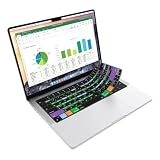
- Microsoft Excel keyboard cover with over 60 color-coded shortcuts for spreadsheets, analysis and finance work, printed over each key.
- Work faster in Excel for Mac: quickly find navigation, formatting, formula and selection commands to reduce repetitive mouse clicks.
- 0.3 mm ultra-thin silicone keyboard protector keeps fast spreadsheet keystrokes responsive while common Excel shortcuts stay in view.
- Washable protection helps keep dust, crumbs and everyday spills off the keyboard. Remove, rinse, dry and reuse. Includes a 12-month warranty.
- Fits MacBook Pro 14/16 (M1-M5), MacBook Air 13/15 (M2-M5) and MacBook Neo 13 (A18 Pro). US English ANSI layout.
Business customers should check:
- Who has billing and administrator permissions.
- Whether Microsoft or a reseller is the merchant.
- Whether the plan has an annual commitment.
- Whether turning off recurring billing stops only future renewal or also affects the current term.
- Which users, licenses, domains, mailboxes, and files depend on the subscription.
Cancelling one business subscription does not cancel other subscriptions belonging to the organization. Plan data and service status separately: Microsoft says a business subscription enters an expired state after its end date, with recovery timing and options depending on the subscription and billing arrangement. Use Microsoft’s business cancellation documentation and expiration guidance.
What to do after an unwanted charge
- Identify the charge, subscription, Microsoft account, and merchant.
- Turn off future recurring billing immediately.
- Use the appropriate cancellation or refund process.
- Save the order number, invoice, transaction date, cancellation confirmation, and correspondence.
- Check whether access, storage, or family benefits will change.
If Microsoft or the actual billing partner will not resolve a charge you believe was unauthorized, contact your card issuer or payment provider promptly. The U.S. Federal Trade Commission recommends reviewing statements, contacting the company, and disputing qualifying charges with the payment provider when the merchant will not resolve the problem. Refund and dispute rights are fact-specific; a forgotten subscription is not automatically the same as an unauthorized transaction. U.S. readers can also consider reporting suspected deceptive practices to the FTC or their state attorney general.
Should you renew, change plans, or buy Office once?
The right answer depends on what you use—not simply on whether recurring billing is inconvenient.
- Keep Microsoft 365 Personal if one person needs desktop Word, Excel, and PowerPoint, OneDrive storage, and continuing subscription features.
- Keep Microsoft 365 Family if several people use the shared benefits and storage. Microsoft’s U.S. page describes up to six people and up to 6 TB total storage, generally 1 TB per person. AI benefits may not be identical for every family member.
- Consider Premium only if its additional or higher Copilot-related features justify the higher recurring price for you. A promotional first-year price is not necessarily the later renewal price.
- Consider Office Home 2024 if your priority is a one-time Office purchase and you can accept different applications, device terms, storage, update behavior, and the absence of Microsoft 365 subscription benefits.
- Use a business plan when the organization needs business identity, administration, security, and licensing controls—not merely because several people need Word.
For context, Microsoft’s U.S. consumer pages showed these prices on August 18, 2026: Personal at $9.99 monthly or $99.99 annually; Family at $12.99 monthly or $129.99 annually; and Premium at $19.99 monthly or $199.99 annually. Microsoft’s retrieved pages showed Office Home 2024 as a one-time purchase at $179.99 on some versions and $149.99 on another. Promotions, taxes, editions, geography, and checkout prices can differ, so confirm the exact renewal price before buying.
Microsoft’s U.S. business pricing page showed Business Premium at $22 per user per month, paid yearly, and described it as an annual auto-renewing subscription. That price should not be generalized to other business plans, enterprise agreements, nonprofit offers, no-Teams editions, resellers, or regions. See Microsoft’s consumer comparison page and business pricing page for the offer that applies to you.
Free tools Windows power users keep installed
One-click scans. No signup required.
Build a simple renewal-prevention system
- Set a calendar reminder 30–45 days before the renewal date.
- Save a screenshot of the current plan and renewal price.
- Create an email rule or folder for Microsoft billing notices.
- Review bank and card statements for recurring charges each month.
- Keep a note identifying the Microsoft account that owns each subscription.
- Review family members, former employees, licenses, and cloud-storage usage before ending a plan.
Switching from annual to monthly may reduce the size of a single unexpected charge, but it can cost more over a full year. Changing the billing interval is also not the same as cancelling. Compare the full annual cost and the features you would lose before changing plans.
Quick Recap
Final cancellation checklist
- Did you use the account that made the purchase?
- Did you identify the actual billing partner?
- Did you record the renewal date, interval, and price?
- Did you turn off recurring billing or complete the relevant cancellation flow?
- Does the account now show an expiration date or disabled recurring billing?
- Did you save confirmation and transaction records?
- Did you check OneDrive, Outlook attachments, and shared-family storage?
- If a charge already posted, did you request a refund through the correct merchant?
- If it is a business account, did an authorized administrator or reseller handle the change?
Product prices and availability are accurate as of the date/time indicated and are subject to change. Any price and availability information displayed on Amazon at the time of purchase will apply.




