Quick wins for a faster PC:
Scan for outdated or missing drivers - takes under a minuteDriver Scan →Clear out junk files and repair common Windows errorsFree Scan →Fix the driver behind crashes, sound loss and screen glitchesFind Drivers →Most Apple Pay scams are not attacks on Apple Pay’s payment technology. They are attempts to impersonate Apple, a bank, or a merchant and trick you into sharing credentials, approving a sign-in, installing remote-access software, or sending money. Don’t click, call, reply, or pay using instructions in an unexpected alert. Check Wallet and your bank’s app yourself, and contact Apple or your card issuer through an independently verified channel.
What an “Apple Pay scam” usually involves
Apple Pay adds safeguards to supported transactions, but it cannot stop someone from persuading you to disclose a password or verification code, approve a payment, or send money. Scams that mention Apple Pay often target the person, Apple Account, phone number, or bank account rather than breaking Apple Pay’s security.
Fake transaction alerts
A text, email, pop-up, or voicemail may claim that a payment was declined, a suspicious charge was blocked, Wallet is locked, or your Apple Account will be disabled. It may tell you to call a number, click a link, or reply “YES” or “NO.” The goal is to move you to a fraudulent contact or sign-in page. Apple warns about fake support messages and suspicious-charge claims at its security guidance.
Fake Apple Support or bank calls
A caller may claim to be Apple Support or your bank’s fraud team and say your iPhone, iCloud account, or Apple Pay is compromised. Caller ID can be spoofed, so a familiar-looking number is not proof. A caller who pressures you to stay on the line, reveal a code, or move money to a “safe” account is not giving you a safe way to verify the claim. The FBI explains how spoofing and phishing work at its spoofing and phishing guidance.
Free tools Windows power users keep installed
One-click scans. No signup required.
#1 Best Overall

- 𝐏𝐫𝐨𝐝𝐮𝐜𝐭 𝐒𝐢𝐳𝐞:𝟑.𝟖𝐱𝟐.𝟑𝟐 𝐢𝐧
- 𝐅𝐢𝐭 𝐟𝐨𝐫 𝐀𝐥𝐥 𝐒𝐢𝐳𝐞 𝐂𝐚𝐫𝐝𝐬:𝐍𝐞𝐰 𝐌𝐞𝐝𝐢𝐜𝐚𝐫𝐞 𝐂𝐚𝐫𝐝, 𝐒𝐨𝐜𝐢𝐚𝐥 𝐒𝐞𝐜𝐮𝐫𝐢𝐭𝐲 𝐂𝐚𝐫𝐝, 𝐛𝐮𝐬𝐢𝐧𝐞𝐬𝐬 𝐜𝐚𝐫𝐝, 𝐜𝐫𝐞𝐝𝐢𝐭 𝐜𝐚𝐫𝐝
- 𝐒𝐨𝐜𝐢𝐚𝐥 𝐒𝐞𝐜𝐮𝐫𝐢𝐭𝐲 𝐂𝐚𝐫𝐝 𝐏𝐫𝐨𝐭𝐞𝐜𝐭𝐨𝐫,𝐍𝐞𝐰 𝐌𝐞𝐝𝐢𝐜𝐚𝐫𝐞 𝐂𝐚𝐫𝐝 𝐇𝐨𝐥𝐝𝐞𝐫 𝐏𝐫𝐨𝐭𝐞𝐜𝐭𝐨𝐫 𝐒𝐥𝐞𝐞𝐯𝐞𝐬
- 𝐄𝐚𝐬𝐲 𝐬𝐥𝐢𝐝𝐞 & 𝐍𝐨𝐧-𝐬𝐭𝐢𝐜𝐤: 𝐒𝐩𝐞𝐜𝐢𝐚𝐥 𝐨𝐩𝐞𝐧𝐢𝐧𝐠 𝐝𝐞𝐬𝐢𝐠𝐧 𝐜𝐚𝐧 𝐢𝐧𝐬𝐞𝐫𝐭 𝐚𝐧𝐝 𝐫𝐞𝐦𝐨𝐯𝐞 𝐲𝐨𝐮𝐫 𝐜𝐚𝐫𝐝 𝐞𝐚𝐬𝐢𝐥𝐲
- 𝐃𝐮𝐫𝐚𝐛𝐥𝐞 𝐌𝐚𝐭𝐞𝐫𝐢𝐚𝐥𝐬:𝐦𝐚𝐝𝐞 𝐨𝐟 𝐰𝐚𝐭𝐞𝐫-𝐫𝐞𝐬𝐢𝐬𝐭𝐚𝐧𝐭 𝐚𝐧𝐝 𝐜𝐨𝐫𝐫𝐨𝐬𝐢𝐨𝐧-𝐫𝐞𝐬𝐢𝐬𝐭𝐚𝐧𝐭 𝐏𝐕𝐂 𝐜𝐚𝐫𝐝 𝐬𝐥𝐞𝐞𝐯𝐞𝐬
Fake sign-in and verification pages
A link can lead to a convincing copy of an Apple sign-in page asking for your Apple Account email, password, verification code, device passcode, or recovery key. It might also request card details, a Social Security number, or other identity information. A familiar logo or page design does not establish that a page is genuine.
Scams that ask you to send money
A scammer may describe a payment as a way to verify an account, cancel a charge, receive a refund, or claim a prize. They might ask for Apple Cash, an Apple Gift Card, a wire transfer, cryptocurrency, or cash. Apple says it will not ask you to pay it through Apple Cash, and warns against using Apple Gift Cards to pay other people (Apple Cash safety guidance; Apple security guidance). Never move money because an unsolicited caller says it must be protected.
How to verify an alert safely
- Stop interacting with the message. Don’t click its link, call its number, reply, share a code, or approve a sign-in you did not initiate.
- Check Wallet yourself. Open the Wallet app directly and inspect the relevant card or Apple Cash transaction.
- Check with the issuer. Open your bank or card issuer’s official app, review its statement, or call the number printed on your physical card. The issuer is the right starting point for a card transaction dispute.
- Contact Apple independently for an Apple Account concern. Use the Apple Support app or Apple’s official website rather than contact details in the message.
- Preserve and report suspicious messages. If a suspicious SMS appears to be from Apple, forward it to [email protected]. In the U.S., forward phishing texts to 7726 (SPAM), and report scams to ReportFraud.ftc.gov. Keep a screenshot if useful, then block or delete the message.
Apple says it will not ask for your Apple Account password, verification codes, device passcode, or other account-security details to provide support, and will not ask you to disable two-factor authentication or Stolen Device Protection (Apple security guidance; Apple Cash safety guidance).
Rank #2

- Secure Your Information: Simply insert the RFID blocking card into your wallet to protect against digital pickpocketing. Block unauthorized scanning of your contactless cards, including credit/debit cards, passports, driver's licenses - to safeguard your identity and financial security
- Effective Protection: Our RFID blocking card utilizes advanced electromagnetic shielding technology, which features an embedded antenna mesh and chip that instantly detects and scrambles scanning attempts, providing consistent and reliable protection for the entire wallet
- Ultra Slim & Easy to Use: Credit-card-sized and just 0.03 inches (0.76 mm) thick, it slips easily into your wallet, purse or card holder adding no bulk. No charging or batteries needed. It will not demagnetize other cards, nor interfere with your phone signals
- A Thoughtful Gift: Give the practical gift of security. Effortlessly protecting your loved ones from digital theft – offering instant peace of mind, which is a truly meaningful way to show your care
- Test the Card: Test our RFID blocking card at self-checkout: Layer your contactless card with our RFID card on the reader - payment fails instantly, error message pops up
Warning signs to take seriously
- Urgency, threats, or pressure to stay on a call.
- A request for a password, one-time code, device passcode, recovery key, or full card number.
- A prompt to tap Allow, Accept, or approve a two-factor authentication request you did not start.
- A request to disable two-factor authentication, Find My, or Stolen Device Protection.
- A demand to install remote-access software, paste a command into Terminal, or install an untrusted app.
- A request to send money to a “safe” account or pay by Apple Cash, gift card, cryptocurrency, wire, or couriered cash.
- A link with an unusual or misspelled domain, or a phone number that appears legitimate only because of caller ID.
Apple lists fake pop-ups, phishing messages, unwanted Calendar invitations, phony support calls, and malicious Terminal commands among social-engineering tactics (Apple security guidance).
What Apple Pay protects—and what it does not
For supported Apple Pay transactions, merchants generally receive a device-specific account number and a transaction-specific security code instead of the underlying card number. Payment authorization uses device authentication such as Face ID, Touch ID, Optic ID, or a passcode. Apple describes its payment security and privacy features at Apple Support and Apple Pay.
Those protections help secure payment credentials in a transaction; they do not make a scam-proof boundary around your finances. They cannot prevent you from entering credentials on a fake page, giving away a valid verification code, approving a fraudulent request, or knowingly sending money to a scammer. Tokenization also does not guarantee recovery of a payment you authorized after being deceived.
Rank #3

- PIN Pad keypad protector fits the Ingenico Lane/7000 keypad; protective spill cover fits the keypad like a glove; securely covers the keys; enhance customer experience with our easy-to-clean keypad protective spill cover
- Our spill cover protector is custom designed to cover the Ingenico Lane/7000 keypad including all around the edges to protect your payment terminal from liquid spills, food, dust, moisture, oil, grease, and dirt; spill cover makes it easy to wipe down and clean your PIN Pad keypad
- Eliminate expensive repairs with a protective overlay that is easy to install, flexible, translucent, and durable; custom fitted to the keypad; made with ultra-thin, high quality polyurethane that is protective and long-lasting
- Protect your customers with our easy-to-clean cover; the cover prevents fingerprint and grease build up without sacrificing customer experience or ease of keypad use; protective cover extends the life of your POS terminal keypad by protecting against scratches and other dangers
- POS terminal accessory is extremely easy to install and remove; protective spill cover is custom designed to cover the entire Ingenico Lane/7000 keypad; terminal not included
Apple Pay, Apple Cash, Apple Card, and Apple Account are different
The name on the alert matters less than the product and transaction involved. The right recovery route depends on what was used.
| Product or account | What it is | Where to start if there is a problem |
|---|---|---|
| Apple Pay | A payment feature in Wallet that can use eligible cards for in-person and online purchases. | For a card charge, contact the card issuer; for a purchase issue, contact the merchant. Apple’s transaction-history guidance and U.S. Apple Pay terms explain issuer and merchant roles. |
| Apple Cash | A U.S.-only person-to-person and stored-value service in Wallet. | For an Apple Cash payment, use the Apple Cash Specialist route described in Apple’s payment guidance. |
| Apple Card | A separate credit-card account with its own transaction-dispute process. | Use the Apple Card dispute process in Wallet, as described in Apple Card support. |
| Apple Account | The account used for Apple services, trusted devices, and account recovery. | Secure the account through Apple’s compromise-response steps. |
A Wallet transaction display may not be the final or most complete record. Apple says the issuer has the most accurate transaction history; some amounts, such as restaurant totals after tips or certain gas-station charges, can change before posting (Apple transaction-history guidance).
What to do if you already responded
You clicked a link but entered nothing
- Close the page and do not download or install anything it offered.
- Update the device through its normal system settings.
- Look for unexpected apps, configuration profiles, Calendar subscriptions, or account prompts, and review the devices listed on your Apple Account.
- Monitor bank and card accounts. Clicking alone does not establish that your account or device was compromised, but any information you entered, prompt you approved, or software you installed changes the risk.
You entered an Apple Account password or shared a verification code
- From a trusted device, change your Apple Account password immediately, either in the device’s account settings or by going directly to Apple’s account site.
- Review the devices associated with the account and remove any you do not recognize. Check the account’s email address, phone numbers, trusted devices, purchases, subscriptions, and recovery details.
- Make sure two-factor authentication is enabled. If you cannot regain access, follow Apple’s recovery guidance at iforgot.apple.com.
- Change the same password anywhere else you reused it, especially on your email account. Contact your cellular carrier if you suspect someone controls your number or has altered its settings.
- If payment or financial information was involved, contact the relevant bank or card issuer through an official channel.
Apple’s account-compromise guidance covers password changes, unfamiliar devices, account details, and recovery. A password change alone may not secure a compromised email account, phone number, or device.
Rank #4
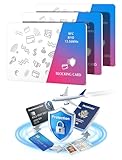
- 13.56MHz PROTECTION FOR CARDHOLDERS – Magriffin RFID blocking card helps interfere with unwanted contactless scans of compatible credit cards, debit cards and e-passports. Designed for people who want added protection inside the wallet or passport holder they already carry
- VERIFY RFID BLOCKING WITH AN EASY SELF-TEST – Turn invisible protection into something you can check. At a compatible tap-to-pay terminal, confirm your payment card reads alone, tap again with the blocker directly against it, then remove the blocker and confirm normal reading returns
- CLEAR PLACEMENT FOR MORE RELIABLE PROTECTION – Position one credit card scan blocker close to the contactless cards you want to protect. Because distance, card position and wallet layout can affect RFID blocking performance, repeat the self-test after moving the blocker or rearranging your cards
- 0.029-IN ULTRA-SLIM WALLET FIT – At only 0.029 in (0.74 mm), these RFID cards for wallet use are slightly thinner than a standard credit card. Each passive RFID blocking card fits into a regular wallet without batteries, charging or switches and has been durability-tested for more than three years
- PROTECTION FOR DAILY CARRY, TRAVEL AND CROWDED PLACES—3 PACK – Place the three RFID blocking cards in different wallets or card groups, or share them with family. They help protect credit cards from scanners while commuting, shopping or traveling and are backed by a Magriffin lifetime warranty
You allowed remote access
- End the call. If a scammer is still connected to the device, disconnect it from the internet.
- Contact banks and card issuers promptly, especially if the caller saw financial information or initiated a transaction.
- Using a known-clean device, change exposed passwords, starting with email and Apple Account credentials.
- Remove unauthorized remote-access software and review apps, profiles, browser extensions, and account sessions. If you cannot assess the device safely, ask a qualified professional to check it.
- Keep messages, phone numbers, receipts, and other records. Report the incident to the FBI’s Internet Crime Complaint Center and the FTC. The FBI warns that tech-support scammers may pass victim information to other criminals (FBI tech-support scam guidance).
Your Apple Pay card was used without permission
- Open Wallet, tap the relevant card, and inspect recent activity.
- Contact the card issuer for its transaction record and dispute process. Give it the merchant name, amount, date, and any other transaction details.
- Ask whether to suspend or replace the card or its digital-wallet credential. A card can be suspended from Apple Pay without necessarily canceling the physical card; follow the issuer’s advice.
- If account compromise may be involved, secure your Apple Account as well.
Do not assume a charge shown in Wallet is the complete or final record; use the issuer’s record for the dispute. A familiar merchant descriptor also does not by itself prove that you made the purchase.
You sent or received an unexpected Apple Cash payment
Apple Cash applies in the U.S. If the payment was sent without your permission, secure the Apple Account and check that nobody with access to the device or debit card made it. Contact an Apple Cash Specialist at Green Dot Bank on 877-233-8552.
For a pending person-to-person payment, open Wallet, tap the Apple Cash card, tap the transaction, tap it again, then choose Cancel Payment. Apple says a completed person-to-person payment generally cannot be canceled through this flow (Apple Cash payment guidance).
What’s actually slowing this PC down?
Pick the symptom - the matching free tool is one click away.
Best Value
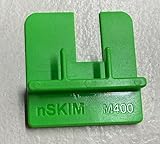
- COMPATIBILITY: Works with multiple credit card terminal models including VeriFone M400 & M440 stationary terminals
- QUICK DETECTION: Takes only seconds to verify if credit card terminals are free from unauthorized skimming devices
- SECURITY TOOL: Helps protect payment systems by identifying potential tampering or foreign objects on card readers
- EASY TO USE: Simple physical verification process requires no technical expertise or special training
- VERSATILE DESIGN: Available in different models to accommodate various terminal types including M400 for Verifone M400 / M440. The MX 900 for Verifone MX900/MX925, Ingenico Lane (3000/5000/7000), Pax PX7 and more.
For an unrecognized Apple Cash merchant transaction, contact an Apple Cash Specialist. If a pending merchant charge is incorrect, Apple advises allowing up to four business days for it to clear because some amounts can change before final posting. For an incorrect cleared charge, contact the merchant and report an unrecognized transaction to the specialist. An unauthorized payment, a payment you were tricked into authorizing, and a merchant dispute are different situations; do not assume a voluntary scam payment will be reversed.
Your Apple Card has an unfamiliar charge
Use the Apple Card transaction-dispute and compromised-card process in Wallet. Apple describes the route at Apple Card support; do not substitute an Apple Cash process for an Apple Card dispute.
Your device was lost or stolen
- Use Find My to place the device in Lost Mode. This attempts to suspend the ability to transact with virtual payment cards on that device.
- If needed, remotely erase the device through Find My.
- Contact the card issuer or bank to suspend cards in Apple Pay, and secure your Apple Account if the passcode or account might be exposed.
- Review the devices signed in to your Apple Account.
Apple explains the payment effects of Lost Mode and remote erasure at Apple Pay security support and in its U.S. Apple Pay terms. If a thief may know your passcode, treat the incident as more serious than a lost device alone.
You disclosed identity or bank information
- Contact the relevant financial institution and change exposed credentials, including any reused passwords.
- Use IdentityTheft.gov for a recovery checklist if your Social Security number or other identity information was exposed.
- Consider a credit freeze or fraud alert through the credit bureaus, and monitor credit reports and financial accounts.
- Report the scam at ReportFraud.ftc.gov.
The FTC directs people whose Social Security, credit-card, or bank-account information may have been exposed to IdentityTheft.gov and provides further steps at its post-scam guidance.
Quick Recap
How to reduce the risk of another scam
Protect your Apple Account and devices
- Use a strong, unique Apple Account password and keep two-factor authentication enabled. Never share a password, recovery key, verification code, or device passcode.
- Keep device software current and review devices associated with your Apple Account.
- Enable Stolen Device Protection on supported iPhones. It can help guard against certain critical changes when an iPhone is away from familiar locations; it does not stop phishing or an authorized payment scam (Apple Stolen Device Protection guidance).
- Do not add another person’s fingerprint or share your device passcode. Consider Apple Account Security Keys only if the added phishing resistance suits your needs and you can keep backup keys safely available; Apple describes them in its account-security guidance.
Make payment activity easier to spot
- Enable transaction alerts from your bank or card issuer and check the issuer’s app, not just Wallet notifications.
- Use a credit card rather than a debit card for purchases when appropriate; the dispute process and immediate cash-flow consequences can differ by account and issuer.
- Treat Apple Cash like cash: send it only to people or businesses you have independently verified.
- Verify unexpected invoices through the merchant’s official website. Never pay a supposed government, utility, support, or delivery fee with a gift card.
Keep control of the conversation
- Do not trust caller ID or personal details a caller already knows; they may have come from another source.
- Do not click unsolicited links or paste commands into Terminal at someone else’s direction.
- Hang up and call back using a number found independently, such as the one printed on your card.
Product prices and availability are accurate as of the date/time indicated and are subject to change. Any price and availability information displayed on Amazon at the time of purchase will apply.




