Free tools Windows power users keep installed
One-click scans. No signup required.
To highlight Excel dates that are strictly before today, create a formula-based conditional-formatting rule with:
=A2<TODAY()Applied to a range such as A2:A100, this highlights dates earlier than the current date but does not highlight today. For most worksheets, the safer version is:
As an Amazon Associate I earn from qualifying purchases.
=AND(ISNUMBER(A2),A2<TODAY())That version ignores blanks, text such as Pending, and imported values that Excel does not recognize as dates. Excel’s TODAY() value is dynamic, but the workbook must recalculate for the rule to reflect a new day. See Microsoft’s TODAY function documentation.
Windows Errors? Fix Them Before They Spread
Repair common Windows errors and clear accumulated junk for a smoother, more stable PC - no reinstall needed.Free scan · no reinstallOutdated Drivers Are Slowing You Down
One free scan finds every outdated or missing driver and matches the right update for your exact hardware.Free scan · exact hardware matchApply the rule in Excel
- Select the date cells, such as
A2:A100. - Go to Home > Conditional Formatting > New Rule.
- Choose Use a formula to determine which cells to format.
- Enter
=A2<TODAY(), or use the blank-safe formula=AND(ISNUMBER(A2),A2<TODAY()). - Select Format, choose a fill, font color, bold style, or border, and select OK.
In Excel for the web, the path is generally Home > Styles > Conditional Formatting > New Rule. Check the Apply to range field before saving. On Mac, the dialog may use a Classic style interface before offering Use a formula to determine which cells to format. Menu labels can vary by Excel edition.
#1 Best Overall

- Easy to Use - Our USB wired numpad does not require any driver or battery; easy to install, plug and play, gives you a stable connection.
- Quiet & Soft Touch - Integrated ergonomic tilt provides comfortable typing, helps reduce the wrist strain. Low noise of the 19-key USB numeric keypad gives you a quiet and soft touch.
- USB Wired Number Pad - Full-size 19mm keys improve speed and accuracy by making it easier to locate and press the numbers you are looking for. Numeric keypad supports NumLock.
- Lightweight & Portable - The black numeric keypads are perfect for working on spreadsheet, you can works household, school, business trips, or daily use, very convenient number use.
- Wide Compatibility - Compatible for Windows 2000, XP, Vista, or Windows 7/8/10, Android operating systems. Works with PC, desktop, notebook and other devices with USB ports.
Conditional-formatting formulas must begin with an equals sign and return either TRUE or FALSE. Microsoft’s instructions cover formula rules, rule management, ranges, precedence, and error handling.
Use the correct reference cell
The formula must refer to the top-left cell of the range to which the rule applies. If the range is A2:A100, use A2—not A1. Excel evaluates the formula relative to the top-left cell and adjusts the relative reference for the remaining cells.
For example, if the rule applies to D5:D200, start with:
Quick wins for a faster PC:
Fix the driver behind crashes, sound loss and screen glitchesFind Drivers →Repair Windows errors before they cause bigger problemsFix Now →Scan for outdated or missing drivers - takes under a minuteDriver Scan →=AND(ISNUMBER(D5),D5<TODAY())A mismatch between the formula’s reference and the range’s first cell is a common reason for apparently incorrect results.
Highlight an entire row based on a date
Suppose a worksheet contains:
| Due date | Task | Status |
|---|---|---|
| 8/10/2026 | Send invoice | Open |
To highlight A2:C100 whenever the date in column A is before today, apply this rule to the full range:
=AND(ISNUMBER($A2),$A2<TODAY())The dollar sign fixes the date column at A, while the row number remains relative. As Excel evaluates each row, it checks A2, then A3, and so on. The ISNUMBER test prevents empty or text entries from triggering the row formatting.
Rank #2

- Widely Compatibility: This Bluetooth number pad is compatible with PC, laptop, desktop and computers running Windows systems. Note: This number pad does NOT support Mac OS systems
- Multi-function 26-key Keypad: With NumLock, ESC, Delete and a shortcut key which can open the computer calculator directly etc.The number keyboard is more unique in that it can be combined into 3 currency symbols through Fn+composite keys
- Bluetooth Number Pad Rechargeable: The wireless numeric keyboard with rechargeable lithium battery, avoid continuous battery consumption and battery replacement. This numeric keypad uses the latest stable buletooth 3.0 connection,plug and play, no delay and caton, fast data transmission, and working range is up to 33FT
- Comfortable Numeric Pad: With quiet SCISSOR-SWITCH KEYS provides a comfortable and smooth typing experience, quick response and good tactile rebound, keep the office quiet and improve work efficiency.15° tilt design fits the human body habits, great for spreadsheets worker, accounting staff and financial officer
- Long Using Time Keypad: The wireless numpad with a large capacity lithium battery, usually can use 1-2 months after fully charged (charged with the provided USB-A to USB-C cable). It will enter the sleep function after being idle for 1 hour, press any key to wake up
A simpler version is =$A2<TODAY(). Use it when column A is guaranteed to contain valid dates and you do not need defensive handling for incomplete data.
Before today, including today, or after today?
| Requirement | Formula |
|---|---|
| Before today, excluding today | =A2<TODAY() |
| Today or earlier | =A2<=TODAY() |
| Today only | =A2=TODAY() |
| After today | =A2>TODAY() |
| Today or later | =A2>=TODAY() |
| Exactly yesterday | =A2=TODAY()-1 |
| Older than 30 days | =A2<TODAY()-30 |
The difference between < and <= matters: “older than today” means strictly earlier than today, while “today or earlier” includes today.
Exclude blanks and non-date text
Use this as the default production-safe rule:
=AND(ISNUMBER(A2),A2<TODAY())Excel stores genuine dates as numeric serial values. A cell can look like a date while actually containing text, especially after importing data. To test a suspicious value, enter =ISNUMBER(A2) in another cell. TRUE indicates a numeric value; FALSE usually means text or another nonnumeric value.
Do these 3 things before closing this tab:
1Repair Windows errors before they cause bigger problems2Scan for outdated or missing drivers - takes under a minute3Clear out junk files and repair common Windows errorsFor a basic nonblank check, you can use:
=AND(A2<>"",A2<TODAY())However, ISNUMBER is more reliable when the column may contain entries such as N/A, Pending, or imported date strings.
Fix dates stored as text
If dates appear correct but are not highlighted, convert them to real Excel dates. Depending on the data, options include re-entering them using a recognized format, using Data > Text to Columns, or applying DATEVALUE to compatible text-date patterns. Clean leading spaces and inconsistent imported formats first.
Do not assume that a value such as 01/02/2026 has one universal meaning. Regional settings may interpret it as January 2 or February 1. For fixed dates, use DATE(year,month,day) rather than an ambiguous slash-separated value; Microsoft documents this function here.
Dates that include times
TODAY() represents the current date at midnight. A date-time from a previous day is still earlier than today and will be highlighted. For example:
The Tool Desk
Outbyte Driver Updater FREEFix the driver behind crashes, sound loss and screen glitchesFind Drivers →Outbyte PC Repair FREERepair Windows errors before they cause bigger problemsFix Now →8/17/2026 23:59 < 8/18/2026 00:00A date-time occurring today is not necessarily less than TODAY(): today at midnight equals it, while today later than midnight is greater than it. If the requirement is “older than the current date and time,” use:
Rank #3

- Versatile Application Scenarios: Ideal for a wide range of uses, from accounting and financial work to data entry and education, this keypad is perfect for professionals and students alike. It's also a great tool for gamers who need additional keys for macros, or digital artists and designers for shortcuts, making it a versatile addition to any workspace
- Easy Plug-and-Play Operation: No need for complicated installations or software. This wireless number pad offers a simple plug-and-play functionality with its USB interface, ensuring a hassle-free setup. Simply connect it to your computer, and you're ready to enhance your productivity. (Note: Compatible only with devices equipped with USB ports)
- Compact and Portable Design: With its sleek, lightweight construction, this numeric keypad is designed for portability. Easily carry it in your laptop bag or backpack to have access to efficient data entry wherever you go, making it perfect for mobile professionals, remote workers, and those who value a clutter-free desk
- Enhanced Typing Experience: Equipped with responsive keys and a comfortable layout, this numpad provides a tactile, satisfying typing experience. Its design minimizes fatigue during long periods of use, making it an ideal choice for those who frequently work with numbers or require additional input options for their computing needs
- Wide Compatibility: Compatible with various devices including laptops, desktops, and tablets, fully supporting systems like Windows 2000, XP, Vista or Windows 7/8/98/10/11 later, Chrome Os, Android, Linux, Paritally work with macOS with USB port (Numbers work fine but hotkeys not workable), making it an ideal wireless numeric keypad solution
=AND(ISNUMBER(A2),A2<NOW())NOW() returns the current date and time, whereas TODAY() returns the current date. Use TODAY() for calendar-date logic and NOW() only when the time of day matters. See Microsoft’s NOW documentation.
Highlight overdue items that are not complete
To highlight an entire row only when the due date is past and the status in column C is not Complete, apply this to the table body:
=AND(ISNUMBER($A2),$A2<TODAY(),$C2<>"Complete")For rows that should be highlighted only when the status is Open, use:
=AND(ISNUMBER($A2),$A2<TODAY(),$B2="Open")Adjust the status column to match your worksheet. If statuses contain inconsistent capitalization or extra spaces, clean or normalize the data before relying on the comparison.
What to check when the rule does not work
The rule applies to the wrong cells
Open Home > Conditional Formatting > Manage Rules and inspect Applies to or Apply to range. Confirm that the range starts at the same cell used in the formula. For a row rule, ensure the full table body—not just the date column—is selected.
The formula is missing the equals sign
Enter =A2<TODAY(), not A2<TODAY(). The equals sign is required for a formula-based rule.
Another rule hides the formatting
In Manage Rules, check rules targeting the same cells. Higher rules have greater precedence when formatting conflicts. Review the order and whether Stop If True is enabled.
Rank #4
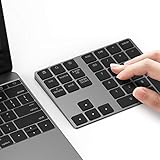
- Slim Aluminum Design: Lekvey Bluetooth number pad is constructed of solid and premium aluminum materials for long-lasting use, the ergonomic tilt for comfortable typing and good look, slim style appearance ( Only 0.46 lb, 5.7 x 4.4 x 0.47 inch ), exactly matches your Macbook, MacBook Air / Pro, iMac, PC, surface pro, laptop or desktop as the side external wireless numeric keypad
- Bluetooth 5.0 Connection: Bluetooth 5.0 technology provides a cable-free & clutter-free connection, the external Bluetooth number pad 34-keys full keypad extends your existing keyboard, operating distance 10 m. Note: For Laptop Desktop PC without Bluetooth function, you need to use third-party Bluetooth adapter (not included) before use
- High-Capacity Rechargeable Battery: Built-in 160 mAh lithium rechargeable battery. The Bluetooth numeric keypad is easily recharged through the included type C cable, no need to change the battery and easy to use. The Bluetooth wireless keypad also has the auto sleep function, lower power consumption, reflect energy saving and humanization of the product. Press any key can wake up the Bluetooth number pad within 3 seconds
- Widely Compatible: This Bluetooth wireless number pad it includes shortcut keys and low profile quiet scissor-switch keys so you can work comfortably on your computer or laptop. The Bluetooth number pad is compatible with Windows, Android, iMac, MacBook Pro, MacBook Air, MacBook, Surface Pro, Tablet PC Desktop laptop, etc. Note: The Bluetooth 10 key is NOT compatible with ChromeBook. And due to MAC OS is special system, the "screenshot", "search", "ins" and "calculator" shotcut keys won't work with Mac OS, but other keys and number keys work well
- Lekvey Aluminum Luxury Bluetooth Number Pad, Happy Purchasing: Are you still worried about using the traditional large keyboard to process data? Or are you still worried that your laptop without a numeric keypad? Lekvey wireless Bluetooth keypad is just for you! The compact and practical wireless number keypad allows you to take it anywhere. Take it out of your pocket or backpackand you'll be better able to get work done on your tablet or laptop. Enjoy it
The date column contains errors
Error values can prevent conditional formatting from being applied as expected. A defensive version is:
What’s actually slowing this PC down?
Pick the symptom - the matching free tool is one click away.
=IFERROR(AND(ISNUMBER(A2),A2<TODAY()),FALSE)If errors need attention, create a separate rule such as =ISERROR(A2) with a different format. Microsoft notes these error-handling considerations in its conditional-formatting guidance.
The result does not change tomorrow
TODAY() is dynamic, but its result updates when Excel recalculates the workbook. If the workbook uses manual calculation, change the calculation setting to Automatic in Excel’s formula calculation settings, then recalculate or reopen the workbook as needed. Do not treat conditional formatting as a permanent snapshot: it changes appearance, not the underlying dates.
Use Excel’s built-in date rule instead
Excel also offers Home > Conditional Formatting > Highlight Cells Rules > A Date Occurring. This is convenient for predefined categories such as yesterday, today, tomorrow, or next week.
For the precise requirement “strictly older than today,” a formula is usually better because it makes the comparison explicit, can ignore blanks and text, can format an entire row, and can combine the date with status or other conditions.
Use a fixed cutoff date
If the rule should compare against a reporting or audit date that must not move tomorrow, put that date in F1 and use:
Best Value

- 1.Number Pad for Laptop: Foloda number pad supports NumLock, ESC, Tab, Delete etc. With shortcut key which can open the computer calculator directly. The Multi - Function 10 keys USB keypad is a must - have laptop accessories. It's more unique than most keyboards, perfectly catering to the needs of laptop users who require efficient numeric input during work, study or financial accounting tasks.
- 2.10 Key USB Keypad: Number Keypad is a great addition to your laptop accessories collection, is only 87g. As a key laptop accessory, Foloda numpad works by 2.4GHz wireless technology, with Plug and Play functionality. You can just plug the receiver into a USB port of your laptop. No device drivers needed, no delays and dropouts, ensuring fast data transmission. The maximum working range up to 32.8 ft. The Receiver is inserted in the battery compartment of the numeric keypad, making it convenient to carry around with your laptop.
- 3.Wireless Number Pad: Number Pad is made of high quality ABS Material which offer great comfortable touch and precise control, good resilience fast response and reduce the press sound. It also has auto sleep function, lower power consumption, reflecting energy saving. Press any key to awake up the keypad. Power Supply by 2 x AAA Battery ( not included ). This makes it an excellent laptop accessories for use in quiet environments like libraries or offices, where noise - free operation is crucial.
- 4.10 Key for Laptop: wireless usb number pad, an essential laptop accessory, works with PC, laptop and desktop computers that have Windows 2000 / XP / Vista / 7 / 8 / 10 systems. Whether you're using a Windows laptop for work or entertainment, Foloda usb numeric keypad is a reliable and compatible accessory.
- 5.USB Number Pad for Laptop: Specialized in Home and try our best to offer the better product and customer service. If you have any question, feel free to contact with us. We are committed to ensuring that your experience with our laptop accessory - the wireless number pad - is nothing short of excellent.
=AND(ISNUMBER(A2),A2<$F$1)The absolute references keep the comparison anchored to F1. For a date built directly into the formula, use:
=A2<DATE(2026,8,18)This avoids regional ambiguity. A hard-coded expression such as =A2<8/18/2026 can be interpreted unexpectedly depending on local date settings.
Excel editions and expanding lists
Microsoft lists TODAY() as supported in Excel for Microsoft 365, Excel for the web, Excel 2024, Excel 2021, Excel 2019, Excel 2016, and corresponding Mac editions. The exact conditional-formatting dialog differs between Windows, Mac, and the web.
If new records will be added, apply the rule to an Excel Table’s date column or table body where appropriate, rather than a small fixed range. The exact expansion behavior can vary with the workbook structure and Excel edition, so verify the rule’s Applies to range after adding rows.
Excel for the web may be sufficient for this task. A paid Microsoft 365 subscription is not necessary merely to apply date-based conditional formatting if the web version meets your needs; desktop Excel is relevant when you need broader desktop, offline, VBA, or other edition-specific features. See Microsoft’s current Excel page for availability and plan details.
Quick Recap
Product prices and availability are accurate as of the date/time indicated and are subject to change. Any price and availability information displayed on Amazon at the time of purchase will apply.




