Quick wins for a faster PC:
Repair Windows errors before they cause bigger problemsFix Now →Scan for outdated or missing drivers - takes under a minuteDriver Scan →Apple no longer sells the USB SuperDrive through its online stores. The external CD/DVD drive disappeared from Apple’s U.S. store in 2024 and later became unavailable across Apple’s regional stores. Apple did not publish a conventional discontinuation announcement, so the most accurate description is that the SuperDrive is effectively discontinued.
As of August 16, 2026, the clearest remaining Apple-branded purchase option is a used, very-good-condition unit from OWC/MacSales listed at $88.99, with a one-year OWC-fulfilled limited warranty. That is more than Apple’s former $79 price for a new drive, which makes a current third-party CD/DVD drive the better value for most buyers.
As an Amazon Associate I earn from qualifying purchases.
What Apple stopped selling
The product is the external Apple USB SuperDrive, model MD564LL/A. It is a slim, slot-loading optical drive that reads and writes CDs, DVDs and dual-layer DVD media. It does not support Blu-ray.
It is also different from the internal optical drives that Apple historically called “SuperDrive” in older Macs. Apple introduced this external model alongside the original MacBook Air in 2008, when the laptop omitted a built-in optical drive. It remained in Apple’s lineup for roughly 16 years. Macworld reported the U.S. store’s $79 unit as sold out in August 2024, and MacRumors later reported worldwide unavailability.
#1 Best Overall
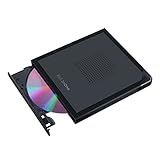
- Convenient cable storage: No more losses with a built-in 24cm connecting cable.
- USB-C interface: Perfect companion for latest-generation ultraslim laptops.
- M-DISC support: Store your precious photos, videos and data for up to 1,000 years.
- Windows or macOS: Cross-platform support for broad compatibility.
- Drag and burn: Create a disc in just three steps, via an intuitive interface. (Windows only)
Apple’s long move away from built-in optical drives and physical media makes a return unlikely. Still, because Apple did not issue a formal announcement with an exact end date, avoid describing a specific date as the official discontinuation date.
Where can you still buy an Apple SuperDrive?
OWC/MacSales: the strongest verified option
Price and availability checked August 16, 2026: OWC/MacSales listed an Apple USB SuperDrive, model MD564LL/A, for $88.99. The listing described it as used, in very good condition, in stock, and covered by a one-year OWC-fulfilled limited warranty.
The listing also identifies the drive as USB-powered, includes its attached USB-A cable and says it is not compatible with Windows PCs. Because the unit is used and costs more than Apple’s former new-product price, treat it as a replacement or design-driven purchase—not a bargain.
Recommended Free Tools
Best Buy’s listing identifies the product but says it is no longer available new. B&H also marks its product page as no longer available. Marketplace inventory on Amazon, eBay and similar sites can change quickly, so old articles quoting prices around $78 to $80 should not be treated as current buying advice.
Rank #2

- Aluminum DVD Drive: Guamar external DVD drive is made of high quality aviation aluminum alloy, completely different from other plastic external CD drive on the market. The aluminum housing makes it feel much sturdier and better heat dissipation than the all-plastic ones. The sleek silver CD drive complements your Apple laptop perfectly.
- Plug and Play: Guamar external CD/DVD drive for laptop is powered by the USB 3.0 port. No eject button, just slot-loading. Just plug the USB DVD drive external into your computer's USB 3.0/Type-C port and then insert a CD or DVD and external CD drive for Mac will recognize the disc. Then you can use the corresponding software to read and write the CDs, no complicated setup and no need to download driver software
- High-Speed Read Write: Guamar CD burner adopted unique intelligent burning technology, it can read and burn CD/DVD discs. This CD burner for laptop supports DVD+R DL, DVD+R, DVD-R, CD-ROM, DVD-ROM, CD-R, CD-RW, DVD±RW. Max DVD read speed 8X and max DVD burn speed 8X; Max CD read speed 24X and max CD burn speed 8X. It's perfect when you want to watch old movies, install software, rip CDs, create data backup discs
- Wide Compatibility: Guamar DVD player for laptop is compatible with Windows 11/10/8/7/XP/Vista, Linux, and all vision Mac OS system. Specially designed for Apple MacBook Pro, MacBook Air, MacBook Neo, iMac, Mac Mini, ASUS, HP, Dell, Samsung, Sony, Acer and other Ultrabook, Netbook, All in One PC desktop, Laptop without CD DVD drive built in But with USB-C or USB interfaces. (Note: Not support Tablet, TV, Car, Smart phone, Projector, Chromebook and bluray disc.)
- High Performance: This DVD burner is equipped with brand new chips with strong error-correction ability, shockproof, low noise, anti-interference and high durability, plays music and movies with no lag or distortion. Intelligent high-speed USB 3.0 technology brings you a smooth and fast player burning experience
Checklist for used or marketplace listings
- Confirm the model is MD564LL/A, not an internal replacement drive or a generic drive using “SuperDrive” in its title.
- Check whether the attached USB-A cable is included and undamaged.
- Verify whether the unit is new, open-box, refurbished or used.
- Look for a clear return period, seller feedback and warranty terms.
- Ask whether it has been tested with both CDs and DVDs.
- Confirm whether a USB-C adapter is included; many listings will not include one.
- Be cautious if the price is substantially higher than the verified OWC listing without stronger warranty or condition guarantees.
Will it work with a modern Mac?
Apple’s support guidance says the USB SuperDrive is compatible with Mac computers introduced in 2008 or later that do not have a built-in optical drive. That does not mean it has native USB-C support.
The drive has a permanently attached USB-A cable. If your MacBook has only USB-C or Thunderbolt ports, you need a compatible USB-C-to-USB adapter. Apple lists the following connection options:
- USB-C to USB Adapter
- USB-C Digital AV Multiport Adapter
- USB-C VGA Multiport Adapter
For the most reliable setup, connect the drive directly to the Mac through a quality adapter. Apple warns that the SuperDrive may not respond through an external display or USB hub. A hub can also introduce power problems even when the connector fits.
Connection and eject steps
- Plug the USB-A cable directly into a USB-A port, or connect it through a compatible USB-C adapter.
- Insert the disc with the aluminum enclosure facing upward.
- Wait for the disc to appear in Finder.
- When finished, open Finder and choose File > Eject, or use the eject key where available.
The SuperDrive is bus-powered and does not require a separate power adapter. However, if it fails to spin up or macOS reports that the accessory needs power, remove any hub, monitor or dock and connect it directly. Then try another adapter and another disc. A scratched, blank, unfinalized or poorly recorded disc can look like a hardware failure.
Rank #3

- Renewed products look and work like new. These pre-owned products have been inspected and tested by Amazon-qualified suppliers, which typically perform a full diagnostic test, replacement of any defective parts, and a thorough cleaning process. Packaging and accessories may be generic. All products on Amazon Renewed come with a minimum 90-day supplier-backed warranty.
- Whether you're at the office or on the road, you can play and burn both CDs and DVDs with the Apple USB SuperDrive. It's perfect when you want to watch a DVD movie, install software, create backup discs, and more.
- Only slightly bigger than a CD case, the Apple USB SuperDrive slips easily into your travel bag when you hit the road and takes up little space on your desk or tray table when you're working.
- Compatible with MacBook Pro with retina display, MacBook Air,iMac (late 2012) and later, Mac mini (late 2009) and later, Mac Pro (late 2013), MacBook Pro models with Thunderbolt 3 (USB-C) ports require a USB-C to USB Adapter (sold separately) to use Apple USB SuperDrive
- There's no separate power adapter, and it works whether your Mac is plugged in or running on battery power.
See Apple’s SuperDrive support instructions for the compatibility and connection guidance.
What can the SuperDrive read and burn?
The drive can:
- Read audio CDs and data CDs.
- Read data DVDs and compatible DVD movie discs.
- Burn compatible CDs and DVDs.
- Create data or backup discs.
It cannot read or write Blu-ray. If Blu-ray is part of your requirement, you need a Blu-ray-capable external drive instead; the SuperDrive is not an upgradeable substitute.
Drive hardware and media software are separate issues. Reading files from a data disc is not the same as playing a commercial DVD movie. Playback can depend on macOS support, region coding, copy protection and the application you use. Burning also requires compatible blank media and suitable software. The drive alone does not guarantee that every commercial or damaged disc will play.
Free tools Windows power users keep installed
One-click scans. No signup required.
Apple SuperDrive versus newer alternatives
| Criterion | Apple USB SuperDrive | Generic CD/DVD drive | Blu-ray drive |
|---|---|---|---|
| CD/DVD reading | Yes | Usually yes | Yes |
| CD/DVD burning | Yes | Usually yes | Usually yes |
| Blu-ray | No | Usually no | Yes |
| USB-C | No; adapter required | Often available | Often available |
| Windows support | OWC listing says no | Usually broader | Usually broader |
| Design | Slim, slot-loading | Often tray-loading | Often bulkier |
| Best fit | Apple design and replacement use | Ordinary CD/DVD tasks | Blu-ray users |
Which option makes financial sense?
Buy the Apple model if design matters most
The SuperDrive may be worth considering if you specifically want Apple’s compact slot-loading design, integrated cable and appearance beside Apple hardware. It can also make sense if you are replacing an existing SuperDrive and want the same form factor.
Rank #4
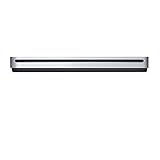
- The sleek, compact USB SuperDrive.
- Whether you’re at the office or on the road, you can play and burn both CDs and DVDs with the Apple USB SuperDrive. It’s perfect when you want to watch a DVD movie, install software, create backup discs, and more.
- Only slightly bigger than a CD case, the Apple USB SuperDrive slips easily into your travel bag when you hit the road and takes up little space on your desk or tray table when you’re working.
- You’ll never have to worry about lost cables with the Apple USB SuperDrive. It connects to your Mac* with a single USB Type-A cable that’s built into the SuperDrive. There’s no separate power adapter, and it works whether your Mac is plugged in or running on battery power.
- The Apple USB SuperDrive is compatible with Mac models from 2008 and later that don't have a built-in optical drive.
But account for the total cost: the used drive, any USB-C adapter, shipping and the risk of wear in the laser, spindle or loading mechanism. The permanently attached cable is convenient when it works but becomes a liability if damaged.
Choose a third-party CD/DVD drive for ordinary use
A current third-party USB optical drive is generally the rational choice for reading old software discs, ripping music CDs, watching compatible DVDs or burning occasional data discs. Look for:
- macOS compatibility, if you use a Mac;
- Windows compatibility, if the drive will be shared across computers;
- USB-C or dual USB-A/USB-C connectivity;
- a detachable cable, if portability and replacement cost matter;
- a clear warranty and return policy.
Do not assume every generic drive works identically with every Mac. Confirm the manufacturer’s operating-system support and power requirements before buying.
Windows Errors? Fix Them Before They Spread
Repair common Windows errors and clear accumulated junk for a smoother, more stable PC - no reinstall needed.Free scan · no reinstallOutdated Drivers Are Slowing You Down
One free scan finds every outdated or missing driver and matches the right update for your exact hardware.Free scan · exact hardware matchChoose Blu-ray for Blu-ray discs
Anyone who needs Blu-ray must skip the Apple drive. An external Blu-ray unit may be more expensive and bulky, and you should separately verify playback or authoring software for your operating system.
Best Value

- 【PLUG & PLAY – EASY CONNECTION】 Simply connect the Amicool External DVD Drive to your computer’s USB or Type-C port, and it will usually be detected right away without the need for extra drivers. For stable operation and sufficient power, we recommend connecting it directly to a USB port on your computer (for desktops, use a rear motherboard port) and avoiding USB hubs or extension cables. This user-friendly design ensures quick setup for both beginners and professionals.
- 【FAST & STABLE DATA TRANSMISSION】 Featuring dual interfaces (USB 3.0 and Type-C), this optical drive supports data transfer speeds up to 5Gbps. To ensure a reliable connection, please connect it directly to your computer. The drive supports multiple disc formats such as DVD+R, DVD-R, CD-R, and CD-RW. Please note: It does NOT support DVD-RAM, Blu-ray (BD) discs, or certain proprietary formats. Maximum DVD read speed is 8x, and maximum CD read/write speed is 24x.
- 【UNIVERSAL COMPATIBILITY】 Compatible with Windows 11 / 10 / 8.1 / 7, Linux, and all macOS (Intel & Apple Silicon) for MacBook Air/Pro, iMac, Mac mini; NOT for iPad/iPhone/Apple TV/ChromeOS; for Mac, insert disc FIRST, connect directly to USB port (use a POWERED USB‑C hub for M1/M2/M3 to avoid insufficient power), and open media with VLC Player (Apple DVD Player not supported). Works with most computers from brands like Apple, Dell, HP, Lenovo, ASUS, Acer, and Samsung. 👉 Important: Designed specifically for computers. It is NOT compatible with TVs, tablets, game consoles (e.g., PlayStation, Xbox), car stereos, or standalone Blu-ray players.
- 【SLIM & PORTABLE DESIGN – BUILT-IN CABLE, READY TO GO】With an integrated cable design, slim body, and stylish matte finish, this lightweight CD/DVD drive is both durable and portable. Easily slip it into your laptop bag or backpack and use it anytime, anywhere—perfect for business, travel, or home use
- 【MULTIFUNCTIONAL & RELIABLE OPERATION】 Equipped with intelligent error correction and anti-shock technology, this drive supports reading, writing, and burning discs. If the drive is not recognized or a disc cannot be read, try restarting your computer or testing with a different, standard CD-R or DVD-R disc. The pop-up button and built-in cable design offer convenience and portability. For desktop PCs, connecting to a rear USB port is recommended for optimal power and performance.
Consider archival requirements separately
If you are creating archival discs, investigate M-DISC support, supported media types and disc-verification tools. Maintain multiple copies and at least one off-site copy. The SuperDrive’s ability to burn DVDs does not make it an archival system, and its verified specifications do not establish M-DISC support.
Practical alternatives for one-time access
If you only need to retrieve files from one old disc, buying a scarce used accessory may be unnecessary. Consider borrowing a drive, checking with a public library or local computer service, asking a repair shop or office, or copying the disc’s contents once to modern storage.
The personal-finance verdict
Apple’s USB SuperDrive is effectively discontinued, and remaining Apple-branded stock is now a scarcity purchase. The verified OWC listing is a legitimate route for buyers who specifically want the Apple design, but $88.99 for used hardware is difficult to justify for routine CD/DVD work when a newer third-party drive may offer USB-C connectivity, broader computer support or additional features.
What’s actually slowing this PC down?
Pick the symptom - the matching free tool is one click away.
Buy the Apple model only when its design, slot-loading mechanism or replacement compatibility is worth the premium—and insist on testing protection through a return policy or warranty. For most Mac owners, choose a current CD/DVD drive. If you need Blu-ray, buy a Blu-ray drive and do not pay a premium for the SuperDrive.
Quick Recap
Product prices and availability are accurate as of the date/time indicated and are subject to change. Any price and availability information displayed on Amazon at the time of purchase will apply.




