The Tool Desk
Outbyte PC Repair FREEClear out junk files and repair common Windows errorsFree Scan →Outbyte Driver Updater FREEFix the driver behind crashes, sound loss and screen glitchesFind Drivers →To start an accounting firm, choose the services and clients you can competently serve, check the professional and local rules where you will operate, form and register the business, obtain tax-preparation credentials if relevant, and build secure, repeatable workflows. Then model revenue and capacity before deciding how to pursue six figures. Requirements depend on your state, credentials, services, and business model; $100,000 in annual revenue is a planning target, not a typical or guaranteed result.
What kind of accounting firm do you want to build?
Decide what work you will sell before choosing a business structure or marketing the firm. An independent practice might focus on bookkeeping, tax preparation, accounting, or advisory services, or combine several. The right mix depends on your expertise, credentials, intended clients, geography, and appetite for seasonal versus recurring work.
Choose a service mix and client profile
Define who you intend to serve—such as individuals, freelancers, or small businesses—and what each engagement includes. For every service, consider the expertise it requires, the time it takes to deliver, how often clients need it, and the potential scope and liability. These are planning factors, not evidence that one service model will earn more than another.
Be precise about scope. For example, preparing a federal tax return is different from representing a taxpayer before the IRS, and neither fact alone establishes that you may offer every accounting service. Do not market a credential or service you are not authorized to provide.
#1 Best Overall

- Keys That Feel Right: Smooth, well-spaced keys with natural resistance allow you to move quickly and confidently—no re-learning or finger fatigue.
- Sharp, Color-Coded Printing: Prints 2.5 lines per second in black for positive and red for negative values—quiet, crisp, and easy to read at a glance.
- Big, Bright Display You Can Trust: The 12-digit fluorescent screen is clear from any angle, so totals are easy to catch without squinting or second-guessing.
- Designed for Speed and Comfort: Ergonomic key shapes follow your fingers’ natural motion—helping you type faster and make fewer mistakes.
- Built to Last, Easy to Maintain: Our heavy-duty design withstands daily use, featuring standard ribbons and paper rolls that are simple to replace.
Understand what each credential allows
A PTIN is for an individual paid tax return preparer; it does not make its holder a CPA. IRS guidance says a PTIN holder may prepare federal returns for compensation, while CPAs, attorneys, and enrolled agents have unlimited representation rights before the IRS. CPA licenses are issued by state boards of accountancy and related jurisdictions, so check the rules applicable to your location and proposed work. The IRS also says enrolled agents must complete 72 hours of continuing education every three years. See its credential and representation-rights guidance.
Which rules and registrations should you check before taking clients?
There is no single nationwide checklist that resolves every accounting-firm requirement. The SBA notes that location affects taxes, zoning, regulations, and business costs; the IRS describes its startup checklist as basic and not all-inclusive and notes that states have additional requirements. Start with the relevant state board of accountancy and local government, then confirm which rules apply to your specific services. Consult the SBA launch guidance and the IRS business-startup checklist as starting points, not substitutes for jurisdiction-specific advice.
Verify professional and local requirements
Before offering services, check whether your state or jurisdiction requires CPA licensing, firm registration, particular ownership or naming arrangements, or additional qualifications for attest or assurance work. Also ask local authorities about permits, zoning, and other applicable rules. The sources linked above do not resolve requirements for an individual state or locality; verify those directly with the relevant authorities. Consider professional liability coverage and determine what coverage is appropriate for your services and circumstances.
Rank #2

- FAST TWO-COLOR PRINTING – Prints at 2.0 lines per second with dual-color output (black/red) for easy distinction between positive and negative values.
- CHECK, CORRECT & RE-PRINT – Review and correct up to 150 steps before printing; use re-print and after-print functions for efficient documentation.
- TAX & BUSINESS FUNCTIONS – Includes cost/sell/margin, mark-up/mark-down, tax calculation keys, and currency exchange for quick financial operations.
- BIG DISPLAY & EASY INPUT – Features a 12-digit LCD and large, clearly spaced plastic keys for comfortable, accurate data entry.
- UPGRADED DESIGN – New version of the HR-100TM, ideal for taxes, bookkeeping, and accounting with clock/calendar printouts, subtotal & grand total, and percent functions.
Get the correct IRS tax-preparation credentials
If you prepare all or substantially all of a federal tax return for compensation, review the IRS requirements for each individual preparer’s PTIN. The IRS PTIN checklist viewed October 8, 2026, lists a $18.75 nonrefundable user fee; fees and requirements can change, so check the current checklist before applying. A PTIN belongs to the individual, not the firm.
If the firm will transmit returns as an authorized e-file provider, it must apply for an EFIN and complete the IRS application and suitability process. An EFIN identifies the approved provider and belongs to the firm or organization, unlike an individual preparer’s PTIN. Review the IRS PTIN application checklist and EFIN FAQs for current requirements.
How do you form and register the business?
Choose an entity with advice from qualified legal and tax professionals when needed. The SBA explains that structure affects taxes, fundraising, paperwork, and personal liability. The right choice depends on your circumstances, applicable state law, and any professional ownership restrictions; an LLC or S corporation is not automatically best for every firm.
Rank #3
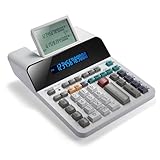
- PAPERLESS DIGITAL TAPE: An editable digital scrolling tape replaces paper entirely, saving space and reducing waste while a large 12-digit LCD display delivers professional-level performance.
- RESPONSIVE FULL-SIZED KEYS: Full-sized keys provide a responsive touch for quick, precise input.
- CHECK AND CORRECT: Review up to 300 entries and correct errors instantly without starting over, using the editable digital scrolling tape to adapt to different scenarios.
- QUIET OPERATION:This calculator operates with far less noise than typical printing calculators, and an adjustable tilt helps reduce glare.
- TRUSTED BY WORKPLACES FOR DECADES: Sharp has been a dependable name in office calculation for generations — practical tools built around the way people actually work.
- Choose a business structure and name. Check whether professional-firm naming or ownership rules apply before settling on either.
- Register where required. Confirm the registration steps and obligations with the relevant state and local authorities.
- Obtain tax IDs as applicable. Check IRS and state requirements for your chosen structure and hiring plans.
- Check permits and zoning. Requirements depend on where the firm operates, including whether clients or staff will use a physical office.
- Separate firm finances. Open a business bank account and establish a process for invoices, collections, expense tracking, and tax records.
- Assess insurance and operating costs. Budget for relevant coverage as well as location-dependent costs such as rent, wages, utilities, and government fees.
The IRS and SBA checklists linked above can help organize general launch tasks, but neither determines which entity or registrations fit your particular firm.
Independent reader supportYour contribution helps us test, update, and keep practical guides available for everyone.How should you protect client information?
Make security part of the firm’s operating plan before client documents begin arriving. The IRS recommends a written data security plan and safeguards including phishing awareness, updated security software, strong passwords, encryption, and protected backups. Review IRS Publication 4557 for tax-professional safeguard guidance.
- Set rules for who can access client records and how access is removed when it is no longer needed.
- Use secure methods to exchange and store files, and establish backup and retention procedures.
- Train staff on phishing and define what to do if an account, device, or client file may be compromised.
- Keep security software updated and use strong passwords and encryption where appropriate.
If the firm has an EFIN, monitor return counts and keep the application’s contact information current. The IRS explains these responsibilities in its EFIN maintenance and security guidance.
Rank #4

- Check your calculations thanks to the calculator's inbuilt serial impact roller printer that enables you to monitor your inputs and retains ongoing records. This two-color printer with a four-key memory prints red and black ink at up to 2.3 lines per second onto the included roll of paper.
- Printing calculator offers 12-digit LCD display for convenient viewing. 4-key memory keeps often-used figures accessible for faster calculations. Clock and calendar functions help maintain schedules.
- Easy-to-use solution for all of your basic math needs. Streamline financial calculations with currency conversion, tax calculation, and item counter functions. 1-year manufacturer limited warranty.
- Dimensions: 2.2"H x 6.4"W x 9.1"D. Package content: AC adapter, paper roll, user manual.
- Powered by any standard AC outlet, eliminating the need for expensive batteries. Decimal switch, rounding switch, percent, sign change, backspace, double zero, and grand total functions help you solve a variety of mathematical problems.
How can you plan for six figures without treating it as a promise?
First define the target: $100,000 in annual firm revenue is not the same as $100,000 in owner take-home pay. Revenue must cover operating costs, taxes, and any staff or contractor expenses. The sources cited here do not establish a typical margin, launch cost, or time to reach six figures, so build a firm-specific plan rather than relying on a universal formula.
Work backward from revenue and capacity
Estimate annual revenue by service line, using expected client count and average annual fee. For a simple illustration, 100 clients paying an average of $1,000 a year would produce $100,000 in gross revenue before expenses; that arithmetic is not a pricing benchmark or earnings forecast. Then test whether your fees, client mix, workload, and collection assumptions are realistic for the firm you intend to run.
- Client mix: Estimate the number and type of clients for each service, rather than treating every engagement as interchangeable.
- Recurring and seasonal work: Separate ongoing engagements from seasonal work so you can see when revenue arrives and when delivery pressure is highest.
- Delivery capacity: Estimate onboarding and service hours, then compare the workload with the time you and any qualified staff or contractors can provide.
- Collections and overhead: Account for fees actually collected, not just quoted, and include location-specific operating costs.
- Scope and expertise: Make sure the services in the plan fit your competence, credentials, and applicable rules.
Evaluate growth levers as choices, not guarantees
A defined niche, referral relationships, repeatable onboarding, packaged recurring services, thoughtful fee reviews, or additional qualified capacity may be worth evaluating for your business model. For each option, consider its cost, effect on workload, and fit with the clients and services you want. None guarantees a particular revenue level or timeline.
Windows Errors? Fix Them Before They Spread
Repair common Windows errors and clear accumulated junk for a smoother, more stable PC - no reinstall needed.Free scan · no reinstallOutdated Drivers Are Slowing You Down
One free scan finds every outdated or missing driver and matches the right update for your exact hardware.Free scan · exact hardware matchQuick Recap
Product prices and availability are accurate as of the date/time indicated and are subject to change. Any price and availability information displayed on Amazon at the time of purchase will apply.




