The Tool Desk
Outbyte Driver Updater FREEScan for outdated or missing drivers - takes under a minuteDriver Scan →Outbyte PC Repair FREEClear out junk files and repair common Windows errorsFree Scan →Compare digital current accounts against how you actually bank—not just how polished the app looks. Check charges and conditions, overdraft terms, cash and cheque access, support, eligibility and deposit protection; then confirm the new account can use the Current Account Switch Service (CASS). CASS transfers eligible payments and your balance in seven working days after the new account is open and a switch date is agreed. It does not open the account or guarantee a replacement overdraft.
Compare the account against your everyday needs
Start with the transactions and services you use now. A feature is useful only if it works for your circumstances, is available on the account you can open and does not carry a cost or condition you would overlook.



- Fees and conditions: Check monthly account fees, transaction charges and the conditions attached to benefits or interest. Ask what you would pay in a typical month, and whether you can meet any monthly pay-in or Direct Debit requirements. MoneyHelper’s account comparison guidance recommends checking fees and conditions rather than choosing on headline features alone.
- Overdraft: Compare eligibility, the limit the bank may agree, the interest rate, any fee-free buffer and the cost for the balance you usually carry. An overdraft is borrowing, and MoneyHelper warns it can be expensive. Approval and terms are subject to the new bank’s lending decision.
- Access to cash and cheques: Check how you can withdraw or deposit cash, pay in cheques and reach your account if you cannot use the app. If you rely on cash deposits or cheque handling, verify the method and any applicable limits or charges in the current account terms.
- Digital features and accessibility: Compare payment controls, notifications, spending tools, integrations and accessibility options. Focus on features that solve a real day-to-day need, and check whether they are paid, conditional or available only through the app.
- Support: Look at the ways you can contact the bank and whether those channels suit you. Published service-quality figures can help, but compare the same measure, customer group, geography and reporting period rather than treating one result as a universal ranking.
- Eligibility and opening: Check who can apply, what identity checks are required and when the account can receive payments. Opening an account and switching it are separate stages; do not schedule a switch on the assumption that account opening is immediate.
- Protection and legal provider: Identify the legal entity providing the specific account and holding its balance. An app’s brand name alone does not establish who holds your money or what protection applies. Confirm whether your deposits are eligible and check the applicable terms.
MoneyHelper’s comparison tool can help you compare fees, features, access and charges, but it says it does not include every available account. Use it as a starting point, then check the provider’s current account documentation: MoneyHelper account comparison.
Compare service evidence on a like-for-like basis
The FCA directory links to providers’ service-quality information and APIs. Use those disclosures to compare the same measure over the same period and geography, and note which customer group the figure covers. A service score for one type of account or a particular customer sample does not establish which bank is best for everyone. Start at the FCA’s open banking performance and availability directory.
#1 Best Overall

- Keep track of everything from attendance to test scores
- Spiral bound
- Measures 8-1/2" x 11"
The FCA’s Financial Lives 2024 survey distinguishes digital banks from current accounts supplied by payment-services or e-money providers. That is the survey’s classification, not a complete current list of brands or products. In particular, do not infer the legal provider or protection status of an account from the fact that its brand is described as digital. See the FCA Financial Lives 2024 survey.
What to check in digital-bank examples
Provider pages describe their own services and are useful for checking current account features, but they are not independent comparisons. These examples illustrate why it is worth checking the terms for the precise account you intend to open.
- Monzo: Its account page describes app-managed banking, in-app support, cash deposits through PayPoint or the Post Office, cheque deposits through the app and CASS switching. It states that eligible money is FSCS-protected up to £120,000 per person. Check its current-account information and terms for the account you are considering.
- Starling: Starling describes app-based banking and says eligible deposits are protected by the FSCS up to £120,000. Check the provider’s current-account page and use its service-information page for its published service data.
- Revolut: Revolut’s announcement describes UK current accounts through Revolut Bank UK Ltd and FSCS protection up to £120,000 for eligible deposits. Because the announcement describes a transition, verify the legal provider and protection status applying to your own account. Read Revolut’s UK bank-account announcement.
The £120,000 figures above are each provider’s stated limit for eligible deposits, not a guarantee that every balance or every account is covered. Check the provider, account status and eligibility that apply to you.
How the Current Account Switch Service works
CASS is a free transfer service managed by your new bank. Its seven-working-day period starts once the new account is open and you have agreed a switch date; it does not include the time needed to apply or complete identity checks. The service moves your balance and eligible payment arrangements, including Direct Debits, standing orders and incoming payments. It redirects eligible payments sent to the old account and closes that account. Read MoneyHelper’s switching guidance and the Current Account Switch Service information.
Do these 3 things before closing this tab:
1Fix the driver behind crashes, sound loss and screen glitches2Repair Windows errors before they cause bigger problems3Scan for outdated or missing drivers - takes under a minuteRank #3
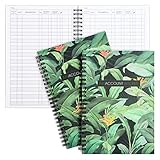
- Efficient Financial Organization: Paper Junkie's Accounting Ledger Book streamlines financial management with its "My Account Tracker" feature, perfect for both personal check registers and professional finance books. Effortlessly monitor savings, debts, and bills with this robust budgeting book
- Comprehensive Record Keeping: Each accounting book sheet provides ample space to track transaction types, dates, descriptions, taxes, payments, and deposits. This makes it an ideal account tracker book for thorough personal or business ledger management
- Premium Quality Paper: The ledger paper is crafted with smooth, durable 100gsm double-sided sheets that ensure easy entry of financial details without bleed-through. This high-quality material supports the durability and longevity of your accounting records
- Compact And Portable Design: Measuring 8.5 x 6.25 inches, these books are conveniently sized for home use or transport in a purse, backpack, or laptop bag. This compact design makes it an essential bill tracker notebook for on-the-go financial management
- Complete Budgeting Solution: With two books providing a total of 100 pages, this package ensures you have a reliable backup for continuous tracking. Ideal as an income and expense log book, cash book, or business expense tracker notebook, it supports diverse financial needs
- Check participation and open the new account. Confirm with the new bank that the account can use CASS. Wait until it is open and ready to receive payments before agreeing the switch date.
- Agree the switch with the new bank. The new bank manages the CASS process. Ask it about any account-specific requirements, including approval of a joint-account switch by both account holders.
- Review the switch and linked arrangements. Check which eligible payments will transfer, and identify any overdraft borrowing or third-party permissions that need separate action.
- Check the old account after the switch. CASS redirects eligible payments sent there after the switch, but check your statements and contact the relevant organisation if a payment or service has not moved as expected.
Under the CASS guarantee, if a problem with the switch causes charges or interest, these are refunded. The service says the new bank decides whether compensation beyond that refund is payable.
Independent reader supportYour contribution helps us test, update, and keep practical guides available for everyone.What does not move automatically
An overdraft needs a new lending decision
Having an overdraft at your old bank does not mean the new bank will offer the same facility or limit. Apply for and agree any replacement overdraft with the new bank before switching. If it will not cover the outstanding balance, make a separate plan to repay the shortfall. The new bank’s lending criteria determine whether it will approve borrowing and on what terms.
Payment arrangements created close to the switch date
If you set up a new payment arrangement at your old bank during the seven working days before the agreed switch date, set it up on the new account instead. MoneyHelper explains this cutoff in its switching guidance.
Third-party app permissions and data access
Permissions you gave to budgeting apps, comparison websites, account-information services or payment services do not transfer with CASS. Cancel the old permission and authorise access again for the new account where appropriate. Check that the third-party service supports the new bank before relying on it.
Free tools Windows power users keep installed
One-click scans. No signup required.
Choose using your own priorities, not a universal winner
There is no single best digital current account for every UK customer. Give greater weight to the factors that affect you: regular fees, how often you use an overdraft, whether you need cash or cheque services, the support channels you can use, and any accessibility or integration needs. Before committing, check the provider’s live charges, eligibility, overdraft terms, service information and protection details for the exact account you plan to open.
Quick Recap
Product prices and availability are accurate as of the date/time indicated and are subject to change. Any price and availability information displayed on Amazon at the time of purchase will apply.




