ADP Workforce Now for Construction, Sage Intacct Construction Payroll, and Sage HCM for Construction are the strongest documented choices for contractors managing certified payroll, prevailing wage, union rules, and job-cost accounting. Payroll4Construction, Sage 100 Contractor, Sage 300 CRE, and QuickBooks Payroll with QuickBooks Time can be better fits for specialist service, integrated construction management, established Sage users, or smaller QuickBooks-based crews.
There is no objective market-share ranking here. This is a practical shortlist based on documented construction-payroll capabilities. Your best choice depends on jurisdictions, wage determinations, union agreements, fringe rules, cost codes, entities, and the amount of payroll administration you want to outsource.
At-a-glance comparison
| Software | Best match | Operating model | Confirm before buying |
|---|---|---|---|
| ADP Workforce Now for Construction | Contractors wanting managed payroll and broad HR | Construction-focused payroll and HR platform | Supported states, union contracts, implementation scope, and report formats |
| Sage Intacct Construction Payroll | Finance teams that need payroll tied closely to project accounting | Payroll connected to construction ERP financials | Required certified-payroll and cash-fringe scenarios in your jurisdictions |
| Sage HCM for Construction | Complex crews with multiple rates, locations, and certifications | Construction HCM and payroll with field and ERP integrations | Which Sage or third-party systems are included in your edition |
| Payroll4Construction | Contractors seeking a construction-payroll specialist | Specialist payroll service | Current ownership, packaging, integrations, and service boundaries |
| Sage 100 Contractor | Small and midsize contractors wanting one back office | Construction management suite with payroll | Current payroll modules and regional availability |
| Sage 300 CRE | Established, larger, or multi-entity Sage customers | Enterprise construction platform with payroll connections | Migration effort, entity structure, and connector requirements |
| QuickBooks Payroll with QuickBooks Time | Smaller contractors already using QuickBooks | Payroll plus a separate field-time layer | Plan limits, geofencing needs, prevailing-wage handling, and certified-report workflow |
What construction payroll software must get right
Construction payroll is more than calculating hourly pay. A usable system must keep wage rates, union benefits, prevailing-wage requirements, job assignments, cost codes, taxes, and certified reports aligned. A mistake in any one of those links can misstate labor cost or delay payment on public work.
Certified payroll and prevailing wage
Ask to see a completed federal WH-347-style report and the state reports you actually file. The demonstration should show base rate, fringe benefit calculations, deductions, classifications, project identifiers, signatures or approvals, and an audit trail. A product that produces a report is not automatically compliant; your wage tables and configuration still have to be correct.
Crashes, No Sound, or Screen Glitches?
Random freezes, missing sound and display glitches usually trace back to one bad driver. Find and replace yours safely.Free scan · under a minuteWindows Errors? Fix Them Before They Spread
Repair common Windows errors and clear accumulated junk for a smoother, more stable PC - no reinstall needed.Free scan · no reinstall#1 Best Overall

- ADVANCED CONSTRUCTION MATH SOLUTIONS: Solve all your dimensional math quickly and accurately with the award-winning CM Pro construction calculator's powerful built-in solutions for completing layouts, plans, bids, estimates and more, directly in the building units you prefer
- EFFORTLESS UNIT CONVERSION: Work in and convert between all common building dimension formats including feet-inch-fractions, decimal feet-inches, yards and metric, with area and volume calculations, plus weight-per-volume and D:M:S to decimal degree conversions
- TIME-SAVING RIGHT ANGLE FUNCTIONS: Built-in functions for right angles provide instant solutions for square-ups, rafters (common, hip, valley, jacks), rake-walls, slopes, angles and more, plus complete stair layout and advanced solutions for arcs, arches, circles, and columns
- PREVENTS COSTLY MATERIAL WASTE: Built-in solutions for roofing, drywall, studs, blocks, concrete footings and board-feet lumber estimating, plus compound miter functions help you avoid errors when working with crown molding and other pricey millwork
- COMES COMPLETE: Comes with a rugged Armadillo Gear protective case, pocket reference guide, two long-life batteries and a full one-year limited warranty for daily professional use
Job costing and accounting flow
Verify how approved hours and pay rates reach cost codes, the general ledger, work-in-progress reports, and customer billing. Determine whether burden, employer taxes, union fringes, and other labor costs post automatically or require a separate import.
Field time and approvals
Crews may work at several sites in one pay period. Test mobile clock-in, job and cost-code selection, geofencing, missed punches, supervisor approvals, offline operation, and corrections after a payroll cutoff.
Scale and operating model
Count employees, states, legal entities, unions, trades, and pay rates before comparing products. A fully managed service can reduce administrative work; an ERP payroll module can provide tighter accounting control; a payroll product paired with a time app may be economical when your accounting system is already established.
The seven construction payroll options
1. ADP Workforce Now for Construction
ADP positions Workforce Now for Construction as an all-in-one payroll and HR platform. Its documented construction capabilities include automatically creating certified payroll reports for government agencies, handling union contract wages and benefits, capturing mobile time and attendance across job sites, producing compliance reports, and providing employee self-service.
The Tool Desk
Outbyte PC Repair FREEClear out junk files and repair common Windows errorsFree Scan →Outbyte Driver Updater FREEScan for outdated or missing drivers - takes under a minuteDriver Scan →This is the leading fit when you want a managed payroll operation with broad HR coverage rather than assembling several specialist tools. Construction-focused implementation support can help with setup, but require a demonstration using your actual states, classifications, union rules, and report deadlines.
Rank #2

- Construction Calculator with Writing Tablet:Equipped with a flip-page writing pad for quick note-taking, it requires no paper or pen, making it both eco-friendly and convenient. The thick, phone-like material provides strong, phone-level protection, keeping your calculator safe from drops and harsh construction environments
- 200+ Engineer Functions: For Mixed Dimension Calculations and Conversions,Area & Volume,Brick and Block,Concrete, Boards, Flooring, and Wall Stud,Drywall Sheet Count,Circle Area, Circumference, and Arc Properties,Compound Miter,Polygon Tiling,Roofing Material,Foundation Correction,Right Angle and Rafter,Roof Pitch and Angle Conversions,Common Rafter Length,Common/Hip/Jack Rafter and Spacing,Stair Layout,Rake Wall Calculations
- Precision for Every Construction Mind: More than 200 functions, designed specifically for engineering professionals, has 45 fast rebound hard PC buttons are reasonably distributed, more than other engineering calculator.It supports custom parameters.and has 3 storage registers for more convenient and smooth use
- Big Screen & Energy-Saving:With a 3" 12 digits large screen,Higher clarity and lager than other calculators.Clearer reading, fewer errors,8-12 minutes of no operation automatically shut down without worrying about energy consumption
- All-in-One Fit: Suitable for most people including builders, carpenters, concrete workers, contractors and DIY home renovators, roofers, architects, interior decorators, construction estimators, engineering students, etc
2. Sage Intacct Construction Payroll
Sage Intacct Construction Payroll is designed to connect payroll with project costing and financials. Sage documents federal and state certified-payroll reporting, union and prevailing-wage workflows, fringe calculations, and payroll connections to project and general-ledger data.
Sage’s 2026 release notes describe additional certified-payroll and cash-fringe scenarios. Ask the vendor to map those scenarios to your contracts and to show how corrections flow through project cost and financial reporting.
3. Sage HCM for Construction
Sage HCM for Construction targets complex workforces. Its documented features include multi-rate crews, union rules, mobile time entry, geolocation, certification tracking, prevailing-wage processing, and certified reports.
It integrates with Sage Intacct Construction, Sage 300 CRE, Sage 100 Contractor, Procore, Vista, and BuildOps. That breadth is useful when payroll must share workforce or project data with several systems, but confirm which connectors, data directions, and support responsibilities apply to your edition.
4. Payroll4Construction
Payroll4Construction is presented as a construction-specialist service focused on union wages, prevailing wage, multi-state payroll, and certified-payroll reports. It may suit a contractor that wants construction payroll administration without adopting a larger ERP.
Rank #3
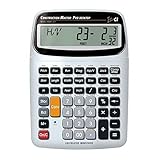
- SOLVE ALL YOUR DIMENSIONAL MATH: Quickly and accurately with the award-winning CM Pro-Desktop construction calculator's powerful built-in solutions for building; and full trig functions with sine, cosine, tangent, arcsine, arccosine and arctangent
- EFFORTLESS CONVERSION BETWEEN BUILDING FORMATS: Work in and convert between all common building dimension formats: feet-inch-fractions, decimal feet-inches, yards and metric -- including area and volume. Plus weight-per-volume and D: M: S to decimal degree conversions too
- TIME-SAVING BUILT-IN FUNCTIONS: Right angles give you instant solutions for square-ups, rafters (hip, valley, jacks), rake-walls, slopes, angles and more. Plus complete stair layout, advanced solutions for arcs, arches, circles, columns and more
- PREVENT COSTLY MATERIAL WASTE: Built-in solutions for roofing, drywall, studs, blocks, concrete footings and board-feet lumber estimating. Plus compound miter functions help avoid errors when working with crown molding and other millwork
- PROFESSIONAL CONSTRUCTION TOOL: Reduces headaches, saves time and prevents expensive material errors on your projects, from the office to the field. Comes with a large digits on easy-to-see multi-position tilt display LCD, easy-to-follow user's guide, plus a pocket reference guide in Spanish, full-size keys, long-life battery
Current ownership, packaging, integration availability, and the division of work between your staff and the provider should be verified directly before signing. Treat those items as open commercial and product questions rather than assumptions.
5. Sage 100 Contractor
Sage 100 Contractor combines estimating, job costing, project management, and payroll in a construction-management back office. It is a candidate for smaller and midsize contractors that want operational and payroll data in one system.
Confirm the current payroll modules, supported regions, tax services, and certified-report capabilities for your location. Also check whether the workflow is deep enough for your union and prevailing-wage requirements or whether an external service is needed.
6. Sage 300 CRE
Sage 300 CRE is aimed at established, larger, or multi-entity contractors already operating in the Sage ecosystem. Sage documents payroll connections that synchronize time, pay rates, and labor costs with accounting and job-cost systems.
Its value is greatest when you already have Sage processes, controls, and reporting to preserve. During evaluation, test entity consolidation, intercompany labor, historical-data migration, and every connector involved in your time-to-payroll process.
Rank #4

- BUILT FOR THE JOBSITE, NOT THE CLASSROOM — 200+ construction-specific functions including feet-inch-fraction math, rafter calculations (rise, run, pitch, diagonal), stair layout, concrete/material estimation, and area/volume with built-in waste factors. Replaces your Construction Master Pro at half the price.
- FULL LAYOUT MATH, NOT JUST MATERIAL COUNTS — goes beyond how-much-to-buy estimating: hip and valley rafters, compound miter angles, roof pitch and angle conversions, stair rise-and-run layout, polygon tiling, and foundation correction. The math a framer, roofer, or finish carpenter actually runs every day.
- LARGE 3-INCH, 12-DIGIT DISPLAY + BACKSPACE KEY — a screen you can actually read at arm's length in daylight, 45 glove-friendly hard buttons, and a backspace key so one typo doesn't erase the whole entry — a feature the big brands still haven't figured out. Drop-proof TPU shell shrugs off jobsite drops, dust, and spills.
- BUILT-IN LCD WRITING TABLET — flip-page notepad right on the calculator. Jot measurements, sketch layouts, or write cut lists without hunting for scrap paper. One-touch clear wipes the page for the next number, and the erase-lock switch makes sure a bumped button never deletes a cut list mid-job.
- EASY TO START, DEEP WHEN YOU NEED IT — battery included and pre-installed, and the 2 quick-reference cards get you running the everyday functions in minutes; grow into all 200+ as the job demands. Auto-off after 13 minutes saves power. The tool they didn't know they needed — a perfect gift for contractors, carpenters, electricians, and DIYers.
7. QuickBooks Payroll with QuickBooks Time
QuickBooks Time provides field-oriented time capture: employees can log hours or a supervisor can clock in a whole crew, with mobile approvals, job assignment, geofencing, and project-hour reporting that synchronizes with QuickBooks Payroll. This is usually the simplest path for a small contractor already committed to QuickBooks and mainly needing dependable mobile time collection.
What’s actually slowing this PC down?
Pick the symptom - the matching free tool is one click away.
Intuit reported that a January 2023 survey of 595 U.S. customers found an average 10.06% increase in billable time among businesses that reported an increase, and average gross payroll-cost savings of 4.26% among businesses that reported savings. These are vendor-reported survey results, not independent benchmarks, and they do not predict what your company will achieve.
Before choosing it for public work, verify how your plan handles wage determinations, fringe benefits, union rules, and certified reports. You may need additional configuration or another service for complex compliance.
Independent reader supportYour contribution helps us test, update, and keep practical guides available for everyone.How to choose among the seven
Choose a managed platform when administration is the bottleneck
ADP or a specialist service can make sense when payroll expertise, filings, employee support, and compliance updates are more valuable than owning every configuration step. Clarify response times, amendment handling, year-end support, and who is responsible for correcting rejected reports.
Choose an ERP payroll module when project reporting is central
Sage Intacct Construction Payroll, Sage 100 Contractor, or Sage 300 CRE is more compelling when labor cost must reconcile directly with estimating, job cost, general ledger, and work-in-progress reporting. Require a complete transaction walkthrough from field approval to financial statement.
Do these 3 things before closing this tab:
1Scan for outdated or missing drivers - takes under a minute2Clear out junk files and repair common Windows errors3Fix the driver behind crashes, sound loss and screen glitchesBest Value

- Professional Feet-Inch-Fraction Conversions for Construction: Master complex field measurements instantly. Precision-engineered for high-precision Feet-Inch-Fraction conversions, this is the essential Contractor Calculator validated by architects, builders, and woodworkers
- Integrated LCD Writing Tablet for Instant Notes: Never lose a measurement or formula again. Solve memory limits and mode-switch data loss with this Construction Calculator with Writing Tablet, a dedicated Engineering Tool for field derived steps. Whether you are jotting down field dimensions or calculating complex loading requirements, the scratch-pad allows you to bypass data loss and mode-switching pain
- Multi-Trade Versatility for Carpenters, Electricians & Pipefitters: Built for the diverse demands of the field. Instantly adapt to any job site with one-click multi-unit conversion between different trades. From Pipefitter Calculator slope calculations to Electrician Calculator and Machinist Calculator scientific functions
- Heavy-Duty Protective Cover & High-Contrast Engineering Display: Optimized visibility under any condition. Say goodbye to screen glare. Our Engineering Calculator features a High-Contrast Display for superior readability from bright outdoor job sites to dim study desks. Encased in a Heavy-Duty Protective Cover, the unit is built to withstand the rigors of your backpack and backpack, preventing input errors and ensuring precise, bug-free Basic Math Accuracy
- Perfect Professional Gift with Unmatched Cost-Efficiency: The ultimate choice for value and utility. Premium professional performance at an accessible price point. Whether looking for Engineer Gifts, Carpenter Gifts, or Graduation Gifts for Engineers, it is the most trusted tool for students, apprentices, and seasoned pros alike
Choose HCM integration when crews and systems are complex
Sage HCM for Construction is worth closer review when you have multi-rate employees, certifications, geofenced locations, or several construction applications. Confirm that integrations eliminate rekeying instead of merely exporting files.
Choose QuickBooks when your needs are narrower
QuickBooks Payroll with QuickBooks Time can be practical when you have a small workforce, straightforward payroll, and an existing QuickBooks accounting workflow. Its lower complexity is an advantage only if your public-work and union requirements fit the available configuration.
A proof-of-fit process before signing
- Document your rules. List every state, entity, union agreement, classification, wage determination, fringe obligation, pay frequency, and cost-code convention.
- Use your data in the demonstration. Give vendors a representative employee who works two classifications on two projects, receives fringe benefits, changes states, and requires a correction.
- Inspect the outputs. Review payroll registers, certified reports, fringe calculations, job-cost postings, general-ledger entries, and audit history—not just the time-entry screen.
- Test field exceptions. Simulate a missed punch, an incorrect cost code, no cellular service, a location change, an approval after cutoff, and a retroactive rate change.
- Validate implementation ownership. Get written responsibilities for data migration, wage-table setup, tax registration, integrations, training, support, and compliance updates.
- Run a controlled parallel cycle. Reconcile at least one payroll against your current process before switching fully, including net pay, taxes, fringes, labor distribution, and certified reports.
Pricing and contract questions
Comparable pricing was not established for these products. Request a quote that separates implementation, recurring payroll, HR, time tracking, tax filing, certified-report support, integrations, additional entities, and year-end services. Ask whether fees are per employee, per payroll, per company, or usage-based, and whether annual increases or minimums apply.
Have the vendor state which features are included in your edition, what requires a separate module, and what happens if you leave the service. Export rights for employee records, time history, wage tables, audit logs, and job-cost data matter as much as the monthly fee.
Bottom line
Start with ADP Workforce Now for Construction when managed payroll and HR are the priority; start with Sage Intacct Construction Payroll when project accounting and certified payroll must be tightly connected; and examine Sage HCM for Construction when workforce complexity and integrations dominate. Evaluate Payroll4Construction, Sage 100 Contractor, Sage 300 CRE, or QuickBooks Payroll with QuickBooks Time when their service model and existing systems match your size and compliance demands. In every case, make the final decision from a live demonstration using your real wage, union, state, entity, and cost-code rules.
Quick Recap
Product prices and availability are accurate as of the date/time indicated and are subject to change. Any price and availability information displayed on Amazon at the time of purchase will apply.




