For a free Excel loan-payment calculator, start with Microsoft’s mortgage and loan calculator templates. They provide customizable worksheets for payment estimates and amortization. If you want to build or audit your own calculator, Excel’s PMT function is the essential formula:
=-PMT(annual_rate/12, loan_term_years*12, loan_amount)This calculates principal and interest for a fixed-rate loan with regular monthly payments. It does not automatically include property taxes, insurance, fees, escrow, or lender-specific charges.
Free Excel payment calculator templates
Microsoft’s official mortgage calculator template page is the safest starting point for a downloadable Excel calculator. Microsoft also maintains a broader free Excel template gallery with loan, amortization, debt, budget, and personal-finance worksheets.
Choose a basic calculator if you only need an estimated payment. Choose an amortization workbook if you need to see how each payment is divided between interest and principal, track extra payments, or estimate an earlier payoff date. A simple PMT worksheet should not be described as an amortization schedule unless it displays the balance and payment breakdown period by period.
The Tool Desk
Outbyte Driver Updater FREEFix the driver behind crashes, sound loss and screen glitchesFind Drivers →Outbyte PC Repair FREERepair Windows errors before they cause bigger problemsFix Now →#1 Best Overall
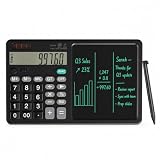
- 【All-in-One Desk Tool: Calculate & Write Without Paper】: Solve math and take notes on the same device! The built-in erasable LCD writing pad supports over 100,000 rewrites—eliminating sticky notes, scratch paper, and clutter. Ideal for accountants, engineers, teachers, and students.
- 【One-Click Clear + Lock to Protect Critical Calculations】: Erase your notes instantly with the dedicated clear button. Press “Lock” to freeze important numbers during audits, exams, or client meetings—no more accidental wipes when you need accuracy most.
- 【Integrated Pull-Out Stylus – Never Lose Your Pen Again】: The smooth-sliding stylus stores inside the calculator body for instant access. No magnets—just reliable, secure storage that keeps your workspace tidy and your tool always ready.
- 【12-Digit Wide Screen & Dual Power for All-Day Reliability】: Large, high-contrast digits reduce errors in complex calculations. Solar-powered with a CR2032 backup battery, it works flawlessly in bright offices, dim classrooms, or during power outages.
- 【Professional Design for Office Desks, Classrooms & Home Use】: Sleek black finish with anti-slip base stays stable during use. Compact enough for backpacks or briefcases—perfect for business professionals, remote workers, and families managing budgets or homework.
What an Excel payment calculator calculates
A standard payment calculator estimates the regular payment for an installment loan with:
- A fixed starting principal balance
- A constant interest rate
- A fixed number of payment periods
- Payments made at regular intervals
That makes it suitable for many fixed-rate mortgages, auto loans, personal loans, and business loans. The result is an estimate under those assumptions—not a lender-issued payoff quote or loan offer.
How to use the spreadsheet
- Open the Microsoft template or your own workbook in Excel.
- Go to the inputs or calculator sheet.
- Enter the amount borrowed, not the purchase price. If applicable, subtract the down payment.
- Enter the annual interest rate as
6%or0.06, not6. - Enter the term in years and the number of payments per year.
- Review the periodic payment, total repayment, and total interest.
- If the workbook includes an amortization tab, inspect the balance and principal/interest split for individual payments.
- Change one assumption at a time when comparing loan scenarios.
The exact names and features of Microsoft templates can change. Check whether the selected file includes an amortization schedule, extra-payment fields, taxes, insurance, or only a basic payment calculation.
The Excel PMT formula
Excel documents the syntax as:
=PMT(rate, nper, pv, [fv], [type])| Argument | Meaning |
|---|---|
rate |
Interest rate per payment period |
nper |
Total number of payment periods |
pv |
Present value, normally the principal borrowed |
fv |
Optional ending balance; normally 0 |
type |
0 for payment at period end; 1 for payment at period beginning |
See Microsoft’s documentation for the PMT function. The default for fv is zero, and the default for type is zero.
Do these 3 things before closing this tab:
1Scan for outdated or missing drivers - takes under a minute2Clear out junk files and repair common Windows errors3Fix the driver behind crashes, sound loss and screen glitchesMonthly payment formula
For a nominal annual rate and monthly payments, convert both the rate and term:
=-PMT(annual_rate/12, years*12, loan_amount)For example, a $300,000 loan at 6% for 30 years uses:
=-PMT(6%/12, 30*12, 300000)The worksheet should also show 360 payments, total scheduled repayment, and total interest. Total interest is the total repayment minus the original principal.
Rank #2

- USER-FRIENDLY DISPLAY – Natural Textbook Display℠ shows expressions and results exactly as they appear in textbooks, simplifying writing and interpreting complex math.
- STUDENT FRIENDLY - Combines ease of use with advanced functionality—ideal for courses from Pre-Algebra to AP Statistics. Supports graph plotting, vectors, probability distributions, spreadsheets, eActivities, integrals, and more for a full range of math and science applications.
- PYTHON INTEGRATION – Program with MicroPython directly on the calculator, or connect to a PC to transfer, store, or share your programs.
- EXAM-APPROVED – Approved for use in AP, SAT, ACT, IB, and other standardized exams, making it a reliable choice for students.
- USB CONNECTIVITY: Easily store and transfer files to and from a computer using the included USB cable.
Why PMT returns a negative number
Excel treats borrowed money and repayments as cash flows moving in opposite directions. If the principal is entered as a positive value, PMT commonly returns a negative payment. Use either:
=-PMT(rate, nper, principal)or enter the principal as a negative value. The minus sign changes the display convention; it does not change the payment calculation.
Build a simple calculator from scratch
Create this input-and-results layout:
| Cell | Label | Example or formula |
|---|---|---|
| B2 | Loan amount | 300000 |
| B3 | Annual interest rate | 6% |
| B4 | Loan term in years | 30 |
| B5 | Payments per year | 12 |
| B6 | Payment type | 0 |
| B8 | Periodic rate | =B3/B5 |
| B9 | Number of payments | =B4*B5 |
| B10 | Payment | =-PMT(B8,B9,B2,0,B6) |
| B11 | Total repayment | =B10*B9 |
| B12 | Total interest | =B11-B2 |
Format B2 and B10:B12 as currency and B3 as a percentage. Add data validation so the rate is a percentage, the term is positive, payments per year is one of 1, 2, 4, 12, 26, or 52, and payment type is either 0 or 1.
Keep the formulas visible or place them on an instructions sheet. An auditable workbook should make its assumptions, payment count, total repayment, and total interest easy to find.
Creating an amortization schedule
An amortization schedule shows how the balance changes after every payment. Useful columns are:
Outdated Drivers Are Slowing You Down
One free scan finds every outdated or missing driver and matches the right update for your exact hardware.Free scan · exact hardware matchPC Slower Than It Used to Be?
A free scan shows the junk files, broken settings and background clutter dragging Windows down - then fixes them in one click.Free scan · Windows 10 & 11| Column | Purpose |
|---|---|
| Payment number | 1, 2, 3, and so on |
| Payment date | The scheduled payment date |
| Beginning balance | Balance before the payment |
| Scheduled payment | Required payment, capped at the remaining balance |
| Extra payment | Optional additional principal |
| Interest | Beginning balance multiplied by the periodic rate |
| Principal | Scheduled payment minus interest |
| Ending balance | Beginning balance minus principal and extra payment |
Assuming the calculator inputs are in B2:B10, a protected schedule can use formulas like these:
A2 = 1
C2 = $B$2
D2 = MIN($B$10,C2+F2)
E2 = 0
F2 = C2*$B$8
G2 = MIN(C2,D2-F2)
H2 = MAX(0,C2-G2-E2)
For the next row:
A3 = A2+1
C3 = H2
D3 = MIN($B$10,C3+F3)
E3 = 0
F3 = C3*$B$8
G3 = MIN(C3,D3-F3)
H3 = MAX(0,C3-G3-E3)
The exact formulas may need adjustment for payment timing and workbook layout. The MIN and MAX functions prevent the final scheduled payment from exceeding the remaining balance or producing a negative ending balance.
Rank #3
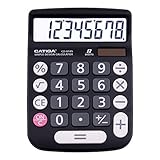
- EASY-TO-USE DESIGN - With its large screen, this calculator is made for convenient and comfortable everyday use. Its tilted and angled display allows you to easily see your calculations without straining your eyes.
- LARGE RESPONSIVE BUTTONS - Spacious button sizes ensure that your fingers are much less likely to hit the wrong number, all while providing a satisfying sensation when typing.
- ROBUST BUILD - Built with a sturdy and premium plastic body, this desktop calculator is constructed with everyday use in mind. It is convenient, powerful, and long lasting.
- VERSATILE FUNCTIONS - With its add, subtract, multiply, divide, percent, grand total and CE Button functionalities, this calculator's versatile nature allows it to be used in many occasions.
- DUAL POWER SOURCES - With the aid of its dual solar and battery power system, this calculator is fully powered in any lit environment. The battery comes included with the calculator, ensuring quick and easy access right away. PLEASE NOTE: The calculator will turn itself off after about 6 minutes of being idle.
Do not round interest or principal inside every formula unless you are deliberately reproducing a lender’s rounding method. Keep full precision in the calculations and round only the displayed values.
Modeling extra payments
To test a fixed extra payment, enter it in the Extra payment column and calculate:
Quick wins for a faster PC:
Repair Windows errors before they cause bigger problemsFix Now →Scan for outdated or missing drivers - takes under a minuteDriver Scan →Clear out junk files and repair common Windows errorsFree Scan →Ending balance = MAX(0, beginning balance - scheduled principal - extra payment)Cap an extra payment so it cannot exceed the balance remaining after scheduled principal:
=MIN(extra_payment, beginning_balance-scheduled_principal)You can also add a one-time lump-sum column and place the payment in the chosen period. The schedule can then compare the original payoff date and interest with the extra-payment scenario.
“Interest saved” is only an estimate if the lender applies the extra money directly to principal and does not charge a prepayment fee. An extra payment may shorten the term, reduce future interest, trigger a payment recast, or simply advance the next due date. Confirm the lender’s application rules before relying on the result.
Principal and interest are not the whole payment
PMT calculates principal and interest under the entered loan assumptions. It does not automatically include:
- Property taxes
- Homeowners insurance
- Mortgage insurance
- HOA dues
- Origination and closing costs
- Servicing or late fees
- Prepayment penalties
- Reserve or escrow payments
For a rough housing-cost estimate, add separate monthly inputs:
Rank #4

- 【Multifunctional Calculator】This calculator desktop integrates a calculator and notebook with a stylus pen. No paper is needed, pursuing paperless. You can take notes while calculating, calling, and meetings to improve your study and work efficiency.
- 【Lightweight and Portable】This is a lightweight calculator with a writing pad and foldable design, and it weighs only 3.73 ounces. It is portable that you can carry it anywhere and it can be removed and used immediately when needed.
- 【Healthy and Eco-friendly】This calculator features a blue light-free LCD screen to protect your eyes, and you can use it as a notepad on your desk when you're not using the calculator. It is re-writable and can be rewritten over 100,000 times. Reduce paper consumption.
- 【Mute Design】The calculator is made of comfortable silicone, and soft touch keys, easier to rebound, quiet, and no noise. Bring you a more comfortable touch and quiet using experience. The Mute button does not disturb others, suitable for office, learning, and a variety of use scenarios.
- 【Multi-scenario use】This high-quality calculator is strong enough to handle calculations in a variety of environments such as business accounting, school, home, office, etc., and would also suitable for various occasions. Whether you are a student, a teacher, or a business person, it offers a fast, efficient experience!
=principal_and_interest+monthly_property_tax+monthly_insurance+monthly_HOA+other_monthly_costsLabel the result “estimated total housing payment,” not the lender’s official payment. If fees are financed, include them in the principal. If they are paid separately, show them separately rather than treating them as part of the PMT result.
APR, variable rates, and payment frequency
Use the loan’s stated interest rate or periodic rate for PMT. Do not blindly substitute APR: APR can include fees and may not be the rate used to calculate scheduled interest.
A single PMT formula assumes a constant rate. For an adjustable-rate loan, model each rate period separately, then recalculate the payment when the rate resets. Apply the contract’s caps, floors, interest-only period, balloon payment, and payment rules. The result is a scenario, not a guaranteed future payment.
| Frequency | Basic rate conversion | Periods |
|---|---|---|
| Annual | annual_rate |
years |
| Semiannual | annual_rate/2 |
years*2 |
| Quarterly | annual_rate/4 |
years*4 |
| Monthly | annual_rate/12 |
years*12 |
| Biweekly | Depends on the contract | Often 26 per year |
| Weekly | Depends on the contract | Often 52 per year |
Biweekly does not always mean the same thing. Some plans use 26 half-payments per year, effectively creating an extra monthly payment; others use different interest-accrual or payment rules. Daily simple-interest loans and loans whose payment and compounding frequencies differ require more than simply dividing the annual rate by 12.
Independent reader supportYour contribution helps us test, update, and keep practical guides available for everyone.Common errors and fixes
The rate is wrong
If you enter 6, Excel interprets it as 600%. Enter 6% or 0.06. For monthly payments, use 6%/12 as the periodic rate.
The payment is negative
This is usually Excel’s cash-flow convention. Use =-PMT(...) to show a positive payment.
The payment is far too high
Check that the annual rate was divided by the number of payments per year and that the term was multiplied by that same number. This is incorrect for monthly payments:
What’s actually slowing this PC down?
Pick the symptom - the matching free tool is one click away.
Best Value

- PROFESSIONAL FINANCIAL CALCULATOR : Built-in TVM, IRR, NPV. Engineered for business analysts, real estate investors, accountants, and finance students.
- ADVANCED CASH FLOW & AMORTIZATION : Execute time value of money, break-even analysis, depreciation schedules, and bond pricing. Trusted for professional exam prep", MBA coursework, and banking certifications.
- CATIGA CF-300 : Flip-open hard case with a snap-close design for a secure fit. Compact and portable: designed for daily professional use in office, classroom, or on-site.
- ALL-IN-ONE FOR PROFESSIONALS : From NPV/IRR for real estate analysis to statistical calculations for business analysts. Handles probability, linear regression, and complex financial formulas.
- MORTGAGE, LOAN & INVESTMENT CALCULATOR : Covers bond pricing, loan amortization, investment analysis, and exam-level computations. Your go-to accounting calculator, business calculator, and real estate calculator in one device.
=PMT(6%,360,-300000)The corresponding nominal-rate calculation is:
=PMT(6%/12,360,-300000)The schedule ends below zero
Cap the final payment and ending balance with MIN and MAX. Also cap extra payments at the outstanding balance.
Zero interest produces an error
Use an explicit zero-rate branch:
=IF(rate=0,principal/nper,-PMT(rate,nper,principal))The workbook will not calculate
Check for text entered where a number is expected, mismatched parentheses, and regional formula separators. Some Excel locales use semicolons instead of commas. A workbook may open in Excel for the web or mobile while offering fewer editing features than desktop Excel, especially if it uses macros, add-ins, or external links.
Related Excel calculations
Excel’s related financial functions can answer reverse questions. To estimate the principal supported by an affordable monthly payment:
=-PV(annual_rate/12,years*12,affordable_payment)To estimate the number of monthly payments needed:
=NPER(annual_rate/12,-payment,loan_amount)Divide the NPER result by 12 for an approximate number of years. Microsoft explains these related functions in its guide to using Excel formulas to calculate payments and savings.
Free tools Windows power users keep installed
One-click scans. No signup required.
Which calculator should you use?
| Option | Best for | Limitation |
|---|---|---|
| Basic PMT sheet | Fast, transparent payment estimates | No payment-by-payment balance |
| Amortization workbook | Principal, interest, payoff, and extra-payment analysis | More formulas and more opportunities for errors |
| Microsoft template | A ready-made, first-party starting point | Features vary by template |
| Online calculator | A one-time estimate without spreadsheet setup | Less customizable |
| Custom workbook | Scenario analysis and auditability | You must maintain the formulas |
Microsoft’s documented compatibility baseline includes Excel for Microsoft 365, Excel for Mac, Excel 2024, 2021, 2019, 2016, and Excel Mobile. Compatibility of a particular custom workbook still depends on its formulas and features, so verify the file in the edition you plan to use.
Use any calculator for planning, not as a substitute for the loan agreement, lender amortization statement, payoff quote, tax advice, or legal advice.
Frequently Asked Questions
Is Microsoft’s Excel payment calculator free?
Microsoft provides free loan and mortgage templates, but Microsoft Excel itself may require a license or subscription depending on the version and access method. Check the current Microsoft 365 plans for availability.
Can I use an Excel payment calculator for a mortgage?
Yes, for a fixed-rate mortgage estimate. Confirm whether the result covers principal and interest only or also includes estimated taxes, insurance, mortgage insurance, and HOA costs.
Recommended Free Tools
Can PMT calculate an adjustable-rate loan?
Not with one unchanged formula. A standard PMT calculation assumes a constant interest rate; adjustable-rate loans require separate rate-period scenarios and the contract’s reset rules.
Quick Recap
Product prices and availability are accurate as of the date/time indicated and are subject to change. Any price and availability information displayed on Amazon at the time of purchase will apply.




