Free tools Windows power users keep installed
One-click scans. No signup required.
There is no single best POS system for every small business. Square is a broad-access candidate, Shopify POS is worth considering when online and in-person retail need to work together, Toast is built around restaurant workflows, and Lightspeed is a candidate for retailers with more demanding inventory needs. Clover is also worth comparing, but the available comparisons do not establish a distinct best-fit advantage for it. Choose by the work your business needs the system to do, then compare the full cost and verify current terms for your country and plan.
Which POS system fits your business?
A point-of-sale system can handle more than taking payments: depending on the product and plan, it may also manage inventory, staff, orders, reporting, or online sales. The right shortlist depends on where you sell and how your business operates. The following positions reflect vendor guides and the 2026 Fit Small Business comparison, not a hands-on test or a universal ranking.
| System | Best-fit starting point | What to verify before choosing |
|---|---|---|
| Square | Small businesses looking for a broad starting point, including mobile sellers and businesses in retail, food service, contracting, or beauty. | Whether the current plan, processing terms, hardware, and features fit your specific workflow. |
| Shopify POS | Retailers that need online and physical-store sales to work together. | Whether the inventory, staff, reporting, and channel tools you need are included in the plan you would buy. |
| Toast | Restaurants that need restaurant-oriented order and service operations. | Current plan and processing terms, plus support for your menu, ordering, kitchen communication, and tip workflow. |
| Lightspeed | Retailers whose inventory needs are more demanding. | Whether its inventory tools, integrations, plan, and costs match your catalog and locations. |
| Clover | A comparison candidate when you are evaluating POS providers. | Get a specific quote and contract. The comparisons cited here do not establish a distinctive best-fit position, and availability and pricing may depend on the reseller. |
For mobile sellers and varied small-business workflows
Square’s guide describes uses across retail, restaurants, contractors, and beauty businesses, as well as several hardware forms. That makes it a sensible broad-access candidate to investigate, not proof that it is the best choice for every business. Check the current plan and fees against your sales volume and the features you actually use.
For online and in-person retail
Shopify’s December 11, 2025 guide emphasizes connecting online and in-person commerce and describes inventory, staff, and reporting tools. If your store sells through both channels, test whether a sale, return, stock change, or product update appears correctly wherever your customers and staff need it.
Recommended Free Tools
#1 Best Overall

- With Square Terminal, you can ring up sales, accept payments, and print receipts, all with one device. Use it at the counter or ring up customers anywhere in your store.
- Accept all major credit and debit cards and pay one low rate with no hidden fees and no long-term contracts.
- Process chip cards in just two seconds.
- Get your money as soon as the next business day.
- Use it cordlessly with the built-in battery, designed to last all day.
For restaurants
Toast is positioned around food-service operations, including table and order management, kitchen communication, menu changes, online ordering, and tips. Square for Restaurants is an alternative to assess for a smaller or simpler operation, as described in Square’s guide and the cited 2026 Fit Small Business comparison. Compare the actual workflows you use rather than relying on a restaurant label alone.
For inventory-heavy retail
The 2026 Fit Small Business comparison characterizes Lightspeed as a candidate for deeper retail inventory management. Match that positioning to your real requirements, such as how you handle products, stock changes, and locations; confirm the relevant tools and integrations in the plan you would purchase.
Rank #2

- Windows 11 PROFESSIONAL POS TERMINAL - Equipped with Intel Core i5 High-Performance CPU, 4 GB Memory, and 128 GB Hard Disk. It also offers versatile connectivity options, including two serial ports, four USB ports, an HDMI output, an audio input, a DC 12V power input, and an Ethernet port.
- SLEEK & COMPACT DESIGN - Volcora POS Terminal is designed to take up as little space as possible so you can focus on better utilization of the counter space. Our sleek yet heavy-duty metal base ensures the terminal is well-stabled while taking orders with style. Suitable for any business such as retail stores, quick service restaurants, dine-in restaurants, cafes, bars, and more.
- WIDE TOUCHSCREEN - The 15.6" capacitive LCD touchscreen, combined with a 1366x768 high-resolution display, makes it easy to read and touch with minimal effort. Our POS Terminals can also withstand over 15000 hours of screen time with little to no quality sacrifice.
- IN THE BOX - Volcora 15.6" Single Screen Windows 11 Professional POS Terminal, Power Adapter, Registration Card, and User Manual.
- LIFETIME WARRANTY & SUPPORT - Simply unbox, and set up your POS terminal like a Windows tablet with ease. We do understand that additional support might be needed for non-tech-savvy users and our US Based Customer Service team is committed to help. Plus, all Volcora products come with a limited lifetime warranty so you can purchase with peace of mind.
How to compare the real cost
Do not compare POS systems by subscription price alone. Oklahoma State University Extension’s comparison chart provides historical examples for several providers, while Shopify’s December 2025 guide presents vendor-published pricing and hardware examples. Those figures are snapshots, not current quotes. Fit Small Business’s 2026 guide says POS software can range from free to several hundred dollars per month and assesses that processing fees can make up a larger share of total cost for many businesses; that is an editorial assessment, not a measured rule for every business.
| Cost to include | Question to ask before signing |
|---|---|
| Software subscription | What plan is required for the features, number of users, registers, or locations you need? |
| Card processing | What are the current rates and any other charges for the transaction types and payment methods you accept? |
| Hardware | Which readers, terminals, printers, scanners, or cash drawers are required, optional, or compatible with your setup? |
| Setup and services | Are installation, onboarding, support, or other services separately charged? |
| Add-ons and integrations | Do the inventory, reporting, ordering, ecommerce, or other tools you need cost extra? |
| Extra registers and locations | How does the cost change when you add a checkout point or another location? |
Estimate the total over the period you expect to use the system, using your own transaction volume and operating needs. Ask the provider to show recurring and one-time charges separately, and request the assumptions behind any quote. A low advertised software price may not mean the lowest total cost once processing, hardware, add-ons, and services are included.
Rank #3

- Windows 11 PROFESSIONAL POS TERMINAL - Equipped with Intel Core i5 High-Performance CPU, 4 GB Memory, and 128 GB Hard Disk. It also offers versatile connectivity options, including two serial ports, four USB ports, an HDMI output, an audio input, a DC 12V power input, and an Ethernet port.
- SLEEK & COMPACT DESIGN - Volcora POS Terminal is designed to take up as little space as possible so you can focus on better utilization of the counter space. Our sleek yet heavy-duty metal base ensures the terminal is well-stabled while taking orders with style. Suitable for any business such as retail stores, quick service restaurants, dine-in restaurants, cafes, bars, and more.
- DUAL WIDE TOUCHSCREEN - Terminal comes with one 15.6" capacitive LCD touchscreen and one 11.6” capacitive LCD touchscreen for customer display, combined with 1366x768 high-resolution, makes it easy to read and touch with minimal effort. Our POS Terminals can also withstand over 15000 hours of screen time with little to no quality sacrifice.
- IN THE BOX - Volcora 15.6" & 11.6” Dual-TouchScreen Windows 11 Professional POS Terminal, Power Adapter, Registration Card, and User Manual.
- LIFETIME WARRANTY & SUPPORT - Simply unbox, and set up your POS terminal like a Windows tablet with ease. We do understand that additional support might be needed for non-tech-savvy users and our US Based Customer Service team is committed to help. Plus, all Volcora products come with a limited lifetime warranty so you can purchase with peace of mind.
Match the POS to the work you do
Retail inventory and multiple sales channels
List the stock tasks that cause the most friction: keeping online and store inventory aligned, handling product changes, or managing more than one location. Then test those tasks using the plan under consideration. Shopify’s stated emphasis is channel connection; Lightspeed is described by Fit Small Business as an option for more demanding inventory management. Neither positioning replaces a check of the specific plan and workflow.
Restaurant service and order handling
Walk through a normal service from order entry to payment. Check table and order management, how orders reach the kitchen, how staff handle menu changes, whether online ordering fits your operation, and how tips are managed. These are the restaurant needs highlighted in Toast’s guide. A simpler operation may also compare Square for Restaurants, but should verify the same operational requirements.
Rank #4

- Windows 11 PROFESSIONAL POS TERMINAL - Equipped with Intel Core i5 High-Performance CPU, 4 GB Memory, and 128 GB Hard Disk. Built-in WIFI, Audio, USB 2.0, USB 3.0, and Ethernet ports for all kinds of connectivity. Windows 11 Professional for a wide range of POS applications of your choice.
- SLEEK & COMPACT DESIGN - Volcora POS Terminal is designed to take up as little space as possible so you can focus on better utilization of the counter space. Our sleek yet heavy-duty metal base ensures the terminal is well-stabled while taking orders with style. Suitable for any business such as retail stores, quick service restaurants, dine-in restaurants, cafes, bars, and more.
- DUAL WIDE TOUCHSCREEN - Terminal comes with one 15.6" capacitive LCD touchscreen and one 11.6” capacitive LCD touchscreen for customer display, combined with 1366x768 high-resolution, makes it easy to read and touch with minimal effort. Our POS Terminals can also withstand over 15000 hours of screen time with little to no quality sacrifice.
- IN THE BOX - Volcora 15.6" & 11.6” Dual-TouchScreen Windows 11 Professional POS Terminal, Power Adapter, Registration Card, and User Manual.
- LIFETIME WARRANTY & SUPPORT - Simply unbox, and set up your POS terminal like a Windows tablet with ease. We do understand that additional support might be needed for non-tech-savvy users and our US Based Customer Service team is committed to help. Plus, all Volcora products come with a limited lifetime warranty so you can purchase with peace of mind.
Mobile, counter, or mixed selling
A mobile reader may suit a pop-up or service business; a fixed counter may call for a different hardware configuration. Square’s guide describes multiple hardware forms. Decide where transactions happen and which payment methods you accept before selecting equipment. Oklahoma State University Extension’s chart lists a Square Reader for contactless and chip payments at $59, but that is a chart-era figure, not a current price quote.
Independent reader supportYour contribution helps us test, update, and keep practical guides available for everyone.Check requirements beyond features
Two systems with similar headline features may differ in the details that determine whether they work in your business. Confirm each item with the provider for the country, plan, and hardware you would use.
Crashes, No Sound, or Screen Glitches?
Random freezes, missing sound and display glitches usually trace back to one bad driver. Find and replace yours safely.Free scan · under a minuteWindows Errors? Fix Them Before They Spread
Repair common Windows errors and clear accumulated junk for a smoother, more stable PC - no reinstall needed.Free scan · no reinstallBest Value
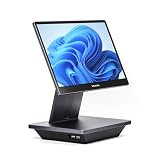
- Windows 11 PROFESSIONAL POS TERMINAL - Equipped with Intel Core i5 High-Performance CPU, 16 GB Memory, and 128 GB Hard Disk. Built-in WIFI, Audio, USB 2.0, USB 3.0, HDMI, and Ethernet ports for all kinds of connectivity. Windows 11 Professional for a wide range of POS applications of your choice.
- SLEEK & COMPACT DESIGN - Volcora POS Terminal is designed to take up as little space as possible so you can focus on better utilization of the counter space. Our sleek yet heavy-duty metal base ensures the terminal is well-stabled while taking orders with style. Suitable for any business such as retail stores, quick service restaurants, dine-in restaurants, cafes, bars, and more.
- WIDE TOUCHSCREEN - The 15.6" capacitive LCD touchscreen, combined with a 1920x1080 high-resolution display, makes it easy to read and touch with minimal effort. Our POS Terminals can also withstand over 15000 hours of screen time with little to no quality sacrifice.
- IN THE BOX - Volcora 15.6" Single Screen Windows 11 Professional POS Terminal, Power Adapter, Registration Card, and User Manual.
- LIFETIME WARRANTY & SUPPORT - Simply unbox, and set up your POS terminal like a Windows tablet with ease. We do understand that additional support might be needed for non-tech-savvy users and our US Based Customer Service team is committed to help. Plus, all Volcora products come with a limited lifetime warranty so you can purchase with peace of mind.
- Payment processing and choice: Identify which processor handles payments, whether you can use another processor, and how the terms affect your total cost.
- Offline operation: Ask what happens if the internet connection fails, which transactions or features remain available, and how transactions are handled when service returns.
- Integrations: Confirm that the tools you rely on connect to the specific POS plan and that the integration supports the tasks you need.
- Support: Check the support channels and availability that apply to your plan and location.
- Locations and registers: Verify how the system handles your current setup and what changes if you expand.
- Hardware compatibility: Confirm exact model compatibility rather than assuming a generic printer, scanner, drawer, or reader will work.
A practical way to make the choice
- Write down your must-have workflow. For example, specify how you handle stock across channels, route restaurant orders, or accept payment away from a counter.
- Choose a short list by business type. Start with the provider positions above, but include any system that can meet your must-haves.
- Ask for a plan-specific quote. Include subscriptions, processing, hardware, add-ons, setup, extra registers, and locations.
- Test a realistic transaction. Walk through a sale and the related tasks that matter to you, such as an inventory update, kitchen handoff, return, or mobile payment.
- Confirm current terms and compatibility. Check country availability, plan inclusions, processing conditions, offline behavior, integrations, support, and hardware before committing.
Plan names, fees, hardware prices, integrations, offline capabilities, and partner terms can change. The provider guides cited here offer useful starting points, but confirm the terms that apply to your purchase directly with the provider or reseller.
Quick Recap
Product prices and availability are accurate as of the date/time indicated and are subject to change. Any price and availability information displayed on Amazon at the time of purchase will apply.




