Free tools Windows power users keep installed
One-click scans. No signup required.
In the United States, Shopify’s advertised plans range from $39 USD per month for Basic on monthly billing ($29 per month when billed annually) to $399 per month for Advanced ($299 per month when billed annually). Those figures are only the subscription: payment processing, possible third-party transaction fees, and point-of-sale costs can add to the bill. Annual billing requires paying the full year upfront. Prices and payment rates vary by country, so use Shopify’s local pricing page if you’re outside the US.
Shopify plan prices in the US
The following advertised prices are from Shopify’s US pricing page in 2026. Annual prices are monthly equivalents, not month-to-month rates; Shopify charges the full year upfront.
| Plan | Monthly billing | Annual billing, monthly equivalent | Third-party transaction fee shown for US |
|---|---|---|---|
| Basic | $39 USD/month | $29 USD/month, billed annually | 2% |
| Grow | $105 USD/month | $79 USD/month, billed annually | 1% |
| Advanced | $399 USD/month | $299 USD/month, billed annually | 0.6% |
| Shopify Plus | $2,500 USD/month on a one-year term; $2,300 USD/month on a three-year term for standard setups | Not stated as an annual-billing monthly equivalent; term pricing applies | Not stated as a single universal rate; fees can vary by setup |
Basic, Grow, and Advanced rates and third-party transaction fees above are US figures; local pricing and payment rates differ. Shopify says Plus pricing can also vary for complex, high-volume businesses. The Plus terms and fees are described separately below.
What each Shopify plan is intended for
Basic
Shopify positions Basic for new businesses ready to launch. It can be a starting point if the included features and staff access meet your needs.
Quick wins for a faster PC:
Repair Windows errors before they cause bigger problemsFix Now →Fix the driver behind crashes, sound loss and screen glitchesFind Drivers →Clear out junk files and repair common Windows errorsFree Scan →#1 Best Overall

- Bluetooth Barcode Scanner For Shopify POS
- Works with Android and iPad.
- Scans all 1D and 2D barcodes, including UPC and QR codes.
- SETUP: 1-On your device, Search for Bluetooth devices, and pair. 2-In Shopify POS app, go the Settings, and enable "Allow HID mode". 3-Android only- On device, go to Settings > System > Keyboard > Physical keyboard and turn on "Show on-screen keyboard"
Grow
Shopify describes Grow as suited to businesses with consistent sales that need features such as more staff accounts or advanced reporting.
Advanced
Shopify positions Advanced for high-volume businesses seeking lower transaction costs or businesses migrating from another platform. Whether the lower listed third-party fee offsets the higher subscription depends on your location, sales, and payment setup.
Rank #2

- Larger battery enables longer continuous usage and twice the stand-by time. With the unique battery indicator light showing the remaining battery level, no more Low Battery Anxiety.
- The curved handle is extended and widened. With specially designed smooth and flat trigger for a better grip.
- The anti shock silicone protective cover can prevent scratches and friction even when dropped from up to 6.56 feet. IP54 technology protects the wireless barcode scanner from dust.
- Plug and play with the USB receiver or the USB cable, no driver installation needed. Easy and quick to set up. Wireless transmission distance reaches up to 328 ft. in barrier free environment.
- Supports almost all 1D Barcodes: Febraban Bank Code, Codabar, Code 11, Code93, MSI, Code 128, EAN-128, Code 39, EAN-8, EAN-13, UPC-A, ISBN, Industrial 25, Interleaved 25, Standard 25, Matrix. Reads damaged, fuzzy, reflective and smudged barcodes.
Shopify Plus
Plus is Shopify’s enterprise offering. Its listed price is term-based for standard setups and integrations, but Shopify says some complex, high-volume businesses may pay a variable platform fee based on revenue and business model.
Costs beyond the subscription
Payment processing
Card processing is separate from the plan subscription. Shopify’s US pricing page lists rates that depend on plan and payment setup; rates are not uniform across countries. Check the current rate for your country, sales channel, and chosen payment method when estimating costs.
Recommended Free Tools
Rank #3
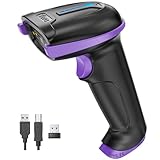
- Larger battery enables longer continuous usage and twice the stand-by time. With the unique battery indicator light showing the remaining battery level, no more Low Battery Anxiety.
- The curved handle is extended and widened. With specially designed smooth and flat trigger for a better grip.
- The anti shock silicone protective cover can prevent scratches and friction even when dropped from up to 6.56 feet. IP54 technology protects the wireless barcode scanner from dust.
- Plug and play with the USB receiver or the USB cable, no driver installation needed. Easy and quick to set up. Wireless transmission distance reaches up to 328 ft. in barrier free environment.
- Supports almost all 1D Barcodes: Febraban Bank Code, Codabar, Code 11, Code93, MSI, Code 128, EAN-128, Code 39, EAN-8, EAN-13, UPC-A, ISBN, Industrial 25, Interleaved 25, Standard 25, Matrix. Reads damaged, fuzzy, reflective and smudged barcodes.
Third-party transaction fees
If you use a payment provider other than Shopify Payments, Shopify may charge a third-party transaction fee in addition to the provider’s own processing charges. The US pricing page lists 2% on Basic, 1% on Grow, and 0.6% on Advanced. These rates should not be applied to merchants in other countries.
Annual billing commitment
Shopify Help Center explains that annual billing charges the full year upfront for a lower effective monthly rate. Compare the annual option with monthly billing based on the cash you can commit, not just the displayed monthly equivalent.
Rank #4
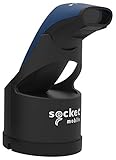
- Native support in square point of sale - identical to 7ci support
- Native support in Shopify, Vend, ShopKeep, LightSpeed POS, NCR Silver, and many more
- Scanning – Fast 2D & 1D, Omni-directional, barcode scanning with highly visible and safe LED aimer.
- Auto scan mode - presentation mode (automatic scanning) provides continuous scanning capabilities without pressing the scan button.
- Led aimer - bright, Rectangular illumination field with LED dot for precise aiming.
Apps, themes, and development
Shopify Plus does not include every possible implementation expense. Shopify notes that custom development, one-time theme purchases, and third-party apps can add costs. These expenses are distinct from the Plus subscription and payment fees.
Point of sale for in-person retail
Shopify describes POS Pro as an additional subscription per location. In-person sellers should also check applicable card rates and hardware costs. A Tap & Chip Card Reader is optional hardware for accepting tap and chip payments at a counter or on the go; it is not a required Shopify purchase.
Best Value
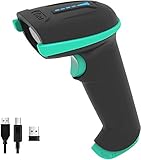
- Larger battery enables longer continuous usage and twice the stand-by time. With the unique battery indicator light showing the remaining battery level, no more Low Battery Anxiety.
- The curved handle is extended and widened. With specially designed smooth and flat trigger for a better grip.
- The anti shock silicone protective cover can prevent scratches and friction even when dropped from up to 6.56 feet. IP54 technology protects the wireless barcode scanner from dust.
- Plug and play with the USB receiver or the USB cable, no driver installation needed. Easy and quick to set up. Wireless transmission distance reaches up to 328 ft. in barrier free environment.
- Supports almost all 1D Barcodes: Codabar, Code 11, Code93, MSI, Code 128, EAN-128, Code 39, EAN-8, EAN-13, UPC-A, ISBN, Industrial 25, Interleaved 25, Standard 25, Matrix. Reads damaged, fuzzy, reflective and smudged barcodes.
How to decide whether a higher plan is worth it
Do not use a universal sales threshold to decide when to upgrade. Shopify says the break-even point depends on location and whether you use Shopify Payments. Compare your own costs using these inputs:
- Subscription commitment: Compare the monthly price with the annual-billing equivalent, while accounting for the upfront annual payment.
- Payment mix: Estimate card-processing costs using your actual transaction types and the rates available in your country.
- Provider choice: Include any Shopify third-party transaction fee if you plan to use another payment provider, plus that provider’s processing fees.
- Features and access: Confirm that the plan supports the staff accounts, reporting, or other features your operation requires.
- Retail footprint: Add POS Pro subscriptions per location and any hardware you choose to purchase.
Then compare the total estimated cost at each plan level. Shopify’s description of a plan’s intended audience is a useful starting point, not a guarantee that upgrading will save money for a particular merchant.
Shopify Plus pricing and variable fees
Shopify Help Center lists Plus at $2,500 USD per month on a one-year term or $2,300 USD per month on a three-year term for standard setups and integrations. Those figures are term-specific, not a universal quote for every business. Shopify says more complex, higher-volume businesses may have a variable platform fee based on revenue and business model; contact Shopify for details relevant to your setup.
Where to confirm your local price
Shopify localizes subscription prices and payment rates. If you are outside the United States, use the country-specific Shopify pricing page and check the currency, billing term, payment provider, and transaction-fee details before budgeting. Introductory offers may also change; do not treat a promotional rate as the standard price without checking eligibility and duration.
The Tool Desk
Outbyte PC Repair FREERepair Windows errors before they cause bigger problemsFix Now →Outbyte Driver Updater FREEScan for outdated or missing drivers - takes under a minuteDriver Scan →Quick Recap
Product prices and availability are accurate as of the date/time indicated and are subject to change. Any price and availability information displayed on Amazon at the time of purchase will apply.




