Choose a professional network for the outcome you need—not just because it has a large user base. LinkedIn is the broadest starting point for professional identity and job discovery, but local referrals, startup connections, peer discussion, and portfolio visibility often call for a more specialized platform. For most people, one broad network and one or two focused communities are more useful than maintaining accounts everywhere.
“Social networking site” covers several different tools here: some help you build a public professional identity, while others center on events, startup programs, anonymous discussion, visible work, or vendor reviews. The 20 options below are worth considering for specific goals, not a ranking of the 20 best platforms for everyone.

Which professional networking site fits your goal?
| Goal | Good starting points |
|---|---|
| General professional visibility | |
| Find recruiters or jobs | LinkedIn, Wellfound, XING in relevant European markets, Blind for tech-sector discussion |
| Local referrals and business relationships | Alignable, Meetup, SCORE, a local chamber or business network |
| Find startup opportunities or programs | Wellfound, F6S, Gust, Startup Grind |
| Meet founders and learn from peers | Indie Hackers, Startup Grind, Meetup |
| Explore funding-related programs | Gust, F6S |
| Demonstrate technical ability | GitHub, plus a relevant Reddit or Discord community |
| Find design work or employers | Behance, Dribbble, LinkedIn |
| Discuss workplace experiences | Fishbowl, Blind, relevant Reddit communities |
| Launch a product | Product Hunt, Indie Hackers, relevant Reddit communities |
| Find agencies or B2B vendors | Clutch, LinkedIn, local business networks |
“Good starting points” means the platform’s format aligns with that goal; it does not guarantee an active audience, an introduction, a job, a client, or funding. Check recent activity and current access terms in your location before investing time or money.
Broad professional identity and regional networks
1. LinkedIn
LinkedIn combines professional profiles, publishing, job discovery, recruiting, company pages, and business-oriented tools. It is the sensible general-purpose baseline if you want colleagues, recruiters, clients, or partners to find a consistent account of your work. It may be less effective on its own when you need local, in-person relationships or a tightly defined specialist community.
Quick wins for a faster PC:
Repair Windows errors before they cause bigger problemsFix Now →Fix the driver behind crashes, sound loss and screen glitchesFind Drivers →Clear out junk files and repair common Windows errorsFree Scan →#1 Best Overall
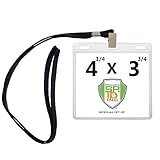
- COMPATIBLE WITH AVERY 5392 3X4 LABELS - UNIVERSAL FIT - Fits Any and All Name 3 x 4 & 4 X 3 Name Tag Refills / Inserts - Slide in Your Credential from the Top Opening and Display Your Name, Exhibitor Badges, Press, Access, VIP Passes, QR Codes, Barcodes, School ID, or Other Important Company Schedule or Event Information
- EXTRA ROOM JUST IN CASE!! - Don’t Show up For the Party Just to Find the Badges Don’t Fit!! Whether Your Credentials are Laminated, a Bit Bigger Than Expected, Or You Just Need Extra Room, These Fit With Any 4X3 Template Badges or Print Out Card You Have! Protector Sleeves to Showcase Your Identification and Networking Credentials - Flip Around to Display Either Side
- LONG LASTING PREMIUM BULLDOG CLIP WOVEN LANYARDS - COMFORTABLE ⅜ WIDE - NOT ROUND!!! - Don’t Cheap out on Your Attendees for Your Event! Reusable and Economical, These can be used for Multiple Events or Get Togethers. Both the Lanyards and the Plastic Sleeves are Premium Quality and Long Lasting
- PROFESSIONAL APPEARANCE - PREMIUM QUALITY BADGE HOLDER AND LANYARD - Ready for Your Next Big Event! Convenient Event Badge Holder with Lanyard Sets - Great for Large Group Meetings, Business Conference, Convention, Symposium, Seminar, Exhibition, Fundraiser, Gala, Workshop, Trade Show, Festival, Office and More!
- NO ANNOYING ZIPPER - CRYSTAL CLEAR HOLDERS DESIGNED FOR QUICK INSERT - User-Friendly and Simple! No Noisy Snap or Zip Distraction - Easy and Fast Access for Small or Large Fingers to Remove - Transparent to Scan Barcodes or Swipe without Needing to Remove
A free account can establish a profile and support basic networking. LinkedIn Premium Business is a paid option aimed at small-business users seeking customer discovery, visibility, business insights, profile-visitor information, or LinkedIn Learning. The vendor lists a starting U.S. price of US$69.99 per month per license or US$539.88 per year per license; its page says prices can vary by country, device, taxes, promotions, and billing frequency. Those are listed starting prices, not a promise of what an individual user will pay. See LinkedIn Premium Business.
LinkedIn also describes Premium All-in-One as a combination of sales, marketing, and hiring tools for small businesses. Its listed starting U.S. price is US$89.99 monthly or US$899.88 yearly per license, and the product is rolling out, so it may not be available to every user. Review the plan page for availability and terms rather than assuming you can buy it now. LinkedIn announced the offering on February 12, 2026, for founders, solopreneurs, and small teams (announcement).
2. Meetup
Meetup helps people find local and interest-based groups, workshops, and events. It is most useful when a group in your area meets regularly and attracts the people you want to know; a directory listing alone does not make a group active or worthwhile.
Attending and organizing are different use cases. Meetup’s official organizer page lists U.S.-dollar starting prices for organizers of US$29.99 per month, US$99.99 for six months, or US$174.99 per year on Standard, and PRO starting at US$55 per group per month. Actual prices may vary by location and offer. Both plans support unlimited events and attendees; PRO adds tools such as advanced member communication, mailing-list export, Mailchimp integration, branded network profiles, sponsors, paid promotions, and additional insights. See Meetup’s organizer pricing and feature details before budgeting to run a group.
What’s actually slowing this PC down?
Pick the symptom - the matching free tool is one click away.
3. XING
XING is a professional identity and career-networking option for German-speaking and selected European markets. It is a more plausible complement to LinkedIn when your work, hiring, or job search is concentrated in those markets than when your network is U.S.-only. Regional usefulness depends on where your contacts and opportunities are; do not assume equal reach in every country.
XING lists Premium benefits including full profile-visitor details, skills highlighting, profile-optimization statistics and tips, five messages per month to non-contacts, a digital business card, and partner perks. Check the live XING Premium purchase page for localized pricing and its feature description for current terms.
4. Alignable
Alignable is designed around small-business relationships and local referrals. It can suit a service provider whose prospective customers, partners, or referral sources are nearby; it is a weaker fit for globally distributed work or enterprise recruiting.
Rank #2
- COMPATIBLE WITH AVERY 5392 3X4 LABELS - UNIVERSAL FIT - Fits Any and All Name 3 x 4 & 4 X 3 Name Tag Refills / Inserts - Slide in Your Credential from the Top Opening and Display Your Name, Exhibitor Badges, Press, Access, VIP Passes, QR Codes, Barcodes, School ID, or Other Important Company Schedule or Event Information
- EXTRA ROOM JUST IN CASE!! - Don’t Show up For the Party Just to Find the Badges Don’t Fit!! Whether Your Credentials are Laminated, a Bit Bigger Than Expected, Or You Just Need Extra Room, These Fit With Any 4X3 Template Badges or Print Out Card You Have! Protector Sleeves to Showcase Your Identification and Networking Credentials - Flip Around to Display Either Side
- LONG LASTING PREMIUM BULLDOG CLIP WOVEN LANYARDS - COMFORTABLE ⅜ WIDE - NOT ROUND!!! - Don’t Cheap out on Your Attendees for Your Event! Reusable and Economical, These can be used for Multiple Events or Get Togethers. Both the Lanyards and the Plastic Sleeves are Premium Quality and Long Lasting
- PROFESSIONAL APPEARANCE - PREMIUM QUALITY BADGE HOLDER AND LANYARD - Ready for Your Next Big Event! Convenient Event Badge Holder with Lanyard Sets - Great for Large Group Meetings, Business Conference, Convention, Symposium, Seminar, Exhibition, Fundraiser, Gala, Workshop, Trade Show, Festival, Office and More!
- NO ANNOYING ZIPPER - CRYSTAL CLEAR HOLDERS DESIGNED FOR QUICK INSERT - User-Friendly and Simple! No Noisy Snap or Zip Distraction - Easy and Fast Access for Small or Large Fingers to Remove - Transparent to Scan Barcodes or Swipe without Needing to Remove
Alignable’s help center, updated January 14, 2026, describes free guest access and paid Basic, Premium, and Premium+ memberships at US$29, US$49, and US$89 per month, respectively. Paid tiers offer different combinations of connection credits, analytics, visibility, support, contact calls-to-action, and group-related features; sponsorship costs vary by local community. Treat these as the help page’s stated prices, not a guarantee of your checkout price. Details: Alignable membership information.
Crashes, No Sound, or Screen Glitches?
Random freezes, missing sound and display glitches usually trace back to one bad driver. Find and replace yours safely.Free scan · under a minuteWindows Errors? Fix Them Before They Spread
Repair common Windows errors and clear accumulated junk for a smoother, more stable PC - no reinstall needed.Free scan · no reinstallStartup and founder networks
5. Wellfound
Wellfound, formerly known as AngelList Talent, is oriented toward startups, founders, and people pursuing startup jobs. Consider it when early-stage company opportunities are your target; it is not a replacement for a general professional profile or a promise of investor access.
6. Gust
Gust is better understood as a startup and early-stage funding platform than as a general social network. It may help founders engage with startup and funding-related processes, but a profile does not guarantee an investor introduction, consideration, or financing.
7. F6S
F6S focuses on startup programs, accelerators, grants, and other opportunities. It can help founders discover and apply to programs, but opportunity discovery is not the same as building sustained peer relationships or securing acceptance.
8. Indie Hackers
Indie Hackers is a peer community for bootstrapped founders and online-business builders, particularly relevant to software and solo ventures. It is a natural choice for practical founder discussions and accountability; people building outside that world may find its focus less useful.
9. Product Hunt
Product Hunt centers on discovering and launching products. Makers can seek feedback and visibility and may meet other people in the startup ecosystem, but a launch is a moment of exposure rather than a substitute for ongoing professional relationships.
10. Startup Grind
Startup Grind connects startup ecosystem participants through events, education, and local chapters. It is worth checking if its chapter is active in your area and relevant to your stage or industry. Event schedules and the value of the experience vary by chapter.
Rank #3
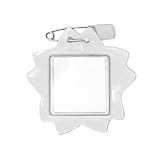
- Size (W x H x D): 2.7 x 2.6 x 0.04 inches (68 x 65
- Available in a variety of colors
Industry discussion and peer communities
11. Fishbowl
Fishbowl is aimed at workplace and industry discussion, including career and employer conversations. Its more candid format can surface perspectives, but anonymous or low-context statements are not verified evidence. Use it to gather viewpoints, not as the sole basis for consequential decisions.
12. Blind
Blind is known for company and career discussion among tech professionals. It may help users compare workplace experiences or follow industry conversations, but anonymous discussion is not the same as an identifiable profile that shows your work to recruiters or clients.
13. Reddit
Reddit contains niche communities where professionals can ask questions, share expertise, and learn how peers approach a problem. Each community has its own rules and culture. Read recent posts and posting rules before contributing; overt self-promotion can be unwelcome or prohibited.
14. Discord
Discord hosts real-time communities, including technical, creator, and specialized professional groups. It can support peer interaction, office hours, and ongoing discussion, but membership is usually tied to a particular community rather than a searchable, public professional identity.
For either discussion platforms or chat communities, distinguish firsthand experience from rumor, and avoid sharing confidential employer, client, or personal information. The same caution applies to any post that could be indexed or copied beyond its intended audience.
Networks where visible work does the networking
15. GitHub
GitHub is a place for developers and technical founders to show code, collaborate, and participate in open-source projects. A clear, maintained body of work can make skills easier to assess and create connections through collaboration. It is proof of work more than a general-purpose networking feed; a profile cannot demonstrate abilities that are not represented in the projects.
16. Dribbble
Dribbble is a visual portfolio and discovery platform for designers and other creative professionals. It can help showcase work and attract collaborators, employers, or freelance inquiries, but its relevance is strongest for people whose work can be presented visually.
17. Behance
Behance supports project-based portfolios for designers, illustrators, photographers, and creative agencies. It is useful when polished projects can speak for your capabilities; portfolio quality and relevance matter more than posting frequently for its own sake.
Business services and structured support
18. Clutch
Clutch is primarily a B2B services directory and review platform, not a peer social network. Agencies and consultants may use it for vendor discovery and reviews, while companies can use it to research providers. A listing is a route to discovery, not a guarantee of qualified leads or conversions.
19. SCORE
SCORE offers mentoring and educational support for U.S. small-business owners and aspiring entrepreneurs. It is a more structured route to guidance and workshops than an open-ended social feed; look for relevant local or online support rather than expecting it to function as a broad professional identity network.
Recommended Free Tools
20. A local chamber or business network
A chamber of commerce or similar local business organization can help place-based businesses meet potential referral partners, service providers, and community stakeholders. The U.S. Chamber of Commerce (uschamber.com) is a national organization, while the best fit for local relationships may be a city or regional chamber. This is a category, not a single universal platform, and membership, events, and benefits depend on the organization.
How to choose a network you can actually use
Before creating an account or paying for a plan, score the option against the people and outcomes that matter to you. A polished interface is less important than whether your target audience is present and whether the platform gives you a credible next step.
- Audience fit: Are the clients, employers, peers, mentors, or partners you need active there?
- Geography and industry: Does the community cover your city, country, language, or profession?
- Intent: Does it support the action you want—hiring, referrals, funding-program discovery, learning, or discussion?
- Identity and trust: Can people assess who is speaking and what evidence supports their claims?
- Conversation quality and activity: Are recent discussions, events, or opportunities useful and moderated?
- Search and conversion path: Can you find relevant people or groups, then move naturally to a meeting, application, referral, or collaboration?
- Access and privacy: Is the useful feature free, paid, invite-only, or community-gated? Consider anonymity, data export, visibility, and professional risks.
- Time and proof of value: Can you maintain the account without duplicating work, and can you tie activity to meaningful outcomes?
Most professionals can start with a simple combination: one broad identity network, one community aligned with their work, and optionally a local or event-based option. For example, a consultant might pair LinkedIn with Alignable or Meetup; a developer might use LinkedIn and GitHub alongside a relevant community; a designer might pair LinkedIn with Behance or Dribbble. The right combination depends on where the people you need actually participate.
Independent reader supportYour contribution helps us test, update, and keep practical guides available for everyone.Build a profile that earns a useful conversation
Profiles should make it easy for the right person to understand your work and decide whether to respond. Keep the core facts consistent across platforms, then adapt the detail to each audience.
Free tools Windows power users keep installed
One-click scans. No signup required.
Best Value

- Product Size: Flat black lanyards with swivel hook. The lanyard is up to 19"/48.5 cm length and 3/8"/1 cm width
- Comfortable & Durable: Flat lanyard is tightly woven from high quality nylon material, which is Lightweight comfortable soft to wear. The lanyard are anti-winkle, soft and smooth
- Wide Application: Great for ID badges, easy to identify students, employees, attendees, visitors, factory workers, management, nurses, contractors, etc. Suitable for all kinds of public places
- Convenient to use: Easy to clip and unclip for stuff with lanyard port/hole. can be used with ID card holders, leather badge holders and keys etc
- Package included: 50 Packs, enough product quantity, suitable for any occasion, such as large conferences, exhibitions, factories, school, indoor and outdoor activities, concerts, business negotiations, etc
- Use a specific headline or description that says what you do and whom you help.
- Include your location or service area when geography affects the work.
- Show evidence: projects, case studies, portfolio pieces, repositories, credentials, or concrete outcomes you can substantiate.
- Give a clear contact route or next step that fits the platform and its rules.
- Use accurate employment, client, income, and funding claims; do not inflate results.
- Review privacy settings and consider what employers, clients, or search engines can see.
Network without turning every connection into a pitch
- Choose one measurable outcome. Decide whether you want referrals, interviews, partnerships, investor or program opportunities, or peer learning.
- Find a small number of relevant people or groups. Relevance beats mass invitations.
- Observe before posting. Read recent discussions and community rules so your contribution fits the space.
- Contribute something useful. Answer a question, share a practical resource, or take part in a discussion before asking for help.
- Personalize outreach. Explain why you are contacting that person and make a specific, reasonable request.
- Follow up with context. Refer to the conversation or event; do not send an immediate generic sales pitch.
- Review what is working. Keep channels that generate relevant conversations and stop spending time on inactive or low-value ones.
Using a platform as a cold-contact database is a common way to damage trust. Respect group rules, anti-solicitation policies, and other people’s privacy; avoid automated mass requests and messages that conceal a sales pitch.
Measure professional outcomes, not just audience size
Follower counts and profile views can provide context, but they do not establish business value. Track the steps between participation and the result you want:
- Relevant conversations started and qualified introductions received.
- Referrals, interviews, partnership discussions, or opportunities that progress to a defined next stage.
- Events attended and useful follow-ups completed.
- Replies, saves, and substantive comments from the audience you want to reach.
- Leads that reach a business stage you define, weighed against the time spent.
Give a new channel a specific purpose and a reasonable trial period, then compare outcomes with the effort it takes. A large following without relevant conversations may be less valuable than a smaller, active community.
When to pay for a professional networking plan
Start with free access where it lets you test audience fit and complete your profile. Consider a subscription only when you can name the feature you need, confirm the audience is active, and track a result the feature might improve. Paid search, messaging, analytics, visibility, event-management, or promotion tools can support a workflow; they cannot create trust, demand, or a qualified audience by themselves.
Do these 3 things before closing this tab:
1Fix the driver behind crashes, sound loss and screen glitches2Clear out junk files and repair common Windows errors3Scan for outdated or missing drivers - takes under a minuteFor Meetup, the organizer plans above apply to running groups, not simply attending events. For Alignable, the paid tiers are most relevant if limits or visibility tools affect an active local-referral strategy. XING Premium is worth assessing only if your target audience uses XING. Before paying anywhere, check the current checkout price, renewal and cancellation terms, taxes, and feature availability for your location and device.
Check a community before you invest in it
Professional networks change: products reposition, features move behind paywalls, moderation shifts, and local communities can lose activity. Before building a strategy around a platform, review its current official product page, recent posts or events, pricing, privacy settings, and rules. Historical lists can include services that have closed or become irrelevant; do not rely on legacy recommendations without checking present availability.
Quick Recap
Product prices and availability are accurate as of the date/time indicated and are subject to change. Any price and availability information displayed on Amazon at the time of purchase will apply.




