Yes—but the best QuickBooks savings are conditional. As of August 16, 2026, Intuit’s U.S. discount page showed 50% off QuickBooks Online for the first three months for eligible new customers who purchase a plan. Existing subscribers may save more reliably through accountant pricing, a lower plan, annual billing, or a carefully evaluated switch to another accounting platform.
QuickBooks discounts at a glance
| Route | Who may qualify | Price or saving shown | How long | Important catch |
|---|---|---|---|---|
| Official new-customer promotion | New QuickBooks customers who purchase, not free-trial users | 50% off; Simple Start $19, Essentials $37.50, Plus $57.50, Advanced $137.50 per month during the promotion | First three months | Renews at the regular price; eligibility and checkout pricing can change |
| ProAdvisor Preferred Pricing | Clients of participating accountants using QuickBooks Online Accountant | Discount varies by product, billing method and current terms | Offer-specific | The accountant may bill the firm or client separately |
| Accountant wholesale terms | Eligible firms using a firm-billed arrangement | Some terms advertise 30% off recommended retail price for selected plans | Offer-specific | Not every ProAdvisor offer is 30% off |
| Annual billing | Customers shown an annual option at checkout | Pricing page displayed approximately 10% annual-billing savings | One-year commitment | May not stack with promotions; confirm cancellation and refund rules |
| Multi-company or bulk pricing | Eligible accounting firms managing multiple companies or clients | Terms have included special per-company and Advanced pricing | Offer-specific | Recent 2026 offers ended July 31 and should not be assumed active |
Check the official QuickBooks discount page and pricing page immediately before subscribing. The figures above are a U.S. snapshot, not a promise of your final invoice. Taxes, payroll, payments, Time, Workforce, Expert Assisted services, add-ons and future price changes can alter the total.
1. Claim the 50%-off offer if you are genuinely new
Intuit’s offer page described 50% off QuickBooks Online for the first three months for new QuickBooks customers who buy a plan. The displayed monthly prices were:
- Simple Start: $38 standard, $19 for the first three months.
- Essentials: $75 standard, $37.50 for the first three months.
- Plus: $115 standard, $57.50 for the first three months.
- Advanced: $275 standard, $137.50 for the first three months.
These are introductory prices. In month four, the subscription returns to the then-current regular rate unless another valid offer applies. The offer is separate from a free trial and may not apply to existing subscribers, reactivations, upgrades, second companies or every QuickBooks product family. You need an Intuit account or must create one at checkout.
Free tools Windows power users keep installed
One-click scans. No signup required.
#1 Best Overall
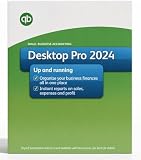
- All‑in‑one desktop accounting for one user: invoices, bills, expense tracking, chart of accounts, and basic inventory management.
- Fast setup with guided company file import and easy CSV/spreadsheet imports for contacts, balances, and prior transactions.
- Professional invoices & estimates with customizable templates, recurring billing, automatic reminders, and PDF/email export.
- Financial dashboards and reports: real‑time cash‑flow view, P&L, balance sheet, sales-by-customer/item, and project/job profitability.
- Time & job tracking plus billable-hours conversion; integration-ready for payroll and third‑party tax or payroll add‑ons.
How to buy without an unpleasant renewal surprise
- Open the official discount page and select the plan you actually need.
- Confirm that the checkout identifies you as eligible for the new-customer promotion.
- Compare the first three months with the regular renewal amount shown before payment.
- Remove or separately price payroll, payments, Time, Workforce and other add-ons you do not need.
- Review the final monthly total, tax and renewal terms, then save the confirmation.
Starting a free trial does not automatically preserve the 50% rate. A trial may be the better financial choice if you need time to test bank feeds, imports, reports, invoicing and accountant access before committing.
2. Ask an accountant about ProAdvisor pricing
For an established business, an accountant or bookkeeper may provide the most durable saving. Intuit says ProAdvisors can obtain pricing for their own firm and for client subscriptions, including QuickBooks Online, Desktop, Desktop Enterprise, Online Payroll, ProConnect Tax Online, checks and supplies.
ProAdvisor Preferred Pricing is an accountant program, not a public coupon code. The accountant uses QuickBooks Online Accountant to add and manage subscriptions. Depending on the arrangement, the client receives a direct discount or the firm pays Intuit and bills the client separately.
Questions to ask before changing billing
- What is the exact monthly price after any discount?
- Is the subscription billed directly to my business or through your firm?
- How long does the quoted price last, and what is the renewal price?
- Are payroll, payments, Time, Workforce or support services separate?
- What happens to the discount if our accounting relationship ends?
- Who controls the Intuit account, data access and cancellation?
An accountant’s subscription discount does not make bookkeeping services free. The firm may add a management fee or bundle the software with monthly services.
Windows Errors? Fix Them Before They Spread
Repair common Windows errors and clear accumulated junk for a smoother, more stable PC - no reinstall needed.Free scan · no reinstallCrashes, No Sound, or Screen Glitches?
Random freezes, missing sound and display glitches usually trace back to one bad driver. Find and replace yours safely.Free scan · under a minuteWhere the accountant checks charges
Intuit’s documented path in QuickBooks Online Accountant is Settings → Subscriptions and billing → Billing details. Labels can change, so verify the current interface. Preferred Pricing replaced the older wholesale-discount program for new subscriptions added on or after July 15, 2021; do not assume older wholesale terms and current Preferred Pricing are identical. See Intuit’s ProAdvisor discount guidance and Preferred Pricing explanation.
Rank #2

- Buyer will receive the product details via 'AMAZON MESSAGE' Within 1-8hrs of placing the order.
- Please check your Inbox/Spam after placing the order and respond to our message.
- The buyer must respond to our initial message after placing the order. Product details will be sent only after we receive a response. If the buyer does not respond to our first message and follow-up reminders, the order will be cancelled after 7 days.
- Genuine official product with original lifetime license codes, backed by 100% technical support from our team.
- We sell only genuine products. If the item doesn’t meet expectations or any issues cannot be resolved, we’ll promptly issue a full refund and will cancel the codes.
3. Treat “30% off” as one offer, not a universal rule
Intuit’s accountant offer terms describe 30% off recommended retail price for certain Simple Start, Essentials and Plus subscriptions under an accountant-billed wholesale arrangement. The firm agrees to pay the subscription, and cancellation can end the discount; some terms say Intuit may not reinstate it.
That language does not mean every ProAdvisor receives 30% off every plan. Product, billing method, firm eligibility and the current terms control the actual price. Read the accountant offer terms before relying on a quoted percentage.
4. If you run several companies, ask about firm-managed pricing
Buying each company independently is not always the lowest-cost route. Intuit’s multi-company terms describe an eligible-accounting-firm program in which one QuickBooks Online Plus subscription could be paired with up to 10 additional companies at $45 per month each for two years, subject to eligibility, timing and list-price conditions.
This is not a universal self-serve bundle. Confirm that the companies qualify, belong to the relevant client arrangement and are administered through an eligible QuickBooks Online Accountant firm. Calculate the price after the two-year period.
Intuit also published a 2026 Advanced bulk example: eligible firms buying at least two Advanced subscriptions for multiple new or QuickBooks Desktop-migrating clients could pay $70 per subscription per month for up to two years when purchased through the sales team during June 24–July 31, 2026. A separate two-Advanced bundle advertised $20 total per month for 12 months with the same stated July 31 end date. Those periods have passed, so treat them as examples, not live offers, unless the current terms page confirms an extension. See the multi-company terms and Advanced bulk terms.
Rank #3

- 𝐏𝐋𝐄𝐀𝐒𝐄 𝐑𝐄𝐀𝐃 𝐓𝐇𝐈𝐒 𝐋𝐈𝐒𝐓𝐈𝐍𝐆 𝐂𝐀𝐑𝐄𝐅𝐔𝐋𝐋𝐘:
- No CD or Shipping Delays - Receive your Product license key quickly via Amazon message. Download and install immediately to start managing your finances without waiting for physical delivery. 𝗧𝗼 𝘃𝗶𝗲𝘄 𝘁𝗵𝗲 𝗔𝗺𝗮𝘇𝗼𝗻 𝗺𝗲𝘀𝘀𝗮𝗴𝗲, log into your Amazon account and go to the "𝗔𝗰𝗰𝗼𝘂𝗻𝘁" section in your profile. Then, click on "𝗬𝗼𝘂𝗿 𝗠𝗲𝘀𝘀𝗮𝗴𝗲𝘀" to see the message, along with your order details, address, and other information.
- Buyer 𝗠𝗨𝗦𝗧 𝗥𝗘𝗦𝗣𝗢𝗡𝗗 to our first message after placing the order. Product details will be sent only after confirmation.
- 🧾 One-Time Purchase – Lifetime License Get full ownership of your software with no monthly fees or annual renewals. A cost-effective desktop solution ideal for small businesses seeking reliable accounting tools.
- 📊 Manage Finances, Invoices & Reports with Ease Easily track income and expenses, manage bills, create professional invoices, and generate detailed financial reports—all from a single, user-friendly dashboard.
Prepare this information for a sales conversation
- Number of companies and required plan for each.
- Whether all entities belong to one client and one accounting firm.
- User, location, inventory, project-accounting and reporting requirements.
- Whether any company is migrating from QuickBooks Desktop.
- The promotional price, end date and post-promotion price for every subscription.
5. Existing subscribers: reduce the bill without chasing a coupon
There is no dependable published policy guaranteeing a retention discount after you call support or threaten to cancel. Use verified levers instead:
- Audit plan usage. Remove features, users or add-ons you do not use.
- Check a lower plan. Confirm that bank feeds, invoicing, reports, accountant access and required integrations still work before downgrading.
- Ask your accountant. Moving from direct billing to an eligible ProAdvisor arrangement may change the price and who administers the account.
- Compare annual billing. The pricing page showed approximately 10% savings for annual pricing, but verify the exact total and whether it stacks with another offer.
- Compare migration economics. Include data cleanup, conversion, training and accountant rework—not just the new monthly subscription.
Annual billing lowers the effective monthly rate only if you keep the service long enough to recover the upfront commitment. Check refund and cancellation rules, and do not choose it while you are still deciding whether to migrate.
6. Calculate the cost you will actually pay
Use this worksheet for each option:
Actual monthly cost = base subscription + payroll + payments and transaction fees + Time or Workforce + extra users + add-ons + tax − verified discount.
For a promotion, calculate the first year separately:
First-year cost = promotional months + regular-price months + add-ons + taxes and transaction fees.
Rank #4

- Buyer will receive the product details via 'AMAZON MESSAGE' Within 1-2hrs of placing the order.
- Please check your Inbox/Spam after placing the order and respond to our message.
- The buyer must respond to our initial message after placing the order. Product details will be sent only after we receive a response. If the buyer does not respond to our first message and follow-up reminders, the order will be cancelled after 7 days.
- 100% Money Back Guarantee – if any issue cannot be resolved, we will issue a full refund and cancel the license.
Payment processing is not subscription pricing. A lower plan can still cost more overall if your business processes substantial card or ACH volume.
7. When switching plans is smarter
Downgrade when you are paying for capabilities you do not use and the lower tier preserves your essential workflow. Check these items before changing:
- Number of users and accountant access.
- Inventory, purchase orders and project profitability.
- Sales-tax reporting and 1099 support.
- Bank-feed connections and required integrations.
- Historical reports and export options.
Export important reports and confirm feature compatibility first. Losing a workflow can cost more than the subscription savings.
8. When another accounting product deserves a trial
Zoho Books
Zoho Books’ U.S. pricing page listed Free at $0 per organization per month; Standard at $20 monthly or $15 when billed annually; Professional at $50 or $40 annually billed; Premium at $70 or $60; Elite at $150 or $120; and Ultimate at $275 or $240 annually billed. Higher tiers add bank feeds, sales tax, inventory, purchase orders, projects, automation and analytics. See Zoho Books pricing.
It is worth testing for solopreneurs, micro-businesses and cost-sensitive companies. It may be a poor fit if your accountant or critical integrations are QuickBooks-specific.
Quick wins for a faster PC:
Repair Windows errors before they cause bigger problemsFix Now →Fix the driver behind crashes, sound loss and screen glitchesFind Drivers →Best Value

- DESKTOP ACCOUNTING SOFTWARE: QB enterprise Desktop Pro Plus 2024 delivers powerful business accounting tools designed for small to mid-sized businesses.
- 3-USER LICENSE: Supports to 1pc, making it ideal for small teams managing finances and bookkeeping together.
- LIFETIME VERSION: This is a one-time purchase lifetime version, so you can use the software without any recurring subscription fees.
- USB INSTALLATION: Comes conveniently pre-loaded on a USB drive for quick and easy installation directly onto your PC.
- PC ONLY COMPATIBILITY: Designed exclusively for Windows PC; this software is not compatible with Mac operating systems.
Xero
Xero’s U.S. page showed Early at $25 per month, Growing at $55 and Established at $90 after the introductory period. Plans include no per-user license fees, but transaction and feature limits apply. The page also showed a 90%-off-for-six-months promotion that ended June 30, 2026; do not treat it as current without confirmation. See Xero pricing plans.
Xero can suit businesses that want cloud accounting without per-user charges and can work within plan limits. It is less suitable when the lowest tier’s invoice or bill limits, or QuickBooks-only integrations, are deal-breakers.
Other candidates
FreshBooks may suit service businesses centered on time tracking, proposals and invoicing. Wave can be worth checking for very small businesses, but payment fees and feature limits matter. Sage or Odoo are more relevant when you need broader operational or ERP functions. Verify current prices and feature fit directly before migrating.
Which saving route fits your situation?
- New customer: Compare the official three-month promotion with a free trial, then judge the renewal price.
- Existing customer with an accountant: Ask about Preferred Pricing before changing or canceling anything.
- Multiple entities: Request current multi-company or bulk terms through QuickBooks Online Accountant.
- Simple, price-sensitive business: Test Zoho Books or Xero and include migration labor in the comparison.
- Feature-heavy QuickBooks user: A verified ongoing discount may be cheaper than rebuilding integrations, history and reporting elsewhere.
The Bottom Line
QuickBooks is not universally cheap, but you do not necessarily have to pay its public list price. New customers can compare the official 50%-off introductory offer with a free trial; existing customers should investigate accountant pricing, annual billing and plan right-sizing; multi-company firms should request current terms. Always make the decision using the post-promotion, add-on-inclusive cost—not the headline discount.
Do these 3 things before closing this tab:
1Clear out junk files and repair common Windows errors2Fix the driver behind crashes, sound loss and screen glitches3Repair Windows errors before they cause bigger problemsQuick Recap
Product prices and availability are accurate as of the date/time indicated and are subject to change. Any price and availability information displayed on Amazon at the time of purchase will apply.




