Recommended Free Tools
Qualcomm announced an agreement to acquire Arduino on October 7, 2025, at the same time it launched the Arduino UNO Q and Arduino App Lab. The announcement described a proposed transaction subject to regulatory approval and customary closing conditions; the official material cited here does not independently confirm a completed closing. The UNO Q is a hybrid board, combining a Debian-capable Linux computer with a separate real-time microcontroller—not a conventional replacement for the classic Arduino UNO.
U.S. prices announced by Arduino on June 26, 2026, took effect July 6: $59 for the 2GB/16GB model and $79 for the 4GB/32GB model. Regional prices, tax, shipping, stock and included accessories can differ; check the official store listing.

What Qualcomm actually announced
Qualcomm said it agreed to acquire Arduino, but its release did not disclose a purchase price and said closing depended on regulatory approval and customary conditions. Unless a later official closing notice is verified, the accurate description is “Qualcomm agreed to acquire Arduino” or “Qualcomm proposed to acquire Arduino,” not that the transaction definitely closed on October 7, 2025.
Qualcomm presented the deal as an edge-computing and developer-access strategy. It wants to pair its processors, graphics, computer-vision and AI technologies with Arduino’s hardware, software, education resources and open-source-oriented community. Qualcomm also pointed to its acquisitions of Edge Impulse and Foundries.io as parts of a broader edge stack. Arduino’s FAQ says the company will retain its brand, tools and mission and continue supporting microcontrollers and microprocessors from multiple semiconductor vendors. Those are stated intentions, not proof of how governance or product policy will evolve over time.
The Tool Desk
Outbyte Driver Updater FREEFix the driver behind crashes, sound loss and screen glitchesFind Drivers →Outbyte PC Repair FREEClear out junk files and repair common Windows errorsFree Scan →#1 Best Overall
![Arduino® UNO™ Q 2GB[ABX00162] - Hybrid Board, Qualcomm Dragonwing QRB2210 microprocessor (MPU) & STM32U585 Microcontroller(MCU), AI Vision, Voice, IoT, Robotics, Linux Debian OS, Wi-Fi 5, USB-C](https://m.media-amazon.com/images/I/51cl4xygwGL._SL160_.jpg)
- Dual-Brain Hybrid Power: Combines the Qualcomm Dragonwing QRB2210 MPU (Quad-core Arm Cortex-A53 @ 2.0 GHz CPU, Adreno GPU, AI acceleration) and the real-time, low-power STM32U585 MCU for advanced applications like object recognition, voice commands, and motion detection.
- AI & Linux Capabilities: Unlocks AI-powered vision and sound solutions; runs Linux Debian OS for coding in Python and supports the Arduino ecosystem with libraries and Sketches; quick start with Arduino App Lab.
- Advanced Features: Equipped with 2 GB LPDDR4 RAM, 16 GB eMMC built-in storage, ideal to develop in PC-connected mode, running the OS, Python scripts, and basic network services (SSH) without a demanding GUI or heavy multitasking; great for lightweight AI and memory-optimized TinyML applications, needing local storage for basic OS and core libraries. Dual-band Wi-Fi 5 (2.4/5 GHz), Bluetooth 5.1, and high-speed headers for vision, audio, and display peripherals.
- Seamless Expansion & Connectivity: Features the classic UNO form factor for shields compatibility, an 8x13 LED matrix, and a Qwiic connector for easy expansion with Modulino nodes; power and connect via the USB-C connector.
- Intended Use & Development: The perfect platform for prototyping robotics or IoT projects, empowering innovators with a unified development experience to mix Arduino Sketches, Python scripts, and containerized AI models in a single interface.
Qualcomm described Arduino’s community as more than 33 million active users; that figure is Qualcomm’s claim and is not independently audited in the cited announcement.
Why Qualcomm wants Arduino
Arduino gives a major chip company a familiar route into classrooms, maker spaces, corporate prototyping and early product development. A developer can encounter Qualcomm silicon through an approachable Arduino-branded board rather than beginning with a specialized industrial kit. The UNO Q demonstrates that approach by putting Qualcomm’s Dragonwing QRB2210 in a familiar UNO-format development board.
The strategic promise is a path from sensor data to a working edge application: collect data, run Python or Linux services, add an AI model, and control physical hardware. Qualcomm and Arduino describe that as easier access to edge AI; it remains a product-positioning claim, not a guarantee that every model or workload will be fast, supported or simple.
What the Arduino UNO Q is
The UNO Q is best classified as a hybrid single-board computer and embedded development board. Its Qualcomm processor runs Debian-based Linux for applications, networking, media and AI workloads. An STMicroelectronics STM32U585 microcontroller runs Arduino sketches under Zephyr OS for deterministic I/O.
Quick wins for a faster PC:
Scan for outdated or missing drivers - takes under a minuteDriver Scan →Repair Windows errors before they cause bigger problemsFix Now →Rank #2
- Dual-Brain Hybrid Power: Combines the Qualcomm Dragonwing QRB2210 MPU (Quad-core Arm Cortex-A53 @ 2.0 GHz CPU, Adreno GPU, AI acceleration) and the real-time, low-power STM32U585 MCU for advanced applications like object recognition, voice commands, and motion detection.
- AI & Linux Capabilities: Unlocks AI-powered vision and sound solutions; runs Linux Debian OS for coding in Python and supports the Arduino ecosystem with libraries and Sketches; quick start with Arduino App Lab.
- Advanced Features: Equipped with 4 GB LPDDR4 RAM, 32 GB eMMC built-in storage, ideal for single-board computer (SBC) mode, running multiple simultaneous high-level processes, more complex AI or ML models, extensive logs. Dual-band Wi-Fi 5 (2.4/5 GHz), Bluetooth 5.1, and high-speed headers for vision, audio, and display peripherals.
- Seamless Expansion & Connectivity: Features the classic UNO form factor for shields compatibility, an 8x13 LED matrix, and a Qwiic connector for easy expansion with Modulino nodes; power and connect via the USB-C connector.
- Intended Use & Development: The perfect platform for prototyping robotics or IoT projects, empowering innovators with a unified development experience to mix Arduino Sketches, Python scripts, and containerized AI models in a single interface.
The two execution environments
- Linux side: Python programs, web dashboards, databases, camera capture, network services, containers and AI inference.
- Microcontroller side: precise sensor polling, PWM, motor and actuator control, timing-sensitive protocols and fail-safe behavior.
- Application link: Arduino’s model combines a Python application on Linux with an Arduino sketch on the MCU.
Linux is not real-time by default. Assigning timing-critical control to the STM32U585 avoids making a motor or safety function depend on scheduling behavior in a multitasking operating system.
UNO Q specifications
| Component | Verified detail |
|---|---|
| Main processor | Qualcomm Dragonwing QRB2210 |
| CPU | Four Arm Cortex-A53 cores, up to 2.0GHz |
| GPU | Adreno 702 3D graphics accelerator |
| Image processing | Dual ISPs supporting 13MP + 13MP or 25MP at 30fps |
| Linux | Debian-based; Arduino documentation identifies Debian Bookworm or newer |
| Real-time MCU | STMicroelectronics STM32U585, Arm Cortex-M33 up to 160MHz |
| MCU memory | 2MB flash and 786KB SRAM |
| Memory variants | 2GB or 4GB LPDDR4X RAM |
| Storage variants | 16GB or 32GB eMMC, respectively |
| Wireless | Wi-Fi and Bluetooth through the WCBN3536A module |
| Expansion | Traditional Arduino UNO headers for shields and compatible hardware |
| Development | Arduino App Lab, Python applications, Arduino sketches and AI models |
Specifications are documented in the UNO Q hardware documentation and datasheet. Current documentation identifies the MCU as STM32U585; an inconsistent store snippet mentioning STM32H5 should not override those primary references. UNO headers do not guarantee that every shield is electrically, physically or library-compatible, so verify each accessory.
How Arduino App Lab fits
Arduino App Lab is the integrated environment for UNO Q. It brings together Arduino sketches, Python applications, Linux development, AI models and reusable modular “Bricks.” Arduino describes three operating modes:
- Standalone: use the UNO Q with a monitor and keyboard; App Lab is preinstalled on the board.
- PC-connected: install App Lab on a supported computer and work with the board over USB.
- Network: develop and operate the board through a network connection.
Arduino’s welcome page lists Debian Bookworm or newer and Ubuntu 22.04 or newer for PC-side downloads. Developers can also use the Arduino IDE or CLI for the MCU and ordinary Linux tools for the processor side; App Lab is an integrated option, not a requirement for every workflow.
Free tools Windows power users keep installed
One-click scans. No signup required.
Rank #3
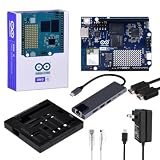
- High-performance single-board computer kit: Includes the official UNO Q with 2 GB of RAM and 16 GB of eMMC storage for demanding AI and embedded projects.
- Dual operating modes: Use the UNO Q as a standalone single-board computer with a monitor and keyboard, or connect it to a PC via USB-C for a familiar Arduino experience.
- Rugged aluminum case: The sturdy aluminum housing protects the board from dust, impacts, and static electricity while ensuring efficient heat dissipation.
- Comprehensive accessory package: Includes a USB-C hub with Ethernet, USB-C PD power supply, HDMI cable, Cat6 Ethernet patch cable, screw set, and a screwdriver.
- Versatile connectivity: The included USB-C hub with an Ethernet port significantly expands the UNO Q's connectivity options for professional applications.
A practical first-project path
- Choose standalone, PC-connected or network mode from the UNO Q setup information.
- Power the board and complete its initial configuration using the official getting-started project.
- Open App Lab on the board or host computer and create an Arduino App.
- Run a simple example such as Blink LED to validate power, firmware and the toolchain.
- Add sensors, motors or Modulinos, keeping timing-sensitive work in the MCU sketch and higher-level logic in Python/Linux.
- Only then try camera or AI examples, measuring memory use, temperature, power, model latency and Linux-to-MCU communication.
Exact screen labels, firmware versions and recovery commands can change, so follow the live documentation for the release you install.
Price and configuration choices
| Variant | U.S. price before July 6, 2026 | U.S. price from July 6, 2026 | Best suited to |
|---|---|---|---|
| 2GB RAM / 16GB eMMC | $44 | $59 | Basic Linux-plus-MCU projects, education, dashboards and initial AI experiments |
| 4GB RAM / 32GB eMMC | $59 | $79 | Larger applications, multiple services, containers and more demanding AI workflows |
Arduino attributed the increase to memory-component costs in its June 26, 2026 notice. These are announced U.S. prices, not a universal global price. The 4GB model is not automatically better value: for a sensor-and-servo project, the extra memory may add cost without solving a real problem.
What you can build
- Computer-vision prototypes with a camera and local inference.
- Sound recognition or keyword-spotting experiments.
- Smart-home controllers and local dashboards.
- Sensor gateways that filter or analyze data before sending it elsewhere.
- Robotics prototypes where Python handles planning and the MCU handles motors.
- Education projects that teach Linux, Python and physical computing together.
Edge Impulse can provide a workflow for collecting sensor data, training models and deploying embedded machine-learning applications; consult its official site for current account and pricing requirements. “AI-capable” does not mean every model runs locally, every camera works, or that optimization, thermal design and framework support are automatic.
UNO Q compared with other boards
| Choose | When it makes sense | Main trade-off |
|---|---|---|
| UNO Q | You need Linux/Python and a dedicated real-time MCU on one Arduino-format board. | More software and system complexity than a microcontroller; Linux and AI support require verification. |
| Classic Arduino | The project needs GPIO, analog input, PWM, simple sensors or low-power deterministic control. | No general-purpose Linux, camera stack, Python environment or comparable application compute. |
| Raspberry Pi 5 | You primarily want a general-purpose Linux computer, broad software and accessory support. | No integrated dedicated real-time MCU; add one when deterministic control is required. |
| NVIDIA Jetson Orin Nano Super | CUDA/TensorRT-oriented computer vision or GPU AI is the central requirement. | Much higher cost and generally greater power and software complexity. |
Raspberry Pi’s December 2025 announcement listed the 1GB Raspberry Pi 5 at $45, with 2GB at $55, 4GB at $70, 8GB at $95 and 16GB at $145; check current availability at the official announcement and product page. NVIDIA lists 67 TOPS for the Jetson Orin Nano Super Developer Kit and showed a $399 marketplace price when retrieved, with the listing marked out of stock; see NVIDIA’s overview and marketplace listing.
PC Slower Than It Used to Be?
A free scan shows the junk files, broken settings and background clutter dragging Windows down - then fixes them in one click.Free scan · Windows 10 & 11Outdated Drivers Are Slowing You Down
One free scan finds every outdated or missing driver and matches the right update for your exact hardware.Free scan · exact hardware matchRank #4

- Unlock your creativity with the versatile UNO R3 Board ATmega328P! Explore endless possibilities in electronics projects with its user-friendly Arduino development environment, extensive digital and analog I/O pins, and compatibility with various sensors and modules. Let your imagination soar!
- Experience the power of UNO R3 Board ATmega328P! This feature-packed development board boasts a high-performance ATmega328P microcontroller, 32KB of flash memory, and 2KB of SRAM. It's perfect for both beginners and advanced users seeking to build innovative applications in robotics, home automation, and more.
- Ignite your passion for electronics with the UNO R3 Board ATmega328P! Its open-source design allows for customization, while its 14 digital I/O pins and 6 analog input pins provide ample connectivity options. Get ready to bring your ideas to life and create interactive projects like never before.
- Elevate your DIY projects with the UNO R3 Board ATmega328P! This highly versatile development board offers seamless integration with the Arduino ecosystem, providing access to a vast library of code and resources. With its reliable performance and broad compatibility, you can easily prototype and realize your electronic dreams.
- Discover the endless potential of the UNO R3 Board ATmega328P! With its robust communication interfaces, including UART, SPI, and I2C, you can connect and communicate with a wide range of devices. Whether you're a hobbyist or a professional, this powerful development board is a must-have for creating innovative and interactive electronic systems.
Risks and unanswered questions
Transaction status
The acquisition announcement included conditions to closing. Treat the legal status as unresolved here unless a subsequent official filing or closing announcement is verified.
Open-source continuity and governance
Arduino says its independent brand, mission and multi-vendor support will continue. Readers should still watch licensing, documentation practices, board choices and community governance after the transaction.
Qualcomm-specific dependency
Drivers, AI runtimes, firmware, cloud services and development tools could make some workflows more dependent on Qualcomm technology. That may be beneficial for integration but can increase switching costs.
Software maturity and lifecycle
Before using UNO Q in a product, check App Lab releases, Debian updates, camera and accelerator support, Linux-to-MCU communication, security maintenance and the support lifetime of AI components. Hardware specifications alone do not establish stability or production readiness.
Total project cost
Budget for a suitable power supply, display and keyboard if using standalone mode, cameras or sensors, shield verification, enclosure or cooling, backups and the time required to learn Linux and App Lab. The board price is only one part of the system.
Verdict
UNO Q is compelling when one project genuinely needs both a Linux application environment and deterministic hardware control. It is not a faster version of the traditional ATmega-based UNO, and it is overkill for a basic LED, sensor or servo project. Compared with a Raspberry Pi, its defining advantage is the integrated STM32U585 real-time side; compared with a Jetson, its appeal is lower-cost Arduino-oriented prototyping rather than maximum GPU AI performance.
Qualcomm’s agreement to acquire Arduino could give edge-AI developers a more accessible path into Dragonwing hardware, but the outcome will depend on App Lab, drivers, documentation, open-source continuity and long-term support as much as on the QRB2210’s specification.
Quick Recap
Product prices and availability are accurate as of the date/time indicated and are subject to change. Any price and availability information displayed on Amazon at the time of purchase will apply.




