What’s actually slowing this PC down?
Pick the symptom - the matching free tool is one click away.
Microsoft Edge accounted for 11.14% of worldwide desktop browser page views in July 2026, its highest share in the May–July figures available here. Google Chrome remained far ahead at 70.67%, according to StatCounter’s worldwide desktop data. Edge is strengthening its place as the leading desktop alternative, but these numbers do not show it nearing Chrome.
July’s desktop figures put Edge in second place
StatCounter’s July 2026 worldwide desktop estimates rank six browsers as follows. The percentages represent each browser’s share of observed desktop page views, not its share of people or installations.
| Browser | July 2026 share | Rank |
|---|---|---|
| Google Chrome | 70.67% | 1 |
| Microsoft Edge | 11.14% | 2 |
| Mozilla Firefox | 6.43% | 3 |
| Apple Safari | 5.66% | 4 |
| Opera | 2.00% | 5 |
| Samsung Internet | 1.60% | 6 |
Chrome led Edge by 59.53 percentage points in July and had about 6.3 times Edge’s share. Edge’s 11.14% amounted to roughly 15.8% of Chrome’s share—not 15.8% of the overall desktop market.
What “record” means in this report
Edge rose from 9.94% in May to 10.45% in June and 11.14% in July 2026. That is a 1.20-percentage-point gain from May to July, or about 12.1% relative to May’s figure. From June to July alone, the gain was 0.69 percentage points. The monthly values are from StatCounter’s desktop series.
#1 Best Overall

- Ultra slim and lightweight. Battery life: Up to 6 months
- Snaps flat and slips easily into a pocket or bag
- Innovative full scroll plane lets you scroll both vertically. Wireless range: 32.8 feet (10 meters) in open area, and 16.4 feet (5 meters) in office environment
- Dimensions: 5.17 x 2.17 x 0.56 inches. Weight: 2.91 ounces (including batteries). Battery: 2 AAA alkaline batteries (included). Battery life Up to 6 months
- Compatibility: Microsoft Windows 10 / 8.1 / 8. Must be Bluetooth 4.0 enabled. Wireless frequency 2.4 GHz frequency range. PC must meet these requirements to download: Microsoft Windows 11 Home/Pro / 10 / 8.1 / 8, 150MB available hard disk space.
Those figures support calling July a new high across the May–July 2026 values cited here. They do not, by themselves, establish an all-time record across the full historical series. “Record” also needs its scope: this is Microsoft Edge, worldwide desktop page views, in July 2026—not every device, every country, or the number of unique people using Edge.
Chrome’s share fell from 72.24% in June to 70.67% in July. That is a change in its portion of observed page views, not proof that Chrome lost a corresponding number of users or that those users switched to Edge. A single monthly movement can reflect changes in browsing frequency, geography, traffic mix, or measurement effects.
Rank #2

- Compatibility :Windows 10 / 8.1 / 8;Host must support Bluetooth 4.0 or higher.(Note: many Apple and Windows 7 devices do not support Bluetooth 4.0.)
- Ultra-slim and lightweight;Design:Bendable tail
- Snaps flat and slips easily into a pocket or Bag
- Optimized design for the most natural interaction
- Innovative full scroll plane lets you scroll both vertically and horizontally. Wireless frequency:2.4GHz frequency range
How StatCounter’s share differs from a user count
StatCounter describes Global Stats as drawing on more than 3 billion page views per month across more than 1 million websites. It identifies the browser associated with page views, removes bot activity, and makes a small adjustment for Chrome prerendering. Its methodology FAQ and factsheet explain how it produces usage statistics.
A page-view share is useful for estimating how browsers are used across the sampled web, but it is not a census of browser owners. One person can use several browsers, and a person who visits websites frequently contributes more page views than someone who browses less often. The figures also depend on the sites and traffic included in the measurement. They should not be translated into claims such as “11.14% of people use Edge.”
Do these 3 things before closing this tab:
1Fix the driver behind crashes, sound loss and screen glitches2Repair Windows errors before they cause bigger problems3Scan for outdated or missing drivers - takes under a minuteRank #3

- [Ultra-Slim and Lightweight] – Designed for portability, it easily fits into your bag or pocket without adding bulk.
- [Snaps Flat for Easy Travel] – Folds flat to slip effortlessly into your pocket or laptop sleeve — perfect for on-the-go use.
- [Natural, Intuitive Design] – Ergonomically shaped for comfort and optimized for smooth, natural interaction.
- [Scroll in Every Direction] – Innovative full scroll plane supports both vertical and horizontal scrolling for easier navigation.
- [Precise and Responsive] – Enjoy accurate tracking with optimized left and right click functionality for everyday use.
Why the result does not make Edge a near-term Chrome challenger
The clearest conclusion is that Edge is consolidating second place on desktop while Chrome retains an enormous lead. The rise over these three months is notable, but it is too short a window to establish a durable reversal. Extending the May-to-July increase in a straight line would not be a sound forecast: browser use does not necessarily change at a constant rate, and the data does not show which users changed browsers.
Edge and Chrome compete for users and distribution, but both use Chromium as their underlying browser foundation. That shared base helps maintain compatibility with many websites and Chrome-compatible extensions; Microsoft also documents Edge-specific compatibility changes in its web platform guidance. Edge gaining share therefore does not necessarily mean a comparable rise in use of a browser engine independent of Chromium.
Rank #4

- Comfortable ergonomic design, with soft easy-to-grip thumb rest, promotes natural hand and wrist position.
- Teflon base with precise tracking sensor glides smoothly over a variety of surfaces[4].
- Machined aluminum scroll wheel for precise navigation.
- Light, durable design with seamless finishes, in premium materials.
- 3 customizable buttons to add app-specific functions to be more productive[2].
Desktop figures do not describe every device or market
Browser rankings change with geography and device category. For example, StatCounter’s June 2026 U.S. all-platform extract put Chrome at 52.26%, Firefox at 8.78%, and Edge at 7.54%. Its U.S. desktop-and-tablet extract for the same month showed Chrome at 58.91%, Edge at 11.90%, Firefox at 13.53%, and Brave at 2.51%. These are different scopes and should not be combined with the July worldwide desktop figures as if they were a single ranking.
Sources: StatCounter U.S. all-platform data and StatCounter U.S. desktop-and-tablet data. Edge’s desktop position does not establish comparable usage on phones, where defaults, operating-system rules, and distribution differ.
Best Value
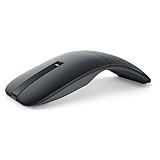
- SLIM AND LIGHT WEIGHT: Weighs only 56.9 grams so you can take the mouse wherever you go.
- SMOOTH TURNING, TWISTABLE DESIGN: Simply twist to turn off, stow, and then go.
- SEAMLESS CONNECTIVITY: Connect up to 3 devices to the mouse via Bluetooth 5.0 and easily switch between devices with the click of a button. Securely pair the mouse with your device with just one click with Dell Pair.
- ENHANCED SENSITIVITY AND PRECISION: An adjustable 4000 DPI (Dots per Inch) mouse sensitivity for a smoother, more precise control of the mouse pointer. Responsive and fast touch scrolling and quiet click buttons.
What may be behind Edge’s gains—and Chrome’s lead
The monthly shares show what happened, not why. Several market factors could help explain the browsers’ positions, but the figures do not isolate their effects or prove that users moved directly from one browser to another.
Why Edge may be gaining desktop use
- Edge is preinstalled and prominently integrated into Windows, and Microsoft promotes it in some setup and service flows.
- People who use Microsoft 365 or Microsoft accounts may encounter Edge through organizational recommendations, administration, or synchronization.
- Its Chromium base reduces compatibility concerns for many websites and extensions.
- Organizations may deploy or encourage Edge as part of their Microsoft environment. Microsoft’s Microsoft 365 browser-usage report helps administrators see how users access Microsoft 365 services through Edge; it is an enterprise reporting tool, not a measure of worldwide consumer share.
Why Chrome remains far ahead
Chrome benefits from wide familiarity, Google account and Android integration, cross-device synchronization, a large extension ecosystem, and broad compatibility expectations. Businesses also have administration and reporting options: Google documents Chrome enterprise monitoring for Windows organizations in its Chrome Enterprise reporting guidance. These are plausible structural advantages, not causes established by the July figures.
Which browser fits your needs?
Market share is not a quality score. A dominant browser is not automatically faster, safer, or better for every person; the practical choice depends on your devices, accounts, workplace, and preferred controls.
Quick Recap
- Consider Edge if you mainly use Windows, rely on Microsoft 365 or OneDrive, want Chromium compatibility with Microsoft account syncing, or your employer supports and manages it. A separate Edge profile can also keep work browsing distinct.
- Consider Chrome if your accounts, extensions, Android devices, or workplace workflows are already centered on Google and Chrome.
- Consider Firefox if you want a non-Chromium browser engine, more browser-engine diversity, or Mozilla’s privacy and customization approach.
- Consider Brave or another Chromium alternative if you want Chromium compatibility with built-in privacy or ad-blocking features. Aggressive blocking can cause some sites to behave unexpectedly, so you may need site exceptions.
Product prices and availability are accurate as of the date/time indicated and are subject to change. Any price and availability information displayed on Amazon at the time of purchase will apply.
Quick wins for a faster PC:
Clear out junk files and repair common Windows errorsFree Scan →Fix the driver behind crashes, sound loss and screen glitchesFind Drivers →



