What’s actually slowing this PC down?
Pick the symptom - the matching free tool is one click away.
Yes, if you already own one—or can buy a healthy, inexpensive unit for Linux, writing, or hobby use. No, in most cases, if you need a dependable Windows laptop for work, school, or everyday internet use. In 2026, the X220’s classic keyboard and repairable design still have appeal, but its aging components, low-resolution screen, and lack of an officially supported Windows 11 path can turn a cheap listing into a costly project.
Why the X220 still attracts buyers
The ThinkPad X220 is a compact 12.5-inch business laptop from the classic-keyboard era. Its seven-row keyboard, dedicated navigation keys, TrackPoint and physical mouse buttons give it a character many newer laptops lack. It also has a sturdy business-oriented chassis, removable battery, Ethernet, VGA, USB, audio, card-reader and docking support.

Memory and storage are replaceable rather than soldered: the X220 has two memory slots and a standard 2.5-inch SATA drive bay. That makes routine upgrades and repairs more approachable than on many thin modern laptops. Lenovo still maintains an X220 support page and downloads and software resources; that legacy support presence is not the same as current full-platform support.
Serviceability is not the same as value. An accessible laptop can still be a poor buy if its battery, display, hinges and motherboard all need attention.
Windows Errors? Fix Them Before They Spread
Repair common Windows errors and clear accumulated junk for a smoother, more stable PC - no reinstall needed.Free scan · no reinstallCrashes, No Sound, or Screen Glitches?
Random freezes, missing sound and display glitches usually trace back to one bad driver. Find and replace yours safely.Free scan · under a minute#1 Best Overall

- 【65W Power Output】 Input: 100-240V ~1.5A, 50/60Hz; Output: 20V 3.25A, 65W. Connector size: 7.9mm x 5.5mm with center pin. Please verify your original adapter and port before purchase.
- 【Strict Compatibility with Round Tip Models】 Designed for Lenovo laptops using the 7.9mm round tip, including ThinkPad T420, T430, T520, T530, X220, X230, X230t, L420, L430, E430, E530, SL410, SL510, and S230u.
- 【Premium Safety Features】 Built-in protection against over-voltage (OV), over-current (OC), short-circuit (SC), and internal overheating (IO). Ensures stable charging and device safety.
- 【Certified Quality】 Manufactured with high-quality materials and certified by CE, FCC, and RoHS. Designed to meet international safety and environmental standards.
- 【Package Includes】 1× VUOHOEG 65W AC Adapter, 1× Power Cord. Compatible with part numbers like 42T4419, 92P1157, PA-1650-16. Reliable support team available for assistance.
Which X220 are you looking at?
“X220” describes a family, not one uniform specification. Listings may have Core i3, i5 or i7 processors; TN or IPS screens; different RAM and wireless cards; and four-, six- or nine-cell batteries. The X220i is a related lower-tier variant, while the X220 Tablet is a substantially different convertible model. The ThinkPad X220 overview provides background on the model family.
For day-to-day use, prioritize the condition and screen over the processor badge. The ordinary screen is 12.5 inches at 1366×768. An IPS panel offers better viewing angles than a TN panel, but neither changes the limited resolution: expect more scrolling, little room for large spreadsheets and constrained multitasking. Older screens may also have uneven backlights, dead pixels, pressure marks or yellowing.
Rank #2
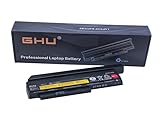
- Premium 44++ 9 cell Battery: Our Lenovo X 230 product is equipped with a premium 44++ 9 cell battery, which offers long-lasting power for your Lenovo Thinkpad X230 laptop. With this battery, your X230 Lenovo laptop will have a reliable and efficient power source that keeps it operational for longer periods. Compatible with 0A36306 0A36283 42T4875 42T4861 42T4873 42T4867 42T4902 42Y494042T4863 42Y4864 42t4862 42t4866 42t4876 42y4868 42y4940 42y4874 45n1019 45n1022 45n1023 45n1025.
- UL Tested and Verified: This Lenovo battery X230 has passed UL testing, ensuring that it meets the highest standards of safety and performance. It's a perfect choice for your Thinkpad X220 battery replacement, providing you with a dependable power source for your laptop. Compatible With Lenovo 42T4942 Laptop Battery,Lenovo 42T4867 Laptop Battery,Lenovo 0A36281 Laptop Battery,Lenovo 42T4940 Laptop Battery,Lenovo 42Y4864 Laptop Battery.
- Fast Charging Feature: Our Lenovo X230 battery 9 cell offers a fast charging feature, reducing the time you spend waiting for your Lenovo X220 laptop to charge. This battery Lenovo X230 is perfect for those who use their laptops extensively and require a fast and efficient charging solution.
- Long Battery Life: The Lenovo X230 9 cell battery lasts for more than 5 hours, making it ideal for long work sessions on your X230 laptop. This Lenovo battery X220 provides you with the convenience of extended laptop use without the need for frequent charging.
- Easy to Install and Free Returns: Our battery for Lenovo Thinkpad X230 is easy to install, providing an immediate solution for your power needs. With our free return policy, we ensure that you're completely satisfied with your purchase of this high-quality Lenovo X230 laptop battery.
What it can—and cannot—handle
With an SSD and at least 8 GB of RAM, a sound X220 can still serve as a light-duty computer. It is most at home with plain-text writing, email in moderation, office documents, SSH and terminal work, basic programming, music, and lightweight applications. Some 720p and selected 1080p video playback may work, depending on the browser, codec and hardware acceleration.
It is a poor fit for heavy browser sessions with many tabs, video editing, 3D work, modern games, large RAW photo libraries, local AI workloads, heavy virtual machines or sustained builds of large projects. Frequent video calls are also a gamble: test the webcam, microphone and browser load rather than assuming they will meet current expectations. A faster storage drive cannot overcome the old CPU, weak integrated graphics or limited display.
Rank #3

- Performance to Power your Potential - The 14" Lenovo ThinkPad E14 Gen 7 laptop is ideal for life on the go. Fueled by AMD Ryzen 7 250 3.30GHz processor (upto 5.1GHz), it boosts multitasking while advanced AI dynamically optimizes workloads to elevate productivity.
- Effortless Mobility, Unwavering Strength - Lightweight yet compact, it ensures portability for uninterrupted work. Remarkably thin and light for true mobility, the E14 Gen 7 powerhouse combines premium performance with a durable design. Its components incorporate recycled plastic in its build to reduce environmental impact. Moreover, it’s MIL-STD-810H tested to withstand extreme real-life circumstances, offering unwavering reliability for any work environment.
- Clear and Comfortable Viewing All Day - Stunning graphics tackle complex projects and creative tasks with ease. 14.0" IPS WUXGA (1920x1200) 60Hz Antiglare display with 300nits brightness.
- Fast Multitasking and Expanded Connectivity - 16GB DDR5 SODIMM RAM, 512GB 2242 PCIe NVMe SSD, 802.11ax Wi-Fi, Bluetooth 5.3, RJ-45, 5M RGB Webcam, Fingerprint Reader, Backlit Standard Keyboard, HDMI, Thunderbolt 4, USB 3.2 Type-C, Headphone/Microphone Combo Jack.
- Professional-Grade Operating System – Windows 11 Pro 64-bit offers enterprise-grade security and productivity tools, enhanced by AI-powered Copilot for smarter task management. Perfect for professionals, educators, creators, developers, small business users, and anyone needing a reliable system for streaming, online classes, and virtual meetings.
Windows support changes the buying decision
Windows 10 reached end of support on October 14, 2025. In 2026, a normally configured X220 running Windows 10 is therefore outside standard support. Microsoft’s Windows 11 requirements include a compatible processor and modern security and firmware prerequisites; Lenovo’s Windows 11 reference guide summarizes the platform expectations. The X220’s second-generation Intel processors are outside supported CPU generations, and it lacks a normal modern TPM 2.0 and Secure Boot/UEFI configuration.
- Windows 10: Familiar, but no longer a good connected primary-machine recommendation after its support ended.
- Unofficial Windows 11: Enthusiasts may be able to bypass installer checks, but getting it to boot is not official compatibility or a guarantee of normal support and security assurances.
- Windows 7 or earlier: Not appropriate for routine internet use.
- Windows-only work or school: Choose a newer supported machine instead.
Linux is the most convincing modern use
A maintained Linux distribution avoids the Windows 11 hardware-eligibility problem and can pair the X220 with a lighter desktop environment. Depending on preference and skill, consider a current long-term-support Ubuntu-based distribution, Linux Mint with a lighter desktop, Fedora with a lightweight desktop, or Debian with Xfce or LXQt. No distribution is guaranteed to handle every unit perfectly.
Rank #4
Before relying on an installation, test Wi-Fi, suspend and resume, brightness keys, audio, webcam, microphone, Bluetooth, external display output, battery reporting, TrackPoint and touchpad behavior, and browser video playback. A modest desktop can help responsiveness; it cannot repair a dim screen, worn battery, poor webcam or old processor. Linux also needs ordinary security care: keep the distribution and browser supported and updated, use a firewall where appropriate, and back up the SSD before experimenting.
Upgrade in order of practical value
- Replace a mechanical hard drive with a SATA SSD. This is usually the most noticeable upgrade: booting, launching apps and general responsiveness improve, with less noise and better shock tolerance. It does not make the CPU faster.
- Bring memory to at least 8 GB. Consider 16 GB if it is inexpensive, but verify the memory type, module compatibility and capacity supported by the specific machine before ordering.
- Assess the battery honestly. A replacement can restore portability, but “new” third-party batteries vary in quality and may not deliver original runtime. Check the manufacture date, seller reputation, return policy and reported full-charge capacity; remove a swollen battery from service immediately.
- Clean and maintain cooling. Inspect the fan and cooling path for dust and listen for excessive noise. Aged thermal compound may merit attention if temperatures or fan behavior are poor.
- Consider a screen replacement only when the economics work. A compatible IPS panel can improve viewing angles, especially when replacing a damaged screen, but a panel swap is worthwhile mainly if you are comfortable with the work and the total remains below the cost of a newer used ThinkPad. Higher-resolution modifications may require additional hardware or firmware work.
- Improve Wi-Fi only after checking compatibility. Some original cards are limited by older standards. The X220 may reject an incompatible replacement with a BIOS whitelist error. Safer options include a compatible whitelisted card or USB adapter. Firmware modification is an enthusiast procedure with a risk of rendering the laptop unusable; do not attempt it without a verified backup and recovery plan.
Age-related faults to check
Surviving units vary considerably. Likely trouble spots include depleted or swollen batteries, failing storage, noisy or clogged fans, dried thermal compound, cracked hinges, a loose charging jack, worn keys or TrackPoint buttons, LCD cable or panel faults, a failed CMOS battery, weak speakers, missing feet, stripped case threads, liquid corrosion and motherboard faults. Parts may be available, but a repair can cost more than the laptop.
Do these 3 things before closing this tab:
1Clear out junk files and repair common Windows errors2Fix the driver behind crashes, sound loss and screen glitches3Repair Windows errors before they cause bigger problemsBest Value

- Windows 11 Professional | WiFi 6E 802.11AX (2 x 2) with Bluetooth 5.3 | 65W AC Adapter | Standard Keyboard with Trackpoint
- 2 x USB-A 3.2 Gen 1 | USB-C 3.2 Gen 2 | USB-C 3.2 Gen 1 | HDMI 2.1 supporting resolution up to 4K@60Hz | RJ45 Headphone / mic combo | MicroSD card reader
- AMD Ryzen 5 7530U Processor (2.00 GHz, up to 4.50 GHz Max Boost, 6 Cores, 12 Threads, 16 MB Cache) | 256GB PCIe SSD | 16GB DDR4 3200Mhz RAM
- Lenovo ThinkPad L14 Gen 4 with Ryzen PRO 7530U for Business and Gaming! | Amazon Renewed, Certified Refurbished
Use this checklist before buying
Confirm the exact configuration
- Is it an X220, X220i or X220 Tablet?
- What are the exact CPU, RAM amount, storage type and capacity, and wireless-card model?
- Is the screen IPS or TN, and what is its condition?
- What is the battery’s cell count and reported health? Is a suitable charger included?
- Is the BIOS free of a supervisor password, and is Computrace/Absolute status disclosed if relevant?
Inspect the physical unit and test its functions
- Check hinges, screen blemishes, keyboard keys, TrackPoint buttons and touchpad.
- Test USB, VGA, Ethernet, audio, SD-card reader, webcam, microphone, charging and dock connector.
- Check the battery latch and look for swelling, liquid damage or case damage.
- Confirm that the BIOS opens without an unknown password and inspect storage health if available.
- If Linux is installed, test Wi-Fi and suspend/resume. If Windows is included, verify legitimate activation rather than trusting a seller’s unsupported “Windows 11 compatible” claim.
Calculate the real cost, then compare alternatives
Use purchase price + SSD + RAM + battery + charger + likely repairs as the X220’s real cost, before counting your labor or shipping. A hypothetical $60 unit that needs a $35 SSD, $45 battery, $20 charger and $30 of RAM becomes a $190 project. Used prices vary by geography, screen, condition and seller, so there is no single fair price to apply to every listing.
Quick Recap
| Option | What changes relative to the X220 | Best fit |
|---|---|---|
| X220 | Classic seven-row keyboard and highly serviceable design; limited 1366×768 display, old platform and no official Windows 11 path. | Linux, writing, repair or retro-computing when the unit is inexpensive and sound. |
| X230 | Newer third-generation Intel platform while retaining a compact, repairable classic-keyboard character; keyboard feel and condition still matter. | Buyers who want a later classic ThinkPad and find one in better condition or at a sensible price. |
| X260 | A newer 12.5-inch platform with DDR4 memory and newer platform features, as reflected in Lenovo’s X260 specifications; it is still used hardware. | Those wanting a more recent compact machine, subject to exact configuration and condition. |
| T480 | Lenovo’s T480 platform specifications list eighth-generation processor options, up to 32 GB RAM, USB-C/Thunderbolt 3 on applicable configurations, Ethernet, HDMI and FHD display choices. | A stronger used-market candidate for Windows-oriented buyers who need modern browser and multitasking performance. Check the exact processor and Microsoft eligibility before buying. |
| Current or certified-refurbished Lenovo | Newer security hardware, displays, connectivity and warranty options. Lenovo’s Certified Refurbished program says PCs are quality-tested, have at least 80% battery performance and a standard one-year warranty; availability varies by market. | Buyers prioritizing current Windows support, video calls, USB-C, warranty or lower purchase risk. |
Who should buy, keep or pass?
- Linux enthusiast or retro-computing hobbyist: Buy or keep one if the machine is inexpensive, physically sound and the project itself is part of the appeal.
- Writer who values the classic keyboard: It can make sense with an SSD, at least 8 GB RAM and a screen you can tolerate, preferably IPS.
- Windows 11 primary user: Pass; the X220 is not an officially supported Windows 11 platform.
- Student needing dependable video calls and Office: Usually pass; the display, webcam, performance and age-related uncertainty are poor trade-offs.
- Buyer who needs long battery life: Buy only with a verified healthy battery and realistic expectations.
- Buyer whose upgrade total approaches a newer T480: Favor the newer machine if its exact condition and processor meet your needs.
Product prices and availability are accurate as of the date/time indicated and are subject to change. Any price and availability information displayed on Amazon at the time of purchase will apply.




