On an iPhone, open Wallet, tap the card, tap Card Number, and authenticate with Face ID, Touch ID, or your passcode. What you see depends on the card: Apple Wallet may show only the last four digits of an Apple Pay device account number, while Apple Card, Apple Cash, and some issuer-supported cards can provide complete virtual card details.
Those numbers are not always interchangeable. If a website requires the number printed on your physical card, the number shown in Apple Pay may not work.
View a regular debit or credit card on iPhone
- Open the Wallet app.
- Tap the debit or credit card.
- Tap Card Number.
- Authenticate with Face ID, Touch ID, or your iPhone passcode.
Depending on your card issuer and how the card was added, Wallet may display one of the following:
- The last four digits of the Apple Pay device account number.
- The physical card number, if the card was added for AutoFill.
- A separate virtual card number, if your issuer supports that feature.
Apple’s iPhone instructions do not promise that every card will reveal its complete underlying number. See Apple’s current iPhone Wallet guidance for the device-specific interface.
Recommended Free Tools
#1 Best Overall

- 📱 Global Cloud Positioning – Works with both Google's Find Hub and Apple Find My (Not for GPS & Huawei)
- 📢 Loud Alert Sound – Built-in speaker with up to 120dB for quick locating
- 🔋 Far Superior Battery Life – Up to 5-10 years battery life on Android and ios Device
- 💧 IP68 Waterproof – It provides protection against rainwaterand splashes
- 🔊 Visualize Distance – Visualize distance using UWB technology within Bluetooth range, allowing you to immediately see the distance
What number does Apple Pay show?
For most ordinary debit and credit cards, the number most commonly visible in Wallet is the last four digits of the Apple Pay device account number. This is a device-specific replacement for your physical card number. It is associated with Apple Pay on that particular iPhone, Apple Watch, or other device—not necessarily with the number printed on your card.
Apple Pay uses the device account number and transaction-specific security data rather than sending your original card number to the merchant. Apple says the device account number is created by the card issuer, stored in the device’s Secure Element, not backed up to iCloud, and not stored on Apple’s servers. Read Apple’s Apple Pay security and privacy explanation for more detail.
That is why the last four digits in Wallet can differ from the last four digits on your physical card. If a merchant asks for the last four digits used in an Apple Pay transaction, give the digits shown in the card’s details—not automatically the digits printed on the physical card.
Find your Apple Card number
Apple Card has its own virtual card-number workflow. On an iPhone:
Rank #2

- APPLE FIND MY OR GOOGLE FIND HUB — EASY SETUP: MFi-certified and Works with Android. Add T2 through "Other Supported Item" in Find My or follow the pairing prompt for Find Hub. No UQO app or subscription. Locate through the selected encrypted network
- CREDIT-CARD FOOTPRINT — 0.11", 0.48 OZ: At 85.6 × 54 × 2.85 mm and 13.6 g, T2 fits most standard wallets, card holders and passport sleeves while helping reduce the localized bulge of round tags. A top hole supports a lanyard or keyring
- QI WIRELESS RECHARGING — 2–3 MONTHS PER CHARGE: Align T2's rear charging area with a compatible Qi pad. About 1 hour of charging provides about 2–3 months of use, depending on usage. Orange means charging; green means full. No routine battery swaps
- 85 dB+ SOUND, SEPARATION ALERTS & FIND NEARBY: Play T2's 85dB+ ringer in Find My or Find Hub when nearby. Enable separation notifications in the selected app. Find Hub can show Bluetooth proximity as you move closer
- LOST MODE, SHARING & A THOUGHTFUL GIFT: Use Lost Mode in Find My or Mark as Lost in Find Hub to add contact details and help recover items. Share T2 with trusted people. Its wallet-friendly design makes a practical gift for travelers and professionals
- Open Wallet.
- Tap Apple Card.
- Tap Card Number.
- Authenticate.
You can view the Apple Card virtual card number, expiration date, and security code. These are the details generally needed when an online merchant does not offer Apple Pay.
To see the last four digits of the titanium Apple Card number and the last four digits of the Apple Pay card number, tap Additional Card Numbers from the same card-information screen.
Apple Card is available only to qualifying applicants in the United States. If the Card Number button is missing, Apple advises updating the device to the latest available operating-system version. Apple’s Apple Card support page lists the current steps and requirements.
Find your Apple Cash virtual card number
Apple Cash is separate from a standard Apple Pay debit or credit card. If the virtual card-number feature is available for your account, use this path on iPhone:
Free tools Windows power users keep installed
One-click scans. No signup required.
Rank #3
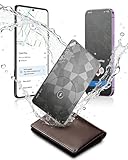
- Dual System Compatibility & Easy Steps: Wallet tracker natively works with both Google "Find Hub" and Apple"Find My" networks no extra apps needed, just quick, direct pairing. Simple step-by-step use banishes the worry of lost items. (Note: Only link to one device at a time.)
- Ultra-High Decibel Ring: Frantically searching for your lost wallet or misplaced items? Tap the "Play Sound" button in the app, and if your wallet tracking card is within Bluetooth range, this card tracker for wallet emits a 120+ dB ringtone.
- Wireless Charging & 6-12 Year Long Battery Life: Tracking card features convenient wireless charging. It delivers 5 year long standby time, ensuring non stop reliability as your go-to gps wallet tracker or smart card wallet tracker.
- 0.09in Ultra-Slim, IP68 Waterproof and Durable: Hate bulky trackers? Air tag card is just 0.09in thin, slipping into wallets or cardholders without bulking them up.IP68 rating means it handles coffee spills, rain and daily bumps.
- Left Behind & Lost Item Alerts: Step out the door or wander the street with peace of mind this Find my Wallet card sends alert system if you accidentally leave your wallet behind. You can retrieve your wallet tracker card before it gone for good.
- Open Wallet.
- Tap Apple Cash.
- Tap the More button.
- Tap Card Number.
- Authenticate with Face ID, Touch ID, or your passcode.
The screen can show the Apple Cash virtual card number, expiration date, and security code. Apple says this virtual number can be used for online purchases wherever Visa is accepted, subject to the feature’s account, device, region, and eligibility requirements. See Apple’s Apple Cash virtual card instructions.
Do not confuse this with Apple Cash’s general account and card-detail screens, which may not present conventional card credentials in the same way. Apple documents those distinctions in its Apple Cash support information.
View card details on Apple Watch
- Open the Wallet app on your Apple Watch.
- Tap the card.
- Tap Card Details.
- Enter your Apple Watch passcode if requested.
For ordinary Apple Pay cards, Apple Watch generally shows the last four digits of that watch’s device account number. It may not reveal the physical card number or a full number. Apple’s Apple Watch guide explains the card-details screen.
View card information on iPad
Apple Card users can use this documented path:
- Open Settings.
- Tap Wallet & Apple Pay.
- Tap Apple Card.
- Tap the Info tab.
- Tap Card Information.
- Authenticate when prompted.
Tap Additional Card Numbers to see the relevant last-four-digit information for the titanium card and Apple Pay card number. For other debit and credit cards, the details available on iPad depend on the issuer and the card’s integration. Apple does not guarantee that every iPad card will show a complete number.
Do these 3 things before closing this tab:
1Fix the driver behind crashes, sound loss and screen glitches2Repair Windows errors before they cause bigger problems3Scan for outdated or missing drivers - takes under a minuteRank #4

- Always worried about losing valuables while traveling or commuting? This wallet tracker card helps keep your wallet, passport, luggage, and keys trackable at airports, road trips, hotels, and everyday commutes.
- Need a tracker that works with both iPhone and Android? This tracking card for wallet is Apple MFi Certified and works seamlessly with Apple Find My and Google Find Hub for reliable cross-device tracking.
- Tired of bulky trackers stretching your wallet or card holder? This ultra-thin tracker card uses premium cold-pressed craftsmanship and measures only 0.05 inches thin for comfortable everyday carry.
- Can’t find your wallet in crowded or noisy places? This find my wallet card features a powerful 120dB alarm that helps quickly locate misplaced items in hotels, restaurants, offices, parking lots, or public spaces.
- Need stable tracking in large public spaces or busy travel environments? This card tracker for wallet delivers reliable long-range Bluetooth connectivity for airports, shopping malls, offices, hotels, and parking garages.
View Apple Pay cards on Mac
On a Mac with Touch ID, open Apple menu → System Settings → Wallet & Apple Pay. The card information available depends on the card and issuer.
A Mac without Touch ID can authorize an Apple Pay purchase with a compatible iPhone or Apple Watch, but that does not mean the Mac can reveal the full underlying card number. Apple’s Apple Pay device and setup guidance covers supported devices and authentication.
Independent reader supportYour contribution helps us test, update, and keep practical guides available for everyone.Why can’t I see the full card number?
Seeing only four digits is usually expected, not an error. Common reasons include:
- Tokenization: Apple Pay is designed to use a device account number instead of exposing the original card number to merchants.
- Issuer limitations: Your bank may not provide a full physical or virtual number through Wallet.
- Card type: Ordinary cards, Apple Card, and Apple Cash have different information screens.
- AutoFill status: A physical number may be available only when the card was added for AutoFill, not merely provisioned for Apple Pay.
- Software or device support: An outdated operating system or unsupported device may omit newer card-information features.
- Wrong screen: You may need Card Details or Additional Card Numbers instead of Card Number.
Apple Pay requires a compatible device, a supported card from a participating issuer, an Apple Account, and device authentication. Availability also varies by country and region.
Quick wins for a faster PC:
Clear out junk files and repair common Windows errorsFree Scan →Fix the driver behind crashes, sound loss and screen glitchesFind Drivers →Repair Windows errors before they cause bigger problemsFix Now →Best Value

- 【AIR TAG WALLET TRACKER – MULTIPLE PACK OPTIONS】Looking for an air tag or wallet tracker card for your everyday essentials? Ultrbeka offers 1, 2, 3, 4, 5 and 6 Pack options for tracking wallets, purses, bags, passports, luggage and more. 1/2/3 Pack includes Tracker Card(s) only; no wireless charger included. 4/5/6 Pack includes the corresp
- 【ULTRA-THIN CARD DESIGN – FITS YOUR WALLET】This slim air tag-style wallet tracker features a convenient card-shaped design that slides easily into wallets, card holders and passport sleeves without unnecessary bulk. It also fits purses, backpacks, briefcases and luggage, making it a practical Bluetooth item finder for everyday carry and travel.
- 【APPLE MFi CERTIFIED & WORKS WITH APPLE FIND MY】Apple MFi Certified and designed to work with the Apple Find My app. Add your Ultrbeka tracker to Find My to help locate your belongings through the Find My network. View the item's location on a map or play a sound when the tracker is nearby. Compatible with iPhone, iPad and Mac. iOS devices only.
- 【RECHARGEABLE AIR TAG ALTERNATIVE FOR REPEATED USE】Unlike disposable battery-powered trackers, this rechargeable tracker card can be powered up again and again using Qi wireless charging. Simply place the tracker on a compatible Qi wireless charger when charging is needed. 4/5/6 Pack includes 1 wireless charger per package; 1/2/3 Pack does not include a wireless charger.
- 【SEPARATION ALERTS & EASY ITEM FINDING】Use this air tag-style Bluetooth tracker to help keep track of important belongings and reduce the chance of leaving them behind. When your tracked item is nearby, use the Apple Find My app to play a sound and help locate it. Required permissions and settings must be enabled on your Apple device for separation alerts and location features.
What to do when the number is missing or rejected
If Wallet does not show a usable number
Use the appropriate fallback:
- Check the physical card.
- Open the bank’s official app or website and look for card details or a virtual-card feature.
- Contact the card issuer using the number on its official website, statement, or physical card.
Do not assume removing and re-adding a replacement card will fix the issue. A replaced card may have a new number, and the issuer may need to update or re-provision its Apple Pay credentials.
If an online checkout rejects the number
A regular card-entry form may require the underlying physical card number, expiration date, and security code. The last four digits of an Apple Pay device account number are not enough, and a device account number is not necessarily accepted as a substitute for the physical card number.
- For Apple Card, use the Apple Card virtual number and its expiration date and security code.
- For Apple Cash, use the Apple Cash virtual credentials when the purchase and feature are supported.
- For another bank card, use the physical card or the number supplied by your bank’s official virtual-card service.
- Use Apple Pay at checkout when the merchant offers it; do not manually enter Apple Pay’s token credentials unless the issuer specifically instructs you to do so.
If the device is lost or unavailable
Apple cannot use iCloud to reveal the device account number. Apple says it is stored in the device’s Secure Element and is not backed up to iCloud. Use the physical card, your bank’s app or website, or the issuer’s customer-service channel instead.
Security precautions
- Reveal card credentials only inside Apple Wallet or the official app from your card issuer.
- Never post or send screenshots showing a full card number, expiration date, or security code.
- Do not install a third-party “card-number finder” app.
- Do not call a phone number supplied by a suspicious pop-up or message claiming to be Apple or your bank.
- Use Face ID, Touch ID, Optic ID, or a passcode as required; Apple Pay’s authentication is part of its security design.
Menu labels can change with iOS, iPadOS, watchOS, macOS, and visionOS updates. The paths above reflect Apple’s support documentation available as of August 18, 2026.
The Tool Desk
Outbyte Driver Updater FREEScan for outdated or missing drivers - takes under a minuteDriver Scan →Outbyte PC Repair FREEClear out junk files and repair common Windows errorsFree Scan →Quick Recap
Product prices and availability are accurate as of the date/time indicated and are subject to change. Any price and availability information displayed on Amazon at the time of purchase will apply.




